Intuit Credit Karma
- 440.75K
- 4.7
- Installs
- 50.00M
- Price
- Free

Screenshots




Analysis by Reviewed
When credit apps become frustrating, the problem is often not the score itself but a mismatch between what you expect to see and what the app is designed to show. Intuit Credit Karma is best approached as a place to keep an eye on your credit profile and review suggestions, not as a complete financial control center. I find that distinction useful: it helps set realistic expectations before you start linking your finances to a service or acting on an offer.
Where users can get stuck
The first hurdle is deciding what information to provide. Credit monitoring depends on identifying the right person and matching a profile, so an account setup can feel more personal than signing up for an ordinary budgeting tool. Take your time with the details and use information you know is accurate. If a field or prompt is unclear, it is better to pause and check the app’s guidance than to guess and create a mismatch that may take longer to untangle.
A second source of confusion is expecting every score or account view to line up perfectly with what you see elsewhere. Credit information can be presented differently across services, and a score shown in an app is not automatically identical to a number used by a lender. I treat the app’s score as a useful way to follow direction over time, rather than as a promise about what will happen with a particular application.
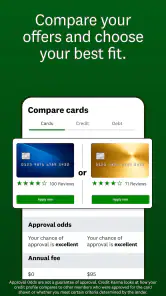
Offers can also blur the line between information and advertising. A suggested card or loan may be relevant to your profile, but that does not make it the best choice for your needs. Before following one, compare the terms with your own budget and priorities. The useful question is not only whether an offer appears tailored, but whether its costs and conditions make sense for you.
Setup checks that save time
Before creating an account, make sure you are using the genuine app published by Credit Karma, LLC, and that your device can run it. The app is free and is rated for Everyone; it is a finance app rather than a bank account or a substitute for your existing lender’s service. Its current version is 25.49, and it requires Android 9 or later. On iOS, check compatibility in the relevant app store before installing, since device requirements can change over time.
It helps to begin with a clear purpose. If you mainly want to watch for changes to your credit report, focus on getting into the account and understanding the report and alert areas first. If your goal is to compare borrowing options, decide what you can afford before looking at recommendations. That small bit of preparation makes it less likely that a polished offer will distract you from the total cost or from whether you need new credit at all.
Give account setup a calm moment rather than trying to complete it while rushing through errands. Have accurate personal details available, check each entry before submitting it, and keep any sign-in recovery information somewhere secure. If the app does not recognize your details, avoid making repeated guesses. Rechecking spelling and other information is a safer first step than creating another account and potentially complicating access.
More From Our News Desk

Weather by Xiaomi Review: Clear at a Glance, Less Clear Up Close

X Under Pressure: Can It Recover When Posting Goes Wrong?

Clash of Clans Is Won Between the Battles

Android Auto Makes the Case for Quieter Car Software

MobiOffice: Transforming Mobile Productivity with Seamless Integration

EA SPORTS FC™ Mobile Soccer: Redefining Mobile Sports Gaming
Recovering a workflow when something feels off
If a score or account detail looks unexpected, first separate a display issue from a genuine change in your credit profile. Reopen the relevant section, review the information shown there, and compare it with the underlying report or account information you already have access to. An alert is a prompt to investigate, not proof by itself that fraud has occurred. If you see an unfamiliar item, follow the appropriate reporting and dispute steps rather than relying on an app notification alone.
For a sign-in problem, use the app’s account-recovery route and carefully verify the details you enter. If a screen will not load or a section appears stale, basic checks such as confirming that your connection is working, reopening the app, and checking for an available update are sensible before assuming your financial information has changed. Do not share passwords or sensitive account details with someone who contacts you unexpectedly claiming to fix the issue.
A practical routine is to check the app at a steady interval that suits you, then investigate only meaningful changes. Constantly refreshing a score can make normal movement feel alarming without improving your decisions. I would use alerts as a reason to look more closely, and keep a separate note of questions to resolve, such as an unfamiliar account or a recommendation whose terms are unclear.
When the app may not be the cause
Credit information can take time to appear consistently across services. If a recent payment or account change is not visible right away, that alone does not establish that the app is broken. Check with the lender or account provider about its reporting and records, then revisit the relevant report later. For an urgent lending decision, use the information and process supplied by the lender rather than assuming a monitoring app’s view is the final word.
Likewise, a lower-than-expected score is not necessarily evidence of an app error. Review the factors shown in the report card and look for a concrete item you can verify. If the underlying report contains a mistake, the appropriate next step is to address the record with the relevant reporting or account provider. Credit Karma can help you notice and understand information, but it cannot make accurate records or sound repayment habits happen on your behalf.
The service is also not the right fit for everyone. If you want a strict household budget, detailed spending categories, or a single place to manage every bill, a dedicated budgeting or banking tool may be more useful. If you would rather avoid personalized financial product promotions, the offers and ads may feel like clutter even when they are not overwhelming. And if you need a lender’s exact decision criteria, only that lender can explain its own process.
Getting Started with Ease
Downloading Intuit Credit Karma was a breeze. It's available for both Android and iOS, so no matter your device allegiance, you're covered. Once installed, the first thing that strikes you is the clean, user-friendly interface. Signing up is straightforward; just a few taps, and you're in. The app asks for some basic information to get your credit profile started, which might feel a tad intrusive, but rest assured, it's all in the name of helping you.
Features that Stand Out
One of the coolest features is the free credit score check. Yep, you heard it right – no strings attached. You can monitor your credit score as often as you like without dinging it, which is a huge relief for those of us who obsess over our scores. Plus, it offers tailored recommendations on how to improve your score, like paying down certain debts or handling late payments.
Another handy feature is the credit report card. It breaks down the factors affecting your score into easy-to-understand categories. You can see at a glance what's working in your favor and what needs attention. It's like having a report card for your financial health, minus the dread of a parent-teacher conference!
Making Sense of Your Finances
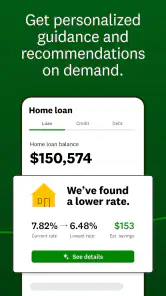
Beyond just the credit score, the app provides insights into your credit accounts, loans, and even suggests credit cards that might be a good fit. I found the personalized loan offers particularly useful. They are based on your credit profile, so you don't waste time applying for loans that might not be within reach.
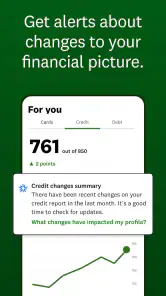
It also sends alerts for any significant changes to your credit report, which is great for catching any fraudulent activity early. It’s like having a watchdog keeping an eye on your financial well-being.
Sneaky Extras
While the core features are free, there are some premium offerings if you're looking to dive deeper into your financial wellness. These include more personalized advice and detailed insights. I didn’t feel the need to upgrade, but it’s nice to know there’s an option if you ever want to go full financial guru.
One thing to keep in mind is the ads. Yes, they’re there, but they’re not overwhelming. They tend to be relevant to financial products, which, if you’re already in the market for, can actually be quite helpful.
Putting the recommendations to work
The strongest use case, in my view, is someone who wants a readable overview without turning credit monitoring into a second job. Imagine checking your report during a quiet moment and noticing an account you do not recognize. You can use the app to identify what looks unusual, then verify it against your own records and contact the relevant provider if needed. That is a more useful workflow than reacting to a score change alone.
For someone planning a major purchase, the app can help make credit factors less abstract. You might review the report card, notice a balance or payment history item that deserves attention, and then decide whether to adjust your finances before applying for new credit. The key trade-off is timing: an app can help you see and organize information, but it cannot guarantee a rapid score change or a particular approval outcome.
I also like the idea of using recommendations as a comparison starting point rather than a decision engine. If a card or loan appears, write down why it might suit you, then compare its terms with alternatives from your bank or other providers. If you are not actively borrowing, there is no need to turn every offer into an application. Avoiding unnecessary credit inquiries and commitments can matter more than chasing a product just because it is visible in the app.
How it fits alongside other finance tools
Compared with checking a score through a bank, Credit Karma can feel more focused on credit education and recommendations in one place. A bank’s own app may be more convenient for tracking balances and paying bills, while a dedicated budgeting app is usually a better match for categorizing everyday spending. These tools serve different jobs, so I would not replace a bank app or a household budget with Credit Karma.
Compared with a paid monitoring service, the free access is attractive if your needs are basic and you are comfortable with product suggestions appearing alongside the information. Paying for a separate service may make sense if you have a specific monitoring requirement or want a different level of support, but it is worth checking exactly what that service provides before spending money. Credit Karma’s broad appeal is its accessible starting point, not a promise that every financial task belongs inside it.
The app has a substantial audience: it has a 4.7 average from around 3.1 million ratings, with over 50 million installs. Those figures suggest that many people find the service useful, but they cannot tell you whether its approach to offers or its credit-focused layout will suit your own habits. I would judge it by whether the report explanations and alerts help you take sensible next steps, not by popularity alone.
Final Thoughts
In a nutshell, Intuit Credit Karma is a fantastic tool for anyone looking to get a handle on their credit. It’s packed with features that make managing your score and understanding your financial standing a whole lot easier. Plus, the fact that most of it is free makes it a no-brainer.
So, if you're looking to take charge of your credit score without shelling out big bucks, this app is definitely worth a try. Just remember, while it’s a powerful tool, maintaining good financial habits is key to a healthy credit score. Happy credit monitoring!
Who I would recommend it to
I would recommend it to someone who wants a straightforward way to check credit information, understand the factors being shown, and notice meaningful changes without paying for a basic starting point. It is particularly useful if you are new to credit monitoring and want plain-language context before deciding what to investigate. The service is free, and its Everyone age rating makes it broadly accessible, though anyone handling personal financial information should still take care with account security.
I would be more cautious about recommending it as the only tool for someone making a complicated borrowing decision. Use the app to prepare questions and understand your profile, then read the lender’s own terms and use its application process when you are ready. The developer, Credit Karma, LLC, has kept the app centered on financial navigation, but that does not remove the need to judge each product offer independently.
One useful habit is to treat the app as a monitoring notebook: check the report when you have a reason, note anything that needs verification, and follow up with the source of the information. That makes the alerts actionable without turning every fluctuation into a crisis. For me, that balance is what makes the app worthwhile: it can make credit information easier to approach, while the final decisions remain yours.
Intuit Credit Karma Frequently Asked Questions
Can I manage my finances on the go with Intuit Credit Karma?
Yes. Intuit Credit Karma is a finance app designed to help you navigate your financial path, and its mobile format lets you access its tools from a compatible device. It is available for Android and iOS, so you can use the platform that suits you. Before downloading, check that your device meets the operating-system requirements for the app.
Who develops Intuit Credit Karma, and is it suitable for everyone?
Intuit Credit Karma is developed by Credit Karma, LLC. Its Everyone content rating means it is classified for a broad audience, although some financial tools or products within the app may be relevant only to people who meet particular eligibility conditions. If you plan to explore an offer, read its terms and requirements carefully rather than assuming the app’s age rating means every product is available to every user.
Is Intuit Credit Karma free to download?
Yes. Intuit Credit Karma is a free finance app, so you can download it without paying for the app itself. It is designed to help you navigate your financial path, with features and recommendations intended to support day-to-day financial decisions. Keep in mind that financial products presented in the app may have their own terms and costs, so review those details before applying or signing up.
Who makes Intuit Credit Karma, and what devices can run it?
Intuit Credit Karma is developed by Credit Karma, LLC and is available for Android and iOS devices. On Android, the listed minimum operating-system requirement is version 9, so check your device’s software before downloading. Its Everyone content rating makes it suitable for a broad audience, though individual financial products and services may have their own eligibility requirements.
What is Intuit Credit Karma and how does it work?
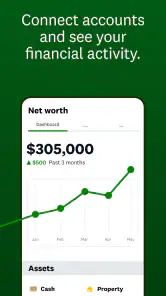
Intuit Credit Karma is a personal finance management app that provides users with free access to their credit scores, reports, and financial insights. It works by collecting and analyzing your financial data to offer personalized recommendations for credit cards, loans, and other financial products. The app uses your credit information to help you improve your financial health, monitor your credit score, and alert you to any significant changes.
Pros
- User-friendly interface
- Comprehensive credit score tracking
- Free credit monitoring
- Personalized financial insights
- No hidden fees
Cons
- Limited customer support
- Ads for financial products
- Requires personal data
- Occasional app glitches
- Limited international support
- Category
- Finance
- Version
- 25.49