Instacart: Get Food Delivery
- 135.83K
- 4.1
- Installs
- 10.00M
- Price
- Free

Screenshots

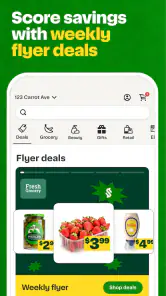
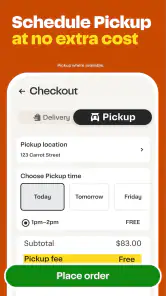
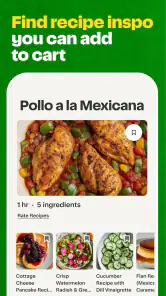
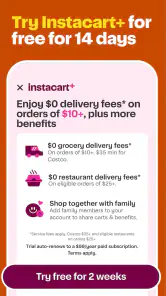
Analysis by Reviewed
My first question with a grocery-delivery app is not just what I can buy, but how much attention I need to give the order once it is underway. With Instacart: Get Food Delivery, I see the appeal in bringing grocery and retail shopping into one place, especially when a trip is inconvenient. I also think trust here is practical: I want to understand what I’m choosing, stay involved when a decision matters, and avoid assuming that convenience means every detail takes care of itself.
Trust starts with what you can judge
Instacart is a free Food & Drink app from Instacart, with an Everyone age rating. It has an average rating of 4.1 from around 308,000 ratings, and more than 10 million installs. Those figures suggest it is widely used, but they don’t tell me whether a particular order will go smoothly. I treat the app as a practical way to shop, while checking each order carefully rather than assuming that popularity guarantees a perfect handoff.
Make the order match your priorities
Before placing a basket, I’d review the selected store, product details, quantities, and any available choices for items that may need a substitute. That small pause can prevent a routine shop from turning into a compromise I didn’t intend. For a planned meal, I’d pay especially close attention to the ingredients and sizes; for general pantry restocking, I’d be more comfortable prioritizing convenience over exact matches.
The most useful way to approach a delivery order is to separate must-haves from flexible picks. I’d put ingredients that define dinner in the first group and snacks or household basics in the second. If an item is essential, I would check the order status and respond to any in-app prompts rather than assume a replacement will suit me. That extra attention is a trade-off: delivery saves the trip, but a little planning helps preserve choice.
Shopping with attention and control
For me, grocery delivery works best when I treat it as a guided shopping process rather than a button that makes the whole job disappear. The choices I can see while building a basket matter more than any general promise of convenience: I need to know what I am ordering, be comfortable with how the order is handled, and keep enough time to respond if a detail changes. That approach is useful whether I’m buying a few essentials or organizing food for several days.
Seamless Shopping Experience
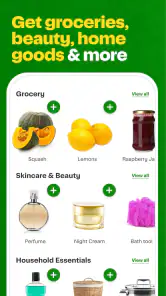
Once I downloaded Instacart, signing up was a breeze. The app interface is clean, intuitive, and super user-friendly. I felt like I was navigating through a well-organized digital grocery store. With just a few taps, I was able to browse through various categories ranging from fresh produce to household essentials. Whether you're planning a dinner party or just stocking up for the week, this app has got you covered.
Variety and Choice
One of the standout features for me was the extensive range of products. Instacart partners with numerous local and national retailers, ensuring you have access to a wide selection of items. It's like having multiple stores rolled into one app! From organic veggies to gourmet cheese, the choices are endless. Plus, the search function is quite robust, making it easy to find exactly what you're looking for.
More From Our News Desk

Weather by Xiaomi Review: Clear at a Glance, Less Clear Up Close

X Under Pressure: Can It Recover When Posting Goes Wrong?

Clash of Clans Is Won Between the Battles

Android Auto Makes the Case for Quieter Car Software

MobiOffice: Transforming Mobile Productivity with Seamless Integration

EA SPORTS FC™ Mobile Soccer: Redefining Mobile Sports Gaming
A broad catalog is most helpful when I use it to solve a specific shopping problem, not simply to browse indefinitely. If I need one familiar brand or a particular pantry staple, search can save time compared with scanning aisle after aisle. For less familiar goods, I slow down and compare the displayed product details before adding anything. A close-looking package is not necessarily the size or variety I had in mind, so reading the listing is a small but worthwhile check.
Convenience at Its Best
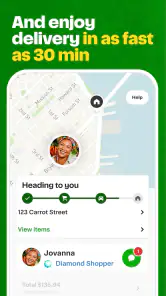
Here's the kicker - delivery times are incredibly flexible. Whether you need something ASAP or want to schedule a drop-off for later, Instacart has options to suit your schedule. I was pleasantly surprised by how quickly my groceries arrived, and everything was packaged with care. Plus, the real-time tracking feature kept me updated every step of the way. No more wondering when your order will arrive!
Customer Service and Support
If you're anything like me, sometimes things don't go as planned. But fear not! Instacart's customer service is top-notch. I had a minor issue with an item, and their support team was quick to respond and resolve the problem. It's reassuring to know that help is just a message away.
Even when an order is straightforward, I would avoid scheduling it around a moment when I cannot check my phone or be available for the handoff. Tracking is useful for knowing how the delivery is progressing, but it does not remove the need to plan around the selected time. For a household with changing plans, I’d choose a window that leaves some breathing room rather than assuming the delivery will fit perfectly between two commitments.
Choosing the right way to shop
For a realistic weeknight use, I’d build a short basket of familiar staples after work, then add the ingredients for one planned meal and check the quantities before checkout. If a key ingredient is unavailable, I’d rather choose a different meal than accept a substitute that changes the recipe. For a larger weekly shop, I’d make the list in advance and leave time to review the order, instead of treating delivery as an instant fix for a complicated plan.
Compared with going to a supermarket, the app saves travel and lets me search across retailers without walking aisles, but I give up the chance to inspect produce and compare package details in person. Compared with ordering from one store’s own service, seeing many retailers together can make it easier to look for a particular item elsewhere; the trade-off is that I still need to check which store I’m shopping from and whether the products in my basket fit the same plan. If choosing every item myself is the priority, shopping in person is the better option.
Who benefits, and where it can frustrate
I’d recommend it most to people juggling work, mobility constraints, caregiving, or a busy household who can benefit from having groceries brought to them. It can also help when a short list of essentials is more urgent than a full trip. I’d be more cautious if I’m shopping on a strict budget, need a very specific fresh item, or want to compare every product closely: delivery convenience may not outweigh the value of choosing items myself. Before relying on it for a time-sensitive meal, I’d check the available delivery window and keep a backup ingredient in mind.
One practical tip is to search by the exact product name and then inspect the size and description, rather than choosing the first close-looking result. When shopping across several categories, I’d review the whole basket once before checkout; it is easier to catch a duplicate or an unintended quantity there than while adding items in a hurry. I’d also keep the order focused when precision matters, since a long list creates more opportunities for a missing or unsuitable item to disrupt the plan.
There is also a useful distinction between a delivery order and a replacement for every shopping routine. Someone who regularly buys the same shelf-stable basics may find it easy to assemble a repeatable basket, while a person deciding what looks freshest that day may prefer a store visit. I’d use the app to take the travel and carrying out of a routine shop, but keep an in-person option for occasions when selecting the produce or checking a product closely is central to the task.
Version and everyday expectations
The app’s current version is 8.95.2, and it supports devices running OS 7.0 or later. Instacart has been available since May 1, 2014, so it is an established service rather than a new experiment, but the quality of an individual shop still depends on the store, the items, and the delivery experience. I would start with a straightforward order to learn how the process feels before making it my only grocery plan.
A common question is whether this works better for a full weekly shop or a small top-up. In my view, both can make sense: a small basket is easier to check, while a weekly order can save more trips but deserves more careful list-making. Another practical question is what to do when an item is missing or unsuitable. I’d use the support route in the app and keep the order details handy, while remembering that resolving a problem is not as effortless as getting every item right in the first place.
Keep control of the details
When an app handles a grocery order, I pay attention to the choices visible during shopping and checkout: what I’m selecting, what substitutions I’m willing to accept, and what the order status shows. I don’t assume that a convenient interface answers every question about personal data or account settings, so I would review the app’s own controls and notices before sharing information I’m uncomfortable providing. That is a sensible habit for any service tied to household shopping, especially if more than one person uses the same device or account.
The useful kind of control here is practical and immediate: keeping the basket intentional, checking the final order, and staying available if a decision is needed. I would avoid placing a complicated order while distracted, and I’d choose a store and delivery time that leave room to handle a change. These steps won’t remove every possible snag, but they help me use delivery on my terms rather than treating the app as a set-and-forget service.
My own cautious rule would be to share only the information needed to make the shopping and delivery process work, and to check the choices the app presents rather than guess how they operate. If I’m setting up an account on a shared device, I’d pay particular attention to which account is active before beginning a basket. That is less about suspicion than avoiding ordinary mix-ups: household orders can reveal preferences, quantities, and routines, so I want the person placing the order to be the one who can review it and its settings.
A cautious verdict
In conclusion, if you're looking for a convenient, reliable, and diverse food delivery app, Instacart: Get Food Delivery ticks all the boxes. It's transformed the way I shop for groceries, saving me time and hassle. So, give it a try and see for yourself how it can make your life a little bit easier. I’d simply begin with an ordinary order, pay attention to item choices and delivery updates, and decide from that experience how much of my routine shopping I want to hand over to the app.
Overall, I’d choose it when avoiding the trip is valuable and I can stay engaged with the order, rather than when I need the certainty of selecting every item myself. A first small shop is a sensible way to learn how the store selection, product details, delivery process, and visible account choices fit your habits. If those steps feel manageable, it can become a useful part of a grocery routine; if checking substitutions and delivery timing feels like more work than shopping in person, there is no reason to force it into the role of a complete replacement.
Instacart: Get Food Delivery Frequently Asked Questions
Can I browse stores and products before placing an order?
Yes. You can use Instacart to browse the stores available in your area and explore their products before deciding what to buy. This can help you check whether a retailer carries the items you want and compare your options. Store and product availability may vary by location, so the selection shown in the app is the best guide for your shopping plans.
What information should I have ready to use Instacart?
Before shopping, have a delivery address or pickup location in mind so you can see which services and retailers are available to you. You will also want to know which items you need and when you would prefer to receive or collect your order. Browsing the app first can help you understand the available choices and review the order details before checkout.
Is Instacart free to download, and what devices can run it?
Instacart is free to download and is rated for Everyone, making it suitable for a broad range of users. The app is available for Android and iOS, and its listed minimum operating-system requirement is version 7.0. Before installing, check that your device’s software is compatible and that you have enough space for the app.
What is Instacart and how does it work?
Instacart is an online grocery delivery service that connects users with personal shoppers who pick and deliver groceries from local stores. Users can browse through the app, select their preferred items, and schedule a delivery or pickup time. The service aims to make grocery shopping convenient by saving users time and effort. Instacart’s store selection includes more than 1,800 grocery and retail brands, with availability depending on where you shop.
Is there a delivery fee with Instacart?
Yes, Instacart charges a delivery fee, which can vary depending on the size of the order and the delivery window selected. Additionally, there might be service fees and optional tips for the shopper. Instacart Express members can benefit from reduced delivery fees on orders over a certain amount. Review the order total and applicable charges in the app before placing your order.
Pros
- User-friendly interface for easy navigation.
- Wide selection of grocery items available.
- Option for scheduled deliveries.
- Real-time order tracking feature.
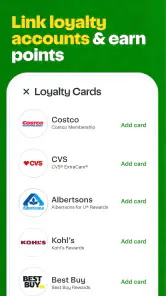
- Integration with loyalty cards for discounts.
Cons
- Service fees can be relatively high.
- Limited delivery areas in some regions.
- Occasional item unavailability issues.
- Dependence on store's inventory accuracy.
- Requires strong internet connection.
- Category
- Food & Drink
- Version
- 8.95.2











