Imprint: Learn Visually
- 1.35K
- 4.3
- Installs
- 500.00K
- Price
- Free

Screenshots
Analysis by Reviewed
I find Imprint: Learn Visually most useful when I want a brisk introduction to a subject without opening a long textbook or getting lost in a search-results rabbit hole. It turns learning into short visual encounters, which can make an unfamiliar idea feel easier to approach. That format is appealing, but I would treat it as a starting point for understanding rather than a substitute for deeper study.
Getting useful learning from a few spare minutes
The main practical advantage is how naturally a lesson can fit into a spare moment. I might use it while waiting for an appointment: pick a topic I’m curious about, follow the visual explanation, then use a quiz to check what stayed with me. That is a more focused use of a few minutes than scrolling through unrelated articles, especially when I’m not ready to commit to a full course.
For better retention, I’d avoid treating each visual as something to swipe through once and forget. I pause after a section, try to explain the central idea in my own words, and then use the quiz as a check rather than a score to chase. If a topic matters for work or study, I’d note what I still don’t understand and follow up with a book or a more detailed course. The app works best as a doorway into a subject, not necessarily the whole room.
Where it fits among learning apps
Compared with a conventional course platform, this visual-first approach can feel less demanding at the beginning: it gives me a way to sample an idea before signing up for a structured sequence of lessons. Compared with searching the web, the experience is more contained and easier to follow, while search still wins when I need a specific answer, current details, or several viewpoints. If I need practice problems, a formal syllabus, or a deep reference source, I’d choose a tool built around that need instead.
I’d recommend it to curious learners, students looking for a quick primer, and busy people who prefer diagrams and concise explanations to dense blocks of text. It may be a poor match if you learn best by listening, need a rigorous step-by-step curriculum, or want every claim backed by extensive source material. Visuals can clarify relationships, but they can also compress nuance; for a complicated subject, I’d use them to orient myself and then verify important details elsewhere.
A realistic way to build it into the day
A useful routine doesn’t need to turn every idle moment into a study session. I’d choose one topic before a commute or a lunch break, complete a short visual lesson, and then spend a minute recalling its main point without looking. Later, I’d return to the question I couldn’t answer confidently. That small pause is more valuable than opening several unrelated lessons simply because they are available.
For a student, the app can be a warm-up before reading a chapter: use a visual overview to identify the main concepts, then watch for those ideas in the assigned material. For someone learning out of curiosity, it can help decide whether a subject is worth exploring in depth. In both cases, the practical test is whether the lesson gives you a clearer question to pursue, not whether it replaces the more demanding work that follows.
More From Our News Desk

Clash of Clans Is Won Between the Battles

Android Auto Makes the Case for Quieter Car Software

MobiOffice: Transforming Mobile Productivity with Seamless Integration

EA SPORTS FC™ Mobile Soccer: Redefining Mobile Sports Gaming

How Microsoft OneDrive Became a Mobile Productivity Giant

How Google Translate Breaks Language Barriers Effortlessly
What the visual format can and cannot do
Visual explanations are particularly handy when a topic depends on relationships: how parts connect, what changes when one factor shifts, or how a process unfolds. I find that a diagram can give me a mental map before I encounter unfamiliar terminology in a longer explanation. But a tidy visual can make a complicated idea look more settled than it is. When definitions, exceptions, or competing interpretations matter, I’d treat the lesson as an orientation and check a fuller source.
One practical tip is to turn a lesson into a question rather than a collection of facts. After viewing it, I might ask myself, “What causes this?” or “What would change if this part were different?” If I can answer only by remembering the picture, I probably need another source or another pass. This makes the short format more active without pretending that quick exposure alone creates lasting expertise.
What is Imprint: Learn Visually?
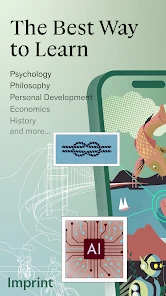
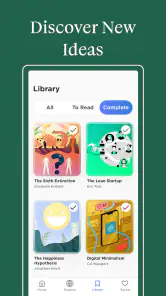
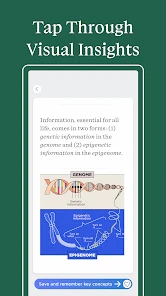
Imagine an app that takes complex topics and breaks them down into digestible visual snippets. That's exactly what Imprint: Learn Visually does. It offers a fresh perspective on learning by using infographics, videos, and interactive visuals to make sure the information not only sticks but also resonates with you.
Features That Stand Out
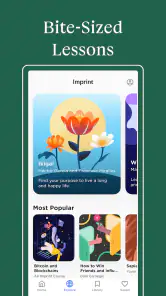
First off, the app's user interface is sleek and intuitive. You won't find yourself fumbling around trying to figure out how to access different lessons. It's all laid out in a way that's easy to navigate, allowing you to focus on what's most important – learning!
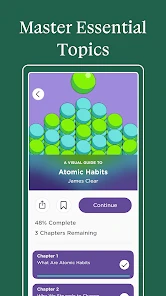
One of my favorite features is the ability to tailor your learning experience. You can choose topics that interest you and skip those that don't. This level of customization ensures that you're always engaged and never bored. Plus, the app regularly updates its content, so there's always something new to explore.
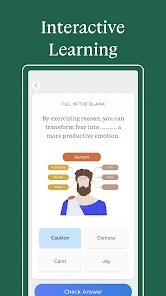
Another cool aspect is the interactive quizzes and tests. They are not only fun but also serve as a great way to reinforce what you've learned. And let's be honest, who doesn't love a little challenge now and then?
Why Choose Visual Learning?
Visual learning isn't just a trend; it's backed by science. Studies have shown that people remember information better when it's presented visually. This makes Imprint: Learn Visually a fantastic tool for students, professionals, and anyone looking to expand their knowledge base in an efficient and engaging way.
In today's fast-paced world, time is of the essence. With this app, you can learn on the go, whether you're commuting, waiting in line, or just lounging at home. It's like having a personal tutor in your pocket!
Keeping a study routine manageable
When I’m studying several subjects, I would not try to make this the center of every session. I’d pick the topic that feels least familiar, use a visual explanation to get oriented, and then move to the material that demands careful practice. That order can reduce the friction of starting, while keeping the app in its strongest role: helping me see the shape of an idea before I tackle its detail.
It can also be useful when returning to a subject after a break. Rather than rereading all my notes immediately, I’d use a lesson and its quiz as a quick check of what I still recognize. Anything I cannot explain becomes a clear target for review. This is a more deliberate workflow than treating quizzes as a final verdict on what I know.
Speed, stability, and device fit
In practical terms, the learning format also shapes how I’d use it during heavier study periods. If I have several subjects to cover, I’d use the app to get an overview first, then switch to focused notes or a textbook for the areas that need detail. That keeps the visual lesson from becoming a false sense of mastery. Short explanations are a strength for orientation, but the same brevity can leave out exceptions that matter in exams or professional decisions.
On speed, I’d expect the short, visual lesson format to feel lighter than opening a full course and working through a long chapter. Actual responsiveness can vary with the device and connection, so I wouldn’t make a promise about loading times. The app’s value is less about rushing through material and more about lowering the effort needed to begin. I’d still give myself time to pause, replay a point mentally, and test what I remember rather than measuring progress by how many lessons I can tap through.
Reliability matters most when learning becomes part of a routine. I would keep a simple backup habit for important study: jot down the key idea or a question in my own notes, so one interrupted session doesn’t break the thread. This is useful with any mobile learning tool, and especially with bite-sized content, where it is easy to forget where an idea fits in a larger subject. I also wouldn’t assume every visual lesson alone is enough preparation for a high-stakes test.
Device fit is worth considering before making it your main study method. Imprint is an education app from Polywise, rated for Everyone, and it is free to install; in-app purchases range from $15.99 to $99.99 per item. It has a 4.3 average from around 10,000 ratings, with more than 1,000 written reviews, and has passed 500,000 installs. It was released on December 30, 2022, and version 3.6.3 requires Android 8.0 or later. Those figures suggest an established audience, though they don’t guarantee that the app will suit your learning style or run identically on every device.
For a phone-based study habit, I’d keep expectations practical: a small screen is convenient for a quick lesson, but it is not always the best place to compare detailed notes or work through a complex argument. If I need to make connections across several sources, I’d move to a larger screen or paper. The app’s brief visual format can make a short session feel approachable; it does not remove the limits of reading or thinking on a compact device.
Choosing free access and paid options thoughtfully
If you’re deciding whether to pay for anything, I’d first try the free experience and see whether the visual explanations genuinely help you recall ideas later. The purchase range makes it sensible to check what an item includes before committing, and to compare that value with a book, course, or other learning resource you already use. I’d skip a purchase if I mainly need a one-off factual answer or a complete academic reference; a targeted search or specialist source is likely to be more direct.
The app is a better fit for someone who enjoys browsing connected topics than for a learner who wants a fixed course plan with every step laid out. Before spending, I’d also ask what outcome I need: a quick overview, a way to refresh familiar material, or sustained preparation for an assessment. The first two suit concise visual learning more naturally. For the last, I’d pair it with structured practice and a source that covers the required syllabus in full.
Who will get the most from it
I’d start with Imprint if dense pages make it hard to begin, if I want a compact introduction before choosing a book, or if I have brief gaps in the day that are too short for a full lesson elsewhere. It also suits people who like to explore across subjects and want a guided visual explanation rather than assembling an answer from scattered search results.
I’d look elsewhere if I needed a strict course sequence, extensive exercises, audio-led instruction, or a reference that I could cite with confidence for a consequential decision. It is also not my first choice when I already know exactly what fact I need; a focused search is faster for that job. The key trade-off is breadth of approach versus depth: the app makes entry into a subject easier, while textbooks, specialist references, and formal courses are stronger for systematic mastery.
Final Thoughts
Overall, Imprint: Learn Visually is a must-have app for anyone keen on learning and self-improvement. It's user-friendly, engaging, and most importantly, effective. If you're tired of the same old learning methods and are ready to try something different, give this app a shot. You won't regret it!
My recommendation is more measured: try it if visual explanations make new subjects less intimidating, and judge it by what you can explain afterward rather than by how polished a lesson feels. The app’s 500,000-plus installs show that many people have given it a try, but the deciding factor for me would be whether its compact style fits my own study habits. Used as a convenient primer alongside deeper sources when needed, it can earn a useful place in an everyday learning routine.
My performance verdict
I see its strongest performance as a matter of learning pace rather than raw speed. A quick visual lesson can lower the barrier to beginning, while the quiz gives me a reason to check my recall before moving on. I would not judge it by how many screens I can get through or assume that a smooth session means I have mastered the subject. For a dependable routine, I’d keep notes on important questions and use fuller resources whenever precision matters.
In the end, I’d recommend trying it when the goal is to get a clear first look at an unfamiliar topic, refresh an idea, or make a short break feel more purposeful. Its compact style is not a replacement for a syllabus, careful research, or sustained practice, and that is an important limit rather than a flaw to hide. If visual explanations suit the way you think, Imprint can be a useful companion; if you need depth and structure first, choose a course or reference built for that job.
Imprint: Learn Visually Frequently Asked Questions
Do I need to create an account to use Imprint: Learn Visually?
Before downloading, it is worth considering how you want to organize your learning and whether you prefer using an account across devices. Imprint: Learn Visually is an education app from Polywise, with a focus on visual learning and helping users read faster and remember more. Its core appeal is the way it presents learning material, rather than serving as a general-purpose reading or note-taking tool.
What is Imprint: Learn Visually and how does it work?
Imprint: Learn Visually is an educational app designed to enhance learning through visual aids and interactive content. The app utilizes a variety of visual elements such as infographics, diagrams, and animations to help users grasp complex concepts more effectively. By offering a visually engaging learning experience, it caters to different learning styles and preferences, making it easier for users to retain information and improve their understanding of various subjects.
Is Imprint: Learn Visually suitable for all age groups?
Imprint: Learn Visually is designed to cater to a wide range of age groups, from young students to adults seeking to learn new subjects. The app offers content tailored to different educational levels and interests, ensuring that users of all ages can benefit from its resources. However, it's always a good idea for parents to review the content to ensure it aligns with their child's learning needs and age appropriateness. It is rated Everyone, though parents may still want to check the material their child will use.
What subjects or topics does Imprint: Learn Visually cover?
Imprint: Learn Visually covers a broad spectrum of subjects, including science, mathematics, history, and more. The app is continually expanding its library to include various topics that cater to the diverse interests of its users. Each subject is presented with detailed visual content, making complex topics more accessible and easier to understand. Users can explore different fields of knowledge and choose the subjects that interest them the most.
Does Imprint: Learn Visually work on my device?
Compatibility is an important point to check before downloading. Imprint: Learn Visually requires Android 8.0 or later, so it is suited to Android devices that meet that minimum operating-system requirement. If your device is running an older version, you will need to update it or use a compatible device to install the app. The app is currently at version 3.6.3.
Pros
- Visually engaging learning materials.
- Interactive quizzes enhance retention.
- Covers a wide range of subjects.
- User-friendly interface and navigation.
- Regular updates with new content.
Cons
- Limited offline access.
- Some content requires in-app purchases.
- Occasional app crashes.
- Not available on all devices.
- Requires a stable internet connection.
- Category
- Education
- Version
- 3.6.3











