Immobiliare.it - Indomio
- 217.00
- 4.8
- Installs
- 10.00M
- Price
- Free

Screenshots


Analysis by Reviewed
When I compare property-search apps, I pay attention not just to how many homes appear, but to how clearly I can narrow a search and decide what deserves a closer look. Immobiliare.it - Indomio is a free house-and-home app from Immobiliare.it S.p.A., focused on property searches in Italy and Spain. Its 4.7 average from around 179,000 ratings suggests it has found a broad audience, but what matters more to me is whether its tools support a careful search rather than encouraging quick taps.
Trust starts with the kind of decision you are making
A home search involves personal priorities, and sometimes personal information, so I would approach any property app with the same care I bring to contacting an advertiser or arranging a viewing. The app is useful for finding and comparing listings, but I would treat a listing as a starting point, not as proof that every detail will match the property in person. Before sharing contact details or making plans, I would check the listing closely and ask direct questions about anything that affects my decision.
The practical value here is its focus on homes across Italy and Spain, rather than trying to serve as a general-purpose local-services app. With over 10 million installs, it is an established option in the category, and its Everyone age rating makes it broadly accessible. Still, popularity alone does not tell me whether a particular listing is right for me; location, budget, and the quality of the information matter much more.
Use visible choices to keep a search manageable
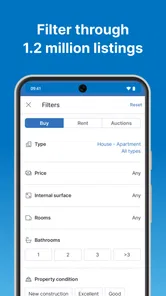
My first step would be to set a realistic area and budget before browsing widely. Filters can help turn a large set of results into a shortlist, but I would avoid narrowing too aggressively at the start. For example, if I insist on a precise size or a long list of amenities before seeing what is available, I might miss a property that is a better fit overall. I would begin with the essentials, then adjust one condition at a time and note which trade-offs change the results.
Saved listings and notifications can also shape how much attention the search demands. Rather than saving every interesting home, I would use favorites for properties I genuinely want to compare, then revisit them together. That makes it easier to spot meaningful differences in location, price, and layout without relying on memory. Notifications are most useful when the criteria are specific enough to be relevant; if a search is too broad, frequent alerts can become noise rather than help.
Handle sensitive moments deliberately
Searching and saving homes is different from contacting someone about a property. I would use the app to do the first part at my own pace, then pause before sharing personal details or arranging a visit. For a promising listing, I would prepare a short list of questions in advance: whether the stated details are current, what costs or conditions apply, and what information is needed to arrange a viewing. That small bit of preparation can make an initial exchange more useful and help me avoid disclosing more than is necessary at that stage.
If I am searching with another person, I would agree on a few non-negotiables before sending listings back and forth. One person may prioritize a shorter commute while another cares more about space or nearby services. Comparing a small set of saved options against those shared priorities is more productive than treating every new notification as a fresh contender. This is where a property app can support a decision without making it for you.
More From Our News Desk

Weather by Xiaomi Review: Clear at a Glance, Less Clear Up Close

X Under Pressure: Can It Recover When Posting Goes Wrong?

Clash of Clans Is Won Between the Battles

Android Auto Makes the Case for Quieter Car Software

MobiOffice: Transforming Mobile Productivity with Seamless Integration

EA SPORTS FC™ Mobile Soccer: Redefining Mobile Sports Gaming
First Impressions: Slick and User-Friendly Interface
From the get-go, Immobiliare.it - Indomio impresses with its sleek, user-friendly interface. The moment I launched the app, I was greeted with an intuitive layout that made navigation a breeze. The search bar prominently displayed at the top allows you to quickly input your desired location, making the whole process straightforward. I found myself effortlessly exploring various listings without feeling overwhelmed by cluttered information.
Browsing Listings: A Comprehensive Experience
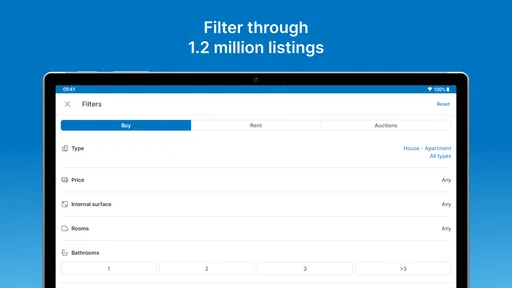
One of the standout features of this app is how comprehensive the listings are. You can filter properties based on a wide array of criteria such as price range, property type, size, and even specific amenities. Whether you’re looking for a cozy apartment or a sprawling villa, the app has got you covered. I particularly appreciated the detailed photos and descriptions provided for each property, which gave me a genuine feel of what to expect. It’s like taking a virtual tour without leaving your couch!
For a more reliable comparison, I would look beyond the cover photo and read each description for details that affect everyday life: the layout, the surroundings, and any stated amenities. Photos help me judge whether a home is worth investigating, but they cannot replace a visit. A useful workflow is to shortlist a few plausible options, compare their details side by side, and then contact only the ones that still fit after that closer check.
Location, Location, Location!
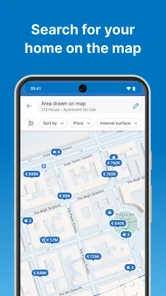
We all know that location is key when it comes to real estate, and this app understands that perfectly. The map feature is incredibly handy, allowing you to view properties in relation to local amenities like schools, parks, and public transport. I found this particularly useful when trying to decide between a few options. It’s like having a personal real estate agent in your pocket guiding you through the neighborhood.
I would use the map to compare areas, not to make a final judgment about a commute or neighborhood. A realistic routine helps: if I am choosing between two rentals, I can check how each sits in relation to the places I visit regularly, then verify travel times and local conditions separately. That distinction matters because a map can orient a search, while the day-to-day feel of a street is something I would want to assess in person.
Saving Favorites and Notifications
Another feature that caught my attention was the ability to save your favorite listings and receive notifications. This means you can keep track of any changes in price or new listings that match your criteria. I found this feature extremely practical as it keeps you updated without having to constantly check the app. It’s a real time-saver for the busy house hunter.
One practical way to avoid alert fatigue is to separate a broad exploration search from a focused one. I would use the first to learn which areas and property types are realistic, then tighten the second around the conditions I would actually act on. That way, a notification has a clearer purpose: it signals a candidate worth checking, rather than another listing to scroll past. If my plans change, I would revisit those criteria instead of letting an old search keep producing irrelevant prompts.
Comparing it with other ways to search
Compared with general property portals or browsing listings through a mobile browser, a dedicated app can make repeat searches and saved options easier to manage. The trade-off is that an app’s convenience does not remove the need to verify details or compare across sources when a decision is important. I would choose this app when I want a focused search in Italy or Spain and a convenient way to revisit candidates; someone who only wants occasional inspiration may find a browser search simpler.
It also suits a different rhythm from asking friends or local contacts for recommendations. Personal referrals can offer context about an area, but they rarely give the same broad, organized starting point for comparing homes. I would use the app to discover candidates, then use conversations, direct questions, and visits to fill in the details that a listing cannot settle. For someone already committed to one neighborhood and relying on a local agent, that personal route may be more efficient than maintaining a large app shortlist.
A realistic search, from commute to viewing
Imagine I am planning a move and can view homes only after work. I would start with the areas that fit my routine, use a loose set of filters to see what is available, and save only the options that meet my essential needs. After comparing descriptions and map positions, I could remove homes that look attractive in photos but do not fit the practical route or budget. Then I would contact the remaining advertisers with specific questions and arrange visits only when the answers make sense.
This approach is useful because it gives each tool a limited job: filters reduce the field, favorites help me compare, the map provides orientation, and a visit checks what the screen cannot. It also keeps a tempting photo from dominating the decision. If I am searching with a partner, we can each rate the shortlist against agreed priorities before reaching out, rather than forwarding every new possibility and turning the process into a stream of competing opinions.
Who will get the most from it
This is a good fit for renters and buyers who are actively exploring locations, comparing several homes, or keeping an eye on new possibilities over time. It can also help someone planning a move by giving them a practical way to build a shortlist before arranging visits. If you are not ready to search seriously, the volume of options and alerts may feel like extra noise. And if you need certainty about a property’s condition, legal details, or final costs, an app listing alone is not enough; those questions call for direct checks and appropriate professional advice.
I would also hesitate to make it my only resource if I were searching somewhere with very specific local requirements or needed detailed guidance on contracts and taxes. A listing app is strongest at discovery and organization, not at replacing a professional who can assess a legal or financial question. For a casual browser, the more useful choice may simply be to search when curiosity strikes rather than enable alerts and build a shortlist that has no immediate purpose.
Version, access, and everyday control
The app is free, and its current version is 25.9.0. It first appeared on January 13, 2012, and supports devices running iOS 7.1 or later. Those details make it easier to judge whether it fits your device and budget, while the app’s main value remains its search and comparison tools. I would still review the choices presented on my device before sharing information, and keep control of what I save or act on by pruning old favorites and refining searches when my needs change.
For a sensitive task like housing, I would treat account and device choices as part of the search rather than an afterthought. I would check what the app asks me to provide at the moment I choose to contact someone, and share only what is needed to move that particular conversation forward. If I stop searching, I would clear out saved candidates that are no longer relevant and revisit any account options available in the app. Those are sensible habits, not a claim that a setting can guarantee privacy or verify a listing.
Readers often ask whether they need an account to browse, whether alerts can be controlled, and whether the app can confirm a home is legitimate. I would check the app’s current on-screen choices for account requirements and notification settings rather than assume the same setup applies to every device. Alerts are a convenience to tune or leave off, while legitimacy still calls for checking the advertiser and property details directly. The same caution applies to costs: a listing can help identify questions, but I would confirm the full terms before making a commitment.
In conclusion, using Immobiliare.it - Indomio felt like having a personalized real estate service at my fingertips. The app makes searching for properties not only efficient but also enjoyable. With its detailed listings, intuitive map feature, and helpful notifications, it provides everything you need to find your dream home. For anyone in the market for a new place, or even just dreaming about one, I’d definitely recommend giving this app a go. Who knows, your perfect home might just be a tap away!
Immobiliare.it - Indomio Frequently Asked Questions
Can I use the app to search for homes in both Italy and Spain?
Yes. Immobiliare.it - Indomio is an app for finding homes in Italy and Spain, so it may be useful if you are comparing places across either country. You can browse property listings and use the app as a starting point for your search. The exact homes and options available will depend on the listings shown in the app.
What is Immobiliare.it - Indomio and what features does it offer?
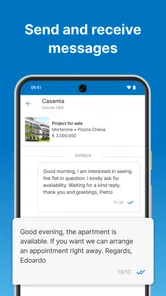
Immobiliare.it - Indomio is a comprehensive real estate app designed for users looking to buy, sell, or rent properties in Italy. It offers features like advanced search filters, property valuation tools, and detailed listings with photos and descriptions. Users can also receive notifications on new listings and contact real estate agents directly through the app.
Is Immobiliare.it - Indomio free to use?
Yes, Immobiliare.it - Indomio is free to download and use for browsing and searching property listings. However, certain premium features or services, such as enhanced listing visibility or professional valuation reports, may require in-app purchases or subscriptions. Users can choose to access these additional features based on their needs.
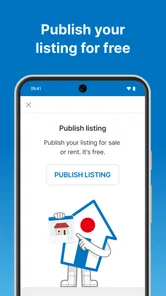
Can I use Immobiliare.it - Indomio to list my property for sale or rent?
Yes, Immobiliare.it - Indomio allows users to list their properties for sale or rent. The app offers tools to create detailed property profiles with images, descriptions, and pricing information. Users can manage their listings, respond to inquiries, and track the performance of their ads directly from the app, making it convenient for individual sellers and real estate agents alike.
How user-friendly is the Immobiliare.it - Indomio app for newcomers?
The Immobiliare.it - Indomio app is designed with user-friendliness in mind, featuring an intuitive interface that simplifies navigation. Newcomers are guided through a streamlined onboarding process, and the app provides helpful tutorials and tips for maximizing its features. Whether you're a first-time real estate app user or a seasoned property hunter, the app caters to all levels of expertise.
Pros
- User-friendly interface for easy navigation
- Comprehensive property listings available
- Advanced search filters enhance user experience
- Regular updates improve app performance
- Secure platform for property transactions
Cons
- Limited support for non-Italian languages
- Occasional bugs in the mobile app
- Search results can be slow to load
- Some features require account registration
- Notifications can be overwhelming







