idealista
- 1.21K
- 4.8
- Installs
- 10.00M
- Price
- Free

Screenshots
Analysis by Reviewed
When I look for a home, I want more than a long list of addresses: I need a way to narrow the field, compare places, and decide which ones deserve a viewing. That is the kind of everyday job idealista is built for. It is a free house-and-home app from idealista, focused on property searches in Spain, Italy, and Portugal. I see it as a practical starting point if you are exploring those markets, though the best choice still depends on where you are searching and how you like to compare listings.
Who gets the most from a property search app
I would start with idealista if I were renting or buying in one of its three core countries, especially if I were still working out which neighborhoods make sense. It is useful for people who want to compare several possible areas before booking viewings, and for anyone moving between cities who needs one place to keep a search organized. It is less compelling as a first stop if your search is elsewhere, or if you already rely on a local agent who brings you a carefully selected set of properties.
A useful way to test whether it fits is to search one familiar area and one area you are only considering. The familiar search helps you judge whether the results look relevant; the second shows whether the map and filters help you discover options beyond your initial assumptions. I would avoid judging the app from a single broad search, since a city-wide result can mix homes that are technically nearby but very different in commute, daily errands, or feel.
Make a shortlist that helps with real decisions
When several listings look promising, I would record why each one made the shortlist rather than saving everything that catches my eye. A brief note such as “good location, ask about storage” or “larger rooms, farther from work” turns saved homes into a decision tool. It also reduces the chance of reopening the same listing repeatedly and forgetting what initially stood out.
For a couple or family searching together, I would agree on a few shared deal-breakers before browsing separately. Then each person can save candidates and compare them against the same criteria, rather than arguing over photos alone. A floor plan can help reveal whether a room arrangement suits everyone’s routine, but it cannot answer practical questions such as noise at different times or how the building feels on arrival. Those are better checked during a visit.
Questions worth asking before a viewing
I find the app most useful when it helps me prepare better questions, not when I expect a listing to settle every doubt. If an advert gives a clear description and shows a floor plan, I can identify what I still need to clarify: whether a feature shown in the pictures is included, whether the advertised arrangement matches the current condition, or what viewing times are possible. I would keep the enquiry short and specific so the person handling the listing can answer the points that matter.
This approach is especially handy when you are searching from another city or country. You can use the listing to decide whether a trip for a viewing is worthwhile, then contact the advertiser before making travel plans. I would still treat any reply as an initial conversation rather than a guarantee; the property should be checked in person, and important terms should be confirmed through the appropriate process before committing.
More From Our News Desk

Weather by Xiaomi Review: Clear at a Glance, Less Clear Up Close

X Under Pressure: Can It Recover When Posting Goes Wrong?

Clash of Clans Is Won Between the Battles

Android Auto Makes the Case for Quieter Car Software

MobiOffice: Transforming Mobile Productivity with Seamless Integration

EA SPORTS FC™ Mobile Soccer: Redefining Mobile Sports Gaming
Before opening any property app, I find it useful to separate must-haves from preferences. Set a realistic budget, choose the areas you can genuinely consider, and decide which features would rule a home out. On idealista, that preparation makes location and price filters more useful: instead of scrolling through an entire city, you can build a manageable shortlist around your actual needs.
It also helps to search with some flexibility. If you are moving for work, for example, a slightly wider map area may reveal homes that fit your commute even if they are outside the neighborhood you first had in mind. If you already know the exact streets you want, a tighter search is better. The app works best when you treat filters as a way to shape the search, not as a substitute for checking whether a listing suits your daily routine.
First Impressions and Usability
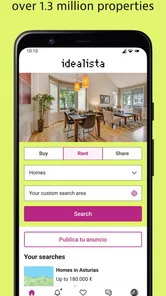
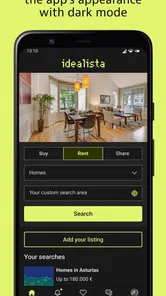
Right off the bat, idealista impresses with its sleek, user-friendly interface. It's got that no-nonsense look that makes navigation intuitive, even for first-time users. The app opens up to a neat dashboard where you can immediately start your search for properties to buy or rent. I found it simple to filter listings by location, price, and property type, which is super handy if you know exactly what you're looking for.
Features That Stand Out
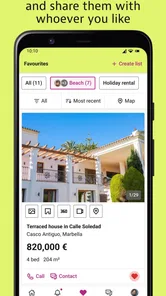
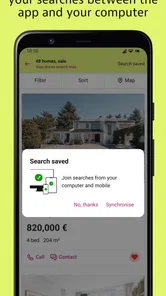
What I love about this app is the comprehensive details it provides for each listing. We're talking high-quality photos, detailed descriptions, and even floor plans. There's a certain level of trust that builds up when you can see every nook and cranny of a potential home before visiting. Plus, the app's ability to save your favorite listings is a lifesaver for comparing properties later.
My practical tip is to use saved listings as a working shortlist rather than a collection of homes you simply like. When I compare them, I look at the trade-offs: a better layout against a less convenient location, for instance, or more space against a higher price. The listing details and floor plans can help me decide what to ask about before arranging a visit, but photos are still only a preview; I would not treat them as proof that a room feels bright, quiet, or spacious in person.
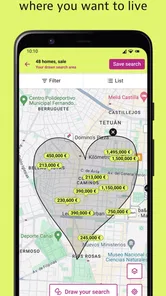
Another cool feature is the map view. You can see all the available properties in a specific area, which is perfect if you're scouting new neighborhoods. The app also allows you to draw custom areas on the map to focus your search, a feature that's both fun and functional.
That custom-area option is especially useful when a neighborhood boundary matters more than a standard radius. I might draw around the part of town that keeps a school, workplace, or familiar transit route within reach, then compare what appears inside that shape. There is a trade-off: a narrow outline can hide nearby homes that might be worth considering, so I would redraw it slightly wider before deciding there are no suitable options.
Communication Made Easy
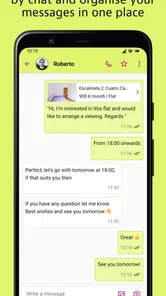
Connecting with property agents can sometimes feel like a game of phone tag, but not with idealista. The app facilitates direct messaging with sellers and agents, which streamlines the whole communication process. This feature not only saves time but also ensures that you get the most accurate and up-to-date information straight from the source.
For a realistic search, imagine checking listings during a lunch break and finding two plausible rentals. I would save both, note the specific questions raised by their descriptions, and contact each advertiser with a concise message about availability and viewing arrangements. That is more useful than sending a vague enquiry, and it makes replies easier to compare. I would still confirm important details directly before making plans; messaging helps start the conversation, but it does not replace a visit or the checks involved in a property decision.
Where other approaches may fit better
For someone searching across Spain, Italy, or Portugal, a property-focused app can be more convenient than browsing broad classified-ad services, where homes sit beside unrelated listings. On the other hand, if you are looking in a different country, a local property portal may be the more relevant place to begin. If your priority is a high-end home, I would also compare specialist real estate sources rather than relying on one general search, especially since the luxury selection here may feel limited.
There is also a difference between using an app to discover possibilities and using it to make a final decision. A map and saved shortlist are helpful for planning viewings, but someone who prefers to speak with a local agent first may find a direct, local service more comfortable. I would not switch away from a familiar portal until I had checked whether it covers the exact towns and property types I need; coverage matters more than a polished search screen.
Room for Improvement?
No app is perfect, and idealista is no exception. While it's generally smooth sailing, there were a couple of times when the app was slightly sluggish, especially when loading high-resolution images. It's not a dealbreaker, but it's something to keep in mind if you're impatient like me.
Additionally, while the app covers a wide range of properties, luxury listings weren't as abundant as one might hope. For those looking for high-end options, this might be a minor setback.
There are a few sensible questions to settle before relying on it as your main search tool. Is it free to start? Yes, the app itself is free, although in-app purchases are available, so I would check what an optional purchase covers before paying. Is it suitable for a family search? Its Everyone age rating makes it suitable for general audiences, while the usefulness of its listings depends on the area and the criteria you choose. Do you need to replace your current portal? Not necessarily: I would first run the same search in both and compare the actual homes that appear, rather than assuming one has everything.
If you are moving between countries, the app’s focus on Spain, Italy, and Portugal is a clear reason to give it a look. For anyone searching elsewhere, a portal centered on that local market is likely a better first step. I would also keep the app updated: the current version is 13.16.2, and it requires Android 7.0 or later. That practical compatibility check is worth doing before building a shortlist you plan to revisit.
Its reach is substantial: idealista has more than 10 million installs and a 4.8 average from around 420,000 ratings. Those figures suggest it is widely used, but they do not tell me whether a particular town has the right homes for my needs. I would judge it by the quality of the results in my target area and the ease of contacting the people behind the listings.
Deciding whether to make it your main search
The simplest switching test is to keep your existing method for a short while and search the same area in both places. Compare the actual candidates, not just the number of results or the appearance of the screens. If idealista surfaces homes you would otherwise miss, or makes it easier to shape a search around a boundary, it has earned a regular place in your routine. If the other service gives you better coverage or more relevant local contacts, there is little reason to abandon it.
There is no need to treat one property app as a complete replacement for every part of a move. I would use idealista to discover and organize possibilities, a local source when its knowledge is stronger, and direct conversations and visits to verify the details. That division of labor is particularly sensible for buyers, who may be comparing more than a listing’s price and layout before taking a serious next step.
My recommendation
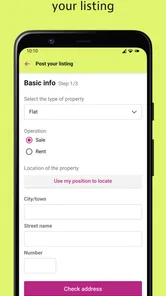
In conclusion, idealista is a robust tool for anyone in the market for a new home or looking to sell a property. It's packed with features that make the daunting task of property hunting a breeze. Whether you're a seasoned homebuyer or a newbie renter, this app is worth checking out. Just a few tweaks and additions, and it could easily be the go-to app for real estate across the board. Happy house hunting!
idealista Frequently Asked Questions
Is idealista free to download, and are optional purchases available?
idealista is free to download, so you can install it without paying upfront and begin exploring property listings. The app also offers optional in-app purchases, with listed items ranging from $5.49 to $289.99. These purchases are separate from downloading the app, so review the details of any purchase before choosing it.
Which countries can I use idealista to search in?
The app is intended for people looking for property in Spain, Italy, and Portugal. That makes it a practical option if you are considering a move, rental, or property search across those markets. You can choose the area that interests you and browse the listings available there, rather than treating idealista as a general property-search app for every country.
Can I search for homes in more than one country with idealista?
Yes. idealista is designed for property searches in Spain, Italy, and Portugal, so it can be useful if you are considering a move, investment, or rental in more than one of these countries. You can focus your search by location and compare available listings in the area you have in mind. The app is free to download, with optional in-app purchases.
What should I check before contacting someone about a listing?
Before getting in touch, read the listing carefully and make sure the location, price, property type, and other details suit your needs. Save promising properties so you can compare them, and prepare specific questions about anything you want clarified. A listing is an initial offer rather than a substitute for checking the property yourself, so consider arranging a viewing and confirming important details directly with the owner or agent.
What is idealista and how does it work?
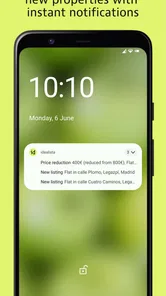
Idealista is a real estate app that helps users find properties across Spain, Italy, and Portugal. The app provides an interface to search for homes, commercial properties, and rentals. Users can filter results by location, price, and property type, making it easier to find a match. It also offers features like saving favorite listings and receiving notifications for new properties.
Pros
- User-friendly interface for easy navigation.
- Comprehensive property listings in various regions.
- Advanced search filters for tailored results.
- Regular updates for the latest property info.
- Free to use with no hidden fees.
Cons
- Limited customer support options.
- Occasional app crashes reported.
- Some listings lack detailed photos.
- Requires internet for full functionality.
- No direct contact with property owners.







