iClicker Student
- 653.00
- 1.3
- Installs
- 500.00K
- Price
- Free

Screenshots
Analysis by Reviewed
Classroom polling sounds simple: a teacher asks a question, students choose an answer, and the room gets an immediate sense of what everyone understands. iClicker Student is built for that specific moment. Developed by Macmillan New Ventures, this free education app turns an Android device into a response tool for classes that use the iClicker system. I found its purpose refreshingly narrow, but that narrow purpose also explains why the experience can feel disappointing when the surrounding classroom setup is not ready for it.
The app was formerly known as iClicker Reef, and its store summary makes the central idea clear: students respond to classroom polls from an Android device. It is not a general study planner, a course library, a video lesson platform, or a replacement for a learning-management system. You install it because an instructor is using iClicker polling and expects students to answer through their phones or tablets.
That distinction matters before you download it. A free download can still involve paid access inside the app, and this one lists in-app purchases ranging from $5.99 to $49.99 per item. I would therefore treat the word “free” as meaning that the app itself costs nothing to install, not as a promise that every classroom participation arrangement will be cost-free. Whether you need to pay depends on how the course and its access model are organized.
What the classroom experience is really like
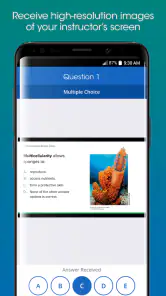
In a typical class, the instructor displays a question and opens a polling session. I would use the app as a focused response screen: open the relevant class, select the answer, and wait for the session to register it. The value is not in spending time inside the app. The value is in removing the need for a separate handheld clicker while keeping participation tied to the live lesson.
That makes it useful in situations where a teacher wants more than a show of hands. A poll can reveal that many students chose the same wrong answer, prompt a short explanation, and give the instructor a reason to revisit a difficult point. From a student’s perspective, the important benefit is that I can respond without carrying another piece of classroom hardware.
There is also a practical advantage for students who move between rooms or courses. A physical clicker can be forgotten, misplaced, or left with another class. A phone is usually already with me. That convenience is the strongest argument for this app, although it only helps when the instructor’s classroom uses the compatible iClicker workflow and the device is allowed during the lesson.
I would not install it expecting a self-guided learning experience. Opening it outside a class does not turn it into a bank of lessons or practice exercises. Its usefulness is event-based: the teacher starts a poll, and I respond. If your course never uses iClicker polling, the app has little reason to remain on your device.
More From Our News Desk

Clash of Clans Is Won Between the Battles

Android Auto Makes the Case for Quieter Car Software

MobiOffice: Transforming Mobile Productivity with Seamless Integration

EA SPORTS FC™ Mobile Soccer: Redefining Mobile Sports Gaming

How Microsoft OneDrive Became a Mobile Productivity Giant

How Google Translate Breaks Language Barriers Effortlessly
Trust starts with a limited purpose
For me, a focused purpose is an important part of judging an education app. A tool that exists mainly to receive classroom responses is easier to understand than one that mixes messaging, social feeds, content recommendations, advertising, and unrelated services. Here, the central question is straightforward: what does the app ask me to do when a class poll is active?
That does not automatically make every privacy or account question disappear. Classroom response tools can still touch information connected with a course, participation, or an account. I would avoid assuming that “used for polling” means “collects nothing.” Instead, I would read the sign-in, consent, and account screens carefully, especially if the app asks me to join a class or connect with an instructor’s course.
The public store profile shows a modest but meaningful level of adoption: over 500,000 installs, with around 2,200 ratings and an average of 1.3. That combination tells me the app is used by a substantial number of students, but the low average rating is a serious warning to investigate the setup rather than blindly rely on it. Ratings cannot explain every failure, yet they are enough to make reliability and account friction central parts of my decision.
The app is marked for Everyone, which fits its role as a classroom response utility rather than an age-restricted entertainment product. It was released on December 5, 2015, and the current version is 8.2.0. Those details show that this is an established product with a long history, but age alone is not proof that every modern phone, campus network, or course configuration will behave perfectly.
Controls I would check before joining a course
The first control is the account path. I would pay attention to whether I am creating a personal account, joining an instructor’s course, or entering a code supplied in class. Those are different actions with different consequences. Before accepting anything, I would look for the name of the course, the identity of the class, and the way participation is associated with me.
The second control is purchase access. Because the app includes paid items, I would not assume that tapping through an enrollment or participation screen is consequence-free. If a course requires an access purchase, I would confirm the amount and what the purchase covers before approving it. I would also check whether the course has an institution-provided arrangement, since paying personally may be unnecessary in some classrooms.
The third control is session accuracy. When a poll is live, I would verify that the selected course or class is the one currently meeting. This is an easy detail to overlook when several courses are listed. Sending a response to the wrong class is more than a technical annoyance: it can affect participation records and create a support problem that could have been avoided by checking the active course first.
I would also keep notifications and device settings under my own control. If the app offers notification choices, I would enable only what helps me notice an active classroom session. I would not grant broad access simply because an app asks for it. A good rule is to review each request in plain language: does this permission help me answer a poll, or is it unrelated to that task?
Where data sensitivity matters in everyday use
The most sensitive moment is not usually choosing an answer. It is linking that answer to a student identity, course, or participation record. Instructors may use polling to measure attendance, understanding, or engagement, so I would treat every response as potentially meaningful beyond the instant it appears on screen. I would answer honestly, but I would also understand what the class expects before the first graded or attendance-related poll.
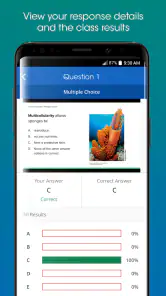
A realistic example is a large lecture where the teacher asks a multiple-choice question after explaining a difficult concept. I select an answer, notice that the class distribution is displayed, and then the instructor discusses why one option is tempting but incorrect. The educational value comes from the discussion that follows. The app is only the channel that records my choice, so I would not confuse a successful submission with proof that I understood the material.
Another sensitive situation is using a personal phone in a classroom with strict device rules. Some instructors welcome phones for polling; others may require devices to stay away except during response periods. I would follow the course policy and avoid leaving the app open during unrelated teaching. That reduces distraction and keeps the tool in its proper role.
Network conditions are another practical concern. A response system depends on communication between the device and the classroom service. If a response appears delayed, I would avoid repeatedly tapping different answers, because duplicate actions can make it harder to know what was actually submitted. I would first check whether the app shows a confirmation, then ask the instructor or teaching assistant if the session appears not to have recorded my response.
I would also keep a simple backup habit: note the question number or briefly remember my selected answer when participation matters. I am not suggesting that every response will fail, but a record of what happened can help when a classroom system behaves unexpectedly. The instructor’s attendance or participation policy should remain the final authority, not my assumption that a tap must have been counted.
How much control does the student really have?
Student agency here is partly technical and partly procedural. I control when I install the app, what account I use, which course I join, and whether I authorize a purchase. I also control whether I continue using it when a course ends. Those choices are useful, but they do not give me complete control over how an instructor interprets or stores classroom responses.
That is why I would ask direct questions before relying on the app for graded participation. Does the course require an account? Is a particular purchase necessary? Are responses used for attendance, marks, or informal feedback? What should I do if my device loses connection? These are not questions the app can answer on its own; they belong to the instructor or institution’s classroom policy.
If I finish a course, I would review the account and class settings rather than simply deleting the icon. If there is an option to leave a class, sign out, or manage account details, I would use it. Deleting an app removes it from the device, but it is not the same thing as reviewing an account relationship. I would not claim that either action erases classroom records, so I would direct any record-retention question to the course administrator.
I would also avoid sharing login details with classmates. A response app may look harmless because its interface is simple, but an account connected to a course should be treated like any other academic credential. If the device is shared, I would sign out when appropriate and avoid saving credentials where another person can submit responses under my name.
Where it beats a physical clicker—and where it does not
Compared with a traditional dedicated clicker, the phone-based approach is more convenient when I already carry my device. There is no separate transmitter to remember, and the software can fit into a familiar device routine. For a student taking several classes, that can reduce the number of objects needed for participation.
Compared with simply raising a hand, digital polling gives the instructor a broader response snapshot. Quiet students can answer without speaking, and the class can see that a question produced mixed results rather than hearing only from the fastest volunteers. That makes it particularly useful for checking comprehension before moving on.
Compared with a course website or learning-management system, however, this app is much narrower. A course platform is usually the better place for readings, assignments, grades, announcements, and longer discussions. I would not want iClicker Student to become my main academic hub. Its strength is immediacy during a live class, not organization across a semester.
Compared with a generic polling service, the main reason to choose this app is compatibility with the instructor’s iClicker setup. A free-form survey app might be more flexible for informal questions, but flexibility is not useful if the teacher needs a particular classroom response system. In other words, the instructor’s choice determines whether this app is the right tool more than the app’s feature list does.
Who should use it, and who should skip it?
I would recommend trying it when an instructor explicitly uses iClicker polling, explains how students should join, and makes clear whether participation or payment is involved. It is also a sensible option for students who dislike carrying a physical clicker and are comfortable using a phone briefly during class.
I would be more cautious if classroom participation affects grades, the course has a strict device policy, or the app’s low average rating reflects problems currently affecting your institution. In those cases, I would install it early, complete the joining process before the first important class, and test the response workflow during a low-stakes session. Waiting until an exam review or attendance check is a poor time to discover an account or connection issue.
I would skip it entirely if no current course uses iClicker. It will not replace a study app, provide general educational content, or make an ordinary class interactive without an instructor using the corresponding system. Students who want a broad learning platform should choose a course-management or study application instead.
Device compatibility also deserves attention. The app requires Android 8.0 or later, so I would check the operating system before planning around it. If my phone cannot meet that requirement, the practical alternatives are a compatible device, a classroom-provided clicker, or whatever method the instructor officially supports. I would not rely on an unofficial substitute when participation records are involved.
My cautious verdict after looking at the whole experience
iClicker Student solves a real classroom problem, but only within a defined ecosystem. I like the idea of replacing a separate clicker with a device I already carry, and I can see why live polling helps an instructor identify confusion faster than a show of hands. The app’s focused role is its clearest strength.
At the same time, the low average rating makes me unwilling to give it an automatic recommendation. I would judge it through a short trial in the actual course, not through the download screen alone. Confirm the class, understand the purchase path, review the account choices, and test a response before participation becomes important. Those steps are more valuable than assuming that a familiar phone-based workflow will be flawless.
My final view is conditional but positive for the right student: use it when your instructor’s iClicker setup requires it, not because it is a general-purpose education app. Keep control of your account and purchases, treat classroom responses as academic records, and ask the instructor about grading or attendance rules. If those conditions are clear and the app works reliably in your class, it can be a convenient polling tool. If they are unclear, a physical clicker or another officially supported classroom method may be the safer choice.
For me, that makes iClicker Student a practical companion rather than an app I would recommend on its own. It earns a place on a student’s phone when a real class gives it a clear job; outside that situation, its narrow purpose and the reported user dissatisfaction outweigh the convenience.
iClicker Student Frequently Asked Questions
Is iClicker Student compatible with my device?
iClicker Student is available for Android and iOS, and its current version is 8.2.0. On Android, the minimum operating system requirement is version 8.0, so check your device’s software before installing. Compatibility matters most during a live class, when you need to open the course and send a response without delay.
Is iClicker Student free to download, and could I still have to pay?
The app is free to download, but that does not necessarily mean every course is free to use. iClicker Student offers in-app purchases ranging from $5.99 to $49.99 per item, and access can depend on the institution, course, and licensing arrangement selected by the instructor or school. Check your course requirements before relying on the app for graded participation.
What is iClicker Student used for?
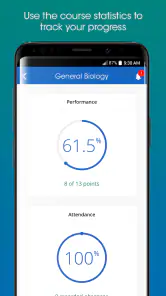
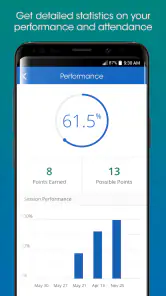
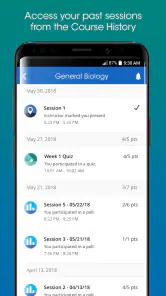
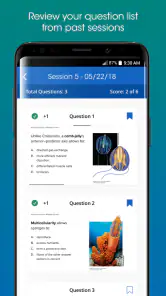
iClicker Student is a classroom participation app that lets students respond to questions during lectures using an Android or iOS device. In supported courses, instructors can ask live multiple-choice, numeric, short-answer, or polling questions, while students submit answers through the app. It can also display participation history and, depending on the instructor’s settings, contribute points toward a course grade.
How do I join a class or course in iClicker Student?
To use iClicker Student, you normally need to sign in with an account and join the course using information provided by your instructor, such as a course code or institution-specific setup instructions. The exact process can vary between colleges and learning platforms. Before downloading, check whether your instructor requires a particular email address, campus login, or integration with the school’s learning management system.
Does iClicker Student work without an internet connection?
iClicker Student is primarily designed for connected classroom participation, so an internet or reliable campus network connection is generally required to receive live questions and submit responses. If connectivity is interrupted, answers may not be transmitted immediately or could fail to register. It is worth keeping mobile data available as a backup and confirming your instructor’s policy for technical problems before a graded session.
Pros
- Quickly answer live polls and quizzes from your phone.
- Supports multiple course sessions in one account.
- Immediate feedback helps you check your understanding.
- Works with common classroom participation workflows.
- Available for both Android and iOS devices.
Cons
- Some features require an instructor using iClicker software.
- Bluetooth or location permissions may be needed in class.
- Connection problems can interrupt time-sensitive responses.
- Account setup may take extra steps before joining a course.
- The interface can feel basic compared with modern learning apps.
- Category
- Education
- Version
- 8.2.0











