Hurdlr: Mileage, Expense & Tax
- 4.76K
- 4.2
- Installs
- 100.00K
- Price
- Free

Screenshots
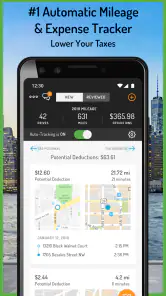
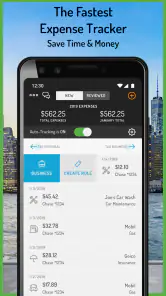


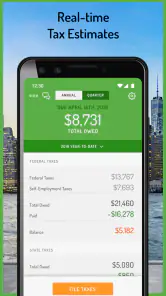
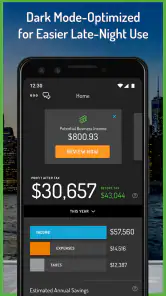
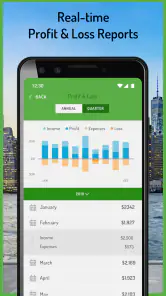
Analysis by Reviewed
Managing money as a freelancer often becomes difficult for a surprisingly simple reason: the work happens in many places, while the records end up scattered across notes, email receipts, bank statements and memory. Hurdlr: Mileage, Expense & Tax is built for that gap. It is a finance app from Hurdlr, Inc. that focuses on the practical records self-employed workers need most: business mileage, expenses, receipts and tax deductions.
I found its appeal less in flashy budgeting tools and more in reducing the small acts of bookkeeping that are easy to postpone. If you drive for work, buy supplies, work from home or combine several income streams, having one place to capture those details can make tax preparation much less stressful. The app is free to install, although optional in-app purchases range from $5.99 to $99.99 per item, so it is worth checking which functions are included before building your whole workflow around it.
At the time of writing, the app is on version 42.2.5 and supports Android 9 or later. It has been available since August 6, 2015, which gives it a longer history than many newer expense trackers. Its current store presence shows an average rating of 4.2 from around 9 thousand ratings, with more than 100 thousand installs. Those figures suggest a real audience, but they do not remove the need to test whether its method of tracking suits the way you work.
How Hurdlr fits into everyday self-employed work
A focused record keeper rather than a complete banking replacement
The first thing I noticed is that Hurdlr is aimed at people who need business records, not people looking for a broad personal-finance dashboard. Its central job is to help separate work-related activity from ordinary personal spending and preserve the evidence behind deductions. That distinction matters. A conventional budgeting app may show where money went, but it may not make mileage, receipts and tax-related categorization feel like one connected routine.
For a delivery driver, rideshare worker or mobile service provider, mileage can be the hardest item to reconstruct later. A forgotten trip is difficult to recover accurately, especially when several personal errands happen on the same day. Hurdlr’s mileage focus makes it more relevant than a standard expense app for anyone whose vehicle is part of earning income. For a designer or consultant who rarely drives for clients, the expense and receipt side may be more valuable than the mileage tools.
I would not treat it as a replacement for an accountant, tax authority guidance or proper business records. The app can help organize information, but the responsibility for deciding whether a cost is deductible still belongs to the user and, where appropriate, a tax professional. That is especially important when a purchase has both personal and business use.
A realistic day with the app
Imagine a freelance photographer who drives to a client meeting, buys a memory card, pays for parking and receives a digital receipt by email. The useful workflow is not simply entering everything at the end of the month. The mileage should be captured close to the trip, the parking charge should be recorded while the purpose is still clear, and the receipt should be attached before it disappears among unrelated messages.
That habit creates a better record than relying on memory. At the end of a busy week, the photographer can review the entries and notice whether a trip was genuinely business-related, whether an expense was categorized correctly and whether the receipt is readable. The important insight is that the app works best as a capture tool used during the workday, not as a rescue tool opened only when taxes are due.
There is also a useful separation between the event and the proof. A mileage entry describes travel, while a receipt supports a purchase. Treating those as different records helps avoid a common mistake: assuming that a bank transaction alone explains why an expense was business-related. For tax organization, context is often as important as the amount.
Who will get the most from it
I see the strongest fit for independent contractors, gig workers, sole traders and small operators who do not want to maintain a spreadsheet for every drive and purchase. It is particularly appropriate when work involves frequent local travel, irregular income or many small expenses that are easy to overlook. A person who works from home and buys software, office supplies or professional services may also find the receipt log useful, even without heavy mileage needs.
The app can also help someone who is newly self-employed and has not yet developed a bookkeeping system. Starting with a focused record of business activity is better than collecting random screenshots and hoping they will make sense later. That said, beginners should still decide on a simple naming and categorization routine before entering dozens of items. Consistency makes later review much easier.
It is less compelling for a salaried employee with no deductible work travel, a household that mainly wants bill tracking, or a company with employees, inventory and formal accounting requirements. Those users may need invoicing, payroll, reconciliation and financial reporting that go beyond Hurdlr’s central purpose. A general budgeting app may be easier for personal spending, while full accounting software is a better fit for a growing business.
What has changed over the product’s life
Hurdlr, Inc. has kept the app active over a substantial period, and the current version number shows that it is not an abandoned utility. The product has evolved from the basic idea of recording work mileage and expenses into a more established finance tool with tax deductions as part of its identity. I would read that evolution as evidence of ongoing maintenance, not as a promise that every user will see dramatic changes in every release.
The current release is 42.2.5, but a version number by itself does not explain which changes matter to a particular worker. What matters in practice is whether the present build feels dependable during the moments when records are created: after a trip, at the point of purchase and during a weekly review. Existing users should therefore judge updates by workflow stability rather than by the size of the version label.
For someone returning after a long break, the sensible approach is to review the current setup before importing old habits. Recheck categories, inspect how receipts are stored, and make sure mileage entries are being created in the way you expect. Product evolution can improve convenience, but it can also make an old routine feel unfamiliar. A short review now is safer than discovering a changed workflow during tax preparation.
The effect on existing users
Long-term users are likely to value continuity most. A mileage and expense app becomes useful only when it holds a dependable history, so changing tools repeatedly can create gaps. Keeping records in one place makes it easier to compare work periods, identify recurring costs and prepare questions for an accountant. The benefit is cumulative rather than immediate.
At the same time, established users should not assume that every old entry is automatically perfect. A record can be complete yet poorly categorized, or it can have a receipt without enough explanation. I recommend a short monthly review: check unusual amounts, confirm mixed-use purchases, and add context while the memory is fresh. This is a stronger workflow than waiting for an annual panic.
Another practical point is device compatibility. The minimum operating system is Android 9, so users on older phones may need to consider their device before depending on the app. Anyone upgrading a phone should also think about account access and record continuity before wiping the old device. Even when an app is designed for cloud-based convenience, a careful user should never assume that every historical item will appear exactly as expected without checking.
Small workflow choices that make a big difference
My first tip is to record the business purpose immediately, not merely the merchant name. “Stationery shop” tells you where money was spent; “client presentation materials” explains why. That extra context can save time later and makes a mixed personal-and-business purchase easier to evaluate.
My second tip is to create a weekly review that is separate from the act of capturing expenses. Recording is about speed; reviewing is about accuracy. If you stop to analyze every item while working, you may abandon the habit. If you never review, errors survive. A short, regular check gives each task a clear purpose.
My third tip is to treat mileage as a work record, not just a number. Note the destination or business reason whenever the app allows you to add that context. A trip to a client, a supplier or a temporary work location is easier to defend and remember than an unexplained distance entry. This is especially useful when several journeys happen on the same day.
A fourth insight is to avoid using the app as a substitute for source documents. A receipt image, transaction detail and business explanation serve different purposes. Keeping all three where possible creates a stronger audit trail than relying on a single total. This is one reason I would use Hurdlr alongside, rather than instead of, a broader accounting or document-storage routine for a more complex business.
Where the experience can feel limited
The focused design is also its main limitation. If you expect a full personal-finance center with detailed household budgets, investment tracking or extensive account management, this is probably not the right first choice. It concentrates on work-related records, so its value depends on whether those records are your main problem.
There is also a learning curve around classification. No app can remove the judgment involved in deciding whether a purchase is business-related, how to handle shared use, or which deduction rules apply in a particular situation. Hurdlr can make the information easier to organize, but it cannot turn an ambiguous expense into a certain deduction. Users who want everything automated may be disappointed when careful review remains necessary.
The free entry point is helpful for trying the basic approach, but optional purchases create an important decision before committing. I would begin with a limited period of real use and ask whether the time saved justifies any paid functions. A person with only a few monthly expenses may be perfectly comfortable with the free experience, while a driver with constant mileage may place a higher value on convenience.
Automatic tracking can also raise a practical trade-off: convenience versus control. The less often you manually record activity, the more important it becomes to review what was captured. Background tracking, categorization and imported information can reduce effort, but they should not be accepted blindly. I prefer a system that saves time while still leaving me responsible for checking the result.
How it compares with familiar alternatives
Compared with a spreadsheet, Hurdlr is more natural for on-the-go capture. A spreadsheet can be flexible and inexpensive, but it depends on disciplined manual entry and does not feel designed around mileage and receipts. I would choose a spreadsheet for a small, stable set of monthly transactions and Hurdlr for work that produces frequent trips and scattered purchases.
Compared with a general budgeting app, Hurdlr has a narrower but more relevant purpose for self-employed work. Budgeting apps usually excel at seeing personal cash flow, recurring bills and household spending. They may not make the connection between a drive, its business reason and the related deduction as clear. I would use the general tool for home finances and Hurdlr for the work layer if I needed both.
Compared with full accounting software, Hurdlr is easier to justify for a solo worker who mainly needs organized mileage, expenses and receipts. Full accounting platforms become more attractive when invoices, payroll, inventory, multiple users or formal financial statements enter the picture. Choosing the simpler app is sensible only while the business remains within that simpler shape.
Compared with a dedicated mileage tracker, Hurdlr has the advantage of bringing mileage into a wider expense-and-tax routine. A mileage-only tool may be preferable for someone who already has excellent bookkeeping and wants nothing else. The trade-off is that a specialist tracker can feel more focused, while Hurdlr is more useful when travel is only one part of the record-keeping problem.
Questions I would settle before relying on it
The first question is whether it works for a particular tax situation. I would use it to organize records, but I would not assume that its categories automatically match every local rule. If your work crosses jurisdictions, involves a home office, or includes substantial mixed-use costs, confirm the treatment with a qualified professional.
The second question is whether paid features are necessary. The app can be installed for free, but the presence of in-app purchases means the practical cost depends on the workflow you need. I would test the free experience with genuine work entries, then compare the benefit of any upgrade with the number of hours it saves during a typical month.
The third question is whether mileage capture fits your phone habits. If you frequently disable location-related functions, keep the phone off during work or use several devices, automatic recording may not match your routine. In that case, a deliberate manual process could be more reliable, provided you actually follow it.
The fourth question is how much history you need. New users should establish a clean routine from the first workday, while returning users should inspect older records rather than assuming they are ready for immediate tax use. I would also keep important source documents in a separate, sensible backup routine.
Finally, ask whether the app will still fit six months from now. A solo contractor with limited expenses may find it ideal, but a growing operation may soon need invoices, payroll or deeper accounting reports. Starting with Hurdlr can still be reasonable; just review the fit as the business changes instead of treating the first tool as permanent.
What I would watch next
For current users, I would watch how future updates affect the balance between automatic capture and manual review. The best improvements would make it easier to correct an entry, explain its business purpose and keep receipt evidence connected to the right expense. Those details matter more to me than cosmetic changes because they directly influence the quality of tax records.
I would also pay attention to compatibility and continuity as the app develops. A finance tool earns trust by preserving history and making changes understandable. Users should read update notes, test their usual mileage and receipt workflow after a major change, and avoid waiting until a filing deadline to discover a problem.
My overall view is positive but deliberately practical. Hurdlr is a strong candidate for independent workers who need a dedicated place for mileage, expenses, receipts and deduction organization. It is not a universal finance solution, and it cannot replace judgment or professional tax advice. Still, when used consistently during the workday and checked regularly afterward, it can turn a messy collection of small records into something far more manageable.
Because it is rated for Everyone and supports Android 9 and newer, it is accessible to a broad range of Android users. I would recommend trying it to a friend who drives for work or regularly loses receipts, with one condition: start before the records become urgent, and decide early whether the free tools are enough or whether an optional purchase genuinely improves the routine. Its real strength is not promising effortless taxes; it is making better record-keeping easier to maintain.
Pros
- Automatically tracks trips with accurate mileage records.
- Combines mileage
- expenses
- income
- and tax estimates in one app.
- Supports customizable mileage rates for different business needs.
- Provides useful reports for accountants and tax preparation.
- Can distinguish business and personal trips for cleaner records.
Cons
- Background location tracking may reduce battery life over time.
- Some advanced tax and reporting tools require a paid plan.
- Automatic trip detection can occasionally require manual corrections.
- Tax estimates are helpful but do not replace professional tax advice.
- The interface may feel overwhelming for users with simple tracking needs.

- Category
- Finance
- Version
- 42.2.5











