Houzz - Home Design & Remodel
- 39.47K
- 4.6
- Installs
- 10.00M
- Price
- Free

Screenshots



Analysis by Reviewed
When I open a home-design app, I want more than a stream of attractive rooms: I need a way to turn a vague idea into choices I can discuss, compare, and eventually act on. Houzz - Home Design & Remodel brings inspiration, products, professionals, and homeowner conversations together, which makes it useful at several points in a project. I find it most valuable when I arrive with a specific question—such as what kind of lighting suits a narrow kitchen—rather than expecting the app to plan a whole renovation for me.
Starting with an actual design question
That distinction matters because home projects often begin with a jumble of concerns: a room feels dark, storage is awkward, or a finish that looked appealing online may not suit the rest of the home. I get more from Houzz when I turn that feeling into a small question I can investigate. It keeps browsing purposeful and gives me a better way to decide whether an image is useful or merely attractive.
The app is a free House & Home product from Houzz Inc., and its broad mix of inspiration and project-discovery tools suits people who want to explore ideas before committing to a plan. It has a 4.7 average from around 405,000 ratings and more than 10 million installs. It is rated for Everyone, and version 25.10.30 is listed for Android 6.0 or later. I’d consider it an accessible starting point, while keeping in mind that a large audience and polished inspiration do not replace careful research for a major purchase or renovation.
The Ultimate Design Playground
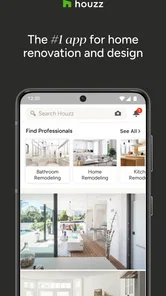
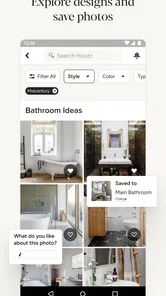
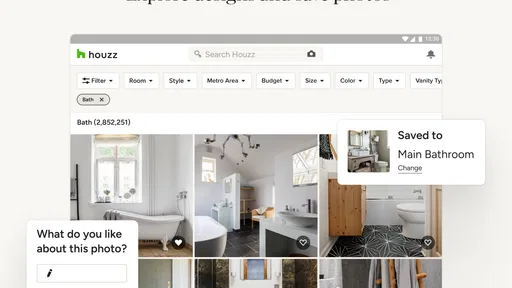
Once you dive into Houzz, you'll discover a treasure trove of design inspiration. The app boasts a vast library of over 20 million high-resolution photos that cover every style imaginable. From chic modern kitchens to cozy rustic bedrooms, you can browse through endless ideas to find what's perfect for your space. And the best part? You can filter these images by style, location, or room to narrow down exactly what you're looking for.
Finding ideas that fit a real room
For me, the most practical way to browse is to start with the room and the problem, then use style filters to refine the results. A broad search for “living room” can leave you admiring spaces that have little in common with yours; looking for a compact room, a particular finish, or a layout challenge gives the images a more useful purpose. Save a few contrasting examples rather than collecting dozens that all say the same thing. That makes it easier to explain what you like—and what you don’t—when you talk with a partner or a professional.
Making an inspiration board useful
I also find it helps to keep inspiration separate from decisions. A photo can be a reference for one detail—the cabinet color, a pendant shape, or the way a shelf uses an awkward corner—without being a blueprint for the entire room. When I save an image, I’d make a quick note about the specific element I want to remember and what may not work in my own space. That small habit makes a collection easier to review and prevents a favorite image from quietly becoming an unrealistic plan.
If two people are planning together, a short list of shared priorities can make browsing less circular. One person may care most about easy-clean surfaces, while the other is focused on warmth or storage. Comparing a few examples against those needs is more productive than debating abstract style labels. Houzz can help bring visual references into that discussion, but the actual trade-offs—maintenance, durability, and budget—still need to be talked through.
More From Our News Desk

Weather by Xiaomi Review: Clear at a Glance, Less Clear Up Close

X Under Pressure: Can It Recover When Posting Goes Wrong?

Clash of Clans Is Won Between the Battles

Android Auto Makes the Case for Quieter Car Software

MobiOffice: Transforming Mobile Productivity with Seamless Integration

EA SPORTS FC™ Mobile Soccer: Redefining Mobile Sports Gaming
Shopping and visual checks
Ever seen a piece of furniture in a photo and wished you could just click and buy it? Houzz makes that possible. With their integrated shopping feature, you can browse and purchase products directly from the app. This feature includes everything from furniture and lighting to gadgets and decor items. And if you're unsure about a color or style, the app's View in My Room 3D tool lets you visualize how an item will look in your space using augmented reality. It's like a virtual fitting room for your home!
Putting product previews in context
I’d treat a room preview as a way to judge broad visual fit, not as a substitute for checking dimensions, finishes, or how an item will work day to day. Before shopping, measure the intended space and note practical constraints such as door clearance or existing fixtures. A piece that looks right in an image can still be too large or awkward in a real room. The useful trade-off is convenience: product discovery sits close to the inspiration, but a dedicated retailer may be a better place to compare specifications, delivery details, and alternatives before buying.
One useful workflow is to decide what you need to verify before opening a product page. For a lamp, that might mean the available surface area and the kind of light the room needs; for a chair, the footprint and the path around it. Then use the visual preview to answer the narrower question of whether the style seems to belong. I wouldn’t let a convincing preview settle questions that only measurements, product details, or seeing a finish in person can answer.
Finding the right kind of professional
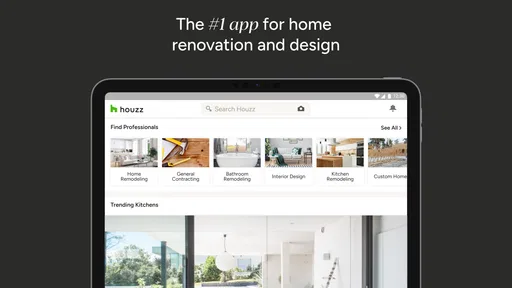
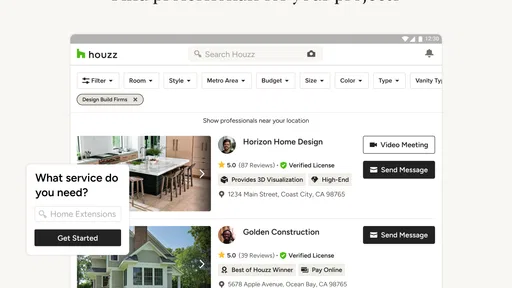
Planning a remodel can be daunting, but Houzz simplifies the process by connecting you with professionals in your area. Whether you need an architect, contractor, or interior designer, the app's Pro directory can help you find the right expert for your project. Plus, you can read reviews from other users to ensure you're making the best choice.
Another cool feature is the ability to collaborate with professionals by sharing your ideas and inspiration boards. This ensures everyone is on the same page and working towards your dream home.
From saved inspiration to a useful brief
A board becomes much more useful when it explains decisions, not just taste. I’d group references by room or project stage, then add a short note to each choice: what to borrow from the image, what must change for my home, and what is still undecided. For example, a kitchen board might separate cabinet color from lighting and storage ideas. This keeps a professional conversation focused and reduces the chance that everyone interprets a single attractive photo differently.
Before contacting someone, I’d also make a separate list of practical questions that photos cannot answer: what needs measuring, what is fixed in place, and which choices are still open. That turns a collection of images into a starting brief rather than an instruction to copy a finished room. It is particularly useful when a household has different priorities, because the professional can respond to the actual constraints instead of guessing from a mood board.
Advice from the community, with a filter
Houzz isn't just about pretty pictures and shopping; it's also a vibrant community where you can ask for advice, share your own experiences, and get feedback on your projects. The app's discussion boards are filled with home enthusiasts and experts ready to help you with everything from paint color dilemmas to layout challenges.
Feeling stuck? Just post a question or browse through the myriad of topics to get your creative juices flowing. It's like having a support group for your home renovation journey!
I’d use community replies as a way to uncover options and questions I had not considered, not as the final word on construction, safety, or product suitability. Advice that helped in one home may depend on its layout, materials, or local requirements. A better question usually includes the relevant context and asks for alternatives, rather than asking strangers to choose a finish from a single image. For consequential work, I’d use those ideas to prepare for a conversation with a qualified professional.
How connectivity changes the experience
Because the experience brings together images, shopping, conversations, and professional discovery, I’d plan to use it when a reliable connection is available. Browsing a specific room or reopening a saved idea while out can be handy, but I wouldn’t make it my only reference at a site visit: keep essential measurements and decisions somewhere you can consult independently. If a page or discussion is slow to load, I’d retry when the connection improves rather than assuming the information has disappeared. For a quick offline checklist, a notes app or a saved document is the safer companion.
It also helps to be selective about how long you browse. A large stream of room photos can make it easy to lose track of the original question, and image-heavy browsing may use more data than a text-only planning session. I’d narrow by room and style first, save only the strongest references, and leave product comparisons for when I’m ready to act. That workflow keeps inspiration from turning into an endless scroll and makes it easier to return to a decision later.
Using it between errands and project visits
On a phone, Houzz is most convenient for quick visual checks: comparing a saved room idea while shopping, showing a partner a reference, or reminding myself what detail I wanted to discuss. It is less comfortable as the only tool for detailed planning, where I may need to compare several images, measurements, and product specifications at once. For that kind of work, I’d review the board on a larger screen when possible and keep exact measurements in a separate, clearly labeled note.
A realistic example is a visit to a lighting shop after work. I can look at a few saved references to recall whether I’m drawn to a simple pendant or a more decorative fixture, then check the product’s dimensions and suitability separately. If the connection is poor inside the building, the app may not be the place to rely on for an immediate decision. I’d keep the key measurements and a brief description of the goal close at hand, so a loading delay does not turn into a guess.
Who it suits—and when another tool is better
I’d recommend Houzz to homeowners planning a refresh, people collecting ideas before meeting a designer, and anyone who wants inspiration and project discovery in one place. It is less suited to someone who only needs a precise floor plan, a technical estimating tool, or a neutral product-price comparison; dedicated planning software, a spreadsheet, or retailer sites may serve those narrower tasks better. For renters, it can still help with movable furniture and decor, but major renovation inspiration may not translate into changes they are allowed to make.
It can also be a poor fit for someone who wants a short, purely practical answer and dislikes browsing visual examples. The breadth is useful when a project is still taking shape, but it can feel like extra work if the decision is already settled and all you need is a product specification or a contractor’s quote. I’d use Houzz to explore and organize possibilities, then move to the more focused tool or conversation that can resolve the remaining decision.
Compared with searching image sites, Houzz brings professional discovery, products, and homeowner discussion closer to the design inspiration. That makes it easier to move from “I like this look” toward “who could help me adapt it?” The trade-off is that an all-in-one destination can encourage more browsing than a focused image search or a retailer’s catalog. I’d choose it when the project benefits from those connected steps, and choose a specialist service when I need precision, a narrow comparison, or a formal plan.
A practical routine for a small refresh
A realistic use is a Saturday morning refresh: I take a photo of a dim corner, browse room ideas for lighting and color, save a few references, then check product options and bring the board to a conversation with a professional. The app can help organize that exploration, but I would still verify measurements and suitability before spending money or starting work. That division—Houzz for visual research and discovery, specialist tools or direct conversations for final decisions—is where it feels most dependable to me.
For a smaller project that does not need professional help, I’d follow the same logic but stop before treating inspiration as a shopping list. I might collect a few examples of wall colors, look at how they work with the room’s existing furniture, and then test the real-world choices using appropriate samples or product information. The app is useful for narrowing the direction; the final decision still belongs to the room, its light, and the people who use it.
My connectivity verdict
Connectivity is part of the experience rather than a minor convenience: image browsing, product discovery, discussions, and professional research are most useful when they load smoothly. I would not plan a project around the assumption that every reference will be available at every moment. For site visits and shopping trips, I keep measurements and the next decision in a separate note, and use Houzz when I can give its visual material time to load and compare.
That makes the app a strong companion for connected research, not a substitute for a project file or a reliable record of measurements. If you mostly browse at home on a stable connection, its mix of visual ideas and practical discovery can help you move a project forward. If your priority is dependable access to plans in places where service is uncertain, a locally stored document or a dedicated planning tool is the safer choice.
In conclusion, if you're a home design enthusiast or someone looking to tackle a remodel, Houzz - Home Design & Remodel is a must-have app. It's a one-stop-shop that combines inspiration, shopping, professional connections, and community advice all in one place. So go ahead, download the app, and start turning your house into the home of your dreams!
Houzz - Home Design & Remodel Frequently Asked Questions
Can I use Houzz without creating a home project right away?
Yes. Houzz can be useful even when you are only browsing and have no immediate renovation plans. You can explore home ideas and design photos, save inspiration, and read renovation advice at your own pace. The app’s focus on home ideas, renovation advice, and local pros means you can start with casual research and decide later whether you want to plan a project, shop, or contact someone.
Is Houzz suitable for people who are new to home design?
Houzz can be a helpful starting point if you are new to home design because it brings inspiration, renovation advice, product browsing, and professional profiles together in one app. Browsing photos can help you identify styles and ideas you like before making decisions. You can explore the available features gradually, rather than needing to arrive with a finished plan or design experience.
Will Houzz work on an older Android phone?
Houzz requires Android 6.0 or later, so check your phone’s operating system before downloading if you use an older device. If your device meets that requirement, you can use the app to explore home ideas, renovation advice, and local professionals. Houzz is also available on iOS, giving users another way to access its home design and planning features.
Is Houzz - Home Design & Remodel free to download?
Houzz is free to download and is rated for Everyone, so it can be a straightforward starting point for browsing home ideas and planning a project. The app is published by Houzz Inc. Keep in mind that downloading the app and choosing to shop or hire a professional are separate decisions; explore the options presented in the app before committing to any purchase or service.
What is Houzz - Home Design & Remodel?
Houzz - Home Design & Remodel is an all-in-one platform that provides users with a wealth of resources for home renovation and interior design projects. It offers access to millions of photos, a vast directory of professionals, and a marketplace for furniture and decor, making it a comprehensive tool for anyone looking to improve their living space. Its focus is summed up as home ideas, renovation advice, and local pros, giving the app appeal whether you are gathering inspiration or preparing to make changes at home.
Pros
- Extensive design inspiration gallery.
- Connects users with professionals easily.
- User-friendly interface for everyone.
- Diverse range of products to explore.
- Regular updates with new features.
Cons
- Some features require in-app purchases.
- Occasional glitches reported by users.
- Can be overwhelming for new users.
- Ads can be intrusive at times.
- Limited offline functionality available.







