Home Design 3D
- 1.51K
- 4.3
- Installs
- 10.00M
- Price
- Free

Screenshots
Analysis by Reviewed
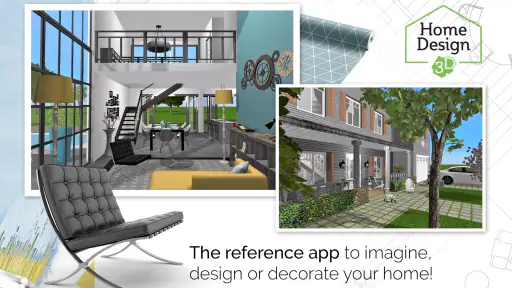
I like Home Design 3D best as a practical sketchpad for thinking through a room before moving furniture or discussing a renovation. It turns ideas into a layout you can inspect from different angles, which is more useful than trying to explain a plan with hand gestures. I wouldn’t treat it as a substitute for professional drawings, but for exploring possibilities at home, it gives beginners a friendly place to start.
A useful bridge between an idea and a room
The app is a free house-and-home design tool from Anuman, and its appeal is easy to understand: you can map out a space, furnish it, and view the result in three dimensions. It has a 4.3 average from around 46,000 ratings, and has been installed over 10 million times. Those figures suggest broad interest, though they don’t guarantee that every control will feel natural on your particular phone or tablet.
For an everyday example, imagine you’re considering whether a desk will fit beside a bedroom window. Rather than shifting heavy furniture first, you can sketch the room, place a desk and other pieces, then switch views to judge the arrangement. I find this especially useful for comparing a couple of plausible layouts: the point isn’t to predict every real-world detail perfectly, but to catch obvious space conflicts before they become a chore.
Getting Started with Your Design Journey
Starting off with Home Design 3D is a breeze. It’s available on both Android and iOS, so whether you're team Apple or team Android, you’re covered. The download and installation process was seamless, and I was up and running in no time. The app opens up to a user-friendly interface that even a novice can navigate without feeling overwhelmed. It’s like the app gently holds your hand and guides you through the initial steps of creating your first design.
The most helpful habit I’d recommend is to get the room outline right before decorating. A polished-looking sofa arrangement can distract you from a doorway that needs more clearance or a wall that was drawn slightly out of place. I’d sketch the boundaries and openings first, check them in the flat view, and only then spend time arranging furnishings. That order makes the design easier to revise when you notice a measurement or placement needs attention.
Planning, furnishing, and checking a layout
Features That Make It Stand Out
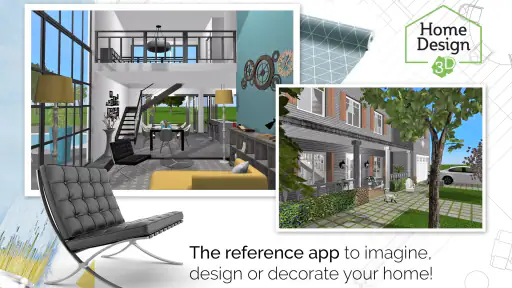
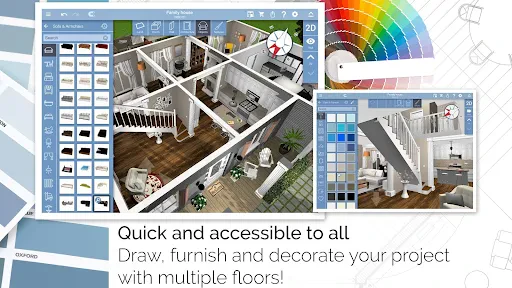
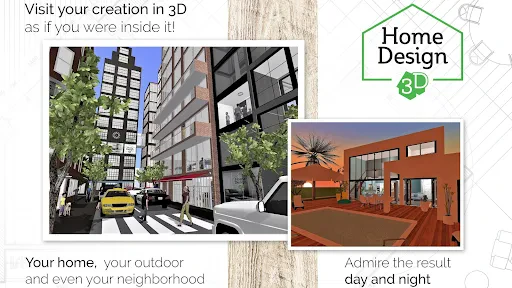
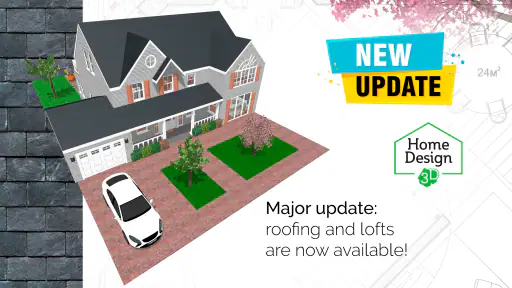
What really caught my attention were the features packed into this app. You can switch between 2D and 3D views, which is super helpful for visualizing your designs from different perspectives. The app allows you to draw rooms, add doors and windows, and even change the thickness of walls. It’s these little details that make designing so much fun and so realistic.
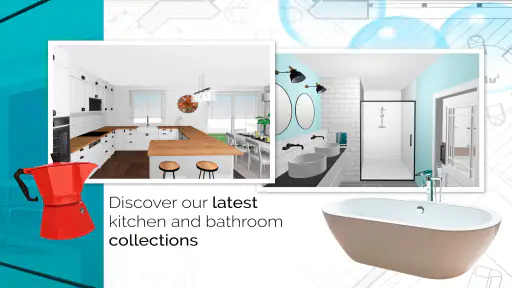
Another feature worth mentioning is the furniture and decor options. The app comes loaded with a vast library of furniture pieces, decor items, and textures. From cozy sofas to chic coffee tables, you can drag and drop these items into your design, resizing and rotating them to fit your vision. Plus, the app’s lighting options let you experiment with how natural light interacts with your spaces, adding another layer of realism to your designs.
More From Our News Desk

Clash of Clans Is Won Between the Battles

Android Auto Makes the Case for Quieter Car Software

MobiOffice: Transforming Mobile Productivity with Seamless Integration

EA SPORTS FC™ Mobile Soccer: Redefining Mobile Sports Gaming

How Microsoft OneDrive Became a Mobile Productivity Giant

How Google Translate Breaks Language Barriers Effortlessly
There’s a useful trade-off in that freedom: a large catalogue encourages experimentation, but it can also tempt you to spend time styling before the layout is settled. I’d use furniture as a scale check first—try the pieces that represent the real items you own, then add decorative choices once the circulation feels sensible. For a small room, the open patch left between furniture can matter more than a perfectly coordinated finish.
Designing Like a Pro
One of the aspects that I loved is how intuitive the app feels. You don’t need to be a professional designer to create something that looks like it came straight out of an interior design magazine. The app empowers you with the tools to create complex layouts effortlessly. And if you’re stuck or need some inspiration, there's a vibrant community within the app where users share their designs, providing endless ideas for your projects.
That makes the app a better fit for visual planning than for construction decisions. A 3D view can help you notice that a tall piece might dominate a narrow corner, while a top-down plan is often clearer for checking how people will move through a room. I’d use both views for different questions rather than trusting a single attractive perspective. Before buying anything, still compare the real item’s measurements with the actual room; a convincing mock-up is a guide, not a guarantee.
Compared with a quick paper sketch, this is easier to revise and more vivid to show another person. Compared with specialist architectural or interior-design software, it feels more approachable for casual home projects, but it isn’t the tool I’d choose for technical documentation or a contractor-ready plan. If your main need is a precise measured drawing, a dedicated planning tool or a professional’s advice is the safer route.
Who will get the most from it
I’d recommend it to renters trying furniture arrangements, homeowners weighing up room changes, and anyone who enjoys experimenting with interiors without committing to a purchase. It can also help you explain an idea to a housemate: a shared visual plan is usually clearer than debating where a cabinet might go. On the other hand, if you only need to record exact measurements, or you want a polished technical plan for building work, this may feel too focused on visual design.
The app is rated for Everyone, and its current version is 5.4.1, with Android 8.0 as the minimum operating-system requirement. It is free to install, while optional in-app purchases range from $0.99 to $19.99 per item. I’d begin with the free experience and decide whether any paid option is worthwhile only after seeing how often you use the tools; the purchase range is broad enough that it’s sensible to check the price of a specific item before confirming it.
Working around the rough edges
There is still a learning curve once you move beyond placing a few objects. Fine adjustments on a phone screen can feel fiddly, and a small mistake in the room outline can make later choices look convincing but be based on the wrong shape. A tablet gives more room to work, while on a phone I’d save detailed rearranging for a moment when I can concentrate instead of trying to do it in a rush.
I also wouldn’t assume a visual preview settles questions about daylight or fit in the real room. Lighting experiments help compare moods, but the actual effect depends on the space and its conditions. Likewise, furniture that looks right on screen still needs to be checked against its real dimensions, doorways, and access routes. The best result comes from using the app to narrow down options, then verifying the practical details outside it.
Designing Like a Pro
One of the aspects that I loved is how intuitive the app feels. You don’t need to be a professional designer to create something that looks like it came straight out of an interior design magazine. The app empowers you with the tools to create complex layouts effortlessly. And if you’re stuck or need some inspiration, there's a vibrant community within the app where users share their designs, providing endless ideas for your projects.
Did I mention the app also has an offline mode? This means you can take your designs on the go, tweak them while on the subway, or show them off to friends over coffee without needing an internet connection. It’s a small feature, but it adds a lot of convenience to the overall experience.
Offline access is handy when you want to revisit a plan away from home, but I’d still make sure the design is in a state you can easily recognize before showing it to someone. A simple room outline with the important furniture in place often communicates better than a crowded scene full of decorative objects. It also keeps a discussion focused on the question you’re trying to answer—whether a layout works, rather than whether every finish is already decided.
Making a plan useful in everyday decisions
For a more deliberate workflow, I’d make a separate version of the room for each serious option rather than repeatedly transforming one layout. If the question is whether a dining table or a work desk belongs near a window, keeping alternatives distinct makes it easier to compare them without relying on memory. It also reduces the chance that leftover objects from an earlier idea will distort the next arrangement.
When measuring, I’d record the room’s awkward details as carefully as its main dimensions: recesses, door swings, and the space needed to pass behind a chair can decide whether an arrangement works. The 2D view is the sensible place to check those relationships. Then I’d use 3D to judge the overall feel, not to infer exact clearances from perspective. That two-step check is a small but useful way to avoid falling for a layout that looks spacious from one angle and cramped from another.
This approach is particularly useful when several people share a decision. A renter can show a housemate why a proposed shelving unit blocks a route, or a family can compare where a table might leave room for everyday movement. It turns a vague disagreement into a specific choice about placement. I’d keep the design focused on the decision at hand; a simple, legible plan is more persuasive than a scene decorated down to the last accessory.
Choosing it over other planning methods
Paper remains quicker when all I need is a rough outline and a few measurements. It is also less distracting: there’s no catalogue to browse when I should be checking whether a sofa can pass through a doorway. But paper is harder to revise cleanly and less effective for showing someone how a room might feel. Home Design 3D sits between that quick sketch and a specialist design package, giving casual users a more visual way to explore without demanding professional drafting skills.
That middle ground is also the app’s boundary. If you’re planning structural work, need dependable technical documents, or have to coordinate exact specifications with tradespeople, I’d move to a dedicated professional tool and get qualified advice. For choosing between furniture arrangements or building confidence before a modest room refresh, the more approachable interface is an advantage. The right choice depends less on how ambitious the design looks and more on what decision you need the plan to support.
Final Thoughts
Wrapping up, I must say, Home Design 3D is a delightful app for anyone interested in home design or looking to revamp their living space. It’s easy to use, packed with features, and genuinely makes the process of designing fun and engaging. Whether you’re a budding designer or just someone who likes to mess around with interior layouts, this app is a fantastic place to start. Go ahead, give it a whirl, and who knows, you might just discover a hidden talent for design!
My recommendation is to approach it as an idea-testing tool: start with the room shape, use the 2D plan to check placement, and turn to the 3D view when you want to judge how the arrangement feels. That workflow gives the app a clear purpose without asking it to do the job of an architect or a measuring tape. If you want an accessible way to picture changes before making them, it’s worth trying; if precision documentation is your priority, choose a more technical option instead.
Home Design 3D Frequently Asked Questions
Can I use Home Design 3D without an internet connection?
Home Design 3D is built around creating and editing home-design ideas on your device, so it may suit users who want to work on layouts without needing an online design service. If you plan to share projects or use any connected features, an internet connection may be needed. Check your device’s connection before relying on those features.
How much does it cost to try Home Design 3D?
Home Design 3D is free to download, so you can install it and explore the app before deciding whether it fits your needs. It also offers in-app purchases, with individual items ranging from $0.99 to $19.99. Consider starting with the free experience and checking the available purchases in the app before spending money.
Is Home Design 3D suitable for planning a real renovation before work begins?
It can help you sketch out a renovation and explore how a home might look after changes, making it useful for thinking through layouts and décor before work begins. Treat the design as a planning aid rather than a substitute for professional measurements or construction advice. You can use its 2D and 3D views to review ideas and make adjustments as your plans take shape.
What is Home Design 3D and how can it benefit me?
Home Design 3D is an intuitive app that allows users to create detailed home layouts and interior designs directly from their mobile devices. Whether you're planning a renovation, designing your dream home, or just enjoy experimenting with interior design, this app provides powerful tools to visualize and customize spaces in 2D and 3D environments, offering a comprehensive design experience.
Is Home Design 3D suitable for both beginners and professionals?
Yes, Home Design 3D is designed to cater to both beginners and professionals. It features an easy-to-use interface for newcomers, with drag-and-drop functionality and pre-made design templates. For professionals, the app includes advanced tools for precision and customization, offering detailed design capabilities that can meet the demands of more complex projects.
Pros
- User-friendly interface for easy navigation.
- Real-time 3D visualization of designs.
- Offline functionality for designing anywhere.
- Regular updates with new features.
- In-app tutorial for beginners.
Cons
- Limited free version features.
- Occasional app crashes reported.
- High battery usage on older devices.
- In-app purchases can be pricey.
- Ads in the free version.
- Category
- House & Home
- Version
- 5.4.1









