Holy Bible - Verse+Audio
- 535.00
- 4.3
- Installs
- 1.00M
- Price
- Free

Screenshots


Analysis by Reviewed
I like that Holy Bible - Verse+Audio can serve two very different moments: a focused reading session at home and a few minutes with scripture when my hands are busy. That flexibility is more useful than it sounds. A phone Bible can easily become another app I open once and forget, so I get the most from it when I give reading, listening, and saving passages a simple routine rather than trying to use every option at once.
A routine that keeps reading manageable
For a practical starting point, I would choose one passage or chapter, read without rushing, and save only the verses I genuinely want to revisit. Later, I can use search to return to a phrase instead of relying on memory or scrolling through a long book. This is especially handy when I want to compare a passage with a note I made earlier. Bookmarks and highlights work best as a small personal trail through the text, not as a way to mark everything.
The app is free and made by GrandApps Inc. It sits in the Books & Reference category, has an Everyone age rating, and runs on Android 7.0 or later. Its current version is 1.5.2. I would check that your device meets the minimum before planning to make it your everyday reading tool, particularly if you keep an older phone as a backup.
Settings and habits worth considering
Notifications can make the daily verse useful, but they are only helpful if their timing suits your day. I would decide whether a morning prompt fits my routine and adjust or disable notifications if they become background noise. A verse is easier to reflect on when I pause to read it in context, rather than treating a brief notification as a complete study session.
Audio also benefits from a little planning. I would try listening while doing a familiar chore or during a settled part of a commute, when it is possible to pay attention without needing to handle the phone. If I am somewhere noisy or trying to follow a complicated passage closely, reading is the better choice. Listening is convenient, but it does not replace the control of moving at my own pace and rereading a line.
Where this Bible fits among alternatives
Compared with carrying a printed Bible, this app makes searching and switching between reading and audio more convenient; a physical copy remains better for people who prefer a screen-free routine or want to write directly on paper. Compared with a general note-taking app, its scripture-focused tools keep bookmarks, highlights, and reflections closer to the passages they concern. Anyone who needs a particular translation, extensive study references, or a specific church’s preferred edition should check that the available text suits them before building a long-term study habit around it.
A realistic use case is a short morning pause: read the daily verse, look up its surrounding passage, and save one line for later. On a busy evening, audio can make a familiar section easier to revisit while tidying up. Those are modest habits, but they give the app a clear role without turning a phone into a distraction. With a 4.3 average from around 6,300 ratings, it has attracted a substantial audience, though popularity alone cannot tell me whether its reading style will suit every person.
More From Our News Desk

Weather by Xiaomi Review: Clear at a Glance, Less Clear Up Close

X Under Pressure: Can It Recover When Posting Goes Wrong?

Clash of Clans Is Won Between the Battles

Android Auto Makes the Case for Quieter Car Software

MobiOffice: Transforming Mobile Productivity with Seamless Integration

EA SPORTS FC™ Mobile Soccer: Redefining Mobile Sports Gaming
The app has over one million installs and is free, which makes it easy to try without committing to a purchase. Still, the best choice depends on what you expect from a Bible app: this one is a sensible fit if you value straightforward access, audio, and personal organization, while a dedicated study edition may serve better if detailed commentary or a particular translation is essential. I would also be cautious about assuming that community discussion is a substitute for a trusted study group; shared interpretations can be thought-provoking, but they deserve discernment.
Making saved passages useful over time
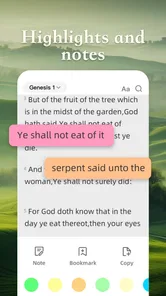
Bookmarks and highlights are most helpful when I give each one a reason. A bookmark can mark where I stopped, while a highlight can flag a phrase I want to think about again. If I use both for every interesting line, the saved material soon becomes hard to scan. I prefer to keep the collection small and revisit it occasionally, removing marks that no longer serve a purpose. That simple habit turns personalization into a practical index rather than a pile of colored passages.
Notes can add context that a highlight alone cannot capture. I might record a question, a connection to another passage, or a thought I want to bring to a conversation later. Keeping notes brief makes them easier to use on a phone; a long reflection is often more comfortable in a notebook. The useful trade-off is to let the app hold quick reminders tied to scripture, while leaving extended study notes wherever I already write comfortably.
Choosing a pace for reading and listening
Audio works especially well when I already know what I want to hear. I can choose a familiar passage for a walk or household task and let listening make room for scripture on a day when sitting down with a screen is unlikely. For a first encounter with a dense section, though, I would read first or keep the text nearby. Pausing to inspect a sentence and returning to an earlier line are easier when I am reading, so I treat listening as another route into the material rather than a replacement for close attention.
One useful routine is to separate discovery from reflection. I can use search to locate a phrase or passage, read enough around it to understand its place, then save a single line if it remains meaningful. Later, audio can help me revisit that material without repeating the search. This avoids the common trap of collecting verses out of context simply because they are easy to find. Search speeds up retrieval; judgment still has to guide what I take from the passage.
Who is likely to appreciate it
I would recommend trying this app if you want a Bible close at hand, enjoy switching between text and audio, and prefer keeping a few personal markers with the passages themselves. It can suit a new reader who wants a low-friction way to build a short daily routine, as well as someone already familiar with scripture who mainly needs convenient access and quick search. The free price makes it approachable for a trial, and its Everyone rating makes it suitable for a broad audience, though families should still choose reading material and device habits thoughtfully.
It is less compelling for someone whose study depends on a particular translation, extensive cross-references, original-language tools, or a carefully curated set of commentaries. Those needs call for a specialist resource, and I would verify that its text and study materials match your approach before relying on it for serious preparation. A paper Bible may also be the better choice if screens interrupt your concentration or if you enjoy writing in margins. The convenience here is real, but it is not a reason to abandon the format that helps you focus.
A Closer Look at the Holy Bible - Verse+Audio
First off, let’s talk about the interface. It’s clean, intuitive, and user-friendly. You don’t need to be a tech wizard to navigate through it. Whether you’re searching for a specific verse or just browsing through the chapters, everything is just a tap away. The app covers both the Old and New Testaments, so you’re not missing out on anything.
Daily Verses to Keep You Inspired
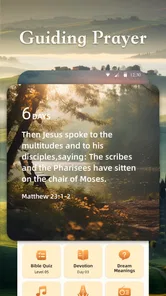
One of my favorite features is the daily verse notification. Every morning, like clockwork, I get a little pop-up with a verse to ponder. It’s a great way to start the day on a positive note. Plus, if you’re like me and forget to open the app sometimes, this feature ensures you still get your daily spiritual boost.
Audio Features for Those On the Go
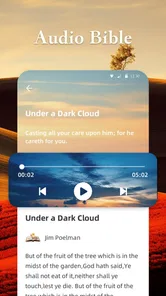
Now, let’s chat about the audio feature. This, folks, is a game-changer. Whether you’re commuting, doing chores, or just relaxing, you can listen to the scriptures hands-free. The narrators have soothing voices, making it easier to absorb the teachings. It’s perfect for those who prefer listening to reading or just want to multitask.
Customization and Other Cool Features
The app also allows for some neat customization. You can highlight verses, bookmark pages, and even create notes. This personalization ensures that your study sessions are tailored just for you. Plus, the search feature is a lifesaver when trying to locate specific scriptures quickly.
There’s also a community aspect where users can share their insights and interpretations. It’s like having a mini Bible study group right in your pocket! This interaction adds a layer of depth to the app, making it not just a solitary experience but a communal one.
Living with its limits
The easiest way to decide whether this fits your life is to try it in the routine you actually have, not an ideal one. If mornings are rushed, a notification may be a useful nudge, but it should not become another demand on your attention. If you tend to silence app alerts, opening the Bible at a time you already have free may be more reliable than expecting a reminder to create a habit for you. I find that consistency comes from choosing a realistic moment, not from adding more prompts.
There is also a practical difference between casual reading and preparing to teach or lead a group. For personal reflection, a searchable text, audio, and a few saved verses can be enough. For careful interpretation, I would compare passages with a trusted edition and use dependable study materials rather than treating any quick result or shared comment as the last word. The app is a convenient starting place, not a substitute for deeper sources when accuracy and context matter.
On a shared or older phone, I would keep the experience simple: make sure the device meets the Android requirement, use the features you genuinely need, and avoid building a complicated system of notes that would be difficult to maintain. A phone Bible is most useful when it removes friction. If managing saved items takes longer than finding a passage in a printed copy, scale the system back. There is no need to use every available tool for the app to earn a place in your day.
Final Thoughts
All in all, the Holy Bible - Verse+Audio app is more than just a digital Bible. It’s a comprehensive tool that caters to both readers and listeners, offering a rich spiritual experience. If you’re looking for an app that combines the traditional with the modern, this might just be it. So why not give it a try? It’s like carrying a little piece of wisdom wherever you go.
My recommendation is to start with one repeatable pattern: read a passage, use a bookmark only when you need to return, and try audio when it suits the setting. That gives you a fair sense of whether its mix of convenience and personal organization actually helps. GrandApps Inc. has built an approachable option for everyday access, and the 535 written reviews alongside its average rating suggest many people have taken time to respond to it. I would still judge it by fit rather than popularity: if its text, listening style, and simple study tools match your needs, it can become a useful companion; if you need a particular edition or deeper reference features, choose a resource built around those priorities.
Holy Bible - Verse+Audio Frequently Asked Questions
Who develops Holy Bible - Verse+Audio, and what kind of app is it?
Holy Bible - Verse+Audio is a Books & Reference app from GrandApps Inc. It is intended for people who want a Bible-reading and prayer resource on their mobile device, with verses and audio at its center. Its content rating is Everyone, so it is presented as suitable for a broad audience. The app was released on November 28, 2023.
What are the main features of the Holy Bible - Verse+Audio app?
The Holy Bible - Verse+Audio app offers a comprehensive experience with features such as offline access to various versions of the Bible, audio narration for hands-free reading, daily verses for spiritual inspiration, and a search function to quickly find specific passages. Users can also bookmark and highlight verses, making it a versatile tool for personal study and reflection.
Is the Holy Bible - Verse+Audio app free to use?
Yes, the Holy Bible - Verse+Audio app is free to download and use. It provides access to a wide range of Bible versions and audio content at no cost. However, there may be optional in-app purchases or subscriptions for premium features, such as ad-free experience or additional study resources, which users can choose to buy for enhanced functionality.
Can I use the app offline?
Absolutely! One of the significant advantages of the Holy Bible - Verse+Audio app is its offline functionality. Once you download the Bible versions you need, you can access them without an internet connection. This makes it convenient for reading and listening to scriptures anytime and anywhere, especially in areas with limited or no internet access.
How user-friendly is the app for beginners?
The Holy Bible - Verse+Audio app is designed with user-friendliness in mind, making it suitable for beginners and seasoned users alike. It features a clean, intuitive interface that allows easy navigation through the Bible. With simple menus and clear font settings, users can easily adjust their reading preferences and explore various features without any hassle.
Pros
- Extensive collection of Bible translations.
- Offline access to scriptures and audio.
- Daily verses for inspiration.
- User-friendly interface for easy navigation.
- Customizable reading plans.
Cons
- Contains ads in the free version.
- Audio feature requires internet at times.
- Limited features without premium.
- Occasional bugs in app updates.
- Interface can be overwhelming for new users.












