HeyJapan: Learn Japanese
- 2.17K
- 4.7
- Installs
- 5.00M
- Price
- Free

Screenshots




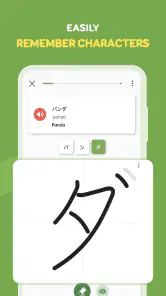

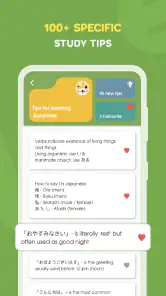
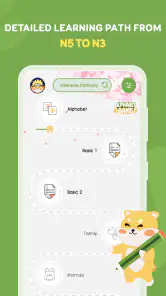
Analysis by Reviewed
I’d judge a Japanese-learning app by what it helps me do after I put my phone away: remember a useful phrase, recognize a familiar character, or feel less hesitant about speaking. HeyJapan: Learn Japanese is aimed at learners who want a guided route into the language rather than a blank set of flashcards. Its lessons bring together vocabulary, grammar, audio, and pronunciation practice, so I can work on more than one part of Japanese without stitching several tools together.
When a lesson depends on a connection
Language practice often happens in the gaps of a day: while waiting for a bus, taking a lunch break, or settling in at home. That makes connectivity part of the experience, not just a technical detail. I would plan to open a lesson when I have a reliable connection rather than assume every activity will be ready wherever I am. If a lesson or audio exercise does not load, switching to a steadier network and trying again is a sensible first step.
This matters especially for speaking practice. The app’s speech recognition feature gives feedback as you work on pronunciation, so a quiet place and a dependable connection make a better practice session than a noisy platform with a weak signal. I’d save that activity for a moment when I can concentrate, and use a short vocabulary review during a commute instead.
Getting Started with HeyJapan
When I first downloaded HeyJapan: Learn Japanese, I was immediately impressed by its clean and intuitive interface. From the get-go, it felt like the app was holding my hand, guiding me through the complexities of the Japanese language with a gentle nudge rather than a shove. The onboarding process is straightforward, making it easy to dive right into the lessons without any fuss.
Lessons and Structure
The app offers a series of lessons that are structured in a way that gradually builds up your vocabulary and understanding. What I love most is how it integrates vocabulary, grammar, and pronunciation into bite-sized lessons. It's perfect for those of us with busy schedules who can only spare a few minutes a day. Trust me, you won't feel overwhelmed.
Each lesson is engaging, using a mix of visuals, audio, and interactive elements to keep you hooked. I found myself eagerly completing lesson after lesson, often losing track of time. The app even rewards you with points for completing lessons, and who doesn't love a little gamification to keep the motivation up?
Making practice work in everyday life
A useful routine is to give each brief session a purpose instead of tapping through several lessons in a hurry. I’d use one sitting to revisit vocabulary, then another to say a few phrases aloud and listen closely to how they sound. That separation makes it easier to notice whether I’m remembering words or actually becoming more comfortable producing them.
More From Our News Desk

Weather by Xiaomi Review: Clear at a Glance, Less Clear Up Close

X Under Pressure: Can It Recover When Posting Goes Wrong?

Clash of Clans Is Won Between the Battles

Android Auto Makes the Case for Quieter Car Software

MobiOffice: Transforming Mobile Productivity with Seamless Integration

EA SPORTS FC™ Mobile Soccer: Redefining Mobile Sports Gaming
For example, before a trip-planning break, I might practice the food and directions scenarios, then return later to pronunciation when I have privacy. This is a practical fit for a beginner who wants a guided first step and regular practice without building a whole study plan from scratch. It is less suitable for someone who wants an advanced grammar reference or a course organized around exam preparation; a dedicated textbook or exam-focused resource may serve that goal better.
Fitting Japanese study into a real day
One realistic way I’d use the app is to open it during a quiet breakfast, complete one focused lesson, and choose a phrase to recall later without looking at the screen. On the way to work, I could mentally test that phrase rather than depend on an audio activity in a place where noise and a patchy signal might get in the way. At home, I could return to speaking practice when I have both privacy and a steadier connection.
This sequence makes the phone a prompt for learning, not the whole learning environment. A useful test is whether I can bring one word or expression back to mind hours after the lesson. If I can only recognize it while it is displayed, I need another retrieval attempt; completing more screens is not necessarily the same as retaining more Japanese.
Features That Stand Out
One of the standout features of HeyJapan is its speech recognition technology. This feature lets you practice speaking, and it gives you instant feedback on your pronunciation. It’s like having a personal tutor available 24/7. I found this particularly helpful because Japanese pronunciation can be tricky, and having immediate feedback ensures that you're on the right track.
Another feature I appreciated is the app's focus on real-world scenarios. The lessons are tailored to help you navigate everyday situations, from ordering food to asking for directions. It’s practical and incredibly useful if you're planning a trip to Japan or want to converse with native speakers.
Making pronunciation feedback useful
I would treat speech recognition as a practice aid rather than a final judge of whether my Japanese sounds natural. A recognized phrase can be encouraging, but it cannot replace listening carefully to spoken Japanese or having a person respond to what I say. If a pronunciation attempt is not accepted, I’d slow down, listen again, and try once more in a quieter place before deciding that the phrase itself is beyond me.
That distinction matters for learners who are nervous about speaking. The feature offers a lower-pressure way to say phrases aloud, but it works best when I use the feedback to notice and repeat, not as proof that I am ready for every conversation. Pairing a lesson with a real person, when that is available, can reveal whether I can understand a reply and adapt what I say.
Choosing it among language-learning options
Compared with a flashcard-only tool, this app brings vocabulary together with grammar, audio, and speaking practice, which makes a short session feel more rounded. A flashcard app can still be the better companion when I want precise control over a personal word list or fast recall drills. Likewise, a conversation exchange gives a human response and cultural nuance that automated pronunciation feedback cannot replace. I see HeyJapan as a structured starting point, not a substitute for every kind of study.
One small strategy is to keep a note of words that repeatedly slip away and revisit them deliberately rather than treating points as the goal. The points can make progress satisfying, but they do not tell me whether I can recall a phrase later without a prompt. Pairing a lesson with a real-life cue—such as naming foods while writing a shopping list—helps turn screen practice into something I can retrieve outside the app.
Who benefits most—and who may want another tool
I think this is a good fit for a new learner who wants a clear starting point and appreciates lessons that combine several kinds of practice. It can also suit someone returning to Japanese who wants to rebuild a daily habit through short, guided sessions. The real-world themes make it easier to connect study with an upcoming trip or ordinary situations, rather than treating every word as an isolated item.
I would look elsewhere, or use another resource alongside it, if my main goal were detailed grammar explanations, exam preparation, extensive free-form writing, or regular conversation with a person. A textbook can provide a more deliberate reference structure; flashcards can give more control over review; a tutor or language exchange can respond to meaning and context. The trade-off is that those alternatives may not offer the same compact blend of lesson activities in one place.
Cost, access, and sensible expectations
The app is free to install, with in-app purchases priced from $18.99 to $54.99 per item. I’d begin with the available free experience and decide whether the lesson style suits me before spending anything. It is rated for Everyone, and Language Skills Studio is the developer. Its 4.7 average across around 236,000 ratings and more than five million installs suggest that many learners have tried it, though popularity alone cannot guarantee that its teaching approach will fit my needs.
It was released on January 7, 2020, and version 3.2.10 requires Android 7.0 or later. Those details are worth checking against an older device before making it part of a daily routine. I’d also avoid planning a study session around a feature that needs a live connection when I know my signal is unreliable: retrying later is more practical than letting a loading interruption derail the habit.
What to do when a session stalls
If an exercise fails to load, I would first check whether the connection is stable, then close and reopen the activity or try again later. I would avoid repeatedly tapping through a stalled screen while rushing, because frustration can make a small technical hiccup feel like a reason to abandon the session. A simple fallback is to review a phrase I already remember or jot down what I want to revisit when the connection is better.
For people who often study underground, travel through areas with inconsistent service, or need lessons to work without a network, this uncertainty is important. I would not make the app my only plan for those moments. Instead, I’d keep a notebook or another resource suited to offline review, and use HeyJapan when connection conditions are more dependable. That is a practical compromise, not a claim that every activity behaves the same way.
Using mobile data thoughtfully
When I want to keep a study habit without casually spending mobile data, I’d reserve audio and speaking sessions for home or another trusted connection. On the move, I’d favor brief activities that do not require me to listen aloud or speak in public, provided they load successfully. This also makes practice more comfortable: pronunciation work is easier when I am not competing with street noise or worrying about other people overhearing.
I would also keep sessions intentional rather than leaving audio or lessons running while distracted. A short, focused visit makes it clearer what I learned and gives me a natural stopping point if the connection becomes unreliable. Since learning needs repetition, planning a few dependable windows is more useful than assuming every spare minute will support every kind of activity.
Overall Experience
In a world filled with language learning apps, HeyJapan: Learn Japanese stands out by offering a comprehensive and user-friendly experience. Whether you're a complete beginner or looking to brush up on your skills, this app caters to all levels. The combination of structured lessons, engaging content, and innovative features makes it a top choice for anyone serious about learning Japanese.
So, if you're ready to embark on your Japanese learning journey, give HeyJapan a try. Who knows, you might just find yourself speaking fluently in no time, ready to explore Japan with newfound confidence! Happy learning!
My connectivity verdict
I’d recommend it to someone who can build a steady routine around short lessons and has access to a reliable connection for audio and speaking work. For a practical test, try a brief session at home, then see whether the same routine fits a commute or break without relying on uninterrupted service. If you mainly need offline study or live conversation with people, choose a tool designed specifically for those needs. For guided Japanese practice that combines several learning activities, this is a promising option—as long as its network-dependent moments suit the way you actually study.
HeyJapan: Learn Japanese Frequently Asked Questions
Can HeyJapan: Learn Japanese help me practice speaking and communication?
HeyJapan: Learn Japanese is presented as a way to study communication as well as hiragana, kanji, and vocabulary. Its lessons and interactive exercises are intended to support several aspects of learning Japanese, including speaking practice. It can be a useful part of a study routine, especially if you want language-learning activities on your phone alongside your other practice.
What Japanese topics does HeyJapan: Learn Japanese cover?
The app’s learning focus includes hiragana, kanji, vocabulary, and communication. Its lessons and practice activities are designed to help learners work with Japanese in different ways, rather than focusing only on memorizing words. If those are the areas you want to explore, HeyJapan offers a mobile education app centered on building Japanese-language skills.
How much space does HeyJapan: Learn Japanese need, and will it work on my phone?
HeyJapan: Learn Japanese requires Android 7.0 or later, so checking your device’s operating system is a practical step before installing it. The app is a mobile resource for learning Japanese, but your available storage can vary by device and by what you keep on it. Make sure you have enough room for an app before starting the download.
Is HeyJapan: Learn Japanese free to download, and what should I know about its cost?
HeyJapan: Learn Japanese is free to download, so you can try its basic learning experience without paying upfront. It also offers in-app purchases, with listed items ranging from $18.99 to $54.99 each. Consider whether you are comfortable with optional spending before installing, and review purchase details in the app before choosing any paid content.
Who makes HeyJapan: Learn Japanese, and is it intended for all ages?
HeyJapan: Learn Japanese is an education app developed by Language Skills Studio. Its content rating is Everyone, making it broadly suitable for users across age groups who want to study Japanese. As with any learning app, younger learners may benefit from a parent or guardian helping them choose a suitable routine and understand any optional purchases.
Pros
- Interactive lessons enhance learning.
- Covers vocabulary
- grammar
- and kanji.
- User-friendly interface for easy navigation.
- Offers offline mode for learning anywhere.
- Regular updates with new content.
Cons
- Limited advanced level content.
- Subscription required for full access.
- Occasional bugs in speech recognition.
- Lacks cultural context in lessons.
- No community forum for user interaction.
- Category
- Education
- Version
- 3.2.10











