Here Comes the Bus
- 8.85K
- 3.4
- Installs
- 1.00M
- Price
- Free

Screenshots
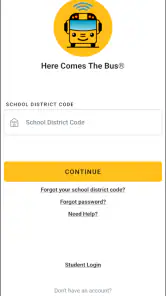
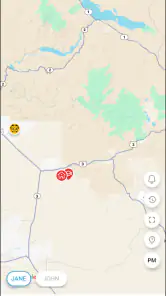
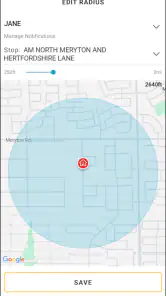
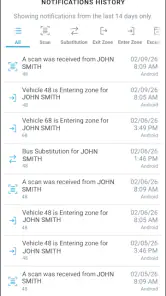
Analysis by Reviewed
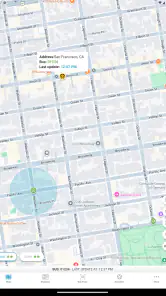
Getting a child to the bus stop at the right moment sounds simple until the morning includes missing shoes, changing weather, traffic, and a bus that does not seem to arrive when expected. Here Comes the Bus is an education app built around reducing that uncertainty. I see it as a practical companion for families who use an eligible school-bus service and want a clearer view of the trip instead of relying only on a printed timetable or a message from school.
The app is free, aimed at Everyone, and developed by CalAmp Student Safety, formerly known as Synovia. It has been available since April 3, 2015, and the current release is version 4.0.6 for devices running Android 7.0 or later. Its central promise is narrow but useful: help a parent decide when a child should leave for the bus stop. That focus is also important because this is not a general school organizer, a homework tool, or a replacement for communication with the school.
How Here Comes the Bus feels in everyday use
A calmer morning when timing matters
In my experience, the biggest value of Here Comes the Bus is not that it eliminates waiting. It gives the family a way to make the waiting more deliberate. Instead of sending a child outside extremely early “just in case,” a parent can check the app before the morning routine is finished and use the displayed bus information as one factor in deciding when to leave.
A realistic example would be a parent preparing breakfast while a child gets dressed upstairs. On a normal day, the family may know the expected pickup time, but that time can feel less useful when the bus is delayed or the child is late getting ready. Checking the app before putting on a coat can help the parent choose between leaving immediately and finishing a small task first. That is a modest improvement, yet repeated every school day it can make the household feel less rushed.
The same idea works in the afternoon. A parent who is meeting a child near the stop can check the trip rather than standing outside for an unnecessarily long period. This is especially helpful when the adult is balancing work, another child, an appointment, or poor weather. The app is most convincing when used as a planning aid, not as a guarantee that every arrival will happen at an exact minute.
The important setup decision
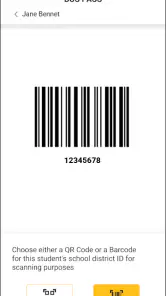
The first thing I would tell a new user is to treat setup as part of the service, not as a quick download followed by instant tracking. The usefulness of a school-bus app depends on the correct student, route, stop, and school information being connected to the account. If any of those details are wrong, the screen may look reassuring while describing the wrong journey.
I would therefore complete the initial setup when there is time to check every selection carefully. Parents managing more than one child should be especially deliberate. A convenient habit is to verify the morning information against what the child already knows about the route before depending on it during a busy morning. This is one of the app’s less obvious trade-offs: digital convenience saves time later, but only after the family has invested attention at the beginning.
It is also worth agreeing on a simple family routine. One adult can check the app, while the child still follows the usual safety rules for crossing roads and waiting at the stop. I would not make a young child responsible for interpreting changing bus information alone. The app can support a parent’s decision, but it should not replace adult judgment or the school’s instructions.
Where it fits among familiar alternatives
The usual alternatives are a printed schedule, a school message, a phone call, or simply watching from the window. Each has a place. A printed schedule is easy to understand and does not depend on a battery or connection, but it cannot help much when the day does not follow the expected timetable. A message from school may explain a major disruption, although it may arrive after the family has already started waiting. Calling the school can provide reassurance, but it is inconvenient for routine uncertainty.
Here Comes the Bus sits between those options. It is more immediate than a static schedule and less disruptive than calling someone for every delay. However, it is not automatically better in every situation. If a family’s school does not support the relevant service, the app cannot create useful route information by itself. If the phone is old, unavailable, or unreliable in the morning, a printed schedule remains an important backup rather than something to discard.
That combination is the sensible approach: use the app for current trip awareness, keep the school’s normal instructions available, and teach the child what to do if the app cannot be checked. I prefer this layered routine because it avoids turning one screen into the only source of truth.
What the current release suggests
Version 4.0.6 is the current release, and that matters mainly because users are not evaluating an abandoned experiment. The app has also been around since 2015, which suggests an established product rather than a newly launched idea. I would still separate that history from assumptions about what has changed internally. A version number alone does not prove that every screen has been redesigned or that every local transport system behaves identically.
For an existing user, the practical question is whether the current version remains comfortable on the phone already used for school routines. Updating is sensible when the device supports it, but I would check the app after an update rather than assuming the account and selected student are exactly as before. A quick review of the route and notification settings can prevent a silent change from becoming a morning surprise.
New users should also keep expectations realistic. The app’s age and continued versioning indicate ongoing product development, but the experience can still depend heavily on the school district and the transport information connected to it. In other words, an update can improve the application without changing the accuracy or coverage of the local bus service.
Strengths that become clearer after regular use
The first strength is decision-making. The app turns a vague question—“Should we leave now?”—into a question that can be checked against current trip information. That is more useful than a decorative map or a generic school calendar because it addresses the exact point of friction in the morning.
The second is flexibility for adults. A caregiver who is not normally at home can use the same kind of information as the parent who usually handles the bus. This can make occasional schedule changes easier to manage, especially when grandparents, babysitters, or another family member are helping. I would still make sure every caregiver understands the normal stop and safety routine rather than assuming the app alone explains everything.
The third is the reduction of unnecessary waiting. This is easy to underestimate. Waiting outside is not merely inconvenient when the weather is unpleasant, the child is tired, or the adult has a fixed work start time. Even when the app cannot predict the trip perfectly, better timing can make the routine feel more controlled.
A less obvious benefit is that it encourages families to notice patterns. After using it for a while, a parent may become better at recognizing when the displayed trip information is early, late, or affected by a local disruption. That does not mean ignoring the app; it means combining its information with experience. The best users treat technology as an aid to judgment, not as a substitute for it.
Limitations I would consider before relying on it
The most important limitation is service dependency. This is not a universal tracker for every bus in every area. Its value depends on whether the child’s school-bus operation is represented and whether the account can be connected correctly. A family should confirm that practical fit early, because no amount of phone troubleshooting can solve a coverage problem.
Another limitation is that live information can create false confidence. A displayed estimate may be useful while still being affected by traffic, loading time, route changes, or a device that has not refreshed properly. I would not tell a child to run to the stop because the screen suggests the bus is close. Safety and the school’s established instructions remain more important than shaving a few minutes from the wait.
There is also a human limitation: someone has to remember to check it. Parents who want completely automatic reassurance may find that the app still requires attention at the right moment. It can improve a routine, but it does not remove the responsibility of planning for the child, the weather, and unexpected changes.
Finally, the experience may feel unnecessary for families whose bus arrives consistently and whose stop is directly outside the home. In that case, a reliable schedule and normal observation might be enough. I would choose this app when uncertainty is a recurring problem, not simply because every school-related task needs an app.
Practical habits that make it more useful
I recommend checking the app before the child is fully ready, rather than waiting until the last possible minute. That gives the family time to react if the information suggests an earlier departure or if the app needs attention. It also avoids teaching the child that digital timing is an excuse to rush.
For households with several caregivers, establish one shared rule about who checks the trip and how changes are communicated. The app can show information, but it does not automatically solve confusion between adults. A short family agreement—who watches the morning, who meets the afternoon bus, and what happens if the app cannot be opened—can be more valuable than repeatedly explaining the screen.
I would also keep a backup plan visible. Write down the usual stop details and the school’s contact route somewhere accessible. This is not a criticism unique to this product; it is sensible whenever a child’s transport depends on a phone. A low battery, forgotten device, or unexpected technical issue should not leave the family without a plan.
Another useful habit is to compare the app’s information with the child’s real experience without treating either source as infallible. If the bus repeatedly appears to be much earlier or later than expected, record the pattern and raise it with the appropriate school or transport contact. That turns the app into an observation tool rather than merely a countdown screen.
Who should use it, and who should skip it
I would recommend Here Comes the Bus to parents whose children use a supported school-bus service and whose daily routine is affected by uncertain pickup or drop-off timing. It is particularly suitable for families where an adult needs to coordinate work, siblings, or a meeting at the stop. The free price also makes it an easy option to try before considering more complicated arrangements.
It is less suitable for someone looking for a complete school-management platform. The app’s identity is centered on bus timing, so it should not be judged as a replacement for homework planning, attendance communication, or direct contact with teachers. Families who need broad school communication may prefer to use the school’s main platform alongside it.
I would also hesitate to recommend relying on it for a child who is too young to follow normal stop safety rules independently. The app may help the adult time the departure, but it does not supervise the child. Likewise, families without dependable access to a compatible device should keep using a schedule-based routine instead of making the app the foundation of transportation planning.
What existing users should watch after updating
When moving to the current version, I would pay attention to practical continuity rather than expecting dramatic new capabilities. Is the correct child still selected? Does the familiar route information appear as expected? Are the app’s alerts and daily checking habits still working for the household? These are the details that determine whether an update helps in real life.
I would also watch how the app behaves on days that are not routine: bad weather, shortened school days, substitute transportation, or a child being collected by someone else. Those situations reveal the product’s boundaries more clearly than a normal morning. If the information becomes confusing, I would fall back to the school’s instructions and contact the relevant transport office rather than repeatedly refreshing the screen.
The broader point is that product evolution should be judged by reliability and clarity, not just by a newer version number. Since the application has a long history and the current release is 4.0.6, it is reasonable to expect an actively maintained experience, but I would still evaluate it through the family’s actual route and device. Local service quality remains a major part of the result.
My overall recommendation
Here Comes the Bus is a focused education app that solves one everyday problem reasonably well: deciding when a child and parent should prepare for the school bus. I like it because it can reduce pointless waiting without asking the family to abandon common sense. Its strongest use is as a quick planning reference inside a wider safety routine.
The average rating is 3.4 from around twenty thousand ratings, and the app has passed one million installs. Those figures show that it has reached a substantial audience, while the middling average is also a reminder not to assume every family will have the same experience. Route coverage, local data, device compatibility, and user expectations all matter.
My recommendation is simple: try it if your school-bus service is supported and timing uncertainty regularly disrupts your day. Set it up carefully, verify the selected route, and keep a backup plan. If your bus schedule is already dependable or you need a full school communication system, this may add little. For the families it fits, though, the app can turn a frustrating daily guess into a more manageable decision.
Pros
- Real-time bus tracking helps reduce uncertainty at pickup time.
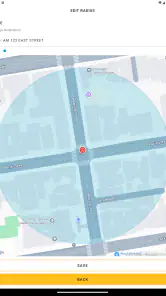
- Route and stop details make daily school transportation easier to follow.
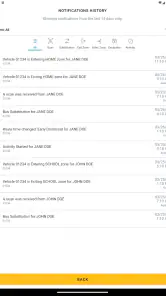
- Parents can receive useful arrival and delay notifications.
- Supports multiple students or routes from one account.
- Free to download for families using participating school districts.
Cons
- Availability depends on whether your school district supports the service.
- Location updates may occasionally be delayed or inaccurate.
- Notifications require proper setup and enabled phone permissions.
- The interface can feel limited outside active school transportation periods.
- Some features may vary depending on district configuration.

- Category
- Education
- Version
- 4.0.6











