HelloTalk - Learn Languages
- 7.31K
- 3.5
- Installs
- 10.00M
- Price
- Free

Screenshots





Analysis by Reviewed
When I think about language practice that has to fit around work, study, and ordinary errands, I value tools that make it easy to start with a small exchange rather than demand a long lesson. HelloTalk takes a social approach: learners connect with people who speak the language they want to practice, and conversations become part of the learning. That can be motivating, though it also means the experience depends partly on finding a good conversational fit.
Readable conversations, flexible navigation
I find the basic idea easy to grasp: choose a language, meet potential conversation partners, and use messages to practice. The app is an education tool from HelloTalk Learn Languages App, but it feels closer to a language-focused social space than a conventional course built around a fixed sequence. That distinction matters if you want to decide what to do next. A chat can be useful practice, but it won’t necessarily tell you which grammar topic to study or what level you have reached.
Its average rating is 3.5 from around 224,000 ratings, and it has been installed over 10 million times. Those figures suggest a large audience, but I wouldn’t treat popularity as proof that every exchange will be helpful. The more useful question is whether you enjoy learning by interacting with other people.
Meet Your Language Partner
One of the best features of HelloTalk is its ability to connect you with native speakers. Imagine having a friend in Japan to practice your Japanese or a buddy in Brazil for your Portuguese sessions. The app’s interface is designed to facilitate easy conversations, and trust me, it’s like hanging out with a pen pal, only in real-time!
All About Communication
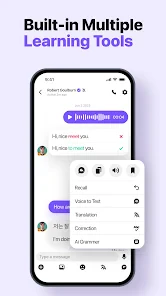
The app isn’t just about exchanging text messages. You can send voice messages, make video calls, and even doodle your thoughts if words fail you. The voice recognition feature is a lifesaver, especially when you’re struggling with pronunciation. Plus, the translation tool is just a tap away, making sure your conversations flow without a hitch.
In practice, I’d use translation as a bridge, not a substitute for trying to understand. A useful habit is to write your own reply first, check a translation only when you get stuck, then save or note the corrected expression for later review. That keeps a conversation moving without turning every message into passive copy-and-paste. Voice notes can serve another purpose: you can listen back to your own attempt and notice where a phrase feels hard to say, even before asking someone else for feedback.
Learn and Teach
HelloTalk promotes a give-and-take culture. While you’re learning Spanish, someone might be learning English from you. This exchange system not only enhances your learning experience but also makes it more rewarding. It’s like being a student and a teacher all in one go!
More From Our News Desk

Weather by Xiaomi Review: Clear at a Glance, Less Clear Up Close

X Under Pressure: Can It Recover When Posting Goes Wrong?

Clash of Clans Is Won Between the Battles

Android Auto Makes the Case for Quieter Car Software

MobiOffice: Transforming Mobile Productivity with Seamless Integration

EA SPORTS FC™ Mobile Soccer: Redefining Mobile Sports Gaming
That balance works best when both people agree on a simple rhythm. For example, you might spend a few messages in one language and then switch, rather than letting the stronger speaker carry the whole chat. If your partner corrects you, ask for one natural alternative and an example sentence; a short explanation is easier to remember than a long list of edits. This is a practical way to turn casual conversation into a repeatable learning routine.
And for those of us who love structure, the app offers language courses and lessons. So, if you want a more traditional approach alongside your chats, you’re covered.
Community Vibes
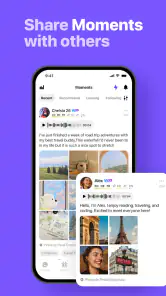
What I love most about HelloTalk is its community feel. You can join group chats, participate in language challenges, and even share moments from your day. It’s a social network for language learners, and it’s incredibly supportive. You’ll find people correcting your grammar, helping with vocabulary, and even sharing cultural insights.
A realistic use case is a learner preparing for a trip: during a lunch break, they could write a few lines about ordering food, ask a partner how the wording sounds in everyday speech, and later try a short voice message. That is more grounded than memorizing a phrase list alone, because the learner has to produce language and respond to another person. For a busy schedule, small exchanges can be easier to maintain than arranging a full lesson, although a partner’s availability may not match yours.
Finding the right fit
I’d recommend this approach to people who already know a little of their target language and want to become more comfortable expressing real thoughts. Beginners can still benefit, especially when they use the lessons for structure and keep chats simple, but someone starting from zero may prefer a guided course that explains basic grammar in order before relying on conversation. Likewise, if you want a private tutor, formal feedback, or a guaranteed lesson schedule, a language-exchange community is not a direct replacement.
Compared with flashcard apps, HelloTalk gives you less control over exactly which words you encounter, but more room to practice choosing words in context. Compared with a traditional course, it can feel more spontaneous and personal, yet less consistent: partners differ in patience, availability, and teaching style. I’d pair it with a notebook or a structured study resource rather than expect every chat to cover a balanced curriculum.
Group conversations can expose you to several voices and informal expressions, but they may move too quickly if you are still decoding basic sentences. I’d start with one-to-one exchanges, then use groups when reading feels comfortable. It also helps to enter a chat with a small goal—asking about a phrase, describing your day, or practicing a particular tense—so the exchange does not drift into English alone.
Comfort across different situations
Text is the least demanding way to participate when you are in a quiet place or have time to compose a sentence. Voice messages and calls add listening and speaking practice, but they require more confidence and a setting where you can hear and respond. I like having these different ways to communicate, though they are not interchangeable: a call can feel immediate, while text gives you more time to reread and formulate a reply.
For motor or sensory needs, the choice between typing, listening, and speaking can make a real difference from one person to another. Someone who finds long typing tiring may prefer a short voice note, while a learner who has difficulty following fast speech may get more from written exchanges. I would test each mode at a comfortable pace rather than assume one format suits everyone. The app’s age rating is Teen, so families should also consider whether a social environment involving contact with other people is appropriate for the young person using it.
Costs, expectations, and everyday friction
HelloTalk is free to start, with in-app purchases ranging from about $0.49 to $399.99 per item. I’d try the free experience before considering any purchase, because the central question is whether you enjoy the exchange format and find partners who make practice worthwhile. The app is on version 6.1.81, and it requires Android 8.0 or later. It was released on December 16, 2013, and has around 7,300 written reviews; it remains a familiar option for learners, but its social nature still calls for patience and sensible boundaries.
One friction point is that a helpful correction is not guaranteed just because someone is a native speaker. People may reply casually, misunderstand what kind of feedback you want, or be more interested in chatting than teaching. I’d state your goal politely at the start and keep personal details private. If a conversation feels uncomfortable or unproductive, you do not need to keep investing time in it; move on to another partner or return to the structured lessons.
But it’s not all sunshine and rainbows. Like any app, there are occasional hiccups. Sometimes, the translation tool can be a bit off, and depending on your internet connection, calls may not always be crystal clear. But hey, nothing’s perfect, right?
Making a small routine work
A practical way to keep the social side useful is to treat each conversation as one small task, rather than expecting a partner to design your study plan. Before opening a chat, I’d pick a topic I can explain in a few sentences, such as what I cooked or what I need to do tomorrow. Afterward, I’d write down one expression I struggled to produce and reuse it in a later message. This turns an unpredictable conversation into a light routine without making the exchange feel like homework.
If you receive several corrections at once, I wouldn’t try to memorize every edit in the moment. I’d ask which change matters most for sounding natural, then focus on that one. This is especially useful when a partner’s explanation is brief: a single example gives you something concrete to imitate, while a long list of unfamiliar grammar terms can interrupt the flow. The app is at its best when the learner stays active and chooses what to take away.
It can also help to set expectations early about response pace and language balance. A message such as “Could we switch languages after a few exchanges?” makes the give-and-take clearer without turning the chat into a formal lesson. If a partner is slow to reply, I’d avoid building a daily plan around that one conversation. Keep another study activity available so practice does not stop whenever someone is busy.
When another learning style is better
The social format is not automatically the easiest route for a shy learner. Writing first can lower the pressure, but even text involves presenting yourself to another person and waiting for a response. Someone who wants to practice privately, repeat the same material many times, or progress through a carefully ordered syllabus may be better served by a self-study course or flashcards. Those options are less conversational, but they provide more control over pace and subject matter.
On the other hand, a textbook or vocabulary deck cannot easily reproduce the small decisions that happen in a real exchange: choosing a polite phrasing, asking what a word means in context, or rewording a thought when the first attempt is unclear. I see HelloTalk as a complement for that gap, not a winner in every comparison. A learner can use a course for explanations and review, then bring a specific question or everyday topic into a chat.
For someone who needs professional instruction, a scheduled tutor is the clearer choice. A language partner may offer useful corrections, but the relationship is mutual and informal; there is no reason to expect every person to diagnose recurring errors or build a lesson around them. That distinction can prevent disappointment. If a learner’s main goal is exam preparation or precise feedback on a particular skill, they should keep a more structured resource at the center of their plan.
Who will get the most from it?
In a world where learning a new language often means expensive courses and boring textbooks, HelloTalk brings a breath of fresh air. It’s interactive, fun, and most importantly, effective. Whether you’re a beginner or looking to polish your skills, this app is a fantastic tool to have in your language learning arsenal.
My recommendation comes with a qualification: it is strongest as a place to practice human communication, not as a complete substitute for a planned course or a professional teacher. If you enjoy meeting people, can tolerate uneven reply times, and are willing to offer help in return, the exchange can make language study feel connected to daily life. If you need quiet, solitary practice or a strictly step-by-step syllabus, a conventional lesson app is likely a better starting point.
So, if you’re ready to say "Hello" to a new language, give HelloTalk a shot. You might just find a new friend—or a few—along the way!
HelloTalk - Learn Languages Frequently Asked Questions
Can I practice through text, voice, and video on HelloTalk?
Yes. HelloTalk supports text chats, voice, and video calls, giving you several ways to practice with language partners. Text can be useful when you want time to think, while speaking lets you work on communicating more spontaneously. Choose the format that feels comfortable and remember that these are conversations with other people, so clear boundaries and respectful communication matter.
Will HelloTalk help me with pronunciation and understanding messages?
HelloTalk includes translation, pronunciation, and transliteration features that can help when a message is difficult to understand or you are unsure how to say something. These tools can make chats easier to follow, particularly when you are starting out, but they work best as support for real practice. Try using them to learn from a conversation rather than relying on them to do all the communicating.
Can I use HelloTalk to practice without making calls?
Yes. You can practice through text chats, so calls are not the only way to use HelloTalk. Text gives you room to reread messages, look for help when needed, and consider your reply before sending it. If you later feel comfortable speaking, voice or video calls are also available, but you can choose the style of interaction that suits your learning and comfort level.
Is HelloTalk mainly for language learning or social conversation?
HelloTalk is an education app focused on language exchange through conversations with native speakers. That makes interaction central to the experience: you practice by communicating rather than only completing lessons on your own. The conversations can feel social, so it helps to be clear with partners that your goal is language practice and to choose exchanges that support the skills you want to develop.
Do I need to pay to download HelloTalk, and are purchases available?
HelloTalk is free to download, and it offers basic features for connecting with language partners and practicing. In-app purchases are available, with individual items ranging from $0.49 to $399.99. You can begin with the free experience and decide whether the app suits your needs before considering an optional purchase; check the purchase details in the app before confirming anything.
Pros
- Connects with native speakers globally
- Supports over 150 languages
- Interactive language tools available
- Free version with essential features
- Audio
- text
- and video communication
Cons
- Limited features in free version
- In-app purchases can be costly
- Occasional connection issues
- Privacy concerns with data sharing
- Advertisements in free version
- Category
- Education
- Version
- 6.1.81











