HealthEquity Mobile
- 3.19K
- 1.4
- Installs
- 1.00M
- Price
- Free

Screenshots
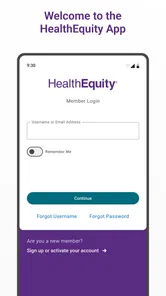
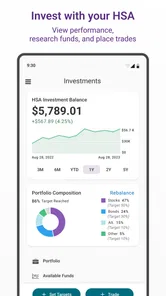
Analysis by Reviewed
The first few days with HealthEquity Mobile can feel reassuring if you want to check healthcare account details without reaching for a computer. I like the basic idea: keep an eye on the account as everyday expenses happen, rather than leaving all the checking and paperwork for later. That convenience matters most when you already have an HSA through HealthEquity and want a quick mobile companion, not a new place to manage every part of your finances.
What the first week makes easier
In the opening stretch, the practical appeal is having account information close at hand. A quick balance check can help me decide whether to use the HSA for a healthcare purchase, while a look at recent activity can make an unfamiliar charge easier to spot and follow up on. The app is free, and its Everyone age rating makes it broadly accessible, though access to useful account details still depends on having a relevant HealthEquity account.
The useful habit is not checking constantly; it is checking at the moment it answers a real question. For example, after paying for an eligible medical expense, I could review the account later and keep the receipt with the transaction records. If I need to submit a claim, having the receipt available is a better starting point than trying to reconstruct the purchase weeks afterward. I would still keep important receipts somewhere I can retrieve them independently, rather than treating a mobile app as my only recordkeeping system.
Effortless Account Management
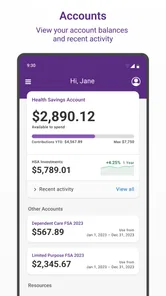
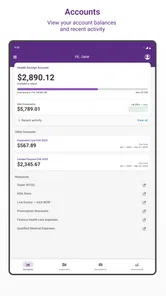
The first thing you’ll notice about HealthEquity Mobile is its user-friendly interface. It’s like having a personal accountant right in your pocket. Seriously, who wouldn’t want that? With just a few taps, you can check your balance, view recent transactions, and even manage your contributions. The app gives you a snapshot of your account activity, making it super easy to stay on top of your finances. I found the transaction history feature particularly useful because it lets you track every penny you spend.
Making a claim while the details are fresh
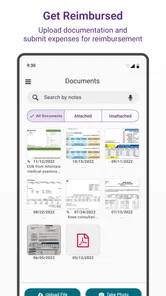
Submitting claims can be a nightmare, but not with this app. HealthEquity Mobile simplifies the whole process. All you need to do is snap a picture of your receipt, and voila! The app takes care of the rest. It’s like having a magic wand for your claims. Plus, it keeps track of all your receipts in one place, so you never have to worry about losing them. This feature alone has saved me countless hours and headaches.
The most useful time to deal with a receipt is often just after a visit, while I can still connect the charge to the appointment and remember what the purchase was for. I would photograph the receipt before it gets crumpled or misplaced, then check that the image is readable rather than assuming a blurry picture will be useful later. If a claim needs more context, a clear record gives me a better starting point than a pile of receipts at tax time. I would still confirm the claim’s status instead of treating submission as proof that reimbursement is complete.
Support is convenient, but not a substitute for checking
Ever had a question about your HSA and didn’t know who to ask? The app has got you covered with its real-time support feature. You can chat with a specialist directly through the app, which is a game-changer. Whether it’s a question about your account or understanding your benefits, help is literally a tap away. It feels like having a personal advisor on call, which adds a lot of peace of mind.
More From Our News Desk

 Bolt: Request a Ride
Bolt and the Shift from One-Tap Rides to More Legible Trips
Bolt shows how ride-hailing is shifting from a one-tap taxi request toward a more legible, choice-driven trip, while leaving the hardest questions of price and reliability unresolved.

 Farm Land - Farming life game
Farm Land Review: A Small Island Farm with a Satisfying Loop
A bright, breezy island farm turns a few quick chores into a satisfying cycle of planting, harvesting, expanding, and deciding what to build next.

 Android Auto
’s Community Takes Shape in the Passenger Seat
Its most valuable network is not a public feed but a shared set of routes, voice habits, app integrations, and advice that make driving less isolating—and sometimes more complicated.

 My Talking Angela
 Makes the Virtual Pet Feel Personal
A polished pet-raising game built on small rituals, playful customization, and a character who gives everyday screen time a surprisingly personal rhythm.

 Google Translate
 Review: A Pocket Tool for the Small Frictions of Travel
From menus and signs to quick conversations, Google Translate earns its place by cutting the little delays that make unfamiliar language feel like a barrier.

 Shazam: Find Music & Concerts
Shazam’s Best Trick Is Turning a Song Into a Night Out
A few seconds of recognition can settle an argument, rescue a half-remembered chorus, and point toward a live show. Shazam’s real trick is what happens after the match.
Latest News



In practice, I would use support for a concrete account question, such as clarifying an unfamiliar activity or asking what step to take next. For decisions about whether an expense qualifies, I would compare the answer with my plan’s own guidance and keep the explanation with the receipt if the purchase is unusual. This is a useful distinction: quick access to a person can reduce the effort of finding help, but it does not remove my responsibility to understand the rules that apply to my account.
Security and everyday caution
When it comes to managing your finances, security is key. HealthEquity Mobile ensures that your information is safe and sound. With its enhanced security features, you can rest easy knowing your data is protected. The app employs top-notch encryption and security protocols to safeguard your information. It’s comforting to know that they take security as seriously as I do.
Even with a finance app, I would keep basic habits in place: use a private device when possible, avoid leaving account details visible to someone else, and sign out if I am using a shared phone. I would also avoid sending sensitive account information through an unrelated channel just because it seems quicker. These precautions do not make account management difficult; they help ensure the convenience of checking on the go does not become a reason to be careless.
How it fits into a healthcare routine
Where this app earns its place over time is in the small recurring jobs: checking account activity after a visit, keeping a contribution in view, or dealing with a claim while the paperwork is still easy to find. I would use it as a companion to the account, not as a substitute for understanding the rules of my particular HSA or benefit plan. A mobile balance is useful, but it does not by itself tell me whether a purchase qualifies or what documentation I should retain.
A realistic routine might start after an appointment: I pay for a healthcare item, keep the receipt, then open the app later when I have a moment to compare the transaction with my account activity. If I am seeking reimbursement, I can handle the paperwork while the purchase is easy to identify. If I paid another way or am unsure about eligibility, I can pause and check the applicable guidance before submitting anything. That small pause matters more than rushing through a claim just because the phone makes the form accessible.
That distinction also answers a common practical concern: does having the app mean every healthcare expense can simply be charged or reimbursed? No app can make plan terms irrelevant. I would check the applicable account guidance before assuming an item is eligible, and keep documentation for expenses that might need explanation later. The app can make the administrative steps feel more manageable, but the account holder still has to make careful choices.
Where it compares—and where it may not
Compared with a general budgeting app, HealthEquity is aimed at a narrower job: following a healthcare account and its related activity. That focus is an advantage if your HSA is already with the company, because healthcare transactions do not have to disappear among groceries, bills, and everyday card spending. A spreadsheet or a standard finance app may be a better fit if you want one cross-account budget, custom reports, or a broad view of household spending; those tools serve a different purpose rather than replacing plan-specific account management.
Compared with signing in through a browser, the phone app makes sense when I need a quick check away from home or want to handle a receipt soon after a purchase. A computer may still be easier for someone who prefers a larger screen for reviewing paperwork or completing several account tasks at once. I would not force every part of my financial routine onto a phone: the best arrangement may be to use the app for quick account touchpoints and a browser or other records for longer reviews.
The trade-off is that a dedicated account app has lasting value only if I return to it when something changes. If I rarely use the HSA, do not submit claims, and already prefer to handle account tasks on a desktop, the phone app may become an occasional shortcut rather than a daily essential. I would also avoid relying on a support chat as a substitute for reading plan details when a decision has tax or eligibility consequences. It can help with questions, but I would still want to understand the answer before acting.
Month-to-month value and upkeep
For someone who makes regular contributions or has recurring healthcare expenses, checking activity periodically can create a low-effort routine: review recent transactions, make sure the account activity looks familiar, and deal with receipts while they are still easy to identify. That is more useful than opening the app out of habit every day. The strongest long-term case is practical continuity—having the same place to check when a claim, contribution, or account question comes up.
I would tie checks to events rather than a calendar reminder that quickly becomes noise: a healthcare purchase, a contribution change, or a claim I am waiting to resolve. That makes each visit purposeful and gives me a reason to notice whether the account activity matches what I expected. If nothing has changed and I have no paperwork to handle, there is little benefit in checking repeatedly. The app’s value is measured by whether it helps with real account tasks, not by how often it is opened.
Maintenance is not just keeping the app installed. I would keep my sign-in details current, make time to review the account after important transactions, and save copies of receipts outside the app when I need dependable records. If the app does not behave as expected, I would use the available support route or another official account channel rather than repeatedly submitting a claim and risking confusion. Those small precautions keep convenience from turning into a new source of administrative work.
For a household with several people’s healthcare paperwork, I would be especially deliberate about whose expense a receipt belongs to and what account it relates to before submitting it. A phone camera makes capture easy, but it does not sort out the meaning of a document for me. A simple naming habit in my separate recordkeeping system can help connect the receipt to the person and visit later. This is one of the less glamorous parts of using a claims tool, yet it can prevent confusion when I need to revisit a purchase.
Who should keep it—and who can skip it
HealthEquity Mobile is most useful for people who already manage an HSA or related healthcare account with HealthEquity and want account checks and claim tasks close by. It is less compelling for someone without a HealthEquity account, someone who wants a complete household budget, or someone who prefers all financial administration on a computer. Before installing, I would also check that the phone’s operating system meets the app’s minimum requirement; the current release is version 7.0.10.1049, and the minimum OS is 10.
It is also a better match for someone willing to stay involved in the details. If you want an app to decide whether a purchase is eligible, preserve every record without your oversight, or replace a full plan review, this is not the right expectation. I would skip it if I had no account with the company or if my preferred way of managing money already gives me everything I need and I rarely handle healthcare claims on my phone. A dedicated tool is most valuable when it addresses a recurring task, not merely because it exists.
The app has been available since May 8, 2013, and HealthEquity Inc is its developer. Its reach is substantial, with over a million installs, but the average rating is 1.4 from around 6,600 ratings, alongside roughly 3,200 written reviews. I would take that low average seriously: it is a reason to keep expectations measured and to check whether the current experience works for my needs, not proof that every person will have the same trouble. For a finance app, reliability matters more than novelty, so I would test the routine tasks I actually need instead of assuming the convenience will automatically last.
That is also why I would give the app a practical trial rather than judging it by the first successful balance check. I would see whether I can get into my account when needed, review a recent transaction, and complete the kind of claim task I expect to use. If those basics fit smoothly into my routine, the low rating may not describe my own experience; if they repeatedly create friction, I would not keep making excuses just because the app has useful ideas. With financial tools, dependable access matters more than a long feature list.
Long-term verdict
In conclusion, the HealthEquity Mobile app is a lifesaver for anyone looking to streamline their HSA management. From easy account management to seamless claims submission and real-time support, it ticks all the boxes. Plus, the security features mean you can trust it with your sensitive information. If you’re looking for a hassle-free way to manage your health savings, this app is definitely worth checking out. You’ll wonder how you ever managed without it!
My more measured recommendation is to treat it as a useful account-specific tool, not an all-purpose financial hub. If its core tasks fit your existing HealthEquity routine, it can earn a lasting place by saving you small bits of effort when account questions arise. If you need broader money management or rarely touch the account, a browser-based option or your usual budgeting tool may suit you better. The value is in returning when there is something concrete to do—not in installing it and expecting it to manage the decisions for you.
HealthEquity Mobile Frequently Asked Questions
Is HealthEquity Mobile free to download, and what kind of app is it?
HealthEquity Mobile is a free finance app from HealthEquity Inc. Its focus is managing healthcare-related finances through a mobile device, and its store summary describes handling healthcare with a few taps. It is rated for Everyone, so the app’s audience is not limited to adults. Before downloading, consider whether you want a mobile way to access and manage your healthcare accounts.
What features does the HealthEquity Mobile app offer?
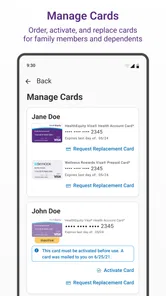
The HealthEquity Mobile app provides users with a comprehensive suite of features to manage their health savings accounts (HSAs), flexible spending accounts (FSAs), and other health-related financial accounts. Users can view account balances, submit claims, upload receipts, and even connect their accounts to a range of health and wellness services. The app is designed to offer a seamless and intuitive experience for managing healthcare finances on the go.
Is the HealthEquity Mobile app secure for managing my healthcare finances?
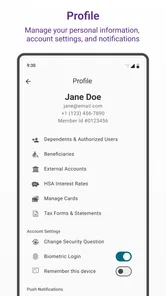
Yes, the HealthEquity Mobile app is built with robust security measures to ensure the safety of your financial and personal information. It includes features such as biometric login, encryption of data, and secure transmission protocols to protect your account details and transactions. Users can be confident that their sensitive healthcare financial data is safeguarded against unauthorized access.
Can I submit claims directly through the HealthEquity Mobile app?
Absolutely, the HealthEquity Mobile app allows users to submit claims directly from their mobile devices. Simply take a photo of your receipt or upload a document, and submit it through the app for processing. This feature streamlines the reimbursement process, making it quick and hassle-free for users to manage their healthcare expenses without the need for cumbersome paperwork.
Does the HealthEquity Mobile app offer customer support?
Yes, HealthEquity Mobile provides excellent customer support to assist users with any queries or issues they might encounter. The app includes access to a help center with FAQs, tutorials, and the option to contact customer service directly. Whether it's troubleshooting or understanding specific features, the support team is available to help users navigate through the app effectively.
Pros
- User-friendly interface for easy navigation.
- Comprehensive health savings account management.
- Secure login with biometric authentication.
- Real-time account balance updates.
- Access to detailed transaction history.
Cons
- Limited customer support options.
- Occasional app crashes reported.
- Some features require stable internet.
- No dark mode available.
- Not optimized for tablets.