Gusto Mobile
- 2.01K
- 4.6
- Installs
- 1.00M
- Price
- Free

Screenshots
Analysis by Reviewed
I look at Gusto Mobile as a companion to a small-business payroll and HR setup, not as a replacement for every task I might do at a desk. That distinction matters: an owner checking a deadline between meetings has different needs from someone building a payroll process from scratch. The app is free, developed by Gusto, Inc., and sits in the finance category. Its current version is 3.43.0, while the app first arrived on December 1, 2020; that history gives it time to mature, but a version number alone doesn’t tell me which tools changed or how they work.
Where the mobile experience fits
For everyday use, I’d reach for the phone when I need a quick check or want to keep an HR task from slipping through the cracks. A practical routine might be reviewing an upcoming payroll deadline during a lunch break, then returning to a computer for a more involved decision. That split is often more comfortable than trying to handle every administrative detail on a small screen. Before committing, I’d also confirm that the account and business setup match the tasks I expect to do, since a mobile app is only useful when it connects to the right workflow.
Gusto has an average rating of 4.5 from around 16,000 ratings, and it has passed one million installs. Those figures suggest a substantial audience, though they can’t tell me whether a particular business’s payroll needs will be a good fit. The app is rated for Everyone and requires Android 8.0 or later. I’d treat those as practical compatibility checks, especially if a team member uses an older device.
Choosing it over a spreadsheet or desktop routine
Compared with a spreadsheet, a dedicated payroll and HR service can reduce the need to keep separate notes, calculations, and reminders in sync. Compared with doing everything in a desktop browser, a mobile app is more convenient for quick reviews while away from a desk. The trade-off is that a phone is not always the best place to compare benefit choices, inspect detailed records, or carefully verify a complex payroll run. I’d use mobile for access and follow-through, and reserve a larger screen for decisions that deserve a slower check.
Questions I’d settle before relying on it
Before making it part of a business routine, I’d ask who on the team needs access, which actions are easiest on mobile, and which should stay in the main account workflow. I’d also check how a change made on the phone appears to other authorized users, so nobody assumes a task is finished when it still needs review. For a business with a straightforward payroll calendar, those habits can keep the app useful without turning every notification into another distraction.
Gusto Mobile is less compelling if you only need a basic calculator, run payroll rarely, or already have an HR system that handles your work comfortably. In those cases, a simple spreadsheet or the mobile tools attached to your existing service may be enough. I’d also avoid treating reminders as a substitute for checking payroll details: convenient prompts help with timing, but the person responsible still needs to review the actual information before acting.
When a phone is useful—and when it isn’t
The clearest benefit I see is continuity between brief moments in a busy day. Imagine an owner finishing a supplier call and remembering that payroll needs attention before the next meeting. A mobile check can help them orient themselves, spot what still needs follow-through, and make a note to complete a careful review later. That is a more realistic role for a phone than expecting it to replace a quiet, uninterrupted payroll session.
More From Our News Desk

 Bolt: Request a Ride
Bolt and the Shift from One-Tap Rides to More Legible Trips
Bolt shows how ride-hailing is shifting from a one-tap taxi request toward a more legible, choice-driven trip, while leaving the hardest questions of price and reliability unresolved.

 Farm Land - Farming life game
Farm Land Review: A Small Island Farm with a Satisfying Loop
A bright, breezy island farm turns a few quick chores into a satisfying cycle of planting, harvesting, expanding, and deciding what to build next.

 Android Auto
’s Community Takes Shape in the Passenger Seat
Its most valuable network is not a public feed but a shared set of routes, voice habits, app integrations, and advice that make driving less isolating—and sometimes more complicated.

 My Talking Angela
 Makes the Virtual Pet Feel Personal
A polished pet-raising game built on small rituals, playful customization, and a character who gives everyday screen time a surprisingly personal rhythm.

 Google Translate
 Review: A Pocket Tool for the Small Frictions of Travel
From menus and signs to quick conversations, Google Translate earns its place by cutting the little delays that make unfamiliar language feel like a barrier.

 Shazam: Find Music & Concerts
Shazam’s Best Trick Is Turning a Song Into a Night Out
A few seconds of recognition can settle an argument, rescue a half-remembered chorus, and point toward a live show. Shazam’s real trick is what happens after the match.
Latest News



I’d also think about who is holding the phone. An owner may value quick access to business administration, while an employee may be looking for a different kind of account access. Before asking a whole team to install an app, I’d identify the specific task each person needs to do and verify that their account role supports it. That prevents a common rollout problem: people download a tool without knowing whether it is meant to help with their own work or the company’s administrative work.
For a very small business where one person handles payroll and HR, keeping a mobile option nearby can make it easier to remember unfinished work. A growing team may benefit from the same convenience, but it also needs clearer ownership: decide who reviews, who approves, and who follows up. The app can be part of that routine, but I wouldn’t let a shared phone or an informal handoff become the process itself.
A more dependable payroll routine
One useful habit is to separate the reminder from the decision. When a deadline prompt brings payroll to mind, I’d treat it as a cue to open the relevant workflow, not as confirmation that the figures are correct or that the run is complete. Before taking action, check the pay period, employee changes, and any details that matter to that cycle. This simple pause is especially valuable when a business has last-minute changes or several people contributing information.
Another practical tip is to decide in advance which work belongs on mobile. Quick status checks and time-sensitive follow-ups may suit a phone; comparing records or working through a complicated benefits choice may be clearer on a larger screen. A business can make this distinction part of its own routine without assuming that every action should be available or comfortable on every device. The advantage is fewer rushed decisions made simply because the phone is at hand.
I would also test the workflow during an ordinary week rather than waiting for a high-pressure payroll day. Try opening the app when there is time to explore, confirm that the account is connected to the right business, and see whether the key information is legible and easy to locate. If a task feels unclear on the phone, note that and use the desktop workflow for it. A low-stakes trial is a better way to judge fit than discovering friction when a deadline is close.
How it compares with common alternatives
Against a spreadsheet, Gusto Mobile belongs to a broader payroll and HR service rather than a do-it-yourself calculation sheet. A spreadsheet can be flexible and familiar, but it asks the business to manage its own formulas, reminders, and recordkeeping habits. The mobile app’s appeal is strongest when the business already uses Gusto and wants a convenient companion for that setup. If the company has no need for a dedicated payroll service, adopting one just for a phone interface may be more than it needs.
Compared with a payroll provider’s desktop site, the mobile experience prioritizes access in short windows of time. That can be handy for checking in away from a desk, but a browser on a computer remains the safer choice for tasks that require concentration, side-by-side comparisons, or a longer review. I wouldn’t choose between them as if one must replace the other. A sensible setup can use mobile to keep work visible and desktop to complete decisions that need more space and attention.
If a business already relies on another HR platform, I’d compare the complete workflow before switching: how the team handles payroll, benefits, records, approvals, and routine questions. A well-used existing service can be better than introducing a second system that duplicates information. The deciding factor is not whether a mobile app exists, but whether it removes friction without creating extra reconciliation work for the person responsible.
What the release history can—and cannot—tell me
There is a useful distinction between knowing that a product has continued to receive versions and knowing exactly what changed in each one. Gusto Mobile’s version 3.43.0 is the current release, and its December 2020 debut gives the product a longer history than a new launch. Neither fact, on its own, tells me that a particular payroll or benefits workflow has recently improved. I’d look at the actual changes shown when updating and test any important workflow instead of reading a version number as a promise.
For an existing user, that means approaching updates with a practical check: after installing one, open the tasks the business depends on and make sure the usual route still makes sense. If a team member uses the app only occasionally, a short reminder about where to find the regular task can save confusion. I would avoid changing a deadline-day routine just because an update is available; test the new version when there is time to verify the steps.
The product’s age may reassure a business that it is not experimenting with an entirely new app, but maturity should not be confused with a guarantee that every company’s process is covered. My expectation is modest: I want updates to preserve dependable access and make routine work understandable. I would watch for clear changes in the workflows I actually use, while keeping expectations separate from what has been confirmed about the current release.
Hey folks! Today, I want to talk about an app that’s been making my life a whole lot easier. Say hello to Gusto Mobile. If you’ve ever struggled with managing payroll, benefits, or even just keeping track of employee information, this app might just be your new best friend. Let me walk you through my experience.
Getting Started with Gusto Mobile
First off, installing Gusto Mobile was a breeze. A quick download from the App Store, and I was ready to dive in. The app greeted me with a clean and intuitive interface, making it super easy to navigate. For someone who isn’t the most tech-savvy, this was a big plus. Setting up my account took just a few minutes, and I was impressed by how straightforward the whole process was.
Features that Stand Out
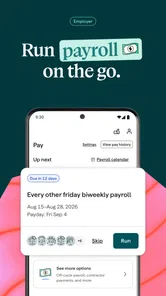
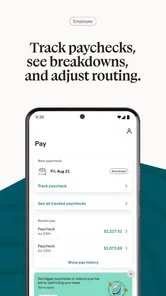
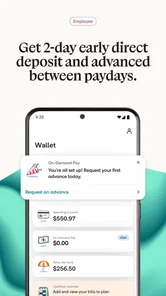
Let’s talk features. The app offers a comprehensive suite of tools to manage everything from payroll to employee benefits. One thing I loved was the automated payroll processing. No more manual calculations or worrying about tax compliance. Gusto takes care of it all. Plus, the app sends reminders for important deadlines, so you’re never caught off guard.
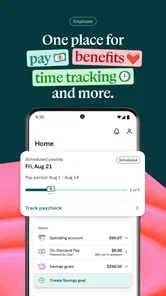
Another feature worth mentioning is the benefits management. Gusto makes it incredibly easy to enroll employees in health insurance and retirement plans. I found the enrollment process to be seamless, and the app provides plenty of resources to help you make informed decisions.
User Experience
Using Gusto Mobile feels like having a personal HR assistant in your pocket. The app runs smoothly, and I haven’t experienced any glitches or crashes. The developers did a fantastic job optimizing it for mobile devices. It’s not just about functionality; the app is designed to be user-friendly, which makes a huge difference in the daily grind.
Moreover, the customer support is top-notch. Whenever I had questions, the support team was quick to respond and incredibly helpful. It’s reassuring to know that help is just a tap away.
What to check before making it routine
Even if the first sign-in feels simple, I’d make the first session a deliberate setup check rather than rushing straight into a time-sensitive task. Confirm that the correct business account is open, learn where the payroll and benefits areas sit, and work out which questions need an administrator’s attention. That small orientation step can prevent a team member from mistaking access to the app for permission to make every business decision.
A related question is whether the app suits a business with unusual payroll patterns. If pay schedules, approvals, or benefit choices are straightforward, a mobile companion can fit naturally into the week. If the business has layered approvals, frequent exceptions, or highly tailored processes, I’d map those steps first and keep the main account workflow central until the team knows exactly where mobile access helps. Convenience matters, but consistency matters more when several people are involved.
For someone deciding whether to install it, the key question is not simply whether payroll can be handled from a phone. It is whether the tasks that person actually owns become easier without blurring responsibility. I’d start with one recurring task, give it a clear owner, and see whether mobile access reduces missed follow-ups. If it only creates another place to check, the desktop routine may remain the better choice.
Final Thoughts
In conclusion, Gusto Mobile has transformed the way I handle business operations. It’s efficient, reliable, and user-friendly. Whether you’re a small business owner or managing a larger team, this app is a game-changer. The peace of mind it provides is invaluable. So, if you’re tired of the hassle that comes with HR tasks, give Gusto a try. Trust me, you won’t regret it!
What to expect as it evolves
Because Gusto Mobile has been around since 2020 and is now at version 3.43.0, I see it as an established product rather than a brand-new experiment. That is useful context for a business choosing a routine it may depend on, but it is not proof that a specific feature has recently changed. I’d judge future updates by whether they make common tasks clearer and easier to complete, rather than assuming a higher version number means a particular improvement.
My practical advice is to try one low-risk workflow first: sign in, find the area you expect to use most, and check that the information is easy to understand on your device. Then build a habit around reviewing deadlines and details before you act. That small trial can reveal whether the mobile experience suits your team’s day-to-day rhythm without asking you to move every HR decision onto a phone.
For a small-business owner who wants payroll and benefits tools close at hand, Gusto Mobile is worth considering, especially if quick checks help keep administrative work moving. I’d be more cautious if your business needs highly customized processes or if you prefer to manage sensitive, detailed work exclusively on a desktop. The best fit is the one that makes routine tasks easier while leaving enough room for careful review when the stakes are higher.
Gusto Mobile Frequently Asked Questions
Can I use Gusto Mobile if my workplace does not use Gusto?
Gusto Mobile is built to provide mobile access to Gusto’s payroll, benefits, and HR tools for small businesses. If your workplace does not use Gusto, the app may have limited relevance for you, since its purpose is not to serve as a general-purpose personal finance app. Before downloading, consider whether you have a work-related reason to access Gusto services.
What is Gusto Mobile’s age rating, and is it intended for employees or business owners?
Gusto Mobile has an Everyone age rating and is aimed at people who need mobile access to Gusto’s small-business payroll, benefits, and HR tools. That can include people using Gusto in connection with their workplace, rather than only business owners. The rating describes the app’s content, while whether it suits you depends on your role and whether your workplace uses Gusto.
Is Gusto Mobile free to download, and who is it intended for?
Gusto Mobile is a free Finance app from Gusto, Inc., intended for people who need mobile access to Gusto’s payroll, benefits, and HR tools for small businesses. Its age rating is Everyone. Before downloading, consider whether Gusto’s small-business services are relevant to your role and workplace; the app is designed around those tools rather than being a general-purpose personal finance app.
What is Gusto Mobile and what features does it offer?
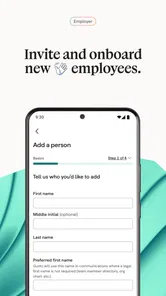
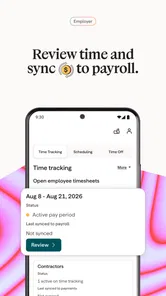
Gusto Mobile is a comprehensive HR and payroll management application designed for small to medium-sized businesses. It offers features such as employee onboarding, payroll processing, benefits administration, and compliance management. The app also provides user-friendly dashboards, real-time updates, and integration capabilities with other business tools. It aims to simplify and automate HR tasks, making it easier for businesses to manage their workforce efficiently.
Is Gusto Mobile secure for handling sensitive employee information?
Yes, Gusto Mobile prioritizes the security of your data. The app employs advanced encryption technologies and follows industry best practices to protect sensitive employee information. Regular security audits and compliance checks are conducted to ensure data integrity and confidentiality. Additionally, users can enable two-factor authentication for an added layer of security.
Pros
- User-friendly interface makes navigation easy.
- Comprehensive payroll features for businesses.
- Integration with popular accounting software.
- Automated tax calculations and filings.
- Responsive customer support team.
Cons
- Limited features in the free version.
- Occasional bugs in the mobile app.
- Subscription can be pricey for small businesses.
- Requires internet for most functionalities.
- Complex setup process for new users.