Gridwise: Gig Driver Assistant
- 3.06K
- 4.5
- Installs
- 1.00M
- Price
- Free

Screenshots
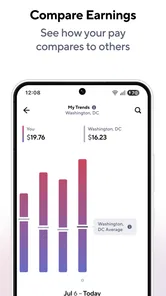
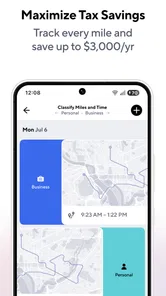
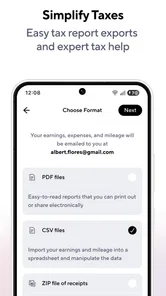
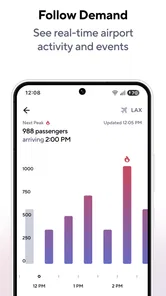
Analysis by Reviewed
I think the best way to judge a gig-driving companion is not by how many figures it can put on a screen, but by whether it helps me make calmer decisions between jobs. Gridwise is a finance app from Gridwise, aimed at drivers who want a clearer picture of the work behind their payouts. It has a 4.5 average from around 12,000 ratings, and more than a million installs; the app is free to start, though it offers optional in-app purchases. That makes it easy to try, but I’d still treat it as a work tool to evaluate over several shifts rather than expecting one glance to change my income.
What “fast” should mean on a driving shift
For an app like this, speed is less about flashy animations and more about whether I can get the information I need without losing focus. Gridwise is built around a driver’s earnings, miles, and work patterns, so its value is in bringing those details together instead of making me bounce between several services. I would check it while parked, before starting a shift or during a break, not while moving. The road-facing apps still need to handle navigation and active orders; this one is better treated as the desk where I review how the shift is going.
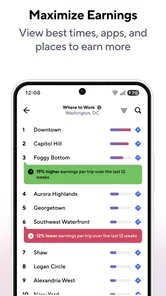
That distinction matters if I’m hoping for instant answers. Insights about better times and places to work can help with planning, but they are decision support, not a promise that a particular location will produce a better fare. Local demand changes, and a useful suggestion still has to fit my route, costs, and preferred hours. I’d use the guidance to compare options, then make the final call based on what is happening around me.
Busy shifts and a more useful routine
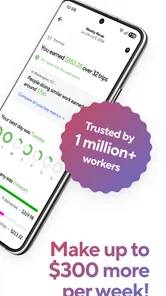
The app makes most sense when driving for more than one service or working irregular hours. Picture a Saturday shift: I start by checking what I earned during the previous session, keep mileage tracking running as I take jobs, and review the totals after I park. If several platforms are part of the same workday, having a combined view can make it easier to spot which hours were worthwhile without reconstructing everything from separate screens.
A practical habit is to give the app a clear start and end to each work period and then review the record while the details are fresh. That makes it easier to catch a missed trip or an unusual mileage total before it becomes a tax-time puzzle. I would still keep receipts and any records required for my own tax situation; a mileage log can support good bookkeeping, but it is not a substitute for checking that the figures are complete and appropriate for my circumstances.
Where the numbers help—and where they need judgment
Automatic mileage logging is convenient because it reduces the effort of remembering every drive. It is also the part I would verify early: compare a few familiar journeys with the recorded distances, and check that the app is tracking work travel rather than every personal trip in the same way. A little attention at the beginning can prevent a small tracking mistake from turning into a long cleanup later.
Insights and alerts can be useful when an event, airport activity, or weather change may affect where drivers want to be. I would treat them as prompts to consider, not instructions to chase every busy-looking area. A longer drive to a possible hotspot has a cost in time and fuel, and there is no guarantee that demand will still be there when I arrive. The strongest use is planning a shift around likely opportunities while keeping a sensible fallback close to the area where I already work.
More From Our News Desk

 Bolt: Request a Ride
Bolt and the Shift from One-Tap Rides to More Legible Trips
Bolt shows how ride-hailing is shifting from a one-tap taxi request toward a more legible, choice-driven trip, while leaving the hardest questions of price and reliability unresolved.

 Farm Land - Farming life game
Farm Land Review: A Small Island Farm with a Satisfying Loop
A bright, breezy island farm turns a few quick chores into a satisfying cycle of planting, harvesting, expanding, and deciding what to build next.

 Android Auto
’s Community Takes Shape in the Passenger Seat
Its most valuable network is not a public feed but a shared set of routes, voice habits, app integrations, and advice that make driving less isolating—and sometimes more complicated.

 My Talking Angela
 Makes the Virtual Pet Feel Personal
A polished pet-raising game built on small rituals, playful customization, and a character who gives everyday screen time a surprisingly personal rhythm.

 Google Translate
 Review: A Pocket Tool for the Small Frictions of Travel
From menus and signs to quick conversations, Google Translate earns its place by cutting the little delays that make unfamiliar language feel like a barrier.

 Shazam: Find Music & Concerts
Shazam’s Best Trick Is Turning a Song Into a Night Out
A few seconds of recognition can settle an argument, rescue a half-remembered chorus, and point toward a live show. Shazam’s real trick is what happens after the match.
Latest News



Stability, phone demands, and everyday friction
Gridwise is most helpful when it becomes part of a consistent routine, but any tracking tool depends on the phone being able to run it during work. I’d test it on a short shift before relying on it for a long day, especially if I also run navigation and delivery or rideshare apps. That trial gives me a chance to see whether the phone stays comfortable to use and whether the tracking fits my habits. I would avoid assuming that a driver-assistance app can replace the services’ own records.
For device compatibility, the listed minimum is Android 8.0, and the current version is 3.76.1. It is rated for Everyone, which is a broad age classification rather than a recommendation that children use a work-focused finance tool. Since optional purchases range from $0.99 to $109.99 per item, I’d look at what is included before paying for anything and decide whether the extra value matches how often I drive. Someone who only takes an occasional delivery may get enough from simpler record-keeping; a regular multi-app driver has more reason to test the combined workflow.
Your Gig Driving Companion
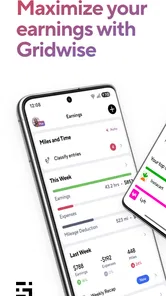
So, what exactly does Gridwise do? Well, imagine an app that consolidates all your gig driving needs into one easy-to-use platform. From tracking your mileage and earnings to providing insights on the best times and places to drive, Gridwise does it all. It’s like having a crystal ball for your gig work that helps you make informed decisions and boost your efficiency.
Tracking Earnings and Mileage
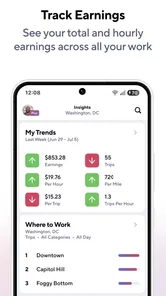
One of the standout features is its ability to track your earnings and mileage across multiple platforms. Whether you're driving for Uber, Lyft, DoorDash, or any other gig service, Gridwise seamlessly integrates with them all. This means no more flipping between apps to see where you stand financially. Plus, it makes tax season a breeze as you’ll have all the necessary info at your fingertips.
What really got me hooked is the mileage tracking feature. You just drive, and Gridwise automatically logs your miles, helping you maximize your tax deductions. It’s like having someone do your homework while you’re out having fun!
Insights and Alerts
Another feature that’s worth its weight in gold is the insights and alerts. Gridwise provides data-driven insights on when and where to drive for maximum profitability. Whether it’s airport traffic, events in town, or weather conditions, Gridwise keeps you in the loop. It sends alerts to help you plan your driving schedule and make the most of your time. Think of it as your secret weapon in the gig economy.
Community and Updates
Driving gigs can get a bit lonely, right? Gridwise tackles this by providing a community feature where drivers can share tips, experiences, and advice. It’s like having a support group that understands the ins and outs of gig driving. Plus, with regular updates and new features, Gridwise keeps improving, making sure you always have the best tools at your disposal.
Easy to Use Interface
Now, let’s talk about the interface. The app is incredibly user-friendly. Even if you’re not tech-savvy, you’ll find it intuitive and easy to navigate. The dashboard is clean, with all your important info displayed clearly. It’s like having a well-organized workspace where everything is in its place. You can focus on what matters most—earning more money without the stress.
Why You Need It
If you’re serious about gig driving, Gridwise is a must-have tool in your arsenal. It’s designed to help you work smarter, not harder. By providing a comprehensive view of your activities and offering strategic insights, it empowers you to make decisions that enhance your earnings and efficiency. Think of it as your personal business manager, ensuring you get the most out of every mile.
In a world where time is money, having a tool like Gridwise can transform the way you approach gig driving. It takes the guesswork out of the equation and puts you in control. So why not give it a spin? Your future self, with more time and money, will thank you.
Making the app fit your own bookkeeping
One question I’d ask before building my routine around it is whether I want one place to review work activity or a complete accounting system. Gridwise is most compelling for the first job: it can help me see driving activity and earnings together, while a dedicated spreadsheet or accounting tool may suit someone who needs custom categories, detailed business reports, or a workflow shared with an accountant. I wouldn’t force it to replace tools I already trust; I’d use it to reduce the scattered tracking that makes those tools harder to maintain.
Another useful trade-off is the difference between a busy day and a profitable one. A packed schedule can still involve too much unpaid driving or waiting, so I’d compare the time spent positioning myself with the earnings that followed. Over several shifts, that kind of personal comparison is more actionable than treating a single alert as a universal rule. It can also show when staying nearer familiar areas works better for me than chasing a distant event.
Who will get the most from it
I’d recommend trying it if gig driving is a regular part of your week, especially if you switch between delivery and rideshare work and want a more organized view of your activity. It is less convincing for someone who drives only now and then, already records mileage reliably, or wants a full tax-preparation product. In those cases, a simple log or the records inside each work platform may be enough, with less to set up and maintain.
My performance verdict is practical rather than dramatic: this is a work companion whose usefulness grows when I check its records consistently and keep my expectations realistic. Start with a short, ordinary shift, confirm that the mileage and earnings view makes sense for your routine, and only then decide whether it deserves a permanent place alongside your driving apps. If it helps you spend less time piecing together the day and more time making informed choices, it earns its spot; if not, simpler records may be the better fit.
Choosing the right way to use it
The biggest benefit for a multi-app driver is not simply seeing more information; it is being able to compare work periods using a consistent routine. I’d note when I begin and finish, then review the same kinds of details after each shift. That makes a comparison between a weekday lunch run and a weekend evening more meaningful than relying on memory. It also keeps me from treating gross earnings as the whole story when extra positioning, waiting, and miles can change how worthwhile a shift felt.
For example, if I finish a delivery block near the edge of my usual area, I can use the next planning check to decide whether another nearby opportunity is worth pursuing or whether the trip back would turn the shift into too much unpaid driving. I would not take an alert as a command to cross town. I’d weigh it against where I already am, how long I want to work, and whether I know the area well enough to make the detour sensible.
What to check before trusting the record
Drivers often want to know whether they can stop keeping their own notes once tracking is running. I wouldn’t make that switch immediately. For the first few work periods, I’d compare the app’s mileage and earnings view with the records I already use, and make a note of any gaps while the shift is still fresh. If the totals line up consistently, the app can become a useful part of the process; if they do not, I’d keep the independent record and investigate my routine before relying on it for bookkeeping.
This is especially worthwhile when a day mixes personal errands with paid driving. A tracking record is only useful for deductions and planning if I can distinguish business miles from private travel in a way that suits my situation. I’d review the relevant trips rather than assume every recorded mile belongs in a work total. The extra check is a small cost compared with sorting through a long history later.
How it compares with familiar alternatives
Compared with opening each gig platform separately, Gridwise is appealing when I want a broader picture of a workday that spans more than one service. The individual platforms remain the place to manage their own jobs and verify their own activity, while Gridwise is the companion for reviewing patterns across the day. A spreadsheet gives me more control over custom fields, and a dedicated accounting product may be better for a more formal business workflow. The trade-off is that those alternatives can ask me to do more manual collecting.
That makes the best choice depend on what is currently slowing me down. If I reliably enter miles and earnings into a spreadsheet, there may be little reason to add another routine. If I often forget to record a trip or lose track of which hours worked well, a combined view is more attractive. I’d use the app to make the comparison easier, not to assume that its suggestions will outperform my local knowledge.
Fit, cost, and a sensible trial
The free starting point lowers the barrier to testing it, but optional purchases mean I’d check the available in-app details before committing money. I’d first decide what problem I need solved: missed mileage, scattered earnings records, or weak shift planning. Then I’d try the relevant workflow over ordinary days, rather than paying because a feature sounds useful in theory. The app has been available since December 3, 2016, and its current release is 3.76.1; that history makes it an established option, but my own phone and work habits are still the best test of fit.
Gridwise is most useful for drivers who want a practical overview and are willing to review it with care. It is not a replacement for safe driving, platform records, personal tax judgment, or a more detailed accounting setup when those are required. I’d give it a short, low-pressure trial, check that its tracking agrees with my own records, and keep only the parts that genuinely make the workday easier. For a regular gig driver juggling services, that can be a worthwhile improvement; for occasional work or an already dependable system, staying with simpler tools may be the smarter choice.
Gridwise: Gig Driver Assistant Frequently Asked Questions
What devices can I use Gridwise on?
Gridwise is a mobile app for gig drivers, and its minimum operating-system requirement is version 8.0. Before downloading, check that your phone meets this requirement and has location services available if you want to use mileage tracking. The app is free to install, with optional in-app purchases, so you can get started without paying upfront.
Who makes Gridwise, and is it intended for newer gig drivers?
Gridwise is developed by Gridwise and is designed around the practical needs of people earning through rideshare and delivery work. Its tools bring work-related information, mileage, and earnings into one place, which can be useful whether you are learning how to manage gig driving or already juggling several services. The app is rated for Everyone.
What is Gridwise and how does it benefit gig drivers?
Gridwise is an app designed to help gig drivers optimize their earnings and manage their work efficiently. It provides crucial insights such as peak demand times, mileage tracking, and earnings comparisons across different platforms. By using Gridwise, drivers can make informed decisions on when and where to work, maximizing their income potential.
Is Gridwise compatible with all gig driving platforms?
Yes, Gridwise is compatible with a variety of gig driving platforms, including Uber, Lyft, DoorDash, and more. The app allows you to link multiple accounts, providing a comprehensive overview of your earnings and mileage across different services. This integration makes it easier for drivers to manage multiple gigs simultaneously.
How does Gridwise track mileage and expenses?
Gridwise uses your phone’s GPS to accurately track mileage every time you drive. It logs your trips automatically and allows you to categorize them for business or personal use. Additionally, Gridwise provides features to track expenses, helping you keep an organized record for tax purposes, saving you time and effort during tax season.
Pros
- Tracks mileage automatically.
- Supports multiple gig platforms.
- Provides earnings insights.
- Fuel price comparisons available.
- Simplifies tax reporting.
Cons
- Limited offline functionality.
- Some features require a subscription.
- Occasional sync issues.
- May drain battery quickly.
- Interface can be overwhelming.