Greenlight: For Families
- 10.87K
- 4.7
- Installs
- 1.00M
- Price
- Free

Screenshots




Analysis by Reviewed
The first week with a family money app can feel exciting: a child gets a card, parents can discuss spending in concrete terms, and allowance stops being a vague promise. What matters more is whether those conversations still happen after the novelty wears off. I see Greenlight Kids & Teen Banking as most useful when a family treats it as a routine for practicing decisions, not simply as a new way to hand over spending money.
Where it fits in everyday family life
A practical way to use the app is to connect money to a predictable weekly moment. For example, before a child goes to a bookstore with friends, a parent and child can agree on what the available money is for and what should be saved. Afterward, they can look at the purchase together and discuss the choice without turning every small expense into a lecture. That kind of follow-through is where a managed card can become a learning tool rather than just a payment method.
It also helps to decide as a family which decisions the child can make independently and which still need a conversation. Spending controls can support that boundary, but they work best when the child understands the reason behind it. If restrictions feel arbitrary, the app may reduce arguments in the moment without teaching much for the next one.
How it compares with simpler options
Compared with cash, a debit card makes everyday purchases easier to track and gives parents more oversight, but it can make spending feel less tangible to a younger child. Compared with a basic bank account or a general budgeting app, Greenlight is built around a parent-child relationship and supervised practice. That focus is a strength for families who want a shared system; it may be unnecessary for parents who only want a simple way to transfer money or for teens ready to manage an account with less guidance.
Before settling into a routine, I would talk through what the card is for, how allowance or chores fit into the household’s expectations, and what happens when money runs low. Keeping those rules simple makes the app easier to use consistently. A child who gets money irregularly may need a different routine from one who receives a steady allowance, so the family should choose a rhythm that matches real life rather than forcing a complicated budget onto it.
Getting Started with Greenlight
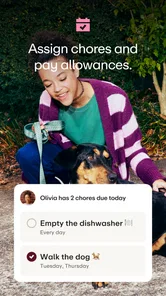
First things first, setting up the Greenlight Kids & Teen Banking app is a breeze. As a parent, you start by downloading the app and signing up. The app guides you through creating accounts for your kids, which is as simple as pie. You can assign chores, set up allowances, and even encourage savings by offering interest on money saved. How cool is that?
Features That Stand Out
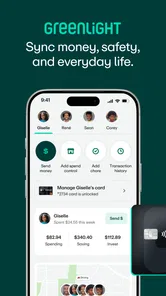
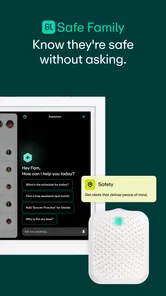
One of the standout features has to be the parental controls. With Greenlight, you have the power to monitor your kids' spending. You can set limits on ATM withdrawals and even choose where they can spend their money. This feature gives you peace of mind while empowering your kids to make their own financial decisions.
More From Our News Desk

 Bolt: Request a Ride
Bolt and the Shift from One-Tap Rides to More Legible Trips
Bolt shows how ride-hailing is shifting from a one-tap taxi request toward a more legible, choice-driven trip, while leaving the hardest questions of price and reliability unresolved.

 Farm Land - Farming life game
Farm Land Review: A Small Island Farm with a Satisfying Loop
A bright, breezy island farm turns a few quick chores into a satisfying cycle of planting, harvesting, expanding, and deciding what to build next.

 Android Auto
’s Community Takes Shape in the Passenger Seat
Its most valuable network is not a public feed but a shared set of routes, voice habits, app integrations, and advice that make driving less isolating—and sometimes more complicated.

 My Talking Angela
 Makes the Virtual Pet Feel Personal
A polished pet-raising game built on small rituals, playful customization, and a character who gives everyday screen time a surprisingly personal rhythm.

 Google Translate
 Review: A Pocket Tool for the Small Frictions of Travel
From menus and signs to quick conversations, Google Translate earns its place by cutting the little delays that make unfamiliar language feel like a barrier.

 Shazam: Find Music & Concerts
Shazam’s Best Trick Is Turning a Song Into a Night Out
A few seconds of recognition can settle an argument, rescue a half-remembered chorus, and point toward a live show. Shazam’s real trick is what happens after the match.
Latest News



Another feature I love? The educational aspect. The app isn't just about managing money; it's a mini financial literacy course. Your kids learn about the importance of saving, budgeting, and even investing. This aspect is crucial because let's face it, schools don't always cover these topics adequately.
User Experience and Design
Now, let's talk about the user experience. The interface is user-friendly and visually appealing. It's designed to engage kids and teens, with vibrant colors and intuitive navigation. The app includes playful animations and easy-to-understand graphs that make financial tracking less of a chore and more of a fun activity.
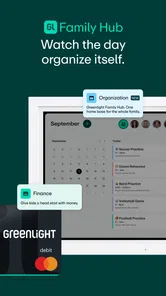
Plus, let's not forget the card. Yes, your kids get their own Greenlight debit card! This card can be customized with your child's name and even their favorite design. It's a tangible way for them to feel independent while you keep tabs on their spending.
Keeping the routine manageable
The lasting value depends less on opening screens than on a small habit: checking in together, asking what went well, and adjusting the next goal. I would avoid reviewing every transaction as if it were a mistake waiting to happen. Instead, let a child explain a choice, then use the spending record to make the lesson specific. For an older teen, gradually loosening agreed boundaries can be more useful than keeping the same level of oversight indefinitely.
There is a maintenance cost in attention, even when the app handles the tracking. Parents need to keep expectations clear, and children need enough independence to make real choices. If no one checks in, the educational side can fade into the background; if a parent monitors too closely, the card can feel like surveillance. The right balance will vary by age, maturity, and how much responsibility the child already handles.
Making allowance and chores work together
One small decision can prevent recurring friction: separate money a child has earned from money they receive as regular allowance, if those are different things in your household. Agree on the rule before a chore is done, rather than negotiating after the child has completed it. That keeps the app from becoming the referee in a disagreement about what was promised and makes the balance easier to interpret.
I would also keep the first savings goal visible and modest enough to feel reachable. A child saving for a particular book or outing can see the trade-off more clearly than a child told only to “save more.” When the goal is met, decide together whether to spend the money or set a new target. That simple reset keeps saving from turning into an abstract rule with no satisfying endpoint.
Who will get the most from it
This is a better fit for parents who want a shared, supervised way to introduce spending and saving than for families seeking a no-strings payment tool. A younger child may benefit from a concrete allowance routine and help understanding trade-offs, while a teen may value having room to make everyday choices. Families who prefer cash, want a child to manage money without parental involvement, or need only occasional transfers may find a simpler approach less demanding.
Practical questions matter too: parents should decide in advance how chores relate to allowance, whether savings goals are optional or expected, and how they will respond when a child wants to spend on something they would not choose. Those conversations prevent the app’s controls from having to carry the whole burden of family rules. For a purchase that is declined or a balance that is lower than expected, treating it as a prompt to review the plan is more constructive than treating the app as the decision-maker.
Handling the awkward moments
Picture a child heading out after school with friends and asking whether there is enough money for a snack and a small purchase. The useful conversation happens before they leave: check the amount they can use, decide what they want to keep for later, and let them make the choice within that boundary. If they spend more than intended, a calm review afterward can help them plan differently next time without turning one ordinary mistake into a reason to remove all independence.
Parents should be ready for the possibility that a card transaction does not explain the whole story. A purchase record can show what was spent, but a child may still need to describe why they chose it or whether it matched the family’s agreement. I would use the app as a prompt for that conversation, not as proof that a child was careless. The distinction matters especially when several children have different rules or levels of responsibility.
Choosing the right level of oversight
Before handing over a card, agree on what happens when a child wants to buy something outside the usual plan. A quick message or a later discussion may be enough for one family; another may prefer tighter limits while a child is still learning. The key is to make the boundary understandable and revisit it as the child shows good judgment. A setting that once felt protective can become unnecessary friction if it never changes.
This is also a useful way to answer a common practical concern: does a parent have to approve every ordinary choice? The app’s controls can help shape where and how money is used, but the family should decide which purchases need discussion rather than treating every transaction as a permission request. If the child is old enough to handle routine spending, leave room for that autonomy; reserve closer involvement for decisions that genuinely call for it.
When another approach is better
A parent who mainly wants to send money occasionally may not need a dedicated family system. Cash can be easier for a young child who is still learning that spending reduces what remains, while a standard account may suit a teen who is ready for less supervision and already understands basic budgeting. Greenlight’s advantage is the combination of a child’s spending tool and a parent’s involvement, so it is most worthwhile when both sides will use that arrangement.
It may also be a poor match for households that do not want to maintain a recurring money conversation. The app cannot decide whether chores should be paid, how much a child should save, or which purchases fit family values. If those expectations remain unsettled, adding a card can make disagreements more frequent rather than resolving them. I would settle the household rules first and use the app to support them second.
Value beyond the first week
Greenlight is a finance app from Greenlight Financial Technology, Inc. It is free to download, rated for Everyone, and currently at version 7.20.0, with a minimum OS requirement of 10. Its 4.7 average comes from around 75,000 ratings, and it has over a million installs. Those figures suggest broad interest, but they do not guarantee that the family routine will suit every household.
The recurring value is the chance to turn ordinary choices into practice: setting aside part of an allowance, thinking before a purchase, or reviewing a spending decision together. That value can last if the family keeps the conversations calm and gives the child responsibility in manageable steps. If the card becomes the only point of contact, or if the parent-child check-ins feel like a chore, the system may lose its purpose after the initial excitement.
Keeping the system from becoming another chore
A workable routine does not need a long family meeting. I would choose one brief check-in that fits an existing moment, such as the day allowance is set or the evening before a regular outing. Look at one decision and one next step, then stop. Reviewing every line item can make money feel like a test, while never reviewing anything leaves the child without help connecting a choice to its consequences.
There is a trade-off in how much the parent handles. If the adult keeps making every adjustment, the child may learn to wait for instructions; if the child is left to manage everything immediately, the app’s supervised-learning value may be lost. A gradual handoff works better: let the child suggest a savings target or explain a purchase, then give more room when the conversation shows they understand the budget they agreed to.
Final Thoughts
In a world where financial literacy is more important than ever, Greenlight Kids & Teen Banking is a game-changer. It combines practicality with education in a way that's engaging for both kids and parents. The app's features empower kids to learn and make informed financial decisions while providing parents with the necessary tools to guide them.
So, if you're searching for a way to introduce your kids to the world of money management, this app should definitely be on your radar. It's not just about giving them a debit card; it's about teaching them life skills that will benefit them for years to come.
Greenlight: For Families Frequently Asked Questions
What devices and operating systems are required to use Greenlight Kids & Teen Banking?
Before downloading, check that the phone or tablet you plan to use meets the app’s operating-system requirement. Greenlight Kids & Teen Banking requires Android 10 or later. The app is developed by Greenlight Financial Technology, Inc., and its content rating is Everyone, so it is intended for a broad audience while its features focus on families and young users.
Who is Greenlight Kids & Teen Banking designed for?
Greenlight is aimed at families who want children or teenagers to practise everyday money management with parental involvement. Its core setup pairs a debit card for young users with an app parents manage. That makes it most relevant to parents looking for a way to oversee spending and to young people who are ready to learn about making financial choices.
Can parents manage their child’s account from the Greenlight app?
Yes. Greenlight is built around a debit card for children and teens that parents manage through an app. Parents can oversee spending, set limits, and review transactions, while young users get a way to practise everyday money management. This shared setup makes it easier for families to discuss spending choices and saving goals together.
What is Greenlight Kids & Teen Banking?
Greenlight Kids & Teen Banking is a financial app designed specifically for children and teenagers. It offers a safe platform for young users to learn about money management, savings, and spending. The app is paired with a debit card that allows parents to set spending limits and track transactions, providing both educational opportunities and security for young users.
How does Greenlight ensure the safety of my child's financial data?
Greenlight prioritizes the security of its users' financial data by implementing advanced encryption technologies and secure servers. Additionally, the app offers parental controls that allow parents to monitor and manage their child's transactions in real-time, ensuring a safe and controlled financial environment for children and teens.
Pros
- User-friendly and intuitive interface for all ages.
- No hidden fees or charges, very transparent.
- Parental controls ensure safety and security.
- Educational tools promote financial literacy.,24/7 customer support available for assistance.
Cons
- Limited international usage capabilities.
- Requires internet for most functionalities.
- Some features are locked behind a paywall.
- Occasional glitches with transaction updates.
- Limited integration with third-party apps.