GPS Tracker: Find Phone
- 46.00
- 4.2
- Installs
- 5.00M
- Price
- Free

Screenshots
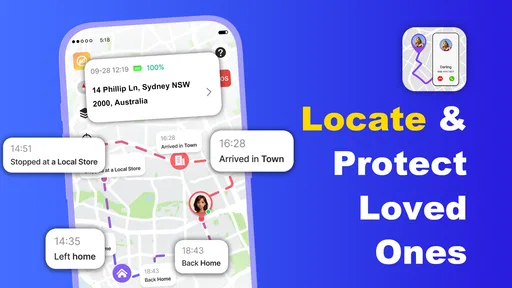
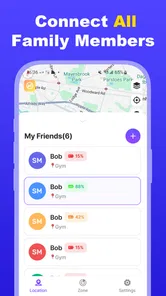
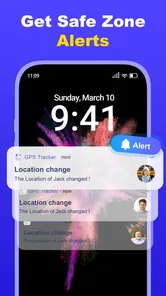
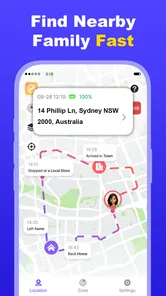
Analysis by Reviewed
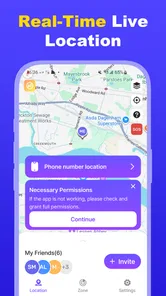
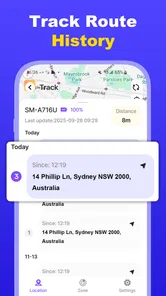
I judge a family location app less by how impressive its map looks and more by whether it makes a stressful moment easier to handle. GPS Tracker: Find Phone is built around a straightforward idea: use a phone’s location to help people keep track of one another. That can be useful when a family member is travelling, a child is making their way home, or someone simply wants a quicker way to check where a relative is. The app is free to install, though some in-app items cost extra, so I would treat it as a practical tool to evaluate carefully rather than assume every option is included at no cost.
Making a location check part of an ordinary routine
I find that the most useful way to make a location check routine is to tie it to a clear moment, such as a departure or an agreed arrival window, rather than opening the map whenever worry strikes. That gives each check a purpose and makes it easier to decide what to do with the result. From there, a few small setup choices can make the routine clearer for everyone.
A useful baseline starts with agreement
In my view, a location tracker works best when everyone involved understands why it is being used. Before relying on GPS Tracker: Find Phone, I would talk through who is sharing their location, who can see it, and when a check-in is appropriate. That simple conversation matters more than any clever habit: location sharing should support trust and safety, not become a way to monitor someone without their knowledge.
The basic workflow is easiest to understand as a deliberate check rather than a promise that a person will always be findable. If a family member is travelling, the person waiting at home can use the app to help locate their phone. For everyday coordination, it can replace a string of messages such as “Where are you now?” and “How long until you arrive?” But I would still send a message or call when timing matters. A map position can help explain where someone is; it cannot explain why they have stopped or whether they are safe.
A realistic example is a teenager walking home after an activity. The family can agree in advance that the app is for checking the journey, not for watching every movement throughout the day. If the expected arrival time passes, a location check gives the parent another piece of information before deciding whether to call. That is a more measured use than repeatedly refreshing the map, and it keeps the tool focused on a specific need.
The app sits in the Maps & Navigation category, but it is not the same kind of product as a turn-by-turn navigation app. I would not choose it to plan a route, compare travel times, or guide a driver through unfamiliar streets. Its purpose is people and phone location, while conventional navigation apps are better for getting from one place to another. Keeping those jobs separate helps set sensible expectations.
Check the setup before relying on it
For any GPS-based tracker, the most useful first step is to check the phone’s location settings and make sure the person using the device is comfortable with the arrangement. A tracker cannot be a dependable family routine if location access is switched off, the phone is unavailable, or the user has not agreed to share. I would test the arrangement while everyone is together, rather than waiting until someone is already late or away from home.
More From Our News Desk

Weather by Xiaomi Review: Clear at a Glance, Less Clear Up Close

X Under Pressure: Can It Recover When Posting Goes Wrong?

Clash of Clans Is Won Between the Battles

Android Auto Makes the Case for Quieter Car Software

MobiOffice: Transforming Mobile Productivity with Seamless Integration

EA SPORTS FC™ Mobile Soccer: Redefining Mobile Sports Gaming
I would also look through the app’s available settings rather than assuming the initial configuration suits the household. Check what location-sharing controls are offered, how the app presents the people or phones being followed, and whether any optional items are clearly marked as paid. The current version is 1.1.4, and the developer is Mitra MT. Those details help identify the app, but they do not replace a practical setup check on the phones that will actually be used.
Battery and connectivity deserve ordinary, not alarmist, attention. GPS use and mobile connectivity depend on the device and its circumstances, so I would avoid making the tracker the only way to coordinate an important pickup. A good habit is to agree on a fallback: call, send a message, or meet at a known place if the map is not helpful. This is especially sensible for a child’s journey or when someone is travelling through areas where reception may be inconsistent.
It is also worth deciding who should have access before inviting relatives into a shared routine. Keep the group small and limited to people who genuinely need the information. If someone no longer needs to be included, revisit the sharing arrangement. These steps are not special tricks; they are the kind of basic housekeeping that makes a location app more respectful and less confusing over time.
Build faster habits without turning the app into a surveillance screen
Experienced users generally get more value from a repeatable routine than from constant checking. For example, a family might agree that the person travelling sends a quick message when they leave, while another member uses the tracker only if the expected arrival window passes. That pairing gives the map context and reduces unnecessary checking. It also makes a location result easier to interpret: the viewer knows whether to expect someone to be moving, waiting, or close to home.
Another useful pattern is to check the right phone before drawing conclusions. In a household with several devices, a location shown for one person’s phone may not tell the full story if that phone has been left behind or handed to someone else. I would make sure each family member knows which device is being used for sharing and avoid treating a phone’s position as unquestionable proof of its owner’s whereabouts.
For regular school pickups or visits, the practical shortcut is to establish a shared expectation in advance: who checks, at what point, and what they do if the location is unclear. That removes the temptation to keep opening the app every few minutes. It also prevents an ambiguous map view from becoming a needless argument. A quick call is often the better next step when the location alone does not answer the real question.
These habits are particularly valuable because a tracker is only one channel of communication. I would use it to reduce uncertainty, not to replace normal conversation. If the person being located can explain a delay directly, a message is clearer. If they cannot respond, the map may offer useful context, but it should not be interpreted as a guarantee of safety or as a substitute for appropriate help in an emergency.
Where a dedicated tracker differs from familiar alternatives
Compared with sharing location through a general-purpose maps or messaging app, a dedicated GPS tracker may feel more focused: the central task is checking a person or phone rather than navigating, chatting, or planning a route. That focus can suit a household that wants a simple location-checking routine. On the other hand, people who already share locations through an app they use every day may prefer to keep everything in one place, especially if they only need occasional check-ins.
Compared with a navigation app, the trade-off is clearer still. Navigation is the better choice when the user needs directions, route guidance, or help reaching a destination. A family tracker is more relevant when another person wants to see where a phone is. I would not install it expecting driving features, detailed trip planning, or a replacement for a map’s travel tools. Choosing the right category of app prevents disappointment and avoids asking one tool to do two different jobs.
GPS Tracker: Find Phone has a 4.2 average from around 9,900 ratings, and it has been installed over 5 million times. Those figures suggest that many people have tried it, but they do not tell me whether it will suit a particular family’s privacy expectations or devices. I would make that decision based on the actual sharing controls and the way everyone involved wants to use it, not popularity alone.
Limits that matter in real use
The biggest limitation of any phone-based location tracker is that it tracks a device, not a person’s intentions or condition. A phone can be misplaced, switched off, left at home, or unavailable. Even when a location appears, it is only one piece of information. If someone is late, I would use the app to inform the next step, not to decide automatically that everything is fine or that something is wrong.
There is also a trust trade-off. For a consenting group of adults or a family with clear expectations, location sharing can make coordination easier. For someone who dislikes being tracked, or for a household that has not agreed on boundaries, installing a tracker may create more friction than it solves. I would skip it if the goal is covert monitoring, if no one is willing to discuss access openly, or if occasional calls and a shared meeting point already work well.
Cost is another detail to check before settling into a routine. The app is free, with in-app purchases ranging from $2.49 to $9.99 per item. I would look carefully at what is included and what an optional purchase changes before paying, particularly if the free experience already meets the household’s needs. There is no reason to buy an add-on simply because it is offered; the sensible test is whether it solves a real problem for the people using the app.
The app is rated for Everyone, and it was released on February 6, 2026. It requires Android 7.0 or later. For iPhone users, I would check the relevant app-store listing and device requirements before making plans, rather than assume Android compatibility details apply across platforms. In either case, every person’s phone should be tested in the actual places and circumstances where the family expects to use location sharing.
Who will get the most from it
I can see GPS Tracker being a reasonable fit for families who regularly coordinate journeys and want a dedicated way to check a phone’s location. It may also help relatives who are comfortable with mutually agreed sharing and prefer a map check over repeated status messages. Its value is strongest when the group has a clear purpose, a small circle of trusted users, and a fallback plan for moments when the location view is unavailable or unclear.
I would recommend a different approach for people who mainly need directions, who already have a location-sharing feature that works well in their everyday messaging or maps app, or who want a tracker to provide certainty in emergencies. It cannot guarantee that a person is safe, and it should not be treated as a substitute for direct contact or emergency services. For users who value privacy above convenience, sharing only when a journey calls for it may be preferable to making tracking a constant household habit.
My verdict: useful when the routine is thoughtful
My overall view is that GPS Tracker: Find Phone makes the most sense as a practical aid for agreed family coordination, not as an all-purpose navigation tool or a reason to watch someone continuously. Its focused purpose is easy to understand, and a simple routine—check the right device, use location as context, and follow up directly when needed—can make it more useful than repeated, anxious map refreshing.
I would try it if my household had a specific need for phone-location checks and everyone involved was comfortable with the arrangement. I would first review the settings, confirm how sharing works on each device, and test the workflow while together. If the app supports that routine without adding confusion, it could earn a place in a family’s everyday toolkit. If the need is only occasional, an existing maps or messaging app may be simpler. The deciding factor is not how often I can look at a location, but whether the information helps people coordinate respectfully and make a better next decision.
GPS Tracker: Find Phone Frequently Asked Questions
What is GPS Tracker: Find Phone used for?
GPS Tracker: Find Phone is designed to help users locate a phone or view its position on a map, depending on the app’s features and setup. Location tools generally require the relevant device to be online, have location services enabled, and grant the app permission to access location data. Check the app listing and its in-app instructions to confirm which tracking and device-finding features are available.
Does GPS Tracker: Find Phone let me locate someone without their knowledge?
A legitimate location-sharing setup should be transparent and based on the person’s consent. Do not use GPS Tracker: Find Phone to secretly monitor another person; tracking someone without permission may violate their privacy or local laws. Before using any sharing features, make sure everyone involved understands what location information is shared, who can see it, and how sharing can be stopped.
What permissions and settings does the app need to work?
Location access is typically essential for a GPS tracking app, and the device may also need an internet connection and location services switched on. Depending on the available features, the app may request additional permissions. Review each request before granting it, and use your phone’s privacy settings to change permissions later. Restricting background location access can affect whether location updates continue when the app is closed.
Is GPS Tracker: Find Phone free, and does it include subscriptions or ads?
Pricing, advertising, and paid features can vary by platform, region, and app version. Check the current Google Play or Apple App Store listing for the latest details, including in-app purchases, subscription terms, and trial conditions. If you start a subscription, review its renewal and cancellation rules in your store account; uninstalling the app alone may not cancel a recurring payment.
Will GPS Tracker: Find Phone work if the phone is switched off or has no internet?
Live tracking generally cannot update when a phone is powered off, out of battery, or unable to connect to the internet. In some cases, a service may show a previously reported location, but that information may be out of date and should not be treated as the phone’s current position. For dependable use, keep the device charged and check that location and connectivity settings are enabled.
Pros
- Can help locate a misplaced phone when location services are enabled.
- A map-based interface makes location information easy to understand.
- Useful for checking the whereabouts of connected family members.
- Location sharing can offer reassurance during trips or daily commutes.
- May help users coordinate meetups by sharing their current location.
Cons
- Location accuracy can vary indoors or in areas with weak GPS coverage.
- Phone tracking depends on the device having an internet connection.
- Background location access may affect battery life.
- Sharing location data raises privacy concerns if access is not managed carefully.
- Some tracking features may require account setup or a paid subscription.












