GPS Tracker: Find My Family
- 8.00
- 4.3
- Installs
- 1.00M
- Price
- Free

Screenshots
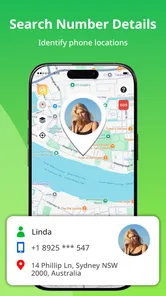
Analysis by Reviewed
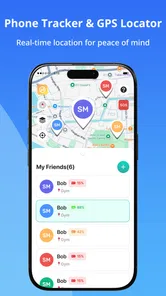
I tend to judge family location apps by what they help people do calmly, not by how many dots they can put on a map. GPS Tracker: Find My Family is aimed at a practical mix of location sharing, alerts when family members reach places, and help finding a misplaced phone. That makes it more of a shared safety and coordination tool than a turn-by-turn navigation app. I’d consider it when a household wants a simple way to check in without sending repeated “Where are you?” messages.
How the app fits into everyday family routines
I’d treat a family location app as a helper for a specific routine, not as a reason to keep checking where everyone is. Before inviting relatives, I would agree on what situation the shared view is meant to make easier and what everyone should do if it is not available. That gives the trial a clear purpose and makes it easier to judge whether the app fits the household.
A focused tool, not a full navigation replacement
In the Maps & Navigation category, this app takes a family-first approach. Its purpose is to help people keep track of one another and notice useful arrivals, rather than plan a long drive or explore unfamiliar streets. I find that distinction important: a location-sharing app can complement a regular map, but it should not be expected to replace one.
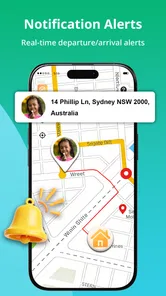
A realistic use is a parent checking that a teenager has arrived at school, or a family member seeing whether someone has reached a meeting point before leaving home. Place alerts can reduce the need for constant manual updates, while location sharing gives relatives a common point of reference. The benefit is less about watching a map all day and more about having a low-effort way to answer a specific question.
The most useful habit is to agree on when location sharing is actually needed. For example, a family might use it during a commute or while coordinating a pickup, then avoid treating continuous visibility as a substitute for conversation. That small boundary can make a tracking tool feel supportive instead of intrusive.
What the current release tells me
The current version is 1.1.0, and the app was released on February 26, 2026. Those details describe an early point in the product’s life, not a long history of established changes. I would treat the present feature set as the starting point and avoid assuming that a particular alert option, device-finding flow, or family control has already evolved beyond what the app currently offers.
That early-stage context matters most to people who depend on location tools every day. A new release can be perfectly useful for occasional family coordination, yet still leave questions about how polished its settings and edge cases feel over time. I’d try it with a small, low-stakes routine first—such as coordinating a regular pickup—before making it the household’s only way to confirm someone’s arrival.
More From Our News Desk

Weather by Xiaomi Review: Clear at a Glance, Less Clear Up Close

X Under Pressure: Can It Recover When Posting Goes Wrong?

Clash of Clans Is Won Between the Battles

Android Auto Makes the Case for Quieter Car Software

MobiOffice: Transforming Mobile Productivity with Seamless Integration

EA SPORTS FC™ Mobile Soccer: Redefining Mobile Sports Gaming
The developer is Mitra MT. The app has an average rating of 4.3 from around 5.5 thousand ratings, and it has been installed over one million times. Those figures suggest that many people have tried it, but they don’t tell me whether it will suit a particular family’s privacy expectations, phone mix, or daily routine. I’d use the app itself and its current settings as the deciding evidence.
Who is likely to get the most from it
I see the clearest fit for families who already communicate by phone but want a shared location view for specific moments: school arrivals, a late commute, or meeting up in a busy place. It may also suit relatives who help an older family member coordinate travel, provided everyone involved understands what is being shared and is comfortable with it.
It is less compelling for someone who only needs directions. A conventional map app is usually the more direct choice for route planning, traffic-aware navigation, or searching for businesses. It may also be the wrong fit for people who prefer not to share their location, even with close relatives. In that case, a quick text or call is less automated but gives the person more control over each check-in.
Making alerts useful rather than noisy
Place alerts are most valuable when tied to a small number of meaningful destinations. If a family uses alerts for every ordinary stop, the notifications can become background noise and lose their usefulness. I’d start with one or two recurring places that answer a real coordination need, then adjust the routine if the alerts do not save effort.
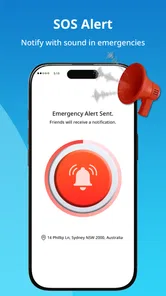
There is also a practical distinction between an alert and a guarantee. A notification can help a family notice that someone appears to have reached a place, but it should not replace a direct check-in when timing or safety genuinely matters. For an urgent situation, I would call or message rather than infer everything from a map or an arrival notice.
One non-obvious way to make the app easier to live with is to decide in advance who needs to see which updates. Family members do not all need the same information for every errand. Even without assuming particular access controls, agreeing on a narrow purpose before sharing helps prevent a location app from becoming an expectation of constant availability.
Finding a misplaced phone: helpful, with limits
The phone-finding aspect gives the app a second everyday use beyond coordinating family journeys. It can be useful when someone has misplaced a device at home or is unsure where it was last left, especially if another family member can help. I would still keep the phone owner involved in the process rather than treating family access as permission to search someone’s device whenever they choose.
There is a trade-off here: a family tracker is convenient because several people can use one shared routine, but it is not necessarily the best specialist tool for every lost-device situation. If the phone is powered off, unavailable, or outside the circumstances the app can handle, a dedicated device-finding service may be a better place to start. I would not rely on any one tracking app as the sole plan for a lost phone.
For a household, a useful preparation step is to test the normal workflow while everyone is together and the phone is easy to recover. That reveals whether each person knows where to look and how to interpret the location information before the app is needed in a stressful moment. It is a simple rehearsal, not a claim that the app offers a particular emergency function.
Privacy, trust, and the people who should skip it
Location sharing is personal, so the quality of the family agreement matters as much as the map. I would explain why the app is being used, who will check it, and whether sharing is intended only for travel or for broader day-to-day visibility. For children, the conversation should match their age and the household’s expectations; for adults, participation should be voluntary and clear.
The app is rated for Everyone, which makes it broadly accessible as a product, but that does not settle whether a family’s use is appropriate. Age suitability in a store is not a substitute for consent, supervision, or thoughtful boundaries. I would skip this kind of app if a family member feels pressured to share, or if location information is likely to create conflict rather than reassurance.
Phone settings and connectivity can also affect location tools in general. Before depending on an alert, I’d check that the app can run as intended on each person’s device and that the phone is able to share its location. This is a practical check rather than a promise about particular permissions or background behavior: a family should verify the experience on its own phones instead of assuming every handset will behave identically.
Cost and the comparison with familiar alternatives
GPS Tracker: Find My Family is free to download, with in-app purchases ranging from $2.99 to $9.99 per item. I would look at what is included before paying for anything and decide whether the free experience already handles the family’s basic routine. Since the app’s main appeal is shared coordination, a paid option only makes sense if it addresses a need the household actually has.
Compared with the location-sharing features built into many phones and map services, this app’s appeal is its explicit focus on family tracking, place alerts, and misplaced-phone help in one product. The trade-off is that a dedicated app adds another account or interface for relatives to learn and trust. If everyone already uses a familiar built-in sharing feature and it covers the same routine, staying with that option may be simpler.
Its minimum operating-system requirement is Android 7.0, and the content rating is Everyone. Those points help with basic compatibility and audience expectations, but I would still check every family member’s device before inviting them. A mixed household can be harder to coordinate than a single-phone trial, so it is sensible to confirm that the app is available and works acceptably for the people who will actually use it.
What I would watch as the app develops
Because the release is recent and the current version is 1.1.0, the next useful evidence will be whether updates make routine tasks clearer and more dependable. I would pay attention to how easy it is to set up sharing, understand an arrival alert, and recover a misplaced phone without confusion. Those are the moments that determine whether a family tracker becomes a quiet convenience or another app everyone forgets to open.
I would also watch how the product handles the balance between convenience and control as it matures. More options are not automatically better if they make sharing difficult to understand. For a family app, clear choices and predictable behavior matter more to me than a long feature list. Until the product has a longer update history, I’d keep expectations measured and avoid depending on it for anything that requires guaranteed, real-time contact.
My recommendation for a low-pressure trial
I’d begin by installing it with one or two willing family members and using it for a single recurring situation, such as confirming a pickup or a commute arrival. Agree on the purpose, test the alert in an ordinary setting, and see whether it actually reduces messages. If it creates more checking or raises privacy concerns, that is a good reason to change the routine or stop using it.
GPS Tracker: Find My Family makes the most sense when a household wants location sharing and place-based check-ins to support everyday coordination. It is not my first choice for navigation, and I would not treat it as an all-purpose guarantee for safety or lost-device recovery. But for people who want a family-oriented tool, are comfortable sharing their whereabouts, and are willing to establish sensible boundaries, it is worth trying. I’d keep the trial practical, review the purchase options before spending, and let the family’s real experience—not the promise of a map—decide whether it earns a place on everyone’s phone.
A pickup routine that tests the right things
For a more useful trial, I would choose a day when a family pickup already has a clear plan rather than creating a special outing just to test the app. One person can travel to the agreed meeting place while another waits at home, then both can compare the alert and shared location with what actually happened. This gives you a concrete answer to whether the app saves a call or simply adds another screen to check.
I’d also make the plan robust enough to work without the app: agree on the meeting point and a simple fallback message before anyone leaves. That small step matters because location sharing can be delayed, confusing, or unavailable in ordinary real-world conditions. The app can make coordination easier, but the family should still know what to do if the expected update does not appear.
Questions worth settling before inviting everyone
People often wonder whether this replaces calling, whether every relative needs to use it, and whether it is suitable for a mixed set of phones. My practical answer is that it should be treated as an optional convenience, not a requirement for the whole household. Start only with the people who have a clear reason to share, and check compatibility on their actual devices before making the routine depend on it.
Another sensible question is whether paid options are necessary. I would first identify the specific task the household wants to improve, then see whether the free use already supports that routine. The in-app purchase range is visible, but the right choice depends on what the family needs; I would not pay simply because an upgrade is offered. If the core check-in habit is not useful during a trial, spending more is unlikely to fix the mismatch.
When a different tool is the calmer choice
This app is not ideal for every family problem that happens to involve a location. If the main need is turn-by-turn directions, a navigation service is more direct. If the priority is locating one person’s own lost device, the phone’s dedicated device-finding option may be a better first stop. And if the household already has a location-sharing arrangement that everyone understands, adding another app could fragment communication rather than improve it.
For people who do choose it, I would keep the first setup deliberately modest: one shared purpose, a small group, and a clear agreement about how the information will be used. That approach makes it easier to notice whether the app genuinely reduces friction without quietly turning location checks into a measure of trust. In my view, that distinction is what separates a useful family convenience from a tool that creates more tension than it removes.
GPS Tracker: Find My Family Frequently Asked Questions
What is GPS Tracker: Find My Family used for?
GPS Tracker: Find My Family is designed to help people share and view location information with family members or other trusted contacts. Depending on the app’s features and your settings, you may be able to see a member’s location on a map and use location updates to coordinate meetups or check that someone has arrived safely. It is not a substitute for emergency services, and location accuracy can vary.
How do I share my location with family members?
Typically, everyone who wants to participate needs to install the app, allow the requested location permissions, and join or connect to the same family group using the app’s invitation or account features. Check the group settings before sharing: location access should be limited to people you trust, and members should understand when their location is visible. The exact setup steps can vary by app version and device.
Does GPS Tracker: Find My Family work when the app is closed?
Location sharing in the background depends on the app’s permissions, your phone’s operating system, and battery settings. You may need to allow background location access and avoid restrictions that pause the app. GPS, Wi-Fi, mobile data, and network coverage can all affect updates, so a location may appear delayed or unavailable. Review your device’s privacy and battery controls if updates stop.
Is GPS Tracker: Find My Family free, and does it include in-app purchases?
The price and available features can differ by platform, region, and app version. Before downloading, check the Google Play Store or Apple App Store listing for whether the app is free to install, offers subscriptions or in-app purchases, or limits certain features to a paid plan. Also review renewal terms and cancellation instructions before starting a trial or subscription.
Is it safe to use, and what should I know about privacy?
A family location app handles sensitive information, so use it only with the informed consent of the people in your group. Review the app’s privacy policy and store listing to understand what location and account data may be collected, how it may be used, and whether it can be deleted. Keep your account secure, share access selectively, and remember that location estimates are not guaranteed to be exact.
Pros
- Shows family members’ locations on a shared map.
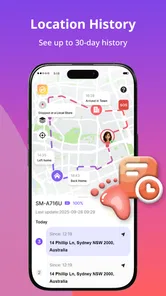
- Location history can help retrace recent trips.
- Geofence alerts can notify you when someone arrives or leaves.
- Useful for coordinating meetups and checking travel progress.
- Designed for family use
- with location sharing among group members.
Cons
- Accurate tracking depends on a phone’s GPS and network connection.
- Continuous location access may increase battery consumption.
- Family members must share their location for tracking to work.
- Location data sharing may raise privacy concerns.
- Background location permissions may be required for timely updates.












