GPS Location Tracker Plus
- 53.00
- 3.9
- Installs
- 1.00M
- Price
- Free

Screenshots
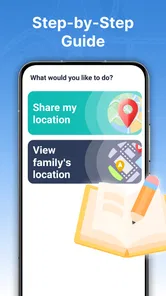
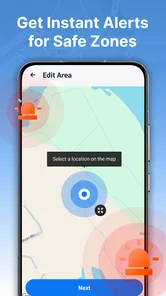
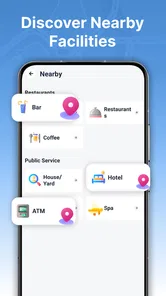
Analysis by Reviewed
I tend to judge a family location app by what happens after the first few days. Seeing a relative appear on a map can feel reassuring at first, but the useful question is whether checking that map becomes a calm, occasional habit—or another source of worry and screen time. GPS Location Tracker Plus is built around shared location and safe-area alerts, so its appeal depends less on elaborate navigation and more on whether a household can agree on when and why to use it.
From first map check to a useful routine
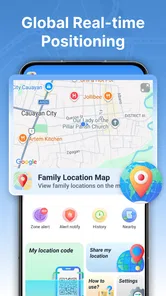
The app’s central job is easy to understand: let family members share real-time location and use alerts tied to a safe area. That makes it a different kind of tool from a turn-by-turn navigation app. I would reach for it to check whether someone is on the way, not to plan a complicated drive or compare routes.
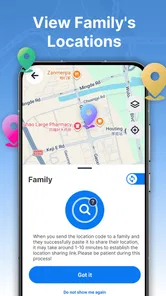
In the first week, the map is likely to be the most attention-grabbing part. A parent can check whether a child has reached an agreed destination, or a family member can see whether someone is still travelling. The safe-area idea adds a practical layer: instead of repeatedly asking for updates, family members can use an agreed boundary as a prompt to check in when a person arrives or leaves.
That only works well when the household sets expectations before relying on it. I would discuss who will share their location, which places matter, and what an alert should mean. A notification can tell you that a boundary was crossed; it cannot explain why. A delayed journey, a changed plan, or a phone that is not reporting its position can all make a map feel more certain than it really is.
For an everyday example, imagine coordinating a pickup after school or an activity. Rather than sending several “where are you?” messages, a family could use a shared map for a quick status check and an agreed safe area for the destination. The benefit is less about constant watching and more about avoiding unnecessary calls when plans are straightforward.
What makes the first week promising
The strongest early use is a small, specific routine: check that a person has arrived, coordinate a meeting point, or know where to start looking when plans change. GPS Location Tracker Plus is more appealing for those moments than for keeping a map open all day. That distinction matters because location sharing can quickly feel intrusive if everyone treats it as a live feed rather than a practical aid.
I would also keep the first setup deliberately simple. Start with the people who genuinely need to coordinate and one or two meaningful safe areas, rather than turning every regular stop into a monitored destination. A shorter list is easier to understand and makes alerts more likely to matter. This is a useful habit for any family location tool, but especially for one whose main value rests on shared location and area alerts.
More From Our News Desk

Weather by Xiaomi Review: Clear at a Glance, Less Clear Up Close

X Under Pressure: Can It Recover When Posting Goes Wrong?

Clash of Clans Is Won Between the Battles

Android Auto Makes the Case for Quieter Car Software

MobiOffice: Transforming Mobile Productivity with Seamless Integration

EA SPORTS FC™ Mobile Soccer: Redefining Mobile Sports Gaming
The app is free and is listed for everyone, which makes it easy to consider without a purchase decision. It is made by Anuoluwapo Product Limited. Its average rating is 3.9 from around 3,200 ratings, while the 53 written reviews offer a smaller pool of detailed reactions. Those figures provide a little context, but they do not tell me whether a particular family will find the location workflow comfortable; a brief household trial is more revealing.
Month-to-month value depends on restraint
Location sharing tends to earn a lasting place when it solves a recurring problem without demanding constant attention. A family with changing schedules, regular pickups, or relatives who travel between familiar places may benefit from being able to check a shared location rather than repeatedly contacting one another. For someone who only needs directions occasionally, a conventional maps app is likely to be more useful.
The key trade-off is that live location is valuable precisely because it can reduce uncertainty, yet checking it too often can create a new habit of monitoring. I would agree on a simple rule: use the map when coordination is genuinely helpful, not as a substitute for every conversation. That gives the app a clear role and helps prevent ordinary gaps in movement from becoming a reason for concern.
Safe-area alerts can also make routine coordination less dependent on someone remembering to send a message. But alerts are most useful when they are tied to a real decision, such as whether a pickup is needed. If every arrival and departure generates attention, the family may stop noticing the alerts—or feel watched. In practice, fewer meaningful boundaries are better than a crowded set of places with no clear purpose.
GPS Location Tracker Plus has more than a million installs, suggesting that many people have tried it as a location-tracking option. Scale alone does not make it a fit for everyone. I would judge its ongoing value by whether the people sharing locations actually use the information to coordinate, and whether they still feel comfortable doing so after the novelty of the map wears off.
Keeping the setup manageable
The app’s current version is 1.3.0.0, and it requires Android 9 or later. Those details are worth checking before a family builds a routine around it: the phones involved need to meet the minimum system requirement, and the app needs to be present for the people who are expected to share location. If one person cannot participate, the household may end up falling back to calls and messages anyway.
There is also a small but important maintenance burden in any shared-location arrangement: people need to remember what they agreed to share and keep the setup relevant as routines change. A safe area that once mattered may become unnecessary; a new pickup point may take its place. I would review the arrangement when schedules change, rather than letting old expectations linger and produce confusing alerts.
Another practical habit is to treat the map as a useful indication, not a guarantee. GPS location can be affected by the phone and its surroundings, and a displayed position may not answer every question about someone’s plans. If an arrival is time-sensitive, a direct message or call remains the clearer option. The tracker is best as a supporting tool, not the sole basis for an important decision.
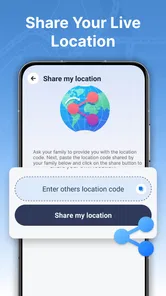
Privacy is part of maintenance too. Before sharing, everyone involved should know who can see their location and when the arrangement is meant to be used. For children, that conversation can be age-appropriate, but it still helps to explain the purpose instead of presenting tracking as invisible supervision. For adults, consent and the ability to discuss boundaries are just as important as the convenience of a shared map.
Where fatigue can set in
The main risk is notification fatigue. When safe-area alerts are attached to too many routine movements, the app can shift from reassurance to noise. I would begin with only the destinations that change what the family needs to do, then adjust if the alerts prove useful. If people start ignoring them, that is a sign to simplify the setup rather than add more checks.
A second source of friction is mismatched expectations. One person may see location sharing as an occasional safety check, while another may expect it to show a precise, continuously current position. Those are not the same promise. Families should agree that a map can help with coordination but cannot replace communication, and that a missing or unexpected position should prompt a sensible check-in rather than an assumption.
GPS Location Tracker Plus is also not the right choice for every navigation need. Someone looking for detailed route planning, turn-by-turn guidance, or a broad set of map tools should choose a dedicated navigation app. Likewise, a person who dislikes sharing location or does not have a trusted group to share with is unlikely to get much value from a family tracker. In those cases, ordinary calls, messages, or a standard maps app are simpler and may feel more appropriate.
For a household that wants to use it, the best way to avoid fatigue is to make location sharing purposeful and mutual. Talk about when a check is welcome, which alerts deserve attention, and when a direct message is better. That conversation is not a technical setting, but it may determine whether the app remains useful far more than adding another safe area.
Who is likely to keep it installed?
I can see this app working for families who coordinate recurring journeys and want a shared view of arrival or movement around a few agreed places. It may also suit relatives who live apart but want a lightweight way to check where someone is during a planned trip. In both cases, the value comes from a shared understanding of the tool, not simply from having it installed.
I would be more cautious about recommending it to someone who wants a hands-off emergency service, a substitute for calling, or precise navigation. A GPS tracker can support a plan, but it cannot make people answer, explain a delay, or guarantee that a displayed location settles every concern. People who find location sharing stressful may be better served by a simple check-in routine that does not involve a live map.
The app is a focused Maps & Navigation option rather than an all-purpose map platform. That focus is a strength when the task is family location sharing, but it also defines the limits of its role. Compared with using messages alone, it can make a location check more visual; compared with a conventional navigation app, it is not the better choice for working out how to reach a destination.
A lasting place, if the household needs it
My long-term verdict is cautiously positive for families with a real, recurring coordination need. GPS Location Tracker Plus has a clear purpose: shared location and safe-area alerts. If those tools help a household avoid repeated updates and make routine arrivals easier to coordinate, the app can earn a place on their phones after the first-week curiosity fades.
It is less compelling as an app to keep open simply because a map is available. The habits that make it sustainable are modest: agree on who shares, choose only meaningful areas, treat alerts as prompts rather than proof, and revisit the arrangement when routines change. Those steps keep the tool from becoming an always-on source of distraction.
For me, the deciding question is whether the app reduces friction without reducing trust. If family members welcome the arrangement and use it for specific situations, its ongoing value is easy to understand. If it leads to constant checking, unexplained alerts, or discomfort about being tracked, I would scale back or choose a less intrusive way to coordinate. That is the difference between a tracker that becomes a useful routine and one that loses its appeal once the novelty passes.
GPS Location Tracker Plus Frequently Asked Questions
What is GPS Location Tracker Plus used for?
GPS Location Tracker Plus is designed to help users view and monitor a device’s location using GPS and related location services. Depending on the version and features available, it may display the current position on a map, record location history, or support location sharing. Check the app’s description and settings before relying on any particular feature, since tools and availability can vary by platform and release.
Does GPS Location Tracker Plus track someone without their knowledge?
A location-tracking app should be used only with the device owner’s informed consent and in accordance with local laws. GPS Location Tracker Plus may need location permissions and, for sharing or monitoring features, account setup or other participation from the people involved. Do not install or configure it to secretly track another person. If you are setting it up for family or a shared device, explain what is collected and who can see it.
What permissions and settings does GPS Location Tracker Plus need?
Location access is central to a GPS tracker, and the app may request permission to use location while it is open or in the background. Exact permission names and options depend on the device and operating-system version. Review each request before approving it, and check the app’s privacy information to understand how location data is used, stored, or shared. You can usually change permissions later in your phone’s settings, though doing so may limit tracking features.
Can GPS Location Tracker Plus work without an internet connection?
GPS can determine a device’s position without mobile data in some circumstances, but map loading, location sharing, account services, and sending updates to another device commonly require an internet connection. Performance also depends on GPS reception, battery settings, and whether the app is allowed to run in the background. If you need reliable updates, test the app in the intended environment and confirm which functions remain available offline rather than assuming all features will work.
Is GPS Location Tracker Plus free, and is it available for Android and iOS?
Availability, pricing, and included features can differ between Android and iOS, as well as by country and app version. Before downloading, check the relevant Google Play or Apple App Store listing for device compatibility, subscription or in-app purchase details, recent updates, and the developer’s privacy disclosures. A free download does not necessarily mean every feature is free. Use the official store listing so you can verify the app’s publisher and current requirements.
Pros
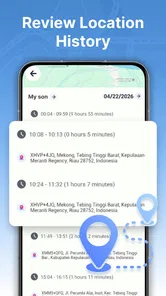
- Records location history for reviewing previous trips.
- Can help share your whereabouts with trusted contacts.
- GPS-based tracking works without a dedicated tracking device.
- Useful for monitoring routes during travel or outdoor activities.
- A simple interface makes core tracking features easy to find.
Cons
- Location tracking can drain battery during extended use.
- Accurate results depend on GPS access and signal quality.
- Background tracking requires ongoing location permissions.
- Sharing location data can raise privacy concerns.
- Some features may require payment or a subscription.












