LoanWise Calculator
- 11.00
- 3.0
- Installs
- 1.00M
- Price
- Free

Screenshots



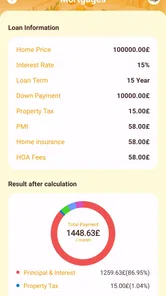
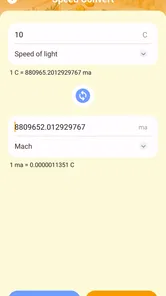
Analysis by Reviewed
When I first opened LoanWise Calculator, I understood its appeal immediately: it is a focused finance app for people who want a quick estimate before making a borrowing or saving decision. It does not try to become a complete banking service. Its job is narrower and, in my view, more useful for that reason: helping you estimate loan payments and calculate interest on deposits without reaching for a spreadsheet.
The app is free, suitable for Everyone, and comes from Anuoluwapo Product Limited. It has passed the one-million-install mark, which suggests that this simple approach has found a sizeable audience. Its average rating is 3.2 from roughly five hundred ratings, so I would not approach it as a universally loved financial tool. I see it more as a convenient calculator whose value depends on whether you need quick planning rather than a full financial-management system.
Getting from installation to a useful estimate
I find the most useful way to begin is to treat the first calculation as a check of your assumptions, not just a search for a convenient payment. Put the loan or deposit terms you have in front of you, then note which figures are quoted and which you are estimating yourself. That small distinction makes the next step—learning what the result can and cannot tell you—much clearer.
What to expect when you open it
The most important thing to understand is the app’s limited scope. LoanWise Calculator is not where I would expect to apply for credit, manage a bank account, transfer money, or monitor a complete personal budget. It is designed around two calculations: loan EMI estimates and deposit-interest calculations. That makes it especially suitable for an early stage of decision-making, when I want to test possibilities before contacting a lender or committing savings.
That narrow purpose is also its main strength. A general finance app can bury a simple calculation under account screens, categories, charts, and setup requests. Here, the central idea is much easier to grasp. I can think about a loan amount, an interest rate, and a repayment period, or switch to the deposit side when I want to see how savings might grow through interest.
The app is currently listed as version 1.6.0.0 and works on Android nine or later. For a first-time user, that means the practical question is less about learning a large system and more about entering figures carefully. I would install it on a compatible Android phone, open it when I have the basic terms of the loan or deposit in front of me, and treat the result as an estimate rather than a promise from a financial institution.
Setting up your first calculation
The first useful preparation is to collect the figures you actually know. For a loan, that usually means the amount you are considering, the quoted interest rate, and the repayment duration. For a deposit, I would have the principal, the applicable interest rate, and the relevant period ready. If a bank or lender uses unusual terminology, I would copy the wording down before entering anything, because a calculator can only be as accurate as the assumptions behind the numbers.
More From Our News Desk

Weather by Xiaomi Review: Clear at a Glance, Less Clear Up Close

X Under Pressure: Can It Recover When Posting Goes Wrong?

Clash of Clans Is Won Between the Battles

Android Auto Makes the Case for Quieter Car Software

MobiOffice: Transforming Mobile Productivity with Seamless Integration

EA SPORTS FC™ Mobile Soccer: Redefining Mobile Sports Gaming
I would start with a small, familiar scenario rather than a major financial decision. For example, imagine that I am comparing a modest personal loan with two different repayment periods. I can enter the same borrowing amount and rate, then change only the duration. That gives me a clearer view of the trade-off between a lower periodic payment and a longer repayment commitment.
This is a better first test than entering random figures. It lets me check whether the result makes sense in everyday terms. If extending the period reduces the estimated EMI but appears to create a surprisingly high total repayment, that is not necessarily an error. It may be showing the cost of taking longer to repay. The useful habit is to compare scenarios, not to admire one isolated number.
I would also keep the units consistent. If the interest rate is expressed annually, I would not casually treat it as a monthly rate. If the lender quotes a flat rate while the calculator expects a reducing-balance style calculation, the result may look precise while still being unsuitable for a direct comparison. LoanWise Calculator can help with arithmetic, but it cannot decide whether two financial offers use identical terms.
The first successful action: test one real decision
My recommended first success is a side-by-side repayment check. Enter the terms of a loan you are genuinely considering, note the estimated EMI, then run the same amount over a shorter and longer period. The result is immediately practical: you can see whether the lower periodic burden is worth the additional time and likely interest cost.
Suppose I am planning a purchase and know the maximum amount I can comfortably set aside each month. I would work backward by testing durations until the estimated payment fits that limit. I would then check the longer-term cost before treating the option as affordable. This prevents a common mistake: choosing a loan only because its periodic payment looks manageable while overlooking how much longer the obligation lasts.
The deposit calculator has a different but equally useful role. I would use it before moving savings into a fixed-term product or comparing two quoted deposit rates. Rather than asking only which rate is larger, I could test how the interest changes when the principal or period changes. That helps separate a genuinely better return from a result that is higher simply because more money was deposited.
A particularly useful workflow is to calculate the deposit return first, then repeat it with a different period while keeping the principal unchanged. After that, I would test a different principal at the same rate. This makes it easier to understand which factor is driving the result. It is a small discipline, but it stops me from confusing a larger balance with a more attractive product.
Where new users may become confused
The word EMI can make a result feel more official than it really is. An estimated monthly installment is helpful, but the amount charged by a lender may also depend on fees, insurance, taxes, penalties, processing costs, or a different interest method. I would therefore use the displayed result as a planning baseline and compare it with the lender’s repayment schedule before signing anything.
Another point of confusion is the difference between interest and total growth. A deposit calculation may show the interest earned, the final amount, or both depending on how the app presents the result. I would read the labels carefully and avoid assuming that a displayed total is pure profit. The original deposit is part of the final balance, so the interest figure is the number that matters when comparing returns.
Compounding is another area where caution pays off. If a deposit pays simple interest, periodic compounding, or a different schedule, the outcome changes. I would use the calculator to model the assumption that matches the product’s terms, not merely the rate printed in an advertisement. When the bank’s language is unclear, I would ask for the calculation method in writing instead of relying on a neat-looking app result.
The rating of 3.2 is worth keeping in mind here. It does not make the tool unusable, but it tells me to verify the inputs and outputs rather than treating the app as an unquestionable authority. A finance calculator deserves that caution even when its interface feels straightforward. A misplaced decimal or misunderstood rate can affect a real decision.
Three practical insights that make the app more useful
First, I would use it as a negotiation-preparation tool. Before speaking with a lender, I could estimate a payment range that fits my budget and then ask how the offered terms compare. That changes the conversation from “How much can I borrow?” to “What does this borrowing actually cost under different durations?” It does not replace professional advice, but it gives me a more informed starting point.
Second, I would use repeated calculations to expose sensitivity. Instead of entering one interest rate, I would test a slightly lower and slightly higher rate while leaving everything else unchanged. This shows whether a seemingly small rate difference materially changes the payment. The insight is more valuable than a single answer because it tells me which terms deserve the most attention.
Third, I would separate affordability from eligibility. LoanWise Calculator can help me estimate what a repayment might look like, but it cannot tell me whether a lender will approve the application. I would never interpret a comfortable EMI as evidence that I qualify. Approval can involve income, credit history, existing obligations, documentation, and lender-specific rules, none of which a basic calculation can settle.
There is also a useful deposit trade-off. If I am comparing a larger deposit for a shorter period with a smaller deposit for a longer period, I would calculate both and then consider access to my money. A higher projected return is not automatically better if it leaves me without an emergency reserve. The app helps quantify the return; I still have to judge liquidity and risk.
How it compares with the usual alternatives
The usual alternative is a manual spreadsheet. A spreadsheet is better when I need a long record of scenarios, custom formulas, charts, or a combined view of income and expenses. It is also more transparent for users who want to inspect every formula. On the other hand, building or finding the right spreadsheet takes more effort, and it is easy to enter a formula incorrectly.
Another alternative is a lender’s own calculator. That may be preferable when I am already reviewing a specific offer because it can reflect that institution’s terminology and assumptions more closely. The drawback is that lender tools are usually designed around one product. LoanWise Calculator is more convenient for an early comparison across possibilities, provided I remember that its estimate may not include every charge in a real contract.
A general budgeting app can be better for tracking recurring payments after a loan begins. It may show how an EMI fits alongside rent, food, utilities, and other commitments. LoanWise Calculator is not the tool I would choose for that broader ongoing picture. Its advantage is speed at the calculation stage, not long-term financial organization.
For a quick estimate on a phone, I prefer this focused approach to opening a spreadsheet. For a final borrowing decision, I would prefer the lender’s official schedule plus my own budget review. The app sits sensibly between those two steps: more structured than mental arithmetic, but not a substitute for contract-level information.
Who should use it, and who should skip it
I think it is a good fit for a first-time borrower who wants to understand how duration and rate affect a payment before making an appointment with a lender. It also suits someone comparing deposit options, especially when the goal is to test several principal and time combinations quickly. Students, families planning a purchase, and savers reviewing a fixed-term offer may all find that narrow focus useful.
I would also recommend it to anyone who feels intimidated by financial formulas. The app gives a practical way to turn a quoted rate into a more understandable estimate. Running two or three careful comparisons can make a financial discussion much less abstract.
I would skip it if I needed debt tracking, bill reminders, investment analysis, tax planning, or a complete household budget. I would also avoid depending on it alone when the loan includes complex fees, variable rates, irregular payments, refinancing terms, or a repayment schedule that does not match a standard EMI structure. In those cases, a lender’s detailed statement or a spreadsheet built around the exact contract is the safer choice.
My final view after using it
LoanWise Calculator succeeds when I treat it as a quick decision aid rather than a financial adviser. Its free access and focused design make it easy to justify keeping around for occasional loan or deposit comparisons. The most valuable feature, in practice, is not any single result; it is the ability to test alternatives before I commit to a conversation or a contract.
At the same time, the app’s simplicity creates a responsibility for the user. I need to check whether the rate type, compounding method, fees, and repayment assumptions match the real product. A clean estimate can still be the wrong estimate if the inputs describe a different kind of agreement. That limitation matters more in finance than it would in an everyday calculator.
My advice to a first-time user is straightforward: begin with one real scenario, change one variable at a time, write down the result, and compare it with the official terms you receive. Use the loan side to examine affordability and total cost, and use the deposit side to distinguish genuine interest from a larger final balance caused by a larger starting amount.
With that approach, I see the app as a useful first step. It will not make the decision for me, and it should not be expected to. But when I want a fast estimate on an Android device before moving to a lender’s schedule or a more detailed budget, this focused calculator is a sensible companion for the early planning stage.
LoanWise Calculator Frequently Asked Questions
Is LoanWise Calculator free to download?
LoanWise Calculator is a free finance app, so you can try its loan and deposit calculations without paying for the download. Its main purpose is to provide estimates that can help with early planning, rather than to arrange or approve a loan. As with any financial tool, review the app’s details and permissions before installing it, and use its results as a starting point for your own comparisons.
What can I calculate with LoanWise Calculator besides loan payments?
Alongside loan EMI estimates, LoanWise Calculator offers deposit interest calculations. This makes it relevant both to people considering borrowing and to users who want to estimate interest on a deposit. The calculations are intended as practical estimates: check the assumptions and figures you enter, then compare the result with the terms offered by a lender or financial institution before making a decision.
What is LoanWise Calculator used for?
LoanWise Calculator is designed to help users estimate loan payments and understand the potential cost of borrowing. You can generally enter details such as the loan amount, interest rate, repayment period, and payment frequency to calculate estimated installments. It is useful for comparing scenarios before applying for a personal, auto, home, or other type of loan, although its results should be treated as estimates rather than official lending offers.
Can LoanWise Calculator calculate monthly payments and total interest?
Yes, LoanWise Calculator is intended to show important repayment figures, including an estimated periodic payment, the total amount repaid, and the interest paid over the life of the loan. These calculations can make it easier to see how changing the term or interest rate affects affordability. Depending on the selected settings, additional charges such as taxes, insurance, origination fees, or penalties may not be included automatically.
Is LoanWise Calculator accurate enough to use when choosing a loan?
The app can provide helpful mathematical estimates, but it should not be considered a substitute for a lender’s official quotation. Actual repayment costs may differ because lenders use different interest methods, fees, rounding rules, approval conditions, and payment schedules. Before making a financial decision, compare the app’s figures with the annual percentage rate, fees, and repayment information supplied directly by the lender.
Pros
- Simple interface makes loan calculations quick and easy.
- Supports comparisons between different loan amounts and terms.
- Useful for estimating monthly payments before applying.
- Helps visualize the effect of interest rates on repayment costs.
- Lightweight tool that can be checked whenever financial planning is needed.
Cons
- Results are estimates and may differ from a lender’s final offer.
- May not include every fee
- tax
- or insurance cost in the calculation.
- Limited value for users seeking personalized financial advice.
- Accuracy depends on entering correct rates
- terms
- and loan details.
- Loan information may require manual updates when market rates change.












