Goodreads: Book Tracker & More
- 12.46K
- 4.6
- Installs
- 10.00M
- Price
- Free
Screenshots
Analysis by Reviewed
I like Goodreads most when I treat it as a reading companion rather than a place that tells me what I ought to read. It gives me a home for books I want to remember, opinions from other readers, and a simple way to see how my reading tastes change. For a first-time user, the best result is not building an elaborate profile; it is adding one book you have finished and one you are curious about. That small start makes the app useful straight away.
What to expect from a book-focused social app
Goodreads is a free books and reference app from Goodreads, designed around discovering titles, reading reviews, and keeping track of your reading life. It is not an ebook reader, so I would not install it expecting to open a novel and read it inside the app. Its value is in organizing your choices and giving you a place to compare reactions before deciding what to pick up next.
The main idea is a personal book list. You can keep track of books you want to read, are reading, or have finished, then add ratings and reviews as you go. That sounds basic, but it solves a familiar problem: remembering the title a friend mentioned, the series you meant to continue, or whether you already tried a book months ago. I find that kind of lightweight record more useful than relying on a scattered notes app or trying to remember everything.
The app has a large reading community behind it: it has passed 10 million installs and holds an average rating of 4.6 from around 220,000 ratings. Those figures suggest that many readers find the concept worthwhile, though they do not guarantee that every review will suit your taste. A popular book can attract plenty of discussion while still being a poor match for what you personally enjoy.
Goodreads is rated Teen, and the current app version is 2.76.0 Build 0, with Android support beginning at version 10. The service has been around since April 29, 2011, which helps explain its familiar role as a long-running hub for book lists and reader opinions. I would approach it as a social catalogue: useful for keeping and sharing reading choices, but not a substitute for a library, bookseller, or dedicated reading device.
Start with a small, useful profile
When I first set up an account in a book-tracking app, it is tempting to rate every book I can remember. I would resist that urge here. Begin with a few books that genuinely represent your taste: perhaps a recent favorite, a book you abandoned, and a title you are considering. This gives recommendations and your profile more context without turning setup into a project.
Be honest with ratings rather than trying to match the general consensus. A rating is most useful when it reflects your own reading experience; otherwise, your record becomes less helpful to you later. If you read across several genres, choose examples from different kinds of books. That can make your eventual browsing feel more personal than a profile built from only the last few popular titles you saw online.
More From Our News Desk

Weather by Xiaomi Review: Clear at a Glance, Less Clear Up Close

X Under Pressure: Can It Recover When Posting Goes Wrong?

Clash of Clans Is Won Between the Battles

Android Auto Makes the Case for Quieter Car Software

MobiOffice: Transforming Mobile Productivity with Seamless Integration

EA SPORTS FC™ Mobile Soccer: Redefining Mobile Sports Gaming
It is also worth deciding how public you want your reading activity to be. Goodreads is built around sharing and reader interaction, so the social side is part of the experience. If you mainly want a private record, keep your use focused on lists and avoid sharing more than you are comfortable making visible. I would check the account and privacy controls during setup rather than assuming every activity is private by default.
Your first meaningful action: save a book you want to read
For a first session, search for a book you already know you want to read and add it to your to-read list. That is a more satisfying test than browsing endlessly: you have made a decision, captured it, and created a reminder for the next time you need a book. Then add one finished title and give it a rating that feels right to you. Now the app has both a future intention and a small piece of your reading history.
A practical everyday example: a friend mentions a novel while you are out, but you cannot visit a bookshop or library just then. Save the title as soon as you have a moment, and when you are ready to choose your next read, revisit the list instead of trying to reconstruct the conversation. The same habit works for books found in a review, a reading group discussion, or a recommendation from someone whose taste you trust.
One useful workflow is to treat the to-read list as a shortlist, not a warehouse. If you add every interesting title you encounter, it can become too long to guide a decision. I find it more actionable to keep the list as a record of genuine interest and use ratings or notes on finished books to remember why a particular author worked for me. The benefit is not merely collecting titles; it is making the next choice easier.
Reviews help, but the rating is only a starting point
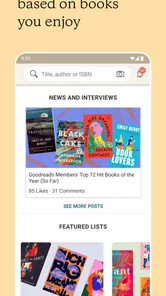
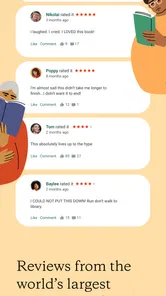
Reader reviews are one of Goodreads’ main strengths, especially when I want to know how people respond to a book beyond its short description. A review can flag pacing, tone, or a content element that matters to an individual reader. But ratings are personal judgments, not an objective quality meter. I try to read a handful of comments from people who explain what they liked or disliked, rather than letting a single score decide for me.
There is a trade-off here: a busy social catalogue offers breadth, but reader commentary can be uneven. Some reviews are detailed and thoughtful; others are brief reactions that tell me little about whether I will enjoy the book. For a niche subject or a very specific reading need, I would compare Goodreads opinions with a librarian’s suggestion, a specialist community, or a trusted publication. The app works best as one source of perspective rather than the final authority.
A less obvious way to get more from reviews is to look for patterns across several readers. If different people independently mention that a book starts slowly, that is more useful to me than one emphatic verdict. Likewise, disagreement can be informative: it may show that the book’s style is distinctive, not that the crowd has failed to agree on its quality. This approach keeps the app’s social feedback helpful without letting popularity replace personal taste.
Common points of confusion before you settle in
The biggest misunderstanding is expecting Goodreads to provide the book itself. It is for tracking and discussing reading, not a digital bookshelf from which you automatically read titles. If your main goal is to borrow, buy, or read ebooks, a library app, bookstore app, or dedicated ebook reader is a better starting point. You can still use Goodreads alongside those services to keep a record of what you plan to read.
Another common snag is mixing up a book’s popularity with a recommendation for you. A high rating can help identify titles that many readers enjoyed, but it does not tell you whether the writing style, subject, or mood will suit your preferences. I would use the rating to decide which books deserve a closer look, then read the description and a few substantive reviews before committing.
It can also take a little thought to keep lists meaningful. If you add a book you have not actually read to your finished shelf, your personal history becomes confusing; if you forget to mark a completed book, recommendations and your own record may feel less representative. A small habit helps: when you finish a book, update its status while you still remember your reaction. Add a sentence or two if the reason you liked it might otherwise fade.
For readers who dislike social features, the community can feel busier than necessary. You do not have to make every part of your reading life public to benefit from maintaining a catalogue, but people seeking a purely private, minimal tracker may prefer a simple notes tool or a dedicated personal library app. Likewise, readers who want expert-curated recommendations may find a local librarian or specialist book site more precise for their particular interests.
How it compares with familiar alternatives
Compared with a basic notes app, Goodreads takes more of the work out of searching for a title and seeing how other readers have responded. A notes app may be faster for a private list, but it will not offer the same book-centred community context. Compared with an ebook reader, Goodreads is less about the act of reading and more about choosing, remembering, rating, and sharing what you read. I see the two as complementary, not interchangeable.
Bookshops and library catalogues are better when the immediate task is finding a copy, checking availability, or borrowing a title. Goodreads is more useful when the task is keeping a long-term record and exploring reader reactions. If you already have a system that reliably remembers your books and gives you recommendations you trust, there is no need to move everything. Its strongest case is for people who want their reading history and future picks in one book-oriented place.
Goodreads is also a better fit for readers who enjoy seeing what friends or other members are reading than for people who want recommendations entirely tailored by a professional editor. Community discovery can surface books you would not have searched for, but it comes with noise and differing standards. I would use it to widen my options, then make the final choice based on my own interests and the kind of reading experience I want at that moment.
Build a routine that stays manageable
After the first saved title, the next useful step is to make updates part of a routine rather than a chore. When you finish a book, move it into your completed reading record, rate it, and note one detail you may want to remember later. When someone recommends a title, save it immediately instead of assuming you will recall it. These small actions turn the app into a dependable memory aid without demanding a full reading diary.
If you want recommendations to become more relevant, keep your ratings sincere and your shelves reasonably tidy. A collection of books you truly enjoyed, disliked, or intend to read gives you a clearer personal map than a long list of titles added on impulse. You can also use that history to notice your own habits: perhaps you keep choosing the same subject, or perhaps your saved list reveals a genre you have been meaning to explore.
I would not make daily engagement a goal. The app earns its place when it helps at a decision point: choosing what to read next, recalling a title, or finding a few reader perspectives before borrowing or buying a book. If you prefer to finish a book without rating it or discussing it, that is fine too. The tracking works best when it supports reading rather than competing with it.
Who I would recommend it to
I would recommend Goodreads to readers who regularly hear about books and then forget the titles, enjoy comparing opinions, or want a lasting record of what they have read. It is especially handy if you move between print books, library loans, and ebooks, because your reading list can remain a single place to collect intentions and reactions even when the actual books come from different sources.
I would skip it if you want an app whose primary job is to deliver books, manage borrowing, or provide a tightly curated reading plan. I would also look elsewhere if social discovery feels distracting or if you want a very private tracker with almost no community layer. Those are not flaws so much as differences in purpose: Goodreads is most convincing when you want your reading life to be both organized and connected to other readers.
My advice to a first-time user is simple: add one book you have finished, save one you genuinely want to read, and browse reviews only when they help you make a choice. That gives you a useful starting point without pressure to catalogue your whole life. The app is free, and for readers who like a mix of personal tracking and community discussion, that modest first step is enough to show whether its approach fits.
Goodreads: Book Tracker & More Frequently Asked Questions
What is Goodreads: Book Tracker & More used for?
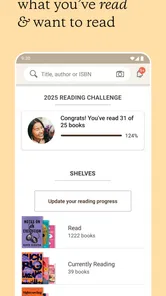
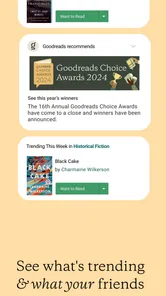
Goodreads is a social reading app for discovering books, keeping track of what you have read, and finding recommendations. You can organize titles on shelves such as “Want to Read,” “Currently Reading,” and “Read,” record your progress, and rate or review books. Its community features also let you follow readers, see their activity, and discuss books, though the experience is most useful when you choose to share and interact.
Is Goodreads free to download and use?
Goodreads is generally free to download and use for its core features, including catalog searches, reading shelves, ratings, reviews, and reader connections. Availability and specific terms can vary by platform or region, so check the app store listing before installing. The app may direct you to retailers when you look for a book; purchasing options, prices, and any retailer services are separate from Goodreads itself.
Can I use Goodreads to track my reading and set a yearly goal?
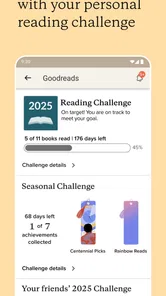
Yes. You can mark books as currently reading, update your progress, and move finished titles to your read shelf. Goodreads also offers a yearly Reading Challenge where you set a target and monitor how many books you have completed. Tracking relies on information you enter or update, so progress may not reflect your reading automatically, and challenge totals can be affected by how books are categorized.
Does Goodreads help me find books I might enjoy?
Goodreads offers recommendations based on details such as your ratings, shelves, and reading activity, alongside popular titles, lists, reviews, and suggestions from people you follow. These tools can help you discover books, but recommendations are not guaranteed to match your taste, and the quality of catalog information and community reviews may vary. You can improve suggestions by rating books honestly and maintaining your shelves.
Do I need an account, and what should I know about privacy?
An account is needed to save shelves, record reading progress, rate books, join discussions, and connect with other readers. Goodreads includes social features, so consider what you want to share and review the visibility settings available in your account. As with any community app, avoid posting personal information in public reviews or discussions, and check the current privacy policy and app permissions before signing up.
Pros
- Track books as Want to Read
- Currently Reading
- or Read.
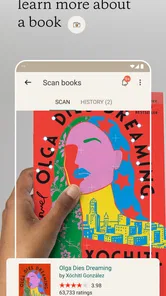
- Scan book barcodes to quickly find and add titles.
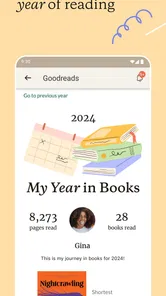
- Set reading goals and monitor progress throughout the year.
- Browse reviews and ratings from a large reader community.
- Keep personalized shelves to organize books by interest or mood.
Cons
- Some titles or editions may be missing or difficult to find.
- Recommendations can feel repetitive if your reading history is limited.
- The social feed may include spoilers in reviews and updates.
- Reading statistics and tracking depend on manually updating books.
- Some features and promotions may vary by country or account.











