Go Fly Drone Camera Controller
- 697.00
- 4.5
- Installs
- 5.00M
- Price
- Free

Screenshots
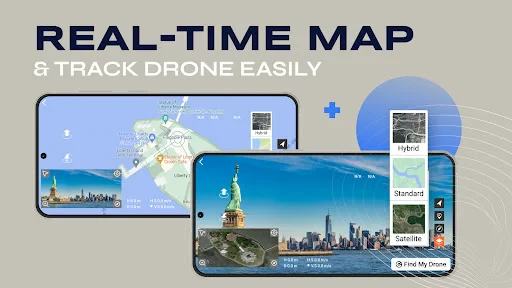
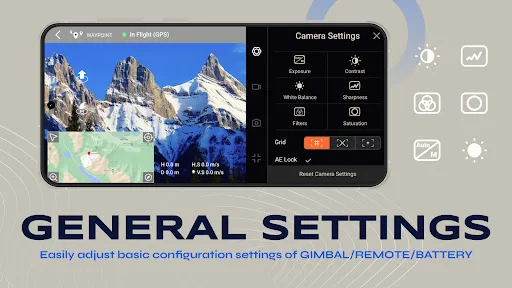
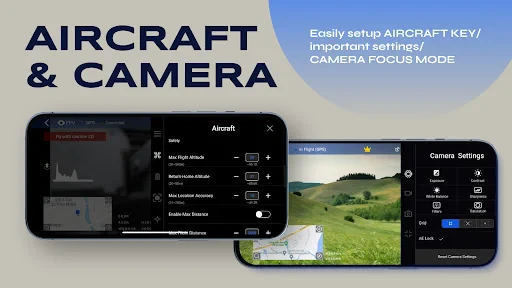
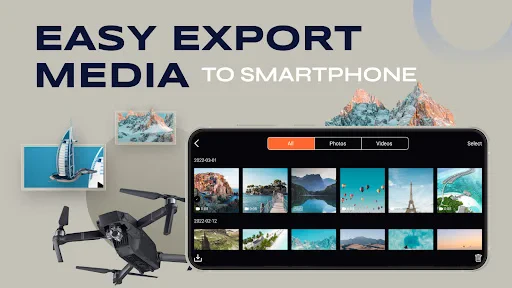
Analysis by Reviewed
My first week with Go Fly Drone Camera Controller would be about learning how it fits the drone I own, not assuming every model works the same way. The app is a free photography tool from Smart Widget Labs Co Ltd, and its name points to its main purpose: using a phone as a drone camera controller. I’d start with a short flight in an open, familiar place, giving myself time to understand the controls before trying to film anything ambitious.
Start with the aircraft, not the feature list
Before building the app into my routine, I’d check whether it works with my specific drone and phone. A controller app is useful only when the connection and controls suit the aircraft in front of me; a promising description cannot settle that practical question. I’d do this check at home, then confirm the connection in a low-pressure setting before relying on it for a trip or an important shot.
I’d also decide what I actually want from a phone-based controller. If I mainly want to frame a view from the drone and make camera adjustments while flying, the app’s purpose is easy to understand. If I want to edit footage, organize a library, or replace every part of a manufacturer’s ecosystem, I’d look for tools built specifically for those jobs instead. Keeping the role narrow makes it easier to judge whether this app deserves a place on my phone.
First Impressions
I remember the first time I opened the Go Fly Drone Camera Controller. The interface is sleek and intuitive, welcoming both beginners and experienced drone pilots alike. It's like the app holds your hand through the initial setup, ensuring you don't accidentally send your drone into the neighbor's pool. Trust me, that's a real fear!
Features That Soar
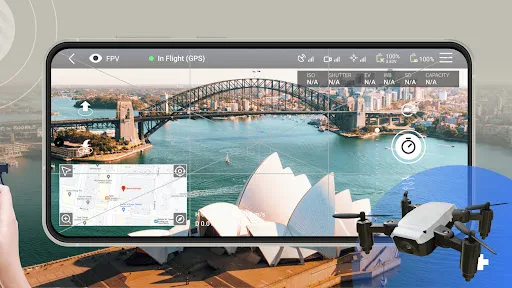
One of the standout features that had me hooked is the real-time video feed. As someone who loves capturing scenic landscapes, this feature is a godsend. You can see exactly what your drone sees, making it easier to capture those perfect shots. The app also allows you to tweak camera settings on the fly. Want a higher resolution? No problem. Need to adjust the exposure? Done and done.
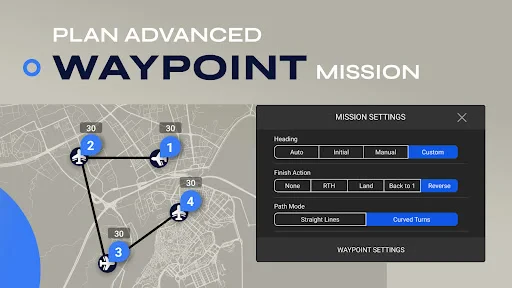
Another cool aspect is the flight path mode. You can pre-program your drone's journey, and it will follow the path like a faithful pet. It's perfect for creating cinematic shots without having to constantly fiddle with controls. Plus, there's a nifty feature that allows you to draw a path on your screen, and the drone will follow it. It's almost like magic!
Learning Curve
Now, let's chat about the learning curve. If you're new to drones, there might be a bit of a learning curve. But don't sweat it! The app includes a comprehensive tutorial section that explains everything in detail. It's like having a patient instructor by your side, guiding you through each step. And if you make a mistake? No worries, the app has safety measures to prevent any mishaps.
More From Our News Desk

Weather by Xiaomi Review: Clear at a Glance, Less Clear Up Close

X Under Pressure: Can It Recover When Posting Goes Wrong?

Clash of Clans Is Won Between the Battles

Android Auto Makes the Case for Quieter Car Software

MobiOffice: Transforming Mobile Productivity with Seamless Integration

EA SPORTS FC™ Mobile Soccer: Redefining Mobile Sports Gaming
For a first outing, I’d treat the tutorial as preparation rather than a replacement for careful flying. Check that your phone and drone are compatible, make sure the phone has enough charge, and test the connection while the aircraft is still close and easy to monitor. A live view is useful, but I wouldn’t let the screen take my attention away from the drone or its surroundings. The practical advantage is being able to frame a shot from the camera’s perspective; the trade-off is that piloting and composing at once can divide your focus.
Performance in the Field
Taking the app out for a spin, I was impressed with its performance. The connection between the app and the drone is rock-solid, even when the drone is a significant distance away. The live feed remains smooth, and the controls are responsive. It's like the app and the drone are speaking the same language, and they get along splendidly.
Battery life is another aspect worth mentioning. The app provides a clear and accurate reading of your drone's battery status, ensuring you have ample time to bring your little flying buddy back before it runs out of juice.
A small, repeatable filming workflow
For a realistic everyday use, imagine arriving at a quiet open spot to record a short view of a park or shoreline. I’d first check the camera feed and make a modest manual adjustment to the framing, then capture a brief test before attempting the main shot. That extra test is useful because it lets me spot a tilted horizon or awkward composition while there is still time to correct it, rather than discovering the problem later.
For a gradual reveal, I’d consider a simple planned route after confirming the aircraft responds as expected. I would keep the path uncomplicated and remain focused on the drone, using the route to reduce repeated directional inputs rather than treating it as an unattended filming mode. If the location is busy, the wind is a concern, or people are moving through the flight area, I’d skip the planned movement and choose a safer, more controlled approach. The feature is most valuable when it supports a shot I have already thought through.
Making It a Habit
The question after the novelty wears off is whether I’d reach for this controller every time I fly. For occasional scenic clips, the live view and on-screen camera adjustments give it a clear role. If I fly regularly, I’d build a small routine: check the connection before takeoff, confirm the battery reading, capture a brief test clip, and only then move on to the shot I actually came for. That habit helps me catch a framing or connection issue early, rather than discovering it after the moment has passed.
Compared with controlling a drone through a manufacturer’s usual companion app, a dedicated alternative is only worthwhile if it supports the exact aircraft and behaves reliably with it. I would not switch simply because another interface looks appealing: compatibility and dependable control matter more than extra-looking options. For someone whose existing controller already provides a clear camera view and the adjustments they need, changing apps may add another setup step without improving the result. On the other hand, a pilot who wants phone-based control and a route-planning workflow may find this app more relevant than a basic camera viewer.
How it compares with a camera-first approach
It helps to separate a controller from the other tools people often use around drone photography. A manufacturer’s companion app may be the simpler choice when it already pairs reliably and covers the controls I use most; there is little benefit in adding a second app just to repeat the same routine. A dedicated editing app becomes more relevant after landing, when I want to trim or polish footage, while a camera viewer alone may be enough for someone who only needs to check framing.
This app’s appeal is the combination of phone-based control with a live camera view and the described route-planning approach. That combination may suit a pilot who wants to compose while directing a flight, but it also asks for more attention than a simple viewing workflow. I’d choose the least complicated option that reliably gets the shot. A more feature-rich controller is not automatically better if I spend the flight looking down at the screen or troubleshooting a connection.
Who Should Keep It Installed?
I see the strongest fit for drone owners who want to compose photos or video from a live camera view and are willing to learn the controls before flying somewhere demanding. It may also suit a beginner who prefers a guided introduction, provided they remain cautious and verify their aircraft works with it. I’d skip it if I don’t own a compatible drone, if I need a polished editing suite rather than a controller, or if I’m already happy with the manufacturer’s app and have no recurring problem to solve. This is a controller, not a reason by itself to buy a drone.
There is also a small ongoing cost question. The app is free to download, but it offers in-app purchases, with individual items ranging from $3.99 to $69.99. I’d try the basic experience and establish that it suits my drone and flying habits before paying for anything. Its Everyone age rating makes it broadly accessible, but younger users still need sensible adult supervision around a flying aircraft. The app has an average rating of 4.5 from around 26,000 ratings, and more than five million installs; those figures suggest many people have tried it, though they cannot guarantee a good match for a particular drone.
Maintenance and Sources of Fatigue
Keeping a drone controller useful is less about constant tinkering than repeating a few checks. I’d keep the phone charged, avoid rushing setup, and recheck the connection and battery information at each outing instead of relying on what worked last time. The app is at version 5.1 and requires Android 8.0 or later, so an older Android phone may be a practical barrier. I’d also avoid making the app the only part of my preparation: a charged aircraft, a suitable location, and attention to the drone still matter more than any on-screen convenience.
One useful maintenance habit is to separate setup checks from shot planning. I’d confirm the aircraft and app connect before deciding on a particular camera move, then test the controls without trying to capture something worth keeping. That makes it easier to tell whether a problem comes from the connection or from my own unfamiliarity with the interface. It also avoids the frustration of attempting to learn controls while a brief lighting opportunity is passing.
The biggest source of fatigue is likely the gap between a promising feature and a dependable routine. If the connection or controls do not suit my particular setup, even an attractive live view will not make me want to repeat the process. Route planning can also feel like extra work for a quick flight; for a simple overhead photo, direct manual control may be quicker. I’d judge it by whether it reliably helps me get the shot I want, not by how many options I can explore on day one.
Questions I’d settle before relying on it
Would I use it for an important one-off flight? Not until I had already tested the connection, camera view, and controls with my own aircraft in a familiar place. Is it a substitute for safe piloting? No: a live feed and a planned route can help with framing, but they do not remove the need to watch the drone and its surroundings. Does a beginner need to master every option? I wouldn’t. I’d learn the basic control and camera workflow first, then try route planning only when I had a clear reason to use it.
Would I pay for an in-app item immediately? I’d wait until I knew which part of the experience I would use repeatedly and whether the free starting point already meets my needs. Should I install it on an older phone? Only if that device meets the Android requirement and is still dependable for the job; a weak or low-battery phone can undermine a flight even when the app itself is suitable. These are practical questions to answer before taking the app on a trip where there is no easy second chance.
Final Thoughts
All in all, the Go Fly Drone Camera Controller app is a must-have for anyone looking to elevate their drone flying experience. It's packed with features that make flying easier and more enjoyable. Whether you're a hobbyist or a professional, this app is sure to enhance your adventures in the sky. Just remember to keep an eye on the weather—you don't want your drone to become a kite!
So, go on, give it a try, and let your imagination take flight. Happy flying!
For me, its lasting value comes down to a simple test: does it make a regular flight easier to frame and control, without adding more setup friction than it removes? If the live view and camera controls become part of a repeatable routine, keeping it installed makes sense. If I only fly once in a while or my existing controller already does the job, the novelty may fade quickly. I’d give it a careful trial with a compatible drone, then keep it only if it earns its place on the next outing.
Go Fly Drone Camera Controller Frequently Asked Questions
Can I use Go Fly Drone Camera Controller without owning a drone?
Go Fly Drone Camera Controller is designed to control a drone and its camera, so its main purpose is most useful when you have a compatible aircraft to connect. You may be able to explore parts of the app without one, but the flight and camera functions depend on a drone connection. If you are choosing an app for general photo editing rather than drone control, this is not its stated focus.
What should I check before connecting the app to my drone?
Before relying on Go Fly Drone Camera Controller for a flight, check that your particular drone model supports the app and follow the connection and setup instructions for both devices. A phone-based controller can only work as intended when the drone and app are compatible. It is also sensible to test the connection and controls in a safe, open area before attempting a more demanding flight or using camera features.
Does Go Fly Drone Camera Controller cost anything to download?
Go Fly Drone Camera Controller is free to download, so you can install it without paying upfront. The app also offers in-app purchases, with items ranging from $3.99 to $69.99 each. It is worth checking the purchase details in the app before buying, especially if you only need basic access for controlling a compatible drone.
Who is Go Fly Drone Camera Controller intended for?
Go Fly Drone Camera Controller is a photography app intended for people who want to use a phone to control a drone and its camera. Its short description is “Go Fly Drone,” and it is published by Smart Widget Labs Co Ltd. The app has an Everyone content rating, making it suitable for a broad audience, though actual use still depends on having a compatible drone.
What features does the Go Fly Drone Camera Controller app offer?
The Go Fly Drone Camera Controller app provides a variety of features including real-time video streaming, intuitive flight control, GPS-based navigation, and automated flight modes such as follow-me and waypoint navigation. Additionally, it offers camera control settings for capturing high-quality photos and videos from your drone, as well as a user-friendly interface suitable for both beginners and experienced pilots.
Pros
- Intuitive user interface
- Real-time video streaming
- Customizable flight controls
- Offline maps available
- Compatible with many drones
Cons
- Limited battery monitoring
- Occasional connectivity issues
- Requires frequent updates
- Not beginner-friendly
- In-app purchases necessary
- Category
- Photography
- Version
- 5.1












