GET Mobile: ID Card Management
- 730.00
- 4.4
- Installs
- 500.00K
- Price
- Free

Screenshots
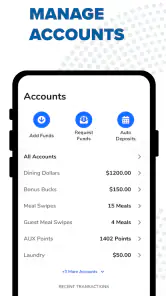
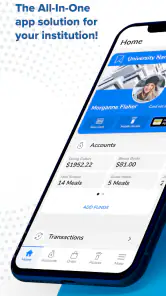
Analysis by Reviewed
Carrying a university or hospital ID can be a surprisingly small daily nuisance: it gets left in another bag, buried under cards, or forgotten when you are already heading into a building. GET Mobile: ID Card Management takes a focused approach to that problem by putting an institution-issued ID on a phone. I see it less as a general finance tool and more as a practical access companion for people whose campus or workplace supports it.
The important detail is that this is not simply a digital wallet for every card you own. GET Mobile is built around an ID connected to a participating university or hospital, and that distinction shapes the whole experience. When the setup matches your institution, the app can make the phone a more convenient place to keep that credential. When it does not, the app is unlikely to replace the physical card or become useful just because it is installed.
Turning an institutional ID into something easier to carry
The strongest idea here is straightforward: your phone is usually already with you, so using it as the home for an eligible university or hospital ID can remove one item from your pocket. In my view, that is the real benefit. The app is not trying to overwhelm the user with budgeting tools, banking dashboards, or unrelated financial features. Its purpose is narrower, and that narrow purpose makes the decision easier.
The app comes from The CBORD Group, Inc., a developer associated with campus and institutional technology. It belongs to the finance category, although I would not judge it like a conventional money-management app. Its value depends on the relationship between the app, your institution, and the ID system behind it. That makes institutional compatibility more important than the app’s category label.
I also appreciate that the basic download price is free and that the content rating is Everyone. Those details make it approachable for students, staff, patients, and other authorized users who need the supported ID experience without paying for the app itself. The practical question is not whether the app costs money; it is whether your university or hospital is part of the environment it serves.
The phone becomes the place to check first
Once an ID is available through the app, the everyday change is mostly behavioral. Instead of asking yourself whether the physical card is in your wallet, you can check the phone you are already carrying. That is especially helpful when moving between a residence, classroom, clinic, office, or other institutional setting where an ID may be needed at an inconvenient moment.
This also creates a useful separation between convenience and replacement. I would not immediately throw away the physical card. A digital ID can be easier to reach, but your institution may still expect the original card in some situations, or your phone may be unavailable. The sensible approach is to treat the app as a convenient primary option where accepted while keeping a backup plan until you understand how your own organization handles it.
What setup feels like in real use
The first step is choosing or connecting to the relevant institution rather than treating the app like an open-ended card scanner. That is an important expectation to set before installing it. You are not manually designing an ID inside the app; you are using an institutional service that recognizes an eligible university or hospital relationship.
After that, the experience is best understood as an access workflow: open the app when you need the digital credential, present it in the way your institution supports, and return to normal phone use afterward. I would pay attention during the first setup to the exact instructions shown for your organization, because the useful part of the app is determined by that local connection rather than by a universal process that works identically everywhere.
A good first test is to use it during a low-pressure visit, not for the first time when you are late for class or standing at a busy entrance. Confirm that you can reach the ID quickly, that you understand what the receiving staff expects, and that you know where your physical backup is. This small trial prevents the common mistake of assuming that installing the app automatically means every ID checkpoint will accept it.
A realistic morning example
Imagine leaving home for a hospital shift or a day on campus with your phone in hand but your usual wallet in another jacket. At the entrance, you realize the ID is needed. With a supported account and a completed setup, opening GET Mobile can be faster than retracing your steps or searching through several bags. That is not a dramatic transformation, but it is exactly the kind of minor friction that a useful utility should remove.
The same convenience can matter when your clothing changes throughout the day. A student moving from a backpack to a gym bag, or a staff member switching from outdoor clothing to work attire, may be less likely to move a physical card every time. The phone stays with the person, so the digital credential follows the routine more naturally.
There is also a less obvious advantage for people who regularly forget cards rather than lose them. A lost physical ID may require a replacement process, while a phone-based option can reduce how often the card is exposed to accidental misplacement. That does not eliminate the need to follow institutional rules, but it can make the daily habit more dependable for someone whose main problem is remembering which wallet contains the card.
Where the focused design helps
Because the app centers on an institutional ID, it avoids the clutter I often associate with broad financial applications. You are not forced to sort through spending charts or promotional sections to reach the one credential you need. For a user who wants a direct path from phone to ID, that restraint is a strength.
It can also be easier to explain to a family member or colleague. The purpose is concrete: connect the supported university or hospital identity and use the phone as a more convenient way to carry it. Someone who dislikes learning complicated apps may find this less intimidating than a full digital wallet with many unrelated cards and payment options.
Another useful insight is that the app’s success should be judged at the moment of need, not by how many screens it contains. If opening it and reaching the ID becomes a familiar reflex, the app has done its job. If it requires repeated searching, confusing institution selection, or uncertainty about acceptance, the convenience advantage becomes much smaller even if the underlying idea is sound.
The tradeoff: convenience depends on acceptance
The biggest limitation is not something the app can solve on its own: a digital ID is useful only where the institution recognizes it. A person may be able to install GET Mobile and still find that a particular entrance, department, service desk, or activity expects a physical credential. For that reason, I would not describe it as a universal replacement for every institutional card.
This dependence also means the experience may differ between users. Two people can install the same app and have very different results because their universities or hospitals use different systems or procedures. That is why I would check the app in the context of your own organization, rather than relying on another user’s experience as a guarantee.
Your phone itself becomes part of the chain. If it is unavailable, out of power, damaged, or locked behind a problem you cannot resolve quickly, the digital ID may not help at that moment. I recommend keeping the physical card accessible until you have a clear backup routine. The app reduces what you carry every day, but it does not remove the need to plan for an unavailable phone.
Privacy and personal comfort are also reasonable considerations. Some users prefer not to place an institutional credential on a personal device, while others see the phone as the safest and most convenient item they already carry. I would make that choice based on your own institution’s instructions and your comfort level, rather than assuming digital is automatically better than physical.
How it compares with ordinary alternatives
The most obvious alternative is the traditional plastic ID. It is simple, familiar, and independent of battery life or app access. Its weakness is physical inconvenience: it can be forgotten, misplaced, damaged, or left in clothing you are not wearing. GET Mobile is most valuable when that daily carrying problem is more annoying than the need to maintain a backup.
A general phone wallet may seem like a competing option, but it is not necessarily interchangeable with an institution-specific ID service. A broad wallet is designed to hold many kinds of passes or payment cards, while GET Mobile is tied to the supported university or hospital identity experience. If your organization directs you to use this app, a general wallet may not provide the same connection or presentation method.
A campus or hospital website can sometimes be useful for account information, but a website is not automatically as convenient as a dedicated mobile path to an ID. On the other hand, a website may be preferable if you only need occasional access and do not want another app on your phone. The right choice depends on frequency: daily users gain more from quick access than someone who needs the credential once every few months.
What the numbers suggest about its place
The app has an average rating of 4.4 from around 4.3 thousand ratings, with roughly 730 written reviews. I read that as evidence of a generally positive reception, but not as proof that every institution delivers the same experience. The rating reflects many users’ overall impressions, while your result will still depend heavily on eligibility, local acceptance, and how often you need the ID.
It has passed half a million installs, which gives the service a meaningful user base without making it feel like a universal app for every phone owner. Its release history goes back to November 19, 2014, and the current version is 5.0.51. For practical purposes, I would focus less on the age of the project and more on whether the current app works with your organization and your phone.
The listed minimum operating-system requirement is 10. Before relying on the app for an important day, I would check that your device meets that requirement and complete the setup while you still have time to troubleshoot. This is a simple but important tip: digital credentials should be tested before they become urgent, not during the first access check of the morning.
Who benefits most from this app
GET Mobile makes the most sense for students and hospital users who already carry a phone everywhere and regularly need an institutional ID. It is also a strong fit for people who move between bags, uniforms, classrooms, wards, offices, or shared workspaces and often forget to transfer a physical card.
I can also recommend it to users who want a dedicated, uncomplicated route to their ID instead of mixing an institutional credential with payment cards and personal passes. The focused design may be reassuring for someone who wants one clear purpose rather than a crowded digital wallet.
I would be more cautious if you rarely need your ID, dislike keeping institutional services on your phone, or already have a physical-card routine that never causes problems. In those cases, installing another app may add more maintenance than value. It is also not the best fit for someone expecting a general finance manager, a universal wallet, or a tool that works independently of institutional support.
My recommendation after using the concept in daily routines
I like GET Mobile because it solves a specific problem without pretending to be something broader. Its best feature is not a long list of tools; it is the ability to make an eligible university or hospital ID easier to reach when the physical card is elsewhere. That can save time and reduce small moments of stress throughout a busy week.
My recommendation comes with one condition: treat compatibility and backup planning as part of the setup. Connect the correct institution, test the ID before you need it, learn where it is accepted, and keep the physical card available until you trust the routine. Those steps turn the app from a promising download into a genuinely useful part of your day.
For the right user, the result is pleasantly modest. You open your phone instead of searching another pocket, bag, or jacket. If your university or hospital supports the service and you regularly carry your phone, I think that convenience is enough to justify trying the free app. If your institution does not fit the workflow or you need a credential that must work everywhere, the traditional card remains the safer choice.
Pros
- Keeps digital ID details available without carrying a physical card.
- Quick access can simplify identity checks and everyday administrative tasks.
- Centralized card management makes multiple credentials easier to organize.
- Useful for users who frequently need to present identification remotely.
- A digital backup may help when the physical ID is misplaced or unavailable.
Cons
- Not every organization may accept a mobile ID instead of the physical card.
- Access depends on a charged phone and a working device.
- Personal identity data requires careful protection if the phone is lost.
- Some features may require account verification or compatible local services.
- Availability and supported documents can vary by region and issuing authority.

- Category
- Finance
- Version
- 5.0.51











