Gallery - Album & Photo Vault
- 7.00
- 3.1
- Installs
- 10.00M
- Price
- Free

Screenshots


Analysis by Reviewed
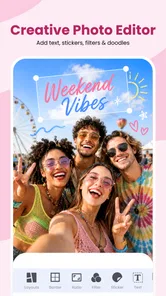
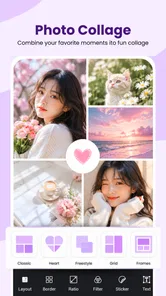
I tend to judge a photo app by what it makes easier on an ordinary day, not by how long its feature list looks. Gallery - Album & Photo Vault brings viewing and organizing pictures together with editing, collage-making, quote creation, and a private vault. That mix is useful if you want one place to tidy up images and make something from them, though it also means the app is doing more than a basic phone gallery.
A practical first routine
Before relying on any new gallery, I’d spend a few minutes learning how it presents the pictures already on my phone. Start with a small batch: find a few recent photos, make an album for a specific purpose, and try one simple edit. This gives you a feel for the app’s everyday rhythm without committing your whole library to a new organizational system.
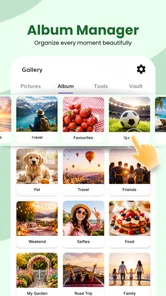
A realistic example is a busy day that leaves you with snapshots, screenshots, and pictures of receipts all mixed together. I’d put the event photos in one album, keep useful reference images separate, and decide whether any sensitive pictures belong in the vault. This is more useful than creating a pile of vague albums, because each one has a clear job and is easier to remember later.
From everyday sorting to private storage
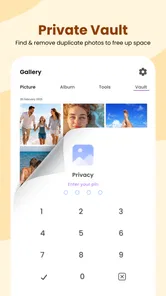
My most practical way to use an app like this is to start with a small, clear task: sort a handful of recent photos, make an album for a trip or project, and decide which images really need to be kept private. That keeps the vault from becoming a second, confusing camera roll. For example, after taking pictures of receipts and personal documents during a busy day, I’d separate the images I need to keep from casual snapshots, then move only the sensitive ones into private storage.
That distinction matters. A vault can reduce the chance of someone casually browsing private pictures, but it is not a substitute for a complete backup or a reason to keep the only copy of an important image on one device. I’d keep irreplaceable photos backed up separately and use the private area for access control, not long-term archival protection.
Keeping Memories Safe
One of the standout features of the Gallery - Album & Photo Vault is its ability to securely store your photos. With just a few taps, you can move your private photos to a secure vault, hidden away from anyone who doesn’t have the password. It’s like having a secret chamber in your phone! The app uses advanced encryption, ensuring that your precious memories are kept under digital lock and key.
Organize with Ease
Besides its robust security features, this app shines when it comes to organizing your photos. The interface is intuitive, allowing you to create albums effortlessly. Whether you’re sorting pictures from your last vacation or organizing screenshots for a project, the app makes the task easy and, dare I say, enjoyable. Plus, it supports a wide range of image formats, so you’ll never have to worry about compatibility issues.
More From Our News Desk

Weather by Xiaomi Review: Clear at a Glance, Less Clear Up Close

X Under Pressure: Can It Recover When Posting Goes Wrong?

Clash of Clans Is Won Between the Battles

Android Auto Makes the Case for Quieter Car Software

MobiOffice: Transforming Mobile Productivity with Seamless Integration

EA SPORTS FC™ Mobile Soccer: Redefining Mobile Sports Gaming
Settings and habits that make a difference
I’d check the app’s available privacy and organization settings before moving a large collection. In particular, get comfortable with how you unlock the vault and how you’ll find items once they are inside. A simple habit helps: move a photo only after confirming that the copy you want is in the right album, and periodically review what you have tucked away. This avoids the common annoyance of forgetting where a picture went when you need it later.
I’d also decide on a naming habit before making many albums. Names tied to a clear event, project, or purpose are easier to scan than a run of generic labels. For screenshots, a few purposeful groups can be more helpful than treating every saved image as a photo-memory: reference material and temporary items have different lifespans, and separating them makes cleanup less risky.
Creative tools in context
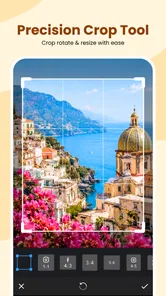
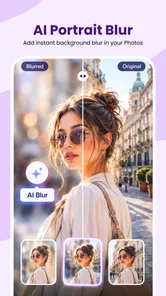
The editing and creative tools are best treated as occasional helpers rather than a replacement for a dedicated editor. A quick crop or a collage for sharing can be convenient in the same place you browse, while someone doing detailed retouching or managing a professional portfolio will likely prefer a specialist app. Likewise, the quote-maker idea suits a quick social post, but users who need precise typography and layout control may find a design-focused alternative more comfortable.
The useful trade-off is convenience against depth. If I only need to straighten a casual image, assemble a small collage, or add a short line of text, staying in one app can save a little time. If the image is for a portfolio, a client, or a carefully designed post, I’d move to an editor built around finer control rather than trying to force a quick tool into a more demanding job.
Faster workflows, with sensible limits
For repeat tasks, I’d group images by purpose instead of repeatedly searching through an unfiltered camera roll: one album for an event, another for useful reference screenshots, and a separate vault for private material. That small routine makes the combination of gallery and creative tools more valuable. Before sharing, I’d also select only the intended images and check the selection carefully; choosing specific pictures is more deliberate than sharing an entire album, especially when personal photos sit nearby.
A useful pattern is to treat sharing as its own final check rather than an automatic next step after editing. I’d review the selected images, make sure the intended version is present, and confirm that nothing private has been included by mistake. For a collage or quote image, I’d also keep the original photo intact where possible by working from a copy or checking the result before removing anything. That small pause matters more than any shortcut when an image is meant for other people.
Where it sits among photo apps
Compared with the default gallery on a phone, this app’s appeal is the added set of tools in one place. The trade-off is that a built-in gallery may feel simpler and more closely tied to the phone’s existing photo workflow. Compared with a dedicated vault, this app may be more convenient if you also want albums and editing, while a privacy-first specialist may suit someone whose main concern is secure storage. I would not choose it as my only photo-management tool if I needed advanced cataloging, extensive editing controls, or a dependable backup workflow.
For someone who mainly wants a place to browse, sort, and occasionally make a shareable image, the combination is a sensible reason to try it. For a large, carefully indexed archive, a cloud library or specialist cataloging tool may make more sense. And if the priority is editing precision, an editor with dedicated controls is the clearer choice. I see this app as a practical middle ground, not a universal replacement for every tool that touches a photo.
Who will get the most from it
RACCOON TECH’s photography app is free to start, rated for Everyone, and has reached over ten million installs. It has an average rating of 3.1 from around 764 ratings, so I’d approach it with practical expectations rather than assuming every part will suit every user. Version 8.5 requires Android 7.0 or later, and optional in-app purchases range from about $0.49 to $29.99 per item. I’d explore the free experience first and only consider a purchase if a feature I actually use calls for it.
This setup is a good fit for someone who wants ordinary photo browsing, basic creative tasks, and a separate place for private images without juggling several apps. It is less suitable if you need a polished professional editor, cloud-based photo library, or a privacy tool whose entire design is centered on security. The useful question is not whether it replaces every photo app, but whether having these jobs together makes your own routine simpler.
It may also suit someone who shares casual images often but wants a more deliberate boundary around personal material. I would be more cautious about recommending it to a person who expects a vault to protect the only copy of important files, or who needs a reliable archive across devices. Those needs call for a separate backup plan, regardless of how convenient the gallery feels during daily browsing.
Sharing without rushing
Now, I know what you’re thinking: if my photos are locked away, how can I share them with friends or family? Worry not! Gallery - Album & Photo Vault has got you covered. You can share photos directly from the app, choosing exactly which images to send without compromising your entire library’s privacy. It’s all about having control over your content.
In practice, the safest habit is to think of the vault and sharing as separate decisions. I’d bring out or select only what I intend to send, then check the final selection before confirming. That is especially worthwhile when an album contains a mix of public event pictures and personal shots. A few seconds of review can prevent the awkward mistake of sharing more than intended.
A measured recommendation
In today’s digital age, privacy is paramount, and this app understands that perfectly. Gallery - Album & Photo Vault offers a comprehensive solution for anyone looking to keep their photos safe and organized. With its user-friendly interface and top-notch security features, it’s a must-have app for anyone who values their digital privacy. So, if you’re searching for an app that offers both protection and convenience, give this one a try. You won’t be disappointed!
My more measured recommendation is to try it with a small batch of pictures first, then decide whether the vault, albums, and creative extras genuinely fit your habits. I would keep a separate backup for photos I cannot replace and avoid relying on any single app for every part of photo care. Used that way, it can be a handy all-in-one option for casual organization and selective privacy, while people with demanding editing or backup needs will be better served by adding a specialist tool.
What mastery looks like
For me, getting the most from this kind of all-in-one gallery is less about using every feature and more about setting a repeatable pattern: sort with a clear purpose, keep the vault selective, use quick creative tools for quick jobs, and check selections before sharing. Those habits reduce the clutter that can build up when browsing, editing, and private storage all live together.
I’d start with a few albums that solve real problems, try the vault with nonessential test images before trusting it with sensitive material, and see whether the app’s organization feels natural over several days. If that routine is comfortable, the extras may save you from switching between apps for simple tasks. If it feels crowded or you need stronger specialist workflows, keeping your default gallery and adding a dedicated editor or privacy tool is a perfectly reasonable choice.
Gallery - Album & Photo Vault Frequently Asked Questions
Is Gallery - Album & Photo Vault free to download, and are there in-app purchases?
Gallery - Album & Photo Vault is free to download, so you can try its gallery and creative tools without paying upfront. The app also offers in-app purchases, with items ranging from $0.49 to $29.99. Check the purchase details in the app before confirming anything, especially if you only want to use its basic photo-organizing features.
What should I know about the app’s age rating and device compatibility before installing it?
The app is rated for Everyone and requires Android 7.0 or later. It is a photography app from RACCOON TECH, with a current version of 8.5 and a release date of May 1, 2025. Before downloading, check that your device meets the minimum operating-system requirement so you can install and run it.
What is Gallery - Album & Photo Vault and what are its main features?
Gallery - Album & Photo Vault is a versatile app designed for organizing and securing your photos and videos. Key features include categorizing media into albums, a secure photo vault for private files, and easy sharing options. It also supports various photo and video formats and offers editing tools for customizing your media. Its listed feature set also includes a quote maker and collage maker, making it useful for simple creative projects as well as browsing a photo collection.
How does the photo vault feature work in Gallery - Album & Photo Vault?
The photo vault feature in Gallery - Album & Photo Vault allows users to secure their private photos and videos with a password or biometric authentication. This ensures that sensitive media remains hidden from unauthorized access, providing peace of mind for users who prioritize privacy and security. Consider how you want to manage access to private files before moving them into a vault, particularly if you share your device with other people.
Is Gallery - Album & Photo Vault available for both Android and iOS devices?
Yes, Gallery - Album & Photo Vault is available for download on both Android and iOS platforms. Users can easily find it on the Google Play Store for Android devices and the Apple App Store for iOS devices, making it accessible to a wide range of smartphone and tablet users. On Android, remember that the app requires version 7.0 or later; check your device’s software version before installing.
Pros
- User-friendly interface
- Secure photo vault
- Customizable albums
- Fast photo loading
- Offline access available
Cons
- Limited free storage
- Ads in free version
- No cloud backup
- Occasional bugs
- In-app purchases required