Frontline Education
- 2.23K
- 4.7
- Installs
- 500.00K
- Price
- Free

Screenshots

Analysis by Reviewed
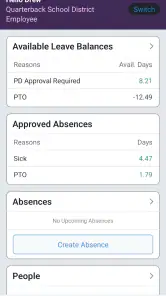
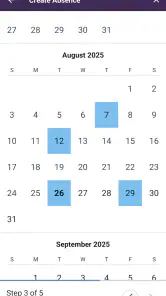
Frontline Education is the kind of app I appreciate more after using it for a real workday rather than opening it casually for a minute. It is an education app from Frontline Education that puts practical staff tasks on a phone, especially checking leave balances and arranging absences. My overall view is simple: it is most useful as a quick companion to an organization’s existing Frontline workflow, not as a complete school-management system in your pocket.
That distinction matters. If your school or district already uses Frontline Education, the app can save you from signing in through a browser every time you need to review time off or handle an absence. If your workplace does not use Frontline’s services, there is little reason to install it just because it is free. The app’s value depends heavily on the account and workplace connection behind it.
The app is free, available for Everyone, and supports Android devices running version 8.0 or later. It has reached over 500 thousand installs and holds a 4.7 average from around 4.7 thousand ratings, which suggests that many users find it dependable for the narrow jobs it is designed to handle. I can understand that response: the app focuses on routine actions that are easy to postpone when they require a desktop browser.
How Frontline Education fits into an everyday school routine
A practical tool rather than a broad learning app
Despite its Education category, this is not an app for lessons, quizzes, student revision, or classroom content. It is aimed at people working within an education organization. In practice, that means teachers, support staff, administrators, and other employees whose workplace uses Frontline systems may find it useful.
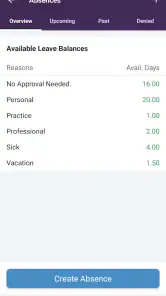
The central appeal is convenience. A staff member who wakes up ill does not necessarily want to open a laptop, navigate a district portal, and search for the absence area. A phone app can make that first administrative step less disruptive. The same applies when someone wants to check how much leave remains before requesting time away.
I also like the way this changes the timing of small decisions. Instead of waiting until you are back at a computer, you can review your balance while planning a trip, check an absence-related task between duties, or deal with a request before it slips your mind. That is not a dramatic feature, but it is exactly the sort of modest improvement that makes a workplace app worthwhile.
What I found most useful in actual scenarios
Imagine a teacher realizing late in the evening that illness will make the next morning impossible. The phone is already nearby, and a focused app is more convenient than opening a full desktop portal. I would use Frontline Education to check the relevant leave information first, then schedule the absence while the details are fresh. That sequence reduces the chance of guessing about available time or leaving the task until the morning rush.
More From Our News Desk

Clash of Clans Is Won Between the Battles

Android Auto Makes the Case for Quieter Car Software

MobiOffice: Transforming Mobile Productivity with Seamless Integration

EA SPORTS FC™ Mobile Soccer: Redefining Mobile Sports Gaming

How Microsoft OneDrive Became a Mobile Productivity Giant

How Google Translate Breaks Language Barriers Effortlessly
A second scenario is less urgent but just as realistic. Suppose you are considering taking a personal day several weeks from now. Rather than asking an administrator to confirm your balance, you can look it up yourself and decide whether the request is sensible. This gives the app a useful planning role, not just an emergency role.
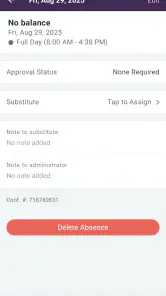
There is also a helpful habit I would recommend: use the app to verify the status and details of a request soon after submitting it, instead of assuming that tapping the final button solved everything. Mobile workflows can be interrupted by weak reception, expired sessions, or a missed confirmation screen. Treating the app as a place to check your record, rather than merely a submission form, is a safer way to use it.
The strongest evidence is its focused purpose
Many workplace apps try to combine announcements, messaging, calendars, documents, payroll, training, and scheduling into one crowded dashboard. Frontline Education feels more valuable when judged against a simpler standard: can it help an employee handle a leave-related task without reaching for a computer?
For that purpose, its narrow focus is a strength. You are less likely to spend time searching through unrelated school content. The app’s store summary points to checking leave balances and scheduling absences, and those functions explain why I would keep it installed. It is not trying to replace every system used by a district; it is there to make a particular administrative connection easier to reach.
The developer, Frontline Education, has kept the product associated with a recognizable workplace service rather than presenting it as an independent generic time-off tracker. That is important because leave information must match the records used by the organization. A personal notes app or calendar can remind you about a planned day away, but it cannot serve as the authoritative place for your workplace balance.
Why the mobile format changes the experience
A browser portal can often perform similar tasks, so the app’s advantage is not that it creates an entirely new kind of leave management. Its advantage is reduced friction. A dedicated icon, a phone-sized layout, and a workflow designed around quick checks can make an occasional administrative task feel less like paperwork.
I find this especially relevant for employees who move between classrooms, offices, campuses, or meetings. The phone is usually closer than a computer, and the best time to deal with an absence is often the moment you remember it. A mobile option makes that possible without requiring a separate planning session.
There is a trade-off, though. A small screen is convenient for checking a balance or entering a straightforward request, but it is not automatically better for reviewing a complicated history. If you need to compare several entries, read detailed policy text, or investigate an unusual discrepancy, I would rather use the full web experience if your organization provides one. The app is strongest for short interactions, not extended administrative research.
Small workflow tips that make it more dependable
First, check your leave balance before building plans around a future absence. A calendar reminder tells you what you hoped to do; the app can help you confirm whether the request fits your recorded allowance. I would make this check before booking anything that depends on approval.
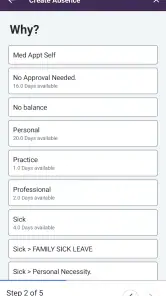
Second, keep the wording and dates of an absence request in front of you while entering it. Mobile forms are convenient, but they also make it easy to rush through a date selector or choose the wrong absence category if several options appear. A few seconds of review before submitting is worthwhile.
Third, do not rely on a screenshot as your permanent record. A screenshot can be useful for your own reference, but the important source remains the organization’s Frontline record. If something looks different after returning to the app, I would check the current status rather than trusting an old image.
Finally, use the app for the tasks it handles well and the organization’s other channels for questions that require interpretation. If you are unsure whether a type of leave is allowed, or if a request needs special approval, the app may help you submit information but cannot replace your workplace policy or administrator.
The meaningful weakness: usefulness depends on the employer setup
The biggest limitation is not a missing decorative feature. It is dependence on the workplace environment. Frontline Education is not a universal leave planner that anyone can open and use independently. Its usefulness comes from being connected to an organization that uses Frontline services and has configured employee access.
That means a new user may experience more friction than expected before reaching the useful part. You need the correct workplace account and the right sign-in details, and your access may be affected by how your district manages employee records. If you are installing the app while trying to solve an urgent absence problem, discovering an account issue at that moment would be frustrating.
My advice is to sign in and test the basic workflow before you actually need it. Check that your account opens, confirm that your leave information appears as expected, and become familiar with where an absence request begins. This is one of the most practical reasons to install it early rather than waiting for a sick morning.
Another limitation is scope. The app should not be mistaken for a full human-resources platform, a substitute for a school calendar, or a personal planning tool. It may help with a specific administrative action, but it does not remove the need to track appointments, travel, lesson responsibilities, or arrangements with colleagues elsewhere.
Where it compares well with the usual alternatives
The most obvious alternative is a mobile browser pointed at the Frontline portal. A browser may be perfectly adequate if you only submit an absence once in a while, and it can be preferable when you need a wider view or access to related web pages. The dedicated app makes more sense for people who perform these checks often or dislike navigating a portal on a small screen.
A second alternative is using email or a phone call to notify an administrator. Those methods may still be necessary in certain urgent or unusual situations, especially when local policy requires direct contact. However, they are less convenient for checking a balance yourself, and they can create uncertainty about whether the request has been recorded in the right system.
Personal calendar apps are useful for remembering approved time away, but they do not replace Frontline Education’s workplace record. I would use a calendar to remember the event and this app to interact with the official leave workflow. Confusing those roles is a common mistake: a reminder is not approval, and an entry in a personal calendar is not proof that an absence was submitted.
Large employee portals may offer more functions in one place, but their breadth can make simple tasks slower. Frontline Education’s advantage is the opposite. It is a focused tool for staff who need a direct path to leave-related information, provided their organization is already part of that ecosystem.
Who should install it, and who should skip it?
I would recommend it to teachers and education staff whose employer uses Frontline Education and who want a quicker way to review leave information or arrange absences. It is particularly suitable for people who work away from a desk, manage changing schedules, or regularly need to handle small administrative tasks outside normal office hours.
It is also a good fit for employees who prefer to verify information themselves. Instead of asking someone else how much leave remains, you can check the available record before making a request. That can make planning more independent and reduce avoidable messages to administrators.
I would be more cautious if you rarely need the service and already find the browser portal easy. Installing another app may not improve your routine if you submit one request a year and have no trouble signing in online. In that case, the browser may be enough.
I would also skip it as a general-purpose education app. Students, parents, and people looking for learning materials are not the audience I would have in mind here. Its value is tied to employee administration, not study support.
Access, compatibility, and long-term practicality
The app was released on March 6, 2017, and its current version is 11.11.1. Those details matter less than whether your device and workplace account work smoothly together, but they do show that this is an established app rather than a brand-new experiment. Support for Android 8.0 and later covers many devices, although anyone using an older phone should check compatibility before depending on it.
Because the app is free, the decision to try it carries little financial risk. The more important cost is attention: learning whether it fits your organization’s process and remembering to verify requests after submitting them. For an employee who uses the service regularly, that small setup effort is likely worthwhile. For someone outside a participating organization, the free price does not create much practical value.
The rating of 4.7 from roughly 4.7 thousand ratings is encouraging, while the app has accumulated around 2.2 thousand written reviews. I would read that reception in context. A high average can indicate that the core workflow works well for its intended audience, but it does not mean every district’s configuration, login process, or policy will feel identical. Your local setup still matters more than the headline score.
My final view after weighing convenience against limits
Frontline Education succeeds because it addresses an unglamorous problem directly. Checking leave and scheduling an absence are not exciting tasks, but they are important, and making them easier on a phone can remove genuine daily friction. I especially like the idea of setting it up before an urgent situation, using it to confirm a balance, and then checking the recorded request rather than assuming everything went through.
Its limitations are equally clear. It is not a standalone planner, not a student-learning tool, and not a replacement for workplace policies or human support. Employees whose organizations do not use Frontline services will gain little from it, while people who need detailed records may still prefer a browser on a larger screen.
My recommendation is straightforward: if your education employer already relies on Frontline, install it and test your access before you need to report an absence. For that audience, the app is a sensible, focused companion. If you are looking for broad education content or a universal time-off tracker, choose something else. Frontline Education earns its place by doing a specific job conveniently, and it is best judged on that practical promise.
Frontline Education Frequently Asked Questions
Who needs to authorize access before I can use Frontline Education?
Frontline Education is most useful when your school district, employer, or education organization already uses its services and has set up your account. Before downloading, check with your workplace or district to confirm that Frontline is part of its process and that you have been assigned access. Installing the app alone does not create an organizational account or unlock services.
What is Frontline Education used for?
Frontline Education is a platform designed for school districts and education organizations to manage administrative and workforce-related tasks. Depending on the services enabled by your district, it may provide access to absence management, substitute teaching assignments, employee information, professional growth, recruiting, time tracking, or related tools. The exact features available can vary significantly, so your organization’s account determines what you can view and use.
Can parents or students use the Frontline Education app?
Frontline Education is primarily intended for educators, school employees, administrators, substitutes, and other district staff rather than general student or parent use. Some districts may connect Frontline products to services that involve families, but access depends on the specific product and organization. Before downloading, check whether your school or employer has instructed you to use Frontline and which sign-in method applies to your account.
How do I log in to Frontline Education?
To sign in, you generally need an account provided or activated by your school district, employer, or education organization. Depending on the setup, you may use a Frontline ID, organization-specific credentials, or a single sign-on service. If you cannot remember your password, use the available recovery option. For locked accounts, missing access, or enrollment issues, contact your district administrator because support permissions are often controlled locally.
Is Frontline Education free to download and use?
The app is free to download, but access to its services is usually provided through a school district, employer, or other organization that has purchased or enabled the relevant Frontline products. Individual users normally do not subscribe independently through the app. Some features may be unavailable unless your organization has an active license and has assigned the correct permissions to your account.
Pros
- Centralizes school-related tools in one convenient mobile app.
- Supports communication between educators
- staff
- and families.
- Useful for managing schedules
- tasks
- and education workflows.
- Provides access to important updates while away from a computer.
- Can reduce paperwork through digital forms and notifications.
Cons
- Some features may vary depending on the school or district’s subscription.
- Login setup can be confusing for users with multiple accounts.
- Notifications may become excessive when several services are enabled.
- Performance and reliability can differ between app modules.
- Limited usefulness if your organization does not use Frontline services.
- Category
- Education
- Version
- 11.11.1











