Font Keyboard: Text Fonts+
- 928.00
- 4.1
- Installs
- 10.00M
- Price
- Free

Screenshots
Analysis by Reviewed
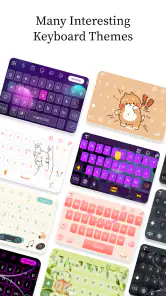
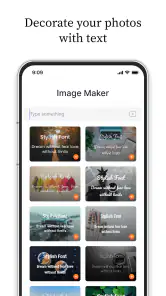
I use Font Keyboard: Text Fonts+ as a quick way to give short bits of writing a different look, rather than as a replacement for the keyboard I use for everything. That distinction matters: it is most useful when a caption, greeting, or profile line needs a little personality, while ordinary messages still benefit from plain, easy-to-read text. The app is free to start, and its focus on fonts, emojis, stickers, GIFs, and keyboard themes makes it a personalization tool for people who enjoy shaping how their words appear.
A simple routine for styled text
For a first try, I would keep the task small: open a message or post I was already planning to write, choose one short phrase to style, and compare it with the plain version. That makes it easier to tell whether the font adds character or merely makes the words harder to scan. There is no need to redesign every message to get value from a decorative keyboard.
I also think about the reader and the screen. A playful greeting to a friend can handle more visual flair than a delivery instruction or a note with a date and address. If the text needs to be understood quickly, I leave the essential details in ordinary characters and use a font effect only as an accent. That habit preserves the point of the message even when a recipient’s device renders a stylized character differently.
Making a distinctive style practical
My most reliable workflow is to decide where the text will go before choosing a style. For a social post, I try a decorative font on the opening phrase, then keep the rest straightforward. A full paragraph in ornate characters can become tiring to read, and some stylized letters may be less convenient to search, copy, or understand at a glance. Using the effect selectively gives me the visual accent without making the message harder to follow.
Unleashing Your Creativity with Fonts
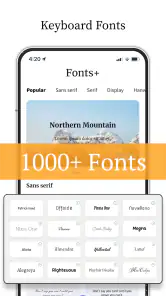
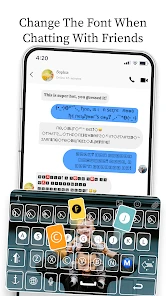
So, the first thing that caught my eye was the sheer variety of fonts available in Font Keyboard: Text Fonts+. We're talking about hundreds of different styles! Whether you're feeling quirky, elegant, or just want something that screams "look at me," there's a font for every mood and occasion. I found myself spending way more time than necessary just scrolling through the options because, let's be honest, who doesn't love a good font?
There is a practical way to keep that browsing from taking over. I choose a style that fits the purpose, test it in the actual destination, and then stick with it for the post rather than changing fonts line by line. That quick check is especially useful for names, hashtags, and short calls to action: decorative characters can look attractive in the editor but feel less clear in a small preview. For a creator who posts regularly, a consistent accent style can also make captions feel intentional without turning every sentence into a design experiment.
For repeat use, I would make a small personal rule rather than chase a new look each time: perhaps one style for a celebratory greeting and another for a short social heading. The benefit is not that the app creates a complete brand identity; it is that choosing from a familiar handful of options becomes quicker. I would still review each phrase in context, since a style that works for a two-word heading may become tiring across a longer caption.
More From Our News Desk

Weather by Xiaomi Review: Clear at a Glance, Less Clear Up Close

X Under Pressure: Can It Recover When Posting Goes Wrong?

Clash of Clans Is Won Between the Battles

Android Auto Makes the Case for Quieter Car Software

MobiOffice: Transforming Mobile Productivity with Seamless Integration

EA SPORTS FC™ Mobile Soccer: Redefining Mobile Sports Gaming
Settings and choices worth checking
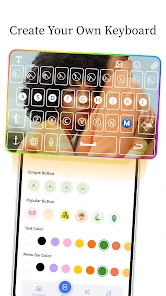
Now, what's a great font without some customization, right? The app lets you tweak things to your heart's content. You can adjust the size, color, and even add cool effects to your text, making every message you send uniquely yours. It's super easy to switch things up, and the user interface is as friendly as your grandma's apple pie.
Before settling on a look, I would check which options are available without paying and try the keyboard in the places I actually write. The app is free, while in-app purchases range from $0.99 to $40.99 per item, so it is sensible to explore the no-cost selection first instead of assuming a paid option is necessary. The developer is Fonts, Emojis & Symbols Studio, and the app is rated Everyone; it suits casual creative use, but I would still choose readable text for anything important, such as instructions or a time-sensitive message.
One useful check is whether a chosen size and effect remain legible in the destination app’s preview, not just in the keyboard interface. Small screens and compact profile fields can make decorative details feel crowded. I would also keep color choices restrained when the text itself is already unusual; stacking several visual treatments can make a short phrase look busy rather than distinctive. These are judgment calls, not settings everyone needs to change, but checking them early can save editing a post after it has been pasted.
The keyboard is most appealing when I want the styling available while composing, but that convenience comes with a practical trade-off: I need to be comfortable using a separate keyboard for those moments. Someone who switches constantly between languages, relies on a carefully tuned typing setup, or dislikes changing input methods may find that interruption outweighs the decorative options. I would try it for a specific task first instead of making it the default for every conversation.
Faster patterns for everyday use
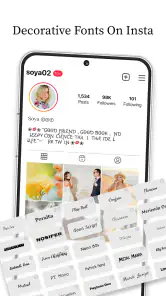
One of the standout features of this app is how smoothly it integrates with other platforms. Whether you're texting, posting on Instagram, or sending out a tweet, Font Keyboard: Text Fonts+ works effortlessly. I didn't experience any lag or issues, which is a big win in my book. It's nice not having to worry about compatibility hiccups when you're trying to impress with your fancy new fonts.
In everyday use, I would treat compatibility as something to check per destination rather than assume every app displays every decorative character identically. A useful habit is to send a test to yourself or preview a draft before publishing, particularly when the text includes a handle, a link written out as plain text, or several emoji. That small step helps catch awkward spacing or a style that looks too dense on a phone screen. The keyboard approach is handy for composing directly in another app; a separate font editor may be a better fit for someone who wants to design a polished graphic rather than type styled text.
A realistic example is preparing a last-minute invitation in a group chat. I would give the opening line a bit of personality, then type the location and timing plainly so nobody has to decode the important parts. Before sending, I would check the message as it appears in the chat rather than rely on the keyboard’s selection view. This is a fast routine, but it also limits the risk that a decorative alphabet makes a practical detail confusing.
For people who post often, the quickest workflow is to separate composing from polishing. I would first write the message normally, decide which single phrase deserves emphasis, then apply a style and read the result once as a recipient. That avoids getting caught in a loop of trying fonts before the wording is settled. It is especially useful for captions, where changing the styling can distract from noticing a typo or an unclear sentence.
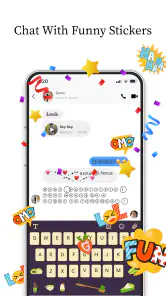
Emojis, stickers, and GIFs can make the keyboard feel like a broader creative kit, but I would not treat every available visual element as something that belongs in every post. A sticker or GIF is more suited to expressive, informal exchanges; a font accent may be enough for a profile line or announcement. Keeping each tool tied to a clear purpose makes the result feel deliberate and prevents a message from becoming cluttered.
Where the app’s limits matter
Ah, the age-old question—do you really need to go premium? Well, the free version of the app gives you access to a decent selection of fonts and customization options, but if you're someone who constantly wants more (like me), the premium version unlocks the entire library. It's worth considering if you find yourself using the app a lot and want that extra bit of pizzazz in your texts.
I would make that decision based on a repeatable need, not a burst of enthusiasm after browsing. If I regularly use a particular style for shop announcements, community posts, or invitations, paying for extra choice may be worthwhile; if I only want an occasional novelty caption, the free version is the sensible place to stay. The app has an average rating of 4.1 from around 68,000 ratings, and more than 10 million installs, which suggests it has found a broad audience, though those figures cannot tell me whether its specific styles suit my own taste.
Decorative text is not the best tool for every audience. Some people use assistive technology, copy text into search, or simply prefer familiar letterforms; unusual characters can create friction for them even when the message looks attractive to the sender. For a public notice, work instruction, or anything someone may need to search later, I would prioritize ordinary text. For a playful caption or a casual greeting, the readability trade-off is easier to accept.
There is also a difference between styling text and designing a finished image. This keyboard is convenient when the words themselves are going into a text field. If I needed precise placement, a carefully composed background, or a finished graphic for a campaign, I would reach for a dedicated design app instead. Conversely, opening a full editor just to give a short greeting a different look feels like unnecessary work; this is where a keyboard-based tool earns its place.
Compared with a phone’s standard keyboard, this app puts visual customization closer to the moment of writing, so I do not have to prepare every phrase in a separate design app. The trade-off is that a standard keyboard remains the simpler choice for speed, accessibility, and long everyday conversations. Its current version is 6.6.30, it runs on Android 5.0 and newer, and it was released on July 28, 2020. Those details make it easier to judge basic compatibility, while my main recommendation remains to test a few styles in the apps where I actually plan to use them.
That comparison also explains why I would not replace a familiar keyboard just for novelty. Standard keyboards are dependable for long replies and routine typing; a font-focused option is more compelling when appearance matters enough to justify a different input habit. Some users may prefer copying styled text from a separate tool, especially if they only make graphics occasionally. I find the direct keyboard workflow more natural for short messages, but it is a convenience choice rather than a universal improvement.
Who will get the most from it
For a realistic routine, I might draft a short event announcement, choose one eye-catching heading, and keep the date and practical details in ordinary text. I would then check the final result in the social app before posting. This gives the design some character without hiding information people need. Anyone who wants custom keyboard themes and decorative text for occasional creative moments is likely to enjoy that workflow; someone who values a uniform, highly legible keyboard above all else may prefer to leave their usual setup untouched.
I can see the strongest fit for people who regularly write short, informal text and enjoy changing its appearance: social posters, friends who send playful greetings, and anyone who likes tailoring a profile line. The app is free to try, is available to an Everyone audience, and has attracted more than 10 million installs. That reach makes it a familiar kind of personalization tool, but the right test is still whether its styles suit the places and people I write to.
It is a weaker match for someone who mainly types long work messages, needs every character to remain conventional, or expects a keyboard to improve writing speed. It also may not suit a person who prefers to avoid switching keyboards at all. In those cases, a standard keyboard is likely the more comfortable daily choice, and a dedicated graphics app is better for detailed visual layouts. I would install this for a specific creative use, not out of an expectation that every text conversation needs decoration.
For Android users, the minimum supported system is Android 5.0, so checking the device’s version is a straightforward first step before installing. The app’s current version is 6.6.30. I would then spend a few minutes testing a font in a low-stakes message and a social draft, rather than immediately changing how I type everywhere. That trial reveals whether the keyboard fits a real routine and whether the recipient-facing result is as clear as it looks while composing.
In conclusion, Font Keyboard: Text Fonts+ is a fantastic tool for anyone looking to spice up their digital communication. It's fun, easy to use, and adds a touch of personality to your messages. Whether you're using it for personal fun or professional branding, it definitely delivers on its promise of making your text look amazing. Give it a try and let your creativity run wild!
My more measured recommendation is to treat it as a creative extra, not a complete replacement for ordinary typing. Start with one short phrase, see how it looks after sending or previewing it, and keep essential information plain. If that small change makes your captions or greetings feel more like you, the app has a clear role; if it slows down routine typing or makes text harder to read, there is little reason to force it into your daily setup.
Font Keyboard: Text Fonts+ Frequently Asked Questions
Can I use Font Keyboard: Text Fonts+ in messaging and social apps?
Font Keyboard: Text Fonts+ is designed to help create messages and other content using decorative fonts, emojis, stickers, GIFs, and keyboard themes. You can use its keyboard while composing text in apps where your device allows you to switch keyboards. The visual result may depend on the app and how it displays characters, so it is worth checking how your preferred styles look in the places you post or chat.
Will messages written with Font Keyboard: Text Fonts+ look the same on every device?
Not necessarily. Some font effects use special characters, and the way those characters appear can vary between devices, operating systems, and individual apps. A style that looks distinctive while you are typing may display differently for the person receiving it. If presentation matters, send a quick test message or preview the text in the destination app before using a decorative style for something important.
Can I switch back to my regular keyboard after setting it up?
Yes. Font Keyboard: Text Fonts+ is an additional keyboard, rather than a replacement that prevents you from using your device’s other keyboards. After setup, you can switch between available keyboards using your device’s keyboard controls. This is useful if you want to use the app for expressive messages but prefer your regular keyboard for other tasks. The precise switching steps depend on your device.
Is Font Keyboard: Text Fonts+ suitable for children?
The app has an Everyone content rating, and its focus is keyboard personalization with fonts, emojis, stickers, GIFs, and themes. That rating can help families decide whether the general content is suitable, but parents may still want to review the app’s options and purchases with younger users. As with any keyboard app, consider your family’s preferences before enabling it for typing across other apps.
What should I check before enabling Font Keyboard: Text Fonts+?
Before enabling a third-party keyboard, take a moment to review the setup prompts and the permissions your device displays. Keyboard apps handle text input, so it is sensible to understand the access requested and enable only what you are comfortable with. You can also keep your regular keyboard available and use Font Keyboard: Text Fonts+ when you specifically want its decorative fonts and creative extras.
Pros
- Wide variety of fonts available.
- Easy integration with social media.
- User-friendly interface.
- Customizable keyboard layout.
- Quick installation process.
Cons
- Contains in-app purchases.
- Limited free font options.
- Occasional ad interruptions.
- Requires iOS 12.0 or later.
- No support for Android devices.
- Category
- Personalization
- Version
- 6.6.30











