Fomz
- 171.00
- 4.4
- Installs
- 10.00M
- Price
- Free

Screenshots
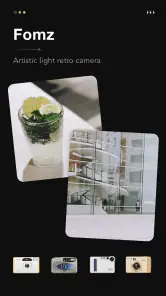
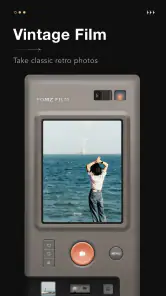
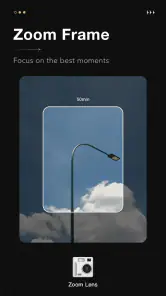
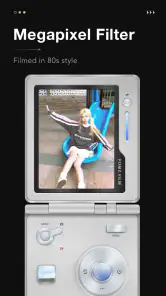
Analysis by Reviewed
I usually reach for a camera app when I want a photo to feel like the moment, not just record it. That’s where Fomz makes sense: it gives ordinary phone pictures a retro, expressive look rather than trying to be an all-purpose editing suite. I’d treat it as a creative choice for shaping a mood, not as a replacement for every camera or photo editor on my phone.
Begin with the scene, not the filter
Before opening a filter menu, I’d decide what I want someone to notice first. A cup of coffee, a familiar street corner, and a friend’s expression all ask for different treatment. Fomz is most convincing when its vintage character supports the subject instead of becoming the subject itself. I’d take a moment to check the background and framing first, because a nostalgic finish can’t simplify a cluttered scene after the fact.
That starting point is useful if you’re wondering whether the app suits your camera habits. If you like taking a quick picture and leaving it untouched, a standard camera may be enough. If you enjoy choosing a visual mood afterward, Fomz gives that choice a clear purpose. I’d think of it as a second stop in a photo routine: capture the moment normally, then bring selected images here when they could benefit from a more expressive finish.
Start with the kind of photo you want
Fomz is a free photography app from MagicDmStudio, and its focus on vintage-style images is apparent from the first editing decision: you’re choosing atmosphere as much as appearance. If I’m taking a quick picture of a coffee, a rainy window, or friends around a table, I can see the appeal of giving it a film-inspired finish instead of polishing away every imperfection. Its 4.4 average from around 66,000 ratings suggests it has found an audience, though whether its look suits you is a personal call.
The app is rated for Everyone, and it has been available since May 5, 2022. It has passed 10 million installs, but popularity alone doesn’t tell me whether a particular filter will work on my photos. I’d start by thinking about the light and colors in the original image: a soft, simple scene may leave room for a nostalgic effect, while a busy, high-contrast shot can become visually crowded once texture and light effects are added.
From capture to a finished image
I’d treat the move from a camera roll to a finished image as a small selection process, not an automatic makeover: choose a photo with a clear subject, test a restrained treatment, then compare it with the untouched version before sharing. That makes it easier to see whether the added mood helps the moment or merely decorates it. The next section looks at how to make those choices deliberately.
Choose a look, then keep the edit intentional
So, what is Fomz all about? Imagine an app that combines the whimsical charm of vintage photography with the ease of modern technology. It's a photo editing app that feels like a playground for your photos. You know those moments when you look at an old photo and feel a wave of nostalgia? That's the kind of vibe Fomz is aiming for, and it nails it.
More From Our News Desk

Weather by Xiaomi Review: Clear at a Glance, Less Clear Up Close

X Under Pressure: Can It Recover When Posting Goes Wrong?

Clash of Clans Is Won Between the Battles

Android Auto Makes the Case for Quieter Car Software

MobiOffice: Transforming Mobile Productivity with Seamless Integration

EA SPORTS FC™ Mobile Soccer: Redefining Mobile Sports Gaming
Features That Make You Go "Wow!"
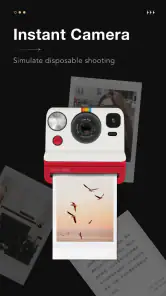
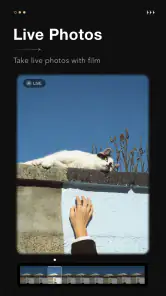
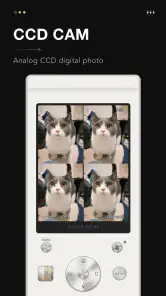
Let's dive into the features, shall we? First off, the app offers a plethora of filters that are inspired by classic film cameras. If you've ever wanted your photos to have that timeless, cinematic feel, Fomz has got your back. The filters are not just slapped on; they are meticulously crafted to give each photo a unique touch.
One of the coolest features is the ability to add light leaks and dust effects to your images. It gives your photos that "straight out of a retro album" look. Plus, the app interface is so user-friendly that even if you're not tech-savvy, you'll find yourself navigating through it like a pro.
Small choices that change the final look
I’d treat the effects as a set of separate visual decisions rather than a single “vintage” switch. If a frame already has bright highlights, a light leak may pull attention away from the subject; if it is a plain wall or a quiet sky, dust can add interest without obscuring much. When I want a coherent set of pictures, I’d keep the same general mood but vary how strongly I use texture. That gives an album a family resemblance without making every frame look like a duplicate.
Another practical habit is to review a picture at the size where it will actually be seen. On a phone screen, a little grain or dust may feel atmospheric; enlarged, the same detail may compete with a face or a line of text. For a social post, I’d prioritize a readable subject and a strong thumbnail. For a print, I’d zoom in before settling on the treatment, since the app’s high-resolution output makes close inspection especially worthwhile.
My practical tip is to decide what should stay important in the frame before adding those effects. A light leak can draw the eye toward an edge and dust can soften a clean surface, but both can compete with a face, sign, or small detail. I’d make a copy of a photo first if I want to compare a restrained treatment with a more dramatic one, then choose the version that still tells the story clearly.
Where it fits in a daily photo routine
Picture a small everyday workflow: I take a picture of a friend’s dessert during lunch, pick a film-like treatment, and check whether the color still makes the food look appetizing. If it does, I save that version for a casual message or social post; if the effect overwhelms the subject, I return to the original rather than forcing the retro look. That quick comparison is more useful than applying the strongest effect by default.
For a more involved day, I can imagine using it after a walk or a short trip. I’d first sort through the pictures and choose only the handful that share a mood, rather than editing every frame automatically. A couple of street details, a window reflection, and one portrait could make a compact visual diary. This approach also makes it easier to notice when a filter is helping: if every image gets the same treatment simply because it is available, the style can flatten the differences between scenes.
This is also where Fomz differs from the usual all-purpose photo editor. A general editor is usually the better stop when I need precise corrections, a clean natural finish, or several kinds of adjustments in one place. Fomz is more appealing when I already know I want character and texture. I wouldn’t use it for every picture in a batch, because a consistent vintage treatment can make unrelated scenes feel repetitive.
Passing the image on
After editing, I’d decide where the picture is going before I call it finished. A version meant for a friend’s message can be more playful than one I plan to print or keep as a record. If I’m sharing a group of images, I’d compare them together rather than judging each in isolation; that makes differences in color and intensity easier to spot. It’s a simple handoff check, but it helps a collection feel intentional instead of like a stack of unrelated filter experiments.
If the picture is important as documentation—for example, a menu, a receipt, or a notice—I would keep an unstyled original easy to find and avoid making the edited version the only copy I rely on. The same applies to family photos I may want to revisit later: a creative treatment can be fun, but preserving a straightforward version gives me flexibility if my taste changes. Fomz is a finishing tool for mood, not a reason to give up a useful original.
Handoffs, output, and practical limits
The app supports high-resolution image output, which is helpful if I plan to print a favorite rather than keep it only on a screen. Before sharing or printing, I’d inspect the image at a larger size: a texture that looks charming in a small preview may distract when the picture is viewed closely. Fomz also has a community where users can share creations and find inspiration, so browsing other people’s work can help me notice different ways to use the effects without treating every example as a template.
There are trade-offs to keep in mind. The app’s strongest identity is also its main limitation: if I want neutral colors or a subtle correction, a standard camera editor may be quicker and more suitable. A stylized filter can’t rescue an awkward crop or poor lighting, so I’d frame carefully and take advantage of good natural light before editing. The current version is 1.2.6 and requires Android 7.0 or later; on iOS, I’d check the relevant store page for device compatibility before installing. The app is free to start, with in-app purchases ranging from $1.99 to $9.99 per item, so I’d explore the available options before assuming every look is included at no cost.
Who will enjoy it—and who may prefer another tool
I’d recommend Fomz to someone who likes deliberate, imperfect-looking images and wants an easy way to give snapshots a recognizable mood. It can be especially enjoyable for a small travel diary, a set of café pictures, or a themed album where a shared visual style matters more than exact color accuracy. If I’m documenting a product, copying text from a notice, or editing a photo that needs to look true to life, I’d choose a more neutral tool instead.
It also makes sense for someone who wants a low-pressure creative routine rather than a long editing session. I’d use it for a few chosen images after a day out, then stop once the pictures feel connected. Someone managing a large work archive, correcting exposure precisely, or needing repeatable technical adjustments will probably be happier with a general-purpose editor built around those tasks. The point is not that one approach is better for every photo; it’s that Fomz has a narrower, more characterful role.
For a first try, I’d choose one well-lit photo with a clear subject and one more atmospheric frame, such as a rainy street or a dim café table. The contrast between them quickly shows whether the app’s visual style works with the kinds of images you actually take. If you only like the result on one of those, that’s still useful: it tells you to reserve the app for the right moments rather than expecting it to become your default camera workflow.
That distinction also answers the question of whether it can replace a regular camera app: I wouldn’t count on one creative style covering every situation. I’d keep my usual camera or editor for dependable everyday shots and bring Fomz in when the image benefits from a nostalgic finish. Since the app is free with optional purchases, trying that role for a few photos is a low-commitment way to decide whether its visual language clicks with me.
Why You Should Give It a Shot
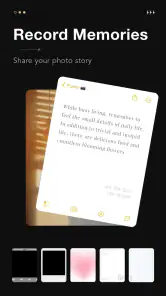
Now, you might be wondering, "Do I really need another photo editing app?" Trust me, I had the same thought. But after using Fomz, I can honestly say it's worth a try. What sets it apart is the emotional connection it creates with your photos. It's not just about editing; it's about storytelling and bringing your memories to life.
The app also supports high-resolution image output, so your prints will look just as stunning as they do on your screen. And let's not forget the community aspect of Fomz. You can share your creations with other users, get inspired by their works, and maybe even make some new friends along the way.
Final Thoughts
In a world flooded with apps, Fomz stands out with its blend of creativity, nostalgia, and community. It's like having a little piece of art studio right in your pocket. So, if you're looking to add a dash of magic to your photos, this app is definitely worth checking out. Who knows, it might just become your new favorite pastime!
So go ahead, download it, and let your creativity run wild. Happy editing!
Fomz Frequently Asked Questions
Can I use Fomz without creating an account?
Fomz is a photography app centered on creating images with an artistic, retro look. If you prefer to try a camera app before committing to a profile, check the sign-in options when you first open it and see whether the features you want are available without an account. You can also review the app’s access prompts before deciding what to allow.
Is Fomz available on both Android and iOS?
Fomz is a photography app, but its stated minimum operating system requirement is Android 7.0, so check that your Android device meets it before downloading. If you use an iPhone or iPad, confirm that Fomz is offered for your device in its app store before planning to use it there. Store availability and compatibility can differ between platforms.
What devices can run Fomz?
Fomz is a photography app for Android, with a minimum operating system requirement of Android 7.0. Before downloading, check your device’s software version and available storage so you can install and use the app comfortably. Fomz is listed as suitable for everyone, making it an option for a broad range of users interested in experimenting with camera effects.
Who makes Fomz, and is it a popular app?
Fomz is developed by MagicDmStudio and is presented as an artistic light retro camera. It has over 10 million installs and a 4.4 average from around 66,000 ratings, so it has attracted a sizable audience of photography fans. Those figures can help set expectations, but the best way to decide whether its creative style suits you is to explore its camera and editing options.
What is Fomz and what does it do?
Fomz is a creative camera application designed for both Android and iOS devices. It offers a variety of filters, effects, and editing tools that allow users to enhance their photos and videos with a unique and artistic flair. The app aims to transform ordinary moments into memorable visual stories by providing an array of customizable features that cater to both amateur and professional photographers.
Pros
- User-friendly interface for easy navigation.
- High-quality photo editing tools.
- Wide range of filters and effects.
- Supports multiple photo formats.
- Seamless social media sharing.
Cons
- Limited free features.
- Occasional in-app ads.
- Requires internet for some features.
- May consume significant battery.
- No video editing capabilities.
- Category
- Photography
- Version
- 1.2.6











