FNBT & FCB Mobile
- 17.44K
- 4.7
- Installs
- 1.00M
- Price
- Free

Screenshots
Analysis by Reviewed
For me, the value of a banking app shows up in small moments: checking a balance before a purchase, taking care of a bill without making a separate trip, or keeping an eye on money while away from home. FNBT & FCB Mobile is a free finance app from FIRST NATIONAL BANK TEXAS, built around those everyday tasks. Its audience is fairly specific: it makes the most sense if you already bank with FNBT or FCB and want a phone-based way to handle routine account activity, rather than a replacement for every in-person banking need.
Making mobile banking work in everyday situations
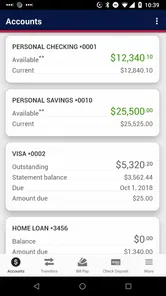
The app’s stated focus is practical banking, and the familiar basics give a new user a clear starting point. In my view, the most useful habit is to check the balance before moving money or paying a bill, then pause to confirm the destination and amount before completing the action. That extra check is simple, but it helps prevent the sort of avoidable mistake that is harder to sort out on a small screen.
On a typical day, I might check an account before buying groceries, pay a bill later when I have a quiet moment, and use mobile check deposit rather than arranging a branch visit. That is where a bank-specific app can be more convenient than a generic budgeting tool: it is meant for account tasks, not just a view of spending. It is less useful if you want one app to pull together accounts from several unrelated banks or to provide a broad financial planning workspace.
Readability and navigation
Setting up the app is as easy as pie. Once you download it from your app store, the user-friendly interface guides you through a simple registration process. Just a few taps, and you’re all set to explore its features.
That straightforward start is helpful, but I would still plan the first session rather than trying to register while distracted or in a hurry. Have your banking details and phone ready, and take time to read each prompt before moving on. A calm setup is especially useful for anyone who finds small screens tiring or needs extra time to process instructions. I would also do a low-stakes first visit—look around and check an account—before attempting a payment or transfer.
For someone who relies on larger text, screen magnification, voice input, or a screen reader, the practical question is not whether the app looks simple in a general sense; it is whether the individual steps remain clear with the phone settings they use. I’d test sign-in, finding the balance, and reaching a confirmation screen before depending on the app for a deadline. If a display setting makes a button or instruction difficult to locate, using the bank’s other support routes may be more comfortable than repeatedly trying to navigate by guesswork.
Everyday tools, with a little care
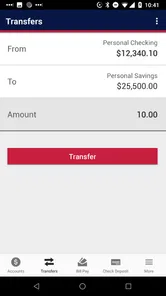
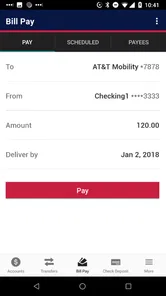
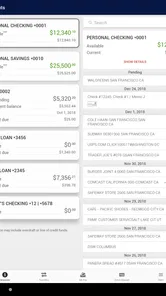
What I find absolutely fantastic about this app is its broad range of features. From checking your account balance to transferring funds, it covers all the basics. But that’s not all—oh no! You can also pay bills directly from the app. This is incredibly handy, especially when you’ve got a busy lifestyle like mine.
More From Our News Desk

 Bolt: Request a Ride
Bolt and the Shift from One-Tap Rides to More Legible Trips
Bolt shows how ride-hailing is shifting from a one-tap taxi request toward a more legible, choice-driven trip, while leaving the hardest questions of price and reliability unresolved.

 Farm Land - Farming life game
Farm Land Review: A Small Island Farm with a Satisfying Loop
A bright, breezy island farm turns a few quick chores into a satisfying cycle of planting, harvesting, expanding, and deciding what to build next.

 Android Auto
’s Community Takes Shape in the Passenger Seat
Its most valuable network is not a public feed but a shared set of routes, voice habits, app integrations, and advice that make driving less isolating—and sometimes more complicated.

 My Talking Angela
 Makes the Virtual Pet Feel Personal
A polished pet-raising game built on small rituals, playful customization, and a character who gives everyday screen time a surprisingly personal rhythm.

 Google Translate
 Review: A Pocket Tool for the Small Frictions of Travel
From menus and signs to quick conversations, Google Translate earns its place by cutting the little delays that make unfamiliar language feel like a barrier.

 Shazam: Find Music & Concerts
Shazam’s Best Trick Is Turning a Song Into a Night Out
A few seconds of recognition can settle an argument, rescue a half-remembered chorus, and point toward a live show. Shazam’s real trick is what happens after the match.
Latest News



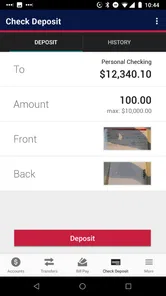
Another feature worth mentioning is the ability to deposit checks using your phone’s camera. Yep, you heard that right! No more rushing to the bank during your lunch break. Just snap a picture, and you’re good to go.
For a smoother check-deposit routine, I would choose a bright, steady spot, lay the check flat, and review the captured images before submitting. This is a useful option when getting to a branch is inconvenient, but it does not make every check situation effortless: taking a readable photo still depends on the phone, lighting, and careful framing. I would keep the check until the deposit appears as expected, rather than treating the camera step as proof that the process is complete.
There is a practical trade-off here: a phone deposit can save a trip, but it asks you to manage image quality and verify the result. If the camera struggles to focus, the check is difficult to position, or you are not confident the images are legible, it is better to pause and use another banking route than submit a questionable capture. I would also avoid leaving the task until the last possible moment; taking a little extra time lets you confirm what happened without adding pressure.
Motor and sensory considerations
Banking involves more than reading screens. Small touch targets, hurried taps, glare, or a busy environment can make a transfer or payment harder to complete accurately. I’d handle sensitive tasks somewhere calm, use the phone’s own display and input settings if they help me, and avoid rushing through confirmation screens. Those are sensible precautions, not a claim that the app has a particular accessibility certification or a specific set of accessibility controls.
The app may suit people who prefer handling familiar tasks on a phone, including those who find a branch trip inconvenient. But if you have difficulty with touch interaction, need a very specific screen-reading experience, or cannot comfortably use the phone’s camera, test the essential steps before relying on it. A branch or direct assistance from the bank may be a better fit for tasks that are difficult to complete independently on a mobile screen.
For users with limited dexterity, a useful routine is to complete one action at a time and stop at the final review screen long enough to check the details. That matters most for transfers and bill payments, where a mis-tap can have consequences beyond a clumsy navigation moment. If using a stylus or a phone’s built-in accessibility settings makes touch more manageable, those may help, but I would not assume they solve every interaction. The best test is completing a modest, familiar task without strain before trusting the app with a more urgent one.
Sensory context matters too. A bright outdoor setting can make screen details harder to inspect, while noise or interruptions can make it easy to lose track of which account or recipient is selected. I would save anything involving money for a place where I can focus, rather than trying to squeeze it into a crowded queue or a noisy commute. The app’s convenience is most valuable when it reduces effort, not when it encourages hurried decisions.
Situational access and choosing the right route
The strongest case for a bank-specific mobile app is having routine access when a branch visit is inconvenient. Imagine checking your balance before picking up groceries, then paying a bill at home after you can sit down and concentrate. Keeping those steps in one place can be easier than delaying them until a trip to a branch. For a customer already comfortable using a phone, that can make ordinary account management fit around work, caregiving, or travel.
It is not automatically the best choice for every situation. A phone with little battery, unreliable connectivity, or a screen that is hard to use can turn a quick task into a frustrating one. I would not wait until the final minutes before a due date to learn how a payment flow works, and I would keep a non-mobile option in mind for situations where access to the phone is uncertain. Mobile access is a useful route, not a reason to make every banking task depend on one device.
Compared with a branch, the app is better suited to routine checks and actions you can complete independently; the branch remains useful when a task needs conversation, documents, or hands-on help. Compared with a general-purpose money tracker, this app is more directly tied to banking actions, while a broader financial tool may be a better fit for someone who wants to view several institutions together or focus on budgeting across them. I would choose based on the job at hand rather than expecting one app to replace every financial tool.
That distinction also helps answer a common question: should someone install it if they are not an FNBT or FCB customer? I would not choose it as a general budgeting app. Its natural audience is people who already use those banks and want a mobile route to their banking tasks. If your priority is seeing balances from unrelated institutions in one place, a service designed for that broader view is likely more appropriate.
Security and support in context
I know what you might be thinking—how secure is mobile banking? The app developers have clearly put a lot of thought into this. With biometric logins and multi-factor authentication, your funds are as secure as Fort Knox. I feel confident knowing my financial information is well-protected.
I would still treat security as a shared responsibility: keep the phone protected, avoid entering banking details when someone can see the screen, and check the recipient before confirming a transfer. For a banking app, convenience should never mean tapping through a prompt without understanding it. If you are using a shared or borrowed device, a personal phone or another bank-approved route is the more prudent choice.
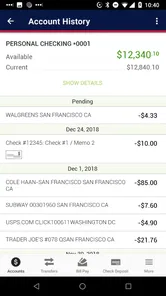
In daily use, I would make a habit of checking the account activity after an important payment or transfer, especially if I had to stop partway through. This is not needless caution; it helps distinguish an action that was completed from one that still needs attention. If the screen freezes or the outcome is unclear, checking first is wiser than immediately repeating the transaction. That small pause is particularly valuable when using the app while distracted or under time pressure.
Help when a task gets stuck
Ever had an issue with an app and felt like you were talking to a wall? Not with this one! The customer support team is responsive and super helpful. Whether it’s a technical glitch or a simple query about your account, they’ve got your back.
For anything time-sensitive, I would not assume that an in-app action has gone through just because I tapped the button. I’d look for a clear confirmation and check the account activity before trying again; repeating a payment without checking could create confusion. If a task remains unclear, contacting the bank is more sensible than guessing, especially when it involves a transfer or a deposit.
If you are new to mobile banking, start with a task that is easy to verify, such as checking a balance, before moving on to bill payment or a check deposit. That gives you a chance to learn where the key details and confirmations appear without adding the pressure of a deadline. If you already know how the bank handles your account in other settings, the transition may feel more familiar; if not, asking the bank about a confusing step is better than relying on assumptions.
Who will get the most from it?
The app is a natural option for existing FNBT and FCB customers who want to check balances, move funds, pay bills, and handle eligible checks from a phone. Compared with visiting a branch for each routine task, mobile banking can save time; compared with a general budgeting app, it is oriented toward acting on bank accounts rather than simply organizing a household budget. If you are not a customer of these banks, or your main goal is to track accounts across multiple institutions, another service may suit you better.
Its broad adoption is reflected in a 4.7 average from around 45,000 ratings, and it has passed one million installs. The app is free, rated for Everyone, and is developed by FIRST NATIONAL BANK TEXAS. It first appeared on April 27, 2020, and version 2025.10.1 lists Android 10 as the minimum operating system. I’d check that your phone meets the requirement before installing, then make sure the app fits the tasks you actually need rather than choosing it just because mobile banking sounds convenient.
For an existing customer, the decision is less about whether mobile banking is useful in theory and more about whether the phone is a comfortable place to perform the tasks they repeat. If checking balances and paying familiar bills are the main needs, the app has a clear purpose. If you need a single dashboard for many banks, prefer a larger screen, or want help walking through a complicated matter, another route may feel more suitable. Choosing the right channel for each task is a sensible way to use it.
In a nutshell, the FNBT & FCB Mobile app is a reliable companion for anyone looking to manage their finances efficiently. It’s packed with features that cater to both tech-savvy users and those who prefer simplicity. So, if you’re still on the fence about mobile banking, give this app a try. I promise, you won’t regret it!
FNBT & FCB Mobile Frequently Asked Questions
Who develops FNBT & FCB Mobile?
FNBT & FCB Mobile is developed by FIRST NATIONAL BANK TEXAS and is intended for banking on the go. Before downloading, consider whether you are a customer of the institution and want to manage banking tasks from a mobile device. The app’s usefulness depends on whether its banking services fit the way you prefer to handle your accounts.
What should I check before installing FNBT & FCB Mobile?
Check that your device runs a compatible operating system and that you are downloading the official FNBT & FCB Mobile app. The app is free to download, but you will need to use the banking service it supports to make practical use of its tools. Keeping your device’s software current can also help with installation and day-to-day use.
Is FNBT & FCB Mobile free to download?
FNBT & FCB Mobile is a free finance app from FIRST NATIONAL BANK TEXAS. It is intended for customers who want to handle banking tasks on the go, rather than pay to download the app. Before installing, make sure your device meets its operating-system requirement and that you are choosing the official app, so you can access your banking through the intended service.
Which devices can run FNBT & FCB Mobile?
The app requires Android or iOS version 10 or later, so check your device’s operating system before downloading. Keeping your device and the app updated can also help you use its banking tools reliably. If your phone or tablet is running an older system, updating the operating system may be necessary before you can install or use FNBT & FCB Mobile.
Who is FNBT & FCB Mobile for, and what does it do?
FNBT & FCB Mobile is a finance app developed by FIRST NATIONAL BANK TEXAS for banking on the go. It is designed for customers who want to manage everyday banking from a phone, with tools for checking accounts and carrying out common transactions. Its usefulness will depend on whether you bank with the institution and want to handle those tasks digitally.
Pros
- User-friendly interface with intuitive navigation.
- Robust security features for secure transactions.
- Quick and easy bill payments.
- Seamless integration with other bank accounts.,24/7 customer support available.
Cons
- Occasional app crashes and glitches.
- Limited customization options for alerts.
- Some features require high-speed internet.
- Delays in transaction notifications.
- Limited language support.