Fluzy: Learn Language with AI
- 79.00
- 4.6
- Installs
- 5.00M
- Price
- Free

Screenshots

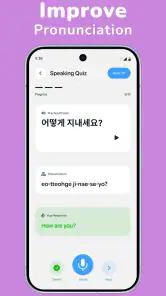
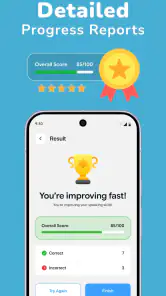
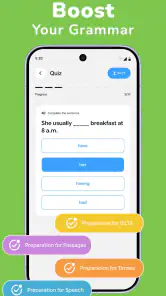
Analysis by Reviewed
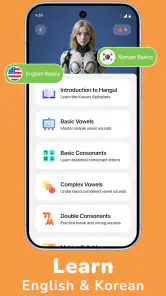
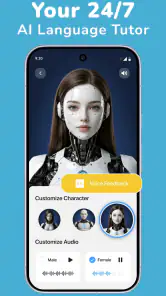
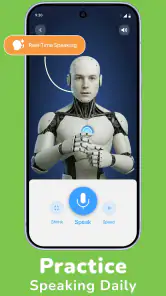
The first thing I would do with Fluzy is resist the urge to treat it like a magic shortcut. It is an education app for language learners, developed by Mall Collections, and its appeal is the chance to combine AI conversation with speaking practice and lessons. That mix can make study feel more active than tapping through vocabulary cards, but it works best when I arrive with a small, clear goal: practise a greeting, rehearse a travel question, or explain what I did today. Without that focus, an open-ended chat can be pleasant without giving me much to remember.
Getting past the first-session friction
Fluzy: Learn Language with AI is free to download, though in-app purchases range from $7.99 to $199.99 per item. I would check the purchase details before committing to anything: a free starting point does not mean every part of a longer learning routine is free. The app is rated for Everyone, and its minimum operating-system requirement is version 8.0, so it is worth checking that a device meets that baseline before troubleshooting a launch problem.
Starting a language-learning app can involve a few decisions that seem minor but shape the experience: which language to study, how much time to give it, and whether I want to begin by reading, listening, or speaking. My practical advice is to choose one immediate use case rather than trying to set up a grand study plan on day one. If I am learning for an upcoming trip, I would start with a short exchange I might actually need. If I am brushing up for work, I would pick a routine introduction or a common question.
AI conversation can feel less intimidating than speaking with a person, but it can also leave a beginner unsure what to say next. I find it useful to prepare a prompt in plain language before opening a practice session: “I’m ordering coffee,” for example, or “Help me introduce myself.” Then I can pay attention to one thing at a time, such as forming a question or remembering a useful phrase. That is more manageable than trying to judge pronunciation, grammar, vocabulary, and fluency all at once.
The app’s public reception is encouraging without being a substitute for a personal test: it has a 4.6 average from around 25,000 ratings, and more than 5 million installs. Those figures suggest that many people have tried it, but they cannot tell me whether its teaching style suits my level or learning habits. I would use the first sessions to decide whether the conversation format helps me practise consistently, rather than assuming a popular app must fit everyone.
Small setup checks that save time
If a lesson or conversation does not behave as expected, I would first check the basics rather than immediately blaming the learning content. Confirm that the app is fully installed, that the device meets the minimum operating-system requirement, and that the connection is working if the part I am using needs online access. If speaking practice is involved, I would also check that the device’s microphone is not being blocked by another app or an accessory. These are ordinary checks, not guarantees about how Fluzy handles every device.
It also helps to distinguish an app problem from a study problem. If I can open a lesson but cannot think of a response, that is not necessarily a technical failure; I may need a simpler prompt or a more familiar topic. If I cannot get a speaking exercise to register anything, then a quiet environment and a quick microphone check are sensible first steps. Separating those cases keeps me from repeatedly restarting the app when what I really need is a lower-pressure way into the exercise.
I would avoid beginning a session in a noisy place if speaking is the main goal. A bus stop or busy kitchen makes it harder to hear myself and notice whether I am getting a phrase out clearly. A quieter five-minute slot is often more useful than a longer session interrupted by background noise. For a commute, I would use the time for a lesson or silent review and save spoken practice for later, when I can concentrate.
A workflow for recovering a stalled practice session
When a conversation runs dry, I would not keep repeating the same vague request. I would narrow it: ask to practise one situation, respond with short sentences, and build from there. If I make a mistake, I would try the corrected version in a fresh sentence rather than merely reading it and moving on. That extra step turns feedback into active recall, which is more likely to stick than passively seeing a correction.
A useful routine is to finish each session by writing down a few expressions I genuinely expect to use. I can then return to them later without relying on memory of the whole conversation. This is especially helpful with AI practice because a chat can generate plenty of language; the learner still has to decide which phrases matter. I would keep the selection small enough to review the next day, not collect a long transcript that I never revisit.
If I lose momentum after a missed day, I would restart with the same practical scenario instead of trying to catch up on everything. Repeating a familiar exchange gives me a quick way to notice what has become easier and where I still hesitate. That is a better recovery plan than turning a missed session into a reason to abandon the routine. Fluzy’s combination of lessons and conversation makes this kind of loop appealing: learn a phrase, try it in context, then bring it back in a later practice session.
There is a trade-off here. Open conversation can make practice feel personal, yet it does not automatically create a structured course in my head. Learners who need a strict sequence, visible milestones, or a teacher to diagnose recurring errors may find that they need another resource alongside it. I would use the app to get more comfortable producing language, then use a textbook, class, or tutor when I need systematic explanations or a carefully planned progression.
When the app is not the thing holding you back
Language practice can feel awkward even when everything is working properly. A learner may understand a phrase while reading it but freeze when asked to say it. That gap is normal: recognition and spontaneous recall are different skills. I would respond by shrinking the task, not by deciding the app has failed. Practise one short answer, repeat it in a slightly different context, and only then try a longer exchange.
AI is also not a replacement for every kind of language feedback. It can give a learner a low-pressure place to practise, but anyone preparing for a high-stakes interview, exam, or professional conversation should verify important wording with a qualified person or a trusted learning reference. The stakes matter. For casual travel phrases, an approachable practice partner may be enough to build confidence; for legal, medical, or formal communication, I would not rely on an AI conversation alone.
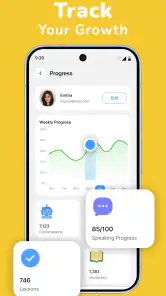
Another common source of frustration is expecting fast fluency from brief sessions. A short daily habit can make practice easier to maintain, but it cannot remove the need to listen, review, and use language outside the app. I would judge progress by concrete changes: can I answer a familiar question with less hesitation, remember a phrase the next day, or keep a simple exchange going? Those are more useful signs than expecting every session to feel dramatically different.
Who will get the most from Fluzy
I can see Fluzy suiting learners who want to speak more but feel self-conscious practising with another person, as well as people who already know some vocabulary and need a low-pressure way to use it. It may also fit someone who likes alternating between a lesson and a conversational exercise instead of spending all their study time on flashcards. A realistic everyday use would be practising a restaurant exchange during a quiet break, then trying to recall the key phrases later when planning a trip.
It is less compelling for someone who wants a complete classroom replacement, a guaranteed expert correction for every sentence, or a purely offline reference tool. It may also be a poor fit if subscriptions or optional purchases are a concern and the available paid items do not match the learner’s budget. I would explore the free experience first and make a purchase decision only after confirming that the app’s style is something I will actually return to.
Compared with conventional flashcard apps, Fluzy’s defining advantage is the emphasis on using language in conversation rather than only recognising isolated words. Compared with a live tutor, the AI format is easier to approach on my own schedule, but it does not offer the same human judgement or personal accountability. Those alternatives are not interchangeable: flashcards are efficient for memorisation, tutors are better for nuanced coaching, and Fluzy makes most sense as a practice companion between those activities.
A practical verdict for daily learners
The current version is 1.5.9, and the app is free to install, with optional in-app purchases. I would treat the paid options as a decision to make after trying the learning flow, not as a reason to rush through setup. The developer, Mall Collections, has built an education app aimed at making speaking practice less intimidating, and that is the part I would test first: can I open it, choose a useful situation, and leave with one phrase I can remember?
My recommendation is to try Fluzy if you want a convenient way to turn language knowledge into short speaking attempts. Keep sessions focused, practise somewhere you can hear yourself, and save a few useful expressions for later review. If you need a rigorous course plan or high-confidence expert feedback, pair it with a more structured resource or choose a tutor instead. Used for what it does best—making it easier to start speaking—Fluzy can be a practical part of a language routine, though not the whole routine by itself.
Fluzy: Learn Language with AI Frequently Asked Questions
What is Fluzy: Learn Language with AI, and how does it help you learn?
Fluzy is a language-learning app that uses AI to support practice and study. Depending on the features available in your version, you may be able to work on vocabulary, grammar, listening, or conversational skills through guided activities. It is best viewed as a practice companion rather than a complete replacement for courses, books, or real conversations. Check the app listing for the languages and learning tools currently supported.
Which languages can I study with Fluzy?
The languages offered can vary by app version, region, or subscription, so confirm that your target language is listed before downloading or paying. Also consider whether Fluzy teaches from your preferred native language and whether its lessons match your level. If you are learning a less commonly taught language, check for suitable courses and sample exercises first; AI features may not be equally available for every language pair.
Is Fluzy free to use, or does it require a subscription?
Fluzy may offer free access alongside paid features, but the exact limits and pricing can change. Before starting a trial or subscribing, review the current in-app purchase details, renewal period, and cancellation terms in the App Store or Google Play. Check whether core lessons, AI conversation practice, or other tools are restricted to premium users, and remember to cancel a trial before renewal if you do not want to continue.
Does Fluzy’s AI correct mistakes and provide reliable language guidance?
AI feedback can be useful for extra practice, explanations, and trying out conversations at your own pace, but it should not be treated as infallible. Suggestions may sometimes miss context, sound unnatural, or vary in accuracy across languages and proficiency levels. Compare unfamiliar explanations with trusted learning materials, and use qualified teachers or native speakers for important nuance, pronunciation feedback, and advanced language questions.
What should I check before downloading Fluzy on Android or iOS?
Check that your phone meets the app’s current operating-system requirements and that you have enough storage and a stable internet connection, as AI-powered activities may need online access. Review the store listing for permissions, privacy information, supported languages, and recent update notes. If you plan to use speech features, confirm microphone access is appropriate for you, and read the app’s data-handling details before sharing voice or personal information.
Pros
- AI conversations let you practise speaking without the pressure of a live tutor.
- Personalized practice can adapt to your language level and learning goals.
- Useful for fitting short study sessions into a busy schedule.
- Interactive exercises make practice feel more engaging than memorizing lists.
- Can help build confidence before speaking with others in real-life situations.
Cons
- AI feedback may miss context or give explanations that are not fully accurate.
- A stable internet connection may be needed for AI-powered features.
- Free access may be limited
- with some features requiring a subscription.
- AI conversation practice cannot fully replace feedback from a fluent speaker.
- Learners seeking a structured
- comprehensive course may need another resource.

- Category
- Education
- Version
- 1.5.9











