flowkey: Learn piano
- 1.91K
- 4.5
- Installs
- 1.00M
- Price
- Free
Screenshots
Analysis by Reviewed
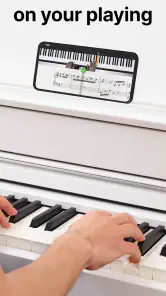
The feature that shapes my experience with flowkey: Learn piano most is its listen-and-respond approach: I can work on a piece while the app follows my playing and shows how I’m doing. That makes practice feel more like a guided session than a video I simply watch. It is a useful distinction for a beginner who wants to know whether they are keeping up, though I would treat the feedback as a practice aid rather than a substitute for a teacher’s ear.
Why playing along matters
The key difference between an interactive lesson and a standard tutorial is that I have to take part. A video can demonstrate a passage clearly, but it cannot make me try it; flowkey’s response gives me a nudge to put my hands on the keys and see what happens. That is particularly useful when I am learning alone and would otherwise be tempted to watch a demonstration several times without testing it myself.
I would still separate “the app followed my attempt” from “I played it musically.” Feedback can help me notice that I need another pass, but it does not replace listening closely to the sound I produce. A passage can be recognizable while still feeling stiff or uneven. Keeping that distinction in mind makes the feature more valuable: I use it to guide repetition, then use my ears to decide whether the result feels settled.
What the interactive feedback changes
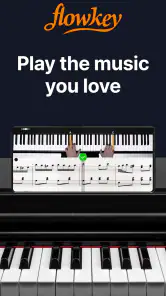
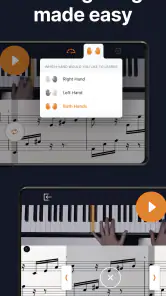
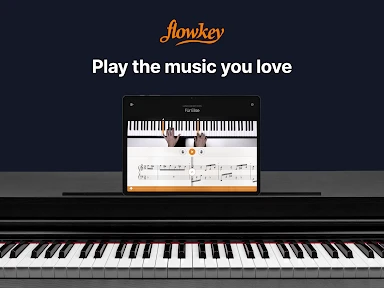
With a piano or keyboard in front of me, I can focus on playing a short passage and use the app’s response to notice where I need another try. Instead of guessing whether a tricky moment went well, I have a reason to slow down and repeat it. The synced sheet music and lesson video give me two ways to follow the same passage: I can watch the pianist’s hands when a movement is unfamiliar, then look back to the notation as I become more comfortable.
A practical tip is to resist the temptation to move through a song just because the video keeps going. I get more out of the session when I choose a manageable section, slow it down, and repeat it until the hand movement feels less awkward. That small routine is especially helpful when the difficulty is coordination rather than recognizing the notes. The adjustable pace supports careful practice, but it cannot decide for me when a passage is secure; I still need to listen and judge whether the rhythm and sound feel right.
Making a practice loop that works
One useful way to use the feedback is to make each attempt answer a small question. I might ask whether I can keep the left hand steady while the right hand changes notes, or whether I can enter a phrase without losing the beat. I play the section, notice the troublesome point, and repeat only after deciding what I am trying to improve. That is more productive than restarting from the beginning every time a single transition goes wrong.
For a new piece, I would first watch enough of the demonstration to understand the hand shapes, then try a small section with the notation in view. If reading the notes is slowing me down, I can use the video as a visual guide; once the movement is familiar, I can shift more attention to the score. This gradual change of focus is a practical bridge between copying a performance and becoming more independent at the keyboard.
More From Our News Desk

Weather by Xiaomi Review: Clear at a Glance, Less Clear Up Close

X Under Pressure: Can It Recover When Posting Goes Wrong?

Clash of Clans Is Won Between the Battles

Android Auto Makes the Case for Quieter Car Software

MobiOffice: Transforming Mobile Productivity with Seamless Integration

EA SPORTS FC™ Mobile Soccer: Redefining Mobile Sports Gaming
Where it fits into an ordinary day
I can see this working well in a short after-work practice: pick one song, revisit a section that caused trouble yesterday, and finish by playing it once at a more natural pace. That gives a session a clear purpose without requiring me to plan a full lesson. For someone learning around school, work, or family commitments, being able to return to a song and continue at a comfortable speed is more useful than an ambitious practice plan that is hard to keep.
A realistic routine might be to leave the keyboard ready, open the lesson, and spend the first few minutes finding the passage that needs attention rather than browsing for a perfect new song. I would then make a few deliberate attempts and finish by playing the section without stopping. Even a brief session can feel complete when it has a clear beginning and endpoint. The point is not to claim that short practice guarantees progress; it is to make it easier to return tomorrow.
Who gets the most from the song-led approach
The app is also a good fit for people who stay motivated by recognizable music. Choosing a piece I actually want to play gives me a concrete reason to sit at the keyboard, while lesson videos can help me connect what I see on the screen with what my hands need to do. Still, I would not use song choice as the only measure of progress. If I only chase familiar tunes, I may neglect the basic reading and technique that make unfamiliar music easier later.
I would especially recommend trying this approach if you are a beginner who wants structure but feels more engaged by songs than by isolated exercises. It can also suit someone returning to piano who wants a guided way to rebuild comfort with the keyboard. A learner who already reads music confidently may use the score as a more direct route, while a complete newcomer can lean more heavily on the videos at first. In either case, the best results come from choosing material that is challenging enough to hold attention without making every attempt frustrating.
It is less suitable as a sole solution for someone who needs personal correction. If I am unsure whether my wrists are tense, my posture is balanced, or my fingering is creating a bad habit, an app cannot look at my body and make the kind of tailored adjustment an in-person teacher can. I would choose a teacher for that kind of feedback and use a guided app as supplementary practice, not as a replacement.
How it compares with other ways to learn
Compared with free piano videos, the main advantage here is the more active practice loop: I can follow a demonstration, play, and use the app’s response rather than relying entirely on my own sense of whether I am keeping up. A video may be a better choice if I only want to watch a particular technique or prefer to explore lessons without an app guiding the session. Private lessons offer personal attention and can respond to posture, sound, and questions in a way a screen cannot, but they require arranging time with another person.
Printed sheet music is another reasonable alternative, especially for a player who already knows how to read and wants to choose any piece independently. It offers freedom, but not the same visual demonstration and guided pacing. I see flowkey as a middle ground: more interactive than simply watching a tutorial, more guided than learning from a score alone, and less personal than a teacher. Which option is best depends on whether I need motivation, musical independence, or tailored correction most.
What to expect from the setup and cost
Before committing to a routine, I would check that I have a piano or keyboard ready and a quiet enough place to practice. A phone or tablet can guide the lesson, but the satisfying part is playing on an instrument; this is not a way to learn piano without one. It also suits people willing to repeat a passage patiently. Anyone looking for a human teacher to correct posture, hand tension, or musical expression in person may be better served by lessons, perhaps using an app only for extra practice.
flowkey is a free education app from flowkey, with in-app purchases ranging from $15.99 to $209.99 per item. I would explore how the available learning material fits my goals before paying, rather than assuming that every song or lesson is included at no cost. The app is rated for Everyone, and its current version is 2.99.1; it requires iOS 11 or later. Its 4.5 average from around 41,000 ratings and more than one million installs suggest that it has reached a broad audience, though popularity alone cannot tell me whether its teaching style suits my hands or learning preferences.
A sensible way to decide whether it suits you
I would start by asking what I want from piano practice over the next few weeks. If the answer is “I want help getting from a demonstration to playing a song myself,” the listen-and-respond format is a strong reason to try it. If my priority is learning theory in depth, correcting physical technique, or exploring music beyond the app’s guided material, I would pair it with another resource or choose a teacher. Being clear about that goal also makes it easier to judge whether a paid option is worth considering.
For someone sharing a home, the setup deserves a little thought too. A keyboard with headphones can make it easier to practice without disturbing others, while a stable place for the phone or tablet helps keep the notation and video visible without interrupting playing. These are small practical details, but they matter: repeatedly stopping to reposition a screen or find the right passage can break concentration more than the lesson itself.
Getting Started with Ease
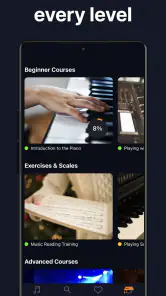
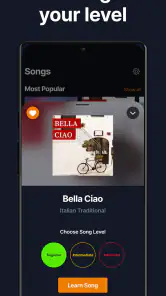
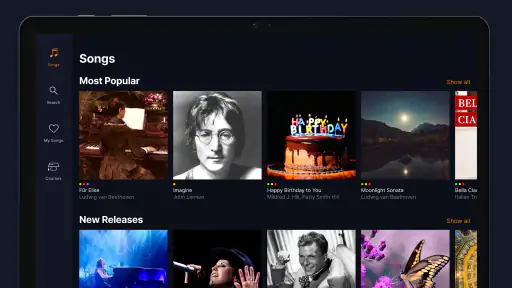
From the moment I downloaded flowkey: Learn piano, I was greeted with a sleek, user-friendly interface that didn’t overwhelm me with options. Setting up the app was a breeze. You just need to select your skill level – whether you’re a complete newbie or a seasoned player looking to polish your skills, there’s something for everyone. The app tailors its content based on your selection, which I found to be incredibly helpful in keeping me engaged and motivated.
Interactive Learning Experience
One of the standout features of flowkey is its interactive approach. The app listens to you play and gives instant feedback. I found this real-time assessment super useful in correcting my mistakes on the fly. No more waiting for the next lesson to find out what you did wrong! Plus, the video tutorials are top-notch, featuring professional pianists who guide you through each piece.
Another cool aspect is the sheet music that flows in sync with the video. As someone who struggles with reading music, this feature was a game-changer. I could follow along easily, and the adjustable speed meant I could practice at a pace that was comfortable for me.
A Diverse Song Library
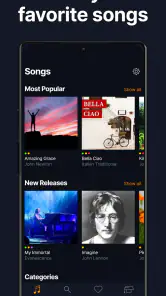
Let’s talk about the song library – it’s massive! From classical pieces to pop hits, there’s a little bit of everything. I loved being able to choose songs that I actually enjoy and want to learn. This made practice sessions feel less like a chore and more like a personal jam session.
For those of us who are a bit indecisive, the app also offers song recommendations based on your progress and preferences. It’s like having a personal music curator right in your pocket!
The Verdict
All in all, flowkey is a fantastic tool for anyone interested in learning piano without the traditional hassles. Its intuitive design, interactive feedback, and vast song library make it a must-have for aspiring pianists. Whether you’re looking to impress at your next family gathering or simply want to enjoy playing your favorite tunes, flowkey has got you covered. So, why not give it a try? After all, the joy of music is just a tap away.
flowkey: Learn piano Frequently Asked Questions
Can I use flowkey: Learn Piano if I have never played piano before?
Yes. flowkey: Learn Piano is intended for learners at different levels, including people starting from the beginning. Its lessons and songs let you build familiarity with playing and progress at a pace that feels comfortable. If you are new to piano, starting with beginner-focused material can make practice feel more approachable than jumping straight into difficult pieces.
What does flowkey: Learn Piano teach, and how are lessons presented?
flowkey: Learn Piano is an education app centered on piano learning, with songs and lessons for different levels. The store summary presents it as a way to start playing piano or keyboard, so it may suit learners who want to combine structured practice with playing music. You can explore material suited to your ability and choose what best supports your learning goals.
Is flowkey: Learn Piano suitable for children and families?
flowkey: Learn Piano is an education app with an Everyone content rating, making it suitable for a broad audience. Families can consider it for piano learning at home, while keeping in mind that the app includes optional in-app purchases. Its focus is on lessons and songs for different playing levels, so learners can explore piano practice at a pace that suits them.
What devices are compatible with flowkey: Learn Piano?
flowkey: Learn Piano is available for Android and iOS, but compatibility depends on the operating system version. iOS devices need iOS 11 or later. Before downloading, check that your phone or tablet meets the relevant minimum requirement so the app can be installed and run. A larger screen may also be useful when following piano lessons.
Is an internet connection required to use flowkey: Learn Piano?
An internet connection is required for initial download and setup of flowkey: Learn Piano. However, once the app is installed, users can access many of its features offline. Still, some functionalities, like accessing new songs or updates, will require internet access.
Pros
- User-friendly interface for beginners
- Wide range of songs to learn from
- Interactive lessons with real-time feedback
- Available on multiple platforms
- Includes sheet music for practice
Cons
- Limited free content available
- Requires internet for full functionality
- Some features need premium subscription
- Occasional lag in app performance
- Not suitable for advanced learners
- Category
- Education
- Version
- 2.99.1











