FitPix - Face & Body Editor
- 680.00
- 4.2
- Installs
- 10.00M
- Price
- Free

Screenshots



Analysis by Reviewed
When I want to make a quick portrait adjustment without turning a simple edit into a project, I look for tools that are easy to control and easy to undo. FitPix - Face & Body Editor is a photography app from eToolkit Inc built around face and body retouching, with filters for a finishing touch. I find it most useful when I have a clear, modest change in mind; it is less suited to someone who wants a full desktop-style editing workflow or precise professional retouching.
Start with the photo, not the effect
Before opening any retouching controls, I decide what I want the finished image to do. A profile portrait, a group picture, and a casual travel photo each call for a different level of editing. With FitPix, I get better results when I choose one specific concern—perhaps a small facial touch-up or a pose that feels unflattering—rather than treating every visible detail as something to fix.
That distinction also helps me decide whether this is the right app for the job. If my goal is a quick, portrait-focused adjustment, its direct approach makes sense. If I need to repair a complicated background, correct a whole scene’s color, or make a precise selection around hair and clothing, I would rather begin in a broader editor with tools built for those tasks.
A realistic everyday workflow
Imagine taking a photo before meeting friends and noticing later that the camera angle makes your posture look different from how you remember it. I would open the picture, make one modest adjustment, then check the nearby background and the overall composition before deciding whether to do anything else. If the scene contains railings, tiles, or other straight details, those are useful reference points for spotting distortion early.
I also keep the original image available rather than judging the result from memory. That makes it easier to answer a practical question: does the edit improve the picture, or have I simply become accustomed to looking at the altered version? For a photo meant to be shared, I would check it at ordinary screen size as well as close up, since retouching that seems subtle while zoomed in can look conspicuous in a feed.
Getting Started with Ease
Diving into FitPix was super smooth. The interface is clean, making navigation a breeze. Right from the moment you open the app, you’re greeted with a user-friendly layout that doesn’t overwhelm you with too many options. It's like chatting with a friend who just knows what you need.
A sensible baseline for each photo
For a natural-looking result, I’d start with one adjustment that addresses the reason I opened the editor, then inspect the whole image before adding another. A face change can look fine in a close crop but feel stronger when viewed beside the shoulders and background. I also keep an untouched copy in my phone’s gallery before experimenting, so I can compare the edit with the original rather than relying on memory.
More From Our News Desk

Weather by Xiaomi Review: Clear at a Glance, Less Clear Up Close

X Under Pressure: Can It Recover When Posting Goes Wrong?

Clash of Clans Is Won Between the Battles

Android Auto Makes the Case for Quieter Car Software

MobiOffice: Transforming Mobile Productivity with Seamless Integration

EA SPORTS FC™ Mobile Soccer: Redefining Mobile Sports Gaming
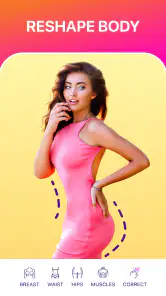
That habit matters most with body reshaping. A useful check is to look at straight edges near the person, such as doorframes, tiles, or furniture. If those lines appear bent after an adjustment, the edit may be noticeable even if the body change itself seems subtle. I would reduce the change or choose a photo with a simpler background instead of trying to disguise an obvious distortion.
Face Editing Features
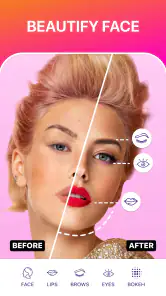
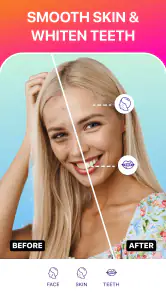
First off, the face editing tools are a game-changer. Whether you want to tweak your smile or smooth out a few wrinkles, it’s all there. The app offers a variety of options such as teeth whitening, skin smoothing, and even reshaping. I played around with these features, and the results were surprisingly natural. You can literally enhance your selfies without looking like a completely different person.
For a profile picture, I’d use this kind of retouching sparingly: a little skin smoothing or a small smile adjustment can keep the image recognizable, while stacking several changes can make skin and facial details look less believable. Before saving, I’d zoom out and check the image at the size friends are likely to see it. Small edits can look much stronger when viewed close up than they do as a thumbnail.
Body Editing Capabilities
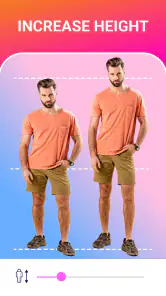
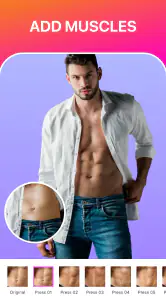
Now, let’s talk about the body editing features. Honestly, this is where I had the most fun. You can adjust your height, slim down certain areas, or even pump up those muscles. It’s like having a personal trainer and a plastic surgeon rolled into one, but without the sweat or the scalpel. The changes are subtle and realistic, which is great if you’re looking to impress without going overboard.
A realistic everyday use might be choosing a holiday photo where the pose or camera angle feels unflattering, then making a restrained adjustment before sharing it with a small group. I’d avoid editing several body areas at once: it becomes harder to judge what made the image look unnatural, and the result can draw more attention to the retouching than to the moment. If the background has strong lines or people close to the subject, a general photo editor with more detailed selection controls may be a better fit.
Settings and a repeatable routine
FitPix is free to download, and its in-app purchases range from $1.99 to $27.95 per item, so I’d check the purchase details in the app before committing to anything. The current version is 1.8.11 and it requires Android 6.0 or later; the app is rated for Everyone. It has a 4.2 average from around 43,000 ratings and more than 10 million installs, which gives newcomers a sense of its reach without telling them whether its editing style will suit their own photos.
To keep edits consistent across a few pictures, I use the same order each time: choose the image, make the main face or body adjustment, inspect nearby edges, then decide whether a filter helps. I don’t assume that the same strength will work on every photo; lighting, pose, and distance from the camera all change how an adjustment reads. This small routine is more reliable than applying a familiar look automatically.
Choosing settings with restraint
I treat filters as a final decision rather than the starting point. A filter can change the mood and color of a portrait, but it can also make it harder to judge whether a face or body adjustment looks natural. I first assess the retouching on its own, then try a finishing effect only if it supports the picture. If the filter becomes the most noticeable part, I would leave it off.
There is also a useful trade-off between consistency and sameness. When editing a set of portraits for the same profile or occasion, keeping a similar overall finish can make the pictures feel related. But copying the same degree of smoothing or reshaping across every image ignores differences in light and camera angle. I would repeat the order of my workflow, not blindly repeat the strength of each change.
Faster patterns that still look intentional
When I have several photos to review, I do not fully edit each one as soon as I open it. I first pick the strongest image—the one with the expression and framing I like—because retouching cannot rescue a moment that already feels awkward. Then I use that photo to settle on a restrained approach before working on any others. This saves time and reduces the temptation to overwork weaker shots.
For a single image, a simple mental checklist keeps the process quick: identify the main issue, make one change, check the edges and proportions, and view the whole photo at normal size. If the original already looks good, stopping after the first adjustment is a valid result. The aim is not to use every available control; it is to make the smallest edit that answers the reason I opened the app.
Additional Perks
Aside from the fantastic editing tools, FitPix throws in some extra goodies. There are filters to add that final touch to your photos, ensuring they’re social media-ready. Plus, the app keeps getting updated with new features, which means you’re always in for a surprise.
Another thing worth mentioning is the ease of saving and sharing your edited pics. Whether you want to flaunt your new look on Instagram or keep it private, the app has got you covered.
What to expect from a focused editor
People often ask whether a portrait app like this can replace a general photo editor. For my needs, the answer depends on the job. FitPix’s appeal is the emphasis on face and body changes, so it is convenient when those are the edits I actually want. For exposure, color work, object removal, or a more involved composition, a general-purpose photography app is the more sensible starting point.
The same distinction matters if you are choosing between a quick phone edit and a careful desktop workflow. I would use FitPix when convenience and a small number of portrait adjustments matter more than detailed control. I would skip it for work where every edge needs close inspection, where the image must remain entirely untouched, or where a body-focused edit would make me uncomfortable. The right tool is the one that suits the image and the reason I am editing it.
Who will get the most from it
I can see FitPix working well for someone who regularly prepares selfies, profile pictures, or informal portraits and wants a direct route to face or body retouching. It is also a reasonable option for a person who is curious about small appearance changes but does not want to learn a complicated editing setup first. The best fit is a user who can make a change, inspect it critically, and stop when the picture still feels like their own.
It is less compelling for photographers who already rely on detailed masking and layered adjustments, or for anyone who wants one app to handle every kind of image correction. It may also be the wrong choice for people who prefer not to reshape bodies or faces at all. That is not a technical shortcoming so much as a matter of taste: an editor can make a change easy, but it cannot decide whether that change belongs in the picture.
Where it fits among photo editors
Compared with a general-purpose photo editor, FitPix is more focused on changing portraits and body shape than on broad image work. That focus can make it a convenient choice when the main task is a quick selfie touch-up. On the other hand, if I’m correcting color, removing distracting objects, or making a carefully masked composite, I’d reach for an editor designed for those jobs rather than expecting this app to replace every photography tool.
It is a good match for casual social posts, profile photos, and people who prefer direct controls over a complicated editing process. I’d skip it if I want my pictures left completely untouched, need fine-grained control over every pixel, or feel uncomfortable with body reshaping as an editing choice. The best result here is not the most dramatic one; it’s the version where the photo still feels like the person and moment I started with.
My verdict after trying the workflow
In conclusion, if you’re on the hunt for an app that offers more than just basic photo editing, FitPix - Face & Body Editor is worth a try. It’s like having a mini makeover studio in your pocket. Perfect for those who love experimenting with their looks or simply want to enhance their natural beauty. So why not give it a shot and see what magic you can create?
My practical advice is to begin with a copy, make one change at a time, and judge the result at both close range and normal viewing size. That gives you a clearer sense of whether the retouching is helping or merely becoming more visible. For quick, restrained portrait edits, I can see the appeal; for detailed image repair or a strict preference for unaltered photos, another approach will feel more appropriate.
FitPix - Face & Body Editor Frequently Asked Questions
Can I use FitPix to edit a photo before sharing it on social media?
Yes. FitPix - Face & Body Editor is designed for retouching photos, including portraits and body-shape edits, so you can prepare an image for sharing wherever you normally post pictures. You can also use filters and stickers to personalize the result. As with any editing app, review the finished image before sharing to make sure it looks the way you intended.
What kinds of photos are best suited to FitPix?
FitPix is most relevant if you want to retouch portraits or adjust the appearance of a person in a photo. Its tools include face and body reshaping, skin smoothing, teeth whitening, and makeup effects, alongside filters and stickers. It is less focused on general camera functions; if you mainly want to edit portraits, its feature set may be a better fit.
Does FitPix work on older Android devices?
FitPix - Face & Body Editor supports Android 6.0 and later, so it can run on many older phones as well as newer ones. Before downloading, check your device’s Android version and make sure you have enough free storage for the app and your edited photos. Its broad compatibility may make it an option if you do not have the latest phone.
What features does FitPix - Face & Body Editor offer?
FitPix - Face & Body Editor is equipped with a range of features designed to enhance your photos. Users can reshape their face and body, smooth skin, whiten teeth, and add makeup effects. The app also includes filters and stickers to further personalize images, making it a comprehensive tool for photo editing enthusiasts.
Is FitPix - Face & Body Editor free to use?
FitPix offers a free version with basic editing tools that users can enjoy without any cost. However, for advanced features and an ad-free experience, there are in-app purchases ranging from $1.99 to $27.95 per item. This allows users access to a broader range of editing tools and enhancements to fully utilize the app's capabilities.
Pros
- User-friendly interface for easy editing
- Wide range of editing tools available
- Real-time editing preview feature
- High-quality image export options
- Frequent updates with new features
Cons
- Some features require in-app purchases
- Occasional app crashes reported
- Limited free version capabilities
- Editing can be time-consuming
- Requires a stable internet connection
- Category
- Photography
- Version
- 1.8.11











