Firefox Fast & Private Browser
- 241.14K
- 4.6
- Installs
- 100.00M
- Price
- Free

Screenshots





Analysis by Reviewed
I judge a browser not only by how quickly it opens a page, but by whether I can read, navigate and keep my place without wrestling with it. Firefox is Mozilla’s free communication app, and its appeal is the balance it aims for: familiar web access, privacy controls and room to adjust the experience. I’d consider it especially if I want a browser that gives me more say over search and browsing habits than the default option on my phone.
Readable pages and a browser I can shape
On a phone, reading often means switching between a long article, a search result and a message, sometimes in a distracting place. I find Firefox most useful when I want to keep those tasks together and make the browser feel less like a fixed window. Its customizable toolbar and search-engine choice give me practical ways to put frequently used controls within reach and choose how I look things up. That flexibility is useful, though it also means I may need to spend a little time in settings before the layout feels natural.
For a reader who struggles with crowded pages, the helpful question is not simply whether a browser has many options, but whether its controls are easy to find and operate on a small screen. I’d try the settings and toolbar adjustments with a familiar site first, then keep only the changes that make everyday browsing clearer. If I prefer a browser that looks and behaves exactly like the one already built into my phone, Firefox’s extra choices may feel like unnecessary setup rather than a benefit.
Fast Browsing Experience
Let’s get real, no one likes waiting around for pages to load, right? With the Firefox Fast & Private Browser, speed is the name of the game. I noticed right off the bat how swiftly it loads pages. Whether I was scrolling through social media, reading news articles, or watching videos, everything popped up in a flash. And let’s be honest, in today’s fast-paced world, every second counts!
Privacy at Its Core
Now, onto what makes this browser stand out – privacy. We’ve all been there, feeling like someone’s peeking over our shoulder while browsing. Well, with Firefox, those days are over. The app boasts robust privacy features, blocking third-party cookies and trackers automatically. I was pleasantly surprised by how easily I could browse without the worry of being tracked. It even offers a Private Browsing mode that erases all traces of your session like a digital ghost.
That distinction matters in an everyday situation such as researching a health question on a shared family tablet or checking a gift idea on your own phone. Private Browsing is a useful choice when you do not want that session kept in the browser history, while tracker blocking can reduce some of the routine tracking encountered during ordinary browsing. I treat these as privacy tools, not as a promise of anonymity: they do not make every website trustworthy, and they are not a substitute for careful decisions about what I share online.
Customizable Features
Another thing I loved is how customizable the browser is. You can tweak just about everything to suit your needs. From choosing your favorite search engine to personalizing the toolbar, it’s all about making the browser truly yours. I spent some time playing around with the settings and it honestly felt like I was fine-tuning a high-performance machine to my exact specifications.
More From Our News Desk

Weather by Xiaomi Review: Clear at a Glance, Less Clear Up Close

X Under Pressure: Can It Recover When Posting Goes Wrong?

Clash of Clans Is Won Between the Battles

Android Auto Makes the Case for Quieter Car Software

MobiOffice: Transforming Mobile Productivity with Seamless Integration

EA SPORTS FC™ Mobile Soccer: Redefining Mobile Sports Gaming
A small but useful habit is to choose a search engine deliberately rather than leaving the default untouched, then arrange the toolbar around the actions I reach for most. That can make repeated tasks easier, especially if I browse one-handed while commuting or use the browser for quick checks throughout the day. The trade-off is that a heavily customized setup can be harder to recognize if someone else occasionally uses my device, so I would keep the layout simple on a shared phone.
Sync Across Devices
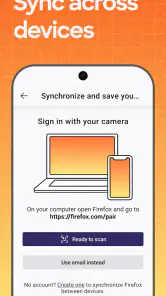
If you’re like me and use multiple devices, then the sync feature is a godsend. With a simple login, all my bookmarks, history, and open tabs were available across my phone, tablet, and laptop. It’s seamless and incredibly convenient. No more emailing myself links or trying to remember what I was looking at earlier.
Sync is most valuable when I begin a task away from my desk and finish it later: I can save a useful page as a bookmark, then pick it up on another device instead of searching for it again. It suits people who already move between Firefox on their devices. If I only browse on one phone, or do not want to use an account to connect devices, this advantage matters much less; keeping my activity local may be the simpler preference.
Using it in different situations
Firefox is a strong fit for someone who reads a lot on a phone, wants control over search and toolbar choices, or regularly switches between devices. It is also worth considering if reducing routine tracker exposure is a priority. By contrast, I would stick with a familiar built-in browser if I value having every setting and gesture match the phone’s default experience, or if I do not want to adjust a new browser at all.
For motor or sensory needs, the useful approach is to test the actual controls with the way I use my phone rather than assume one layout works for everyone. A toolbar arrangement that helps me reach a frequent action may not suit someone else, and a page that loads quickly can still be tiring to read if its design is busy. I would try a few common sites and adjust the available browser settings before making Firefox my everyday choice. The browser’s flexibility is a real strength, but it does not remove barriers built into individual websites.
What to expect before switching
Firefox is currently at version 145.0.2, and it has been available since December 21, 2010. It has a 4.6 average from around 6.2 million ratings, with over 100 million installs; the app is rated for Everyone. Those figures suggest broad use, but the better test is whether its controls and privacy approach suit my own routine. The main practical cost is time spent setting it up and learning where preferred options live.
When moving from another browser, I would start by choosing a search engine, arranging the toolbar, and deciding whether cross-device sync is useful before importing the browser into every part of my day. That way I can tell which changes genuinely help rather than changing everything at once. Firefox is not automatically the right pick for someone who wants no setup or who expects privacy tools to eliminate every online risk, but it offers a thoughtful alternative to the usual default browser.
For a more concrete comparison, I see Firefox as a middle ground between a phone’s built-in browser and a browser chosen mainly for a particular ecosystem. The default is often the easiest place to start because it already feels familiar; Firefox makes more sense when search choice, toolbar placement and tracker blocking are reasons to switch. Someone who depends on another browser’s specific workflow may be happier staying there, while a reader who wants a more personal setup may appreciate the change. I would test the same everyday tasks in both before deciding, rather than assuming a different name alone will improve browsing.
Small habits that make the switch easier
A practical first-day test is to open the pages I actually use: a news story, a web form, a map or a recipe, and notice where my hand naturally reaches for controls. I would change one setting at a time, then revisit those pages. That makes it easier to spot whether a toolbar adjustment helps, instead of creating a layout that looks tidy in settings but slows me down in real use.
For a busy day, I might search for a place while walking, save a page with details for later, and continue reading at home on another device. That is where the combination of bookmarks and sync has a clear purpose. If I am on a single device and only need a quick answer, the default browser may be just as convenient; Firefox’s advantages are most noticeable when I make use of its choices rather than merely install it.
Readers who rely on assistive technology or need a particular display or input setup should judge the browser alongside the websites they visit, not in isolation. A browser can make navigation feel more manageable, but a poorly structured page can still be difficult. I would check a few important sites before committing, especially if they are essential for work, study or appointments. The useful question is whether the complete browsing path works comfortably, from opening a page to completing the task.
Who will get the most from it
I would recommend giving Firefox a try if you read on your phone often, want to choose your search engine, value reduced routine tracking, or move between devices. It is also a reasonable option for someone willing to spend a little time arranging controls to suit their habits. It is free, and Mozilla has built a browser with broad appeal: its 4.6 average and 241,000 reviews reflect a large audience, though popularity cannot tell me whether its layout will suit my hands or eyes.
I would skip it if I want every interaction to match my phone’s default browser, do not want to learn another settings menu, or need a browser-specific feature that I already rely on elsewhere. The app is rated for Everyone, but that does not mean every web page is suitable for every reader or accessible in every context. Firefox can improve the way I approach browsing; it cannot make the open web consistent.
A considered choice for everyday browsing
My overall view is that Firefox is most compelling when its flexibility solves a real annoyance: controls that are awkward to reach, a search setup I want to change, or a reading routine spread across devices. It is less persuasive as a switch made simply because a browser claims to be faster or more private. I would begin with a few familiar tasks, keep the settings that genuinely help, and avoid expecting any browser to remove every online risk or accessibility barrier.
In conclusion, if you’re after a browser that’s fast, secure, and tailor-made for your browsing habits, Firefox Fast & Private Browser is worth a shot. It’s like having a personal assistant for all your online adventures, ensuring you’re both efficient and protected. So, go ahead, give it a whirl and see how it transforms your internet experience. I’m hooked, and I bet you will be too!
Firefox Fast & Private Browser Frequently Asked Questions
Can Firefox Fast & Private Browser translate web pages?
If you often visit websites in different languages, check whether the version available for your device offers a translation option for the pages you want to read. Firefox Fast & Private Browser is intended for browsing and searching the web, but translation tools can vary by version and platform. Review the app’s current features before downloading if page translation is essential to your routine.
Can I import bookmarks from my current browser?
If you have bookmarks saved in another browser, you may want to bring them with you when switching. Firefox offers options for syncing information between devices through a Firefox account, but importing bookmarks from a different browser is a separate process. Check the available setup and import options on your device before making the switch, especially if you rely on a large collection of saved sites.
Can I set Firefox as the default browser on my phone?
If you want links from other apps to open in Firefox, look for the default-app settings on your phone after installing it. The exact steps depend on your device and operating system, so the setting may not be in the same place on every phone. Making Firefox your default can simplify everyday browsing, but you can still open another browser whenever you prefer.
Can I browse the web without an internet connection?
A browser is most useful when your device is connected to the internet, since websites and search results generally need a connection to load. Some pages you have already opened may remain available temporarily, depending on the site and your device, but you should not expect full web browsing while offline. If offline access matters, save important information separately before disconnecting.
Does Firefox Fast & Private Browser work on Android tablets as well as phones?
Firefox Fast & Private Browser is made for mobile web browsing, and Android compatibility depends on the device meeting the required operating system version. Tablets can differ in their software and app-store compatibility, so check the app page on your tablet before installing. If it is available for your device, you can use it to browse websites and search the web there.
Pros
- Fast page loading speeds
- Enhanced privacy features
- Customizable interface
- Syncs across devices
- Open source
Cons
- Occasional compatibility issues
- Higher RAM usage
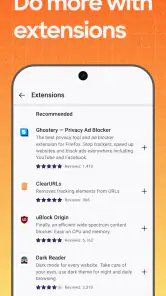
- Extension support varies
- Can drain battery quickly
- Limited customer support
- Category
- Communication
- Version
- 145.0.2












