FamilySearch Tree
- 6.13K
- 4.4
- Installs
- 10.00M
- Price
- Free

Screenshots

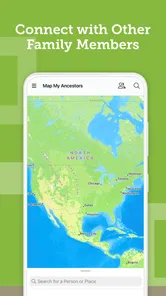


Analysis by Reviewed
If you’re opening a family-history app for the first time, it helps to have a modest goal: record what you know, then follow one clue. FamilySearch Tree is a free Books & Reference app from FamilySearch International, built around researching ancestors and exploring family heritage. I find it most useful as a place to organize an ongoing search—not as a shortcut to a complete family story. The first satisfying result may be a better question, or a lead worth checking, rather than a finished branch.
What to expect from your first visit
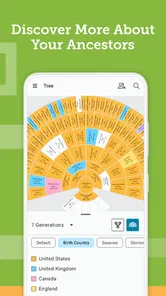
The app’s focus is exploring ancestors and researching family heritage. A first-time user can start with what they already know, then use those details to orient further searching. That makes it less intimidating than opening a blank document or trying to organize names across scattered notes. Still, family research is rarely a straight line: names can be shared by several relatives, dates may be uncertain, and a promising lead needs checking before it belongs in your tree.
It is worth knowing how this differs from a basic notes app or a private family chart. Those alternatives can be simpler if you only want to record relatives you already know. FamilySearch Tree is aimed at connecting that starting knowledge with broader research and a growing family history. That can be more rewarding, but it also asks you to think carefully about evidence and distinguish a confirmed relationship from a possibility.
In practical terms, I’d expect a tool for gradual investigation rather than a polished family album that fills itself in. Genealogy often involves revisiting the same person as new clues appear, and a name that seems promising can turn out to belong to someone else. The app is a better match for that patient process than for someone who wants a quick, definitive answer without sorting through uncertainty.
Getting started without getting stuck
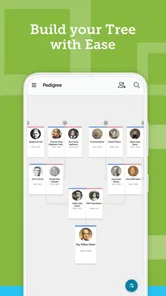
The journey with FamilySearch Tree begins with a simple, intuitive interface. I was immediately captivated by how user-friendly it is. You don't need to be a tech wizard to navigate through the family histories. From the moment you sign up, you're guided through the process of adding family members, and trust me, it feels like piecing together a fascinating puzzle.
For a calmer first session, I’d begin with myself and work backward one relationship at a time. Before adding a relative, gather a name and any details your family can confidently share; even a spelling variation or an approximate period can help you keep your own notes organized. If you are unsure, pause and ask rather than turning a guess into a fact. This small habit makes later research easier to review and helps prevent a mistaken link from sending your search down the wrong branch.
A useful preparation step is to write down where each detail came from. “My aunt remembers this” and “I found a document” are different kinds of support, even if both are valuable clues. Keeping that distinction in mind makes it easier to decide what needs follow-up and to explain a correction later. I would also avoid trying to enter every relative in one sitting; a small, carefully checked starting tree is easier to build on than a large one assembled from memory.
More From Our News Desk

Weather by Xiaomi Review: Clear at a Glance, Less Clear Up Close

X Under Pressure: Can It Recover When Posting Goes Wrong?

Clash of Clans Is Won Between the Battles

Android Auto Makes the Case for Quieter Car Software

MobiOffice: Transforming Mobile Productivity with Seamless Integration

EA SPORTS FC™ Mobile Soccer: Redefining Mobile Sports Gaming
Turning a clue into a useful result
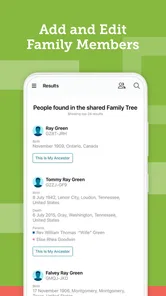
One thing that really blew my mind was the app's ability to fetch historical records. With a couple of clicks, I unearthed census data, birth and death records, and even marriage certificates of my great-grandparents. It's like having a personal historian in your pocket!
A realistic first win might be checking a family story against a record, not completing an entire branch. If you find a possible match, compare the details you know before treating it as your ancestor: a familiar name alone is not enough when relatives may share names. I find it helpful to keep a short list of unanswered questions for the next time I speak with an older family member. The app can support the search, but relatives’ memories and records still need to be weighed together.
For example, imagine you hear that a great-grandparent moved to a particular place, but no one remembers exactly when. Rather than building out several generations immediately, start by checking whether a candidate record fits the place and the other details you have. If it does not, that is still useful: you have learned which assumption needs another look. This is one reason I prefer treating search results as leads to assess, not automatic proof of a relationship.
Another impressive feature is the ability to collaborate. You can invite family members to contribute and verify information. This ensures that your family tree is not just a reflection of your knowledge but a collective memory of your family. Plus, the app supports multiple languages, making it a global platform for shared family discoveries.
Collaboration is especially useful when different relatives hold different pieces of the story, but it can also bring conflicting recollections. I would treat disagreements as research questions instead of editing them away: note what each person remembers, then look for a record or another relative who can clarify it. If you are researching sensitive or living-family details, take a moment to consider what you are comfortable sharing before inviting others into the project.
A low-pressure way to involve family is to ask someone to check one specific point rather than inviting them to review an entire tree. A relative may remember a nickname, a spelling, or who appears in an old photograph, while someone else may know the context behind a story. Narrow questions are easier to answer and can prevent a group project from becoming a tangle of unlabelled corrections. I would keep a note of unresolved differences instead of forcing a consensus before the evidence is clear.
Saving the human side of family history
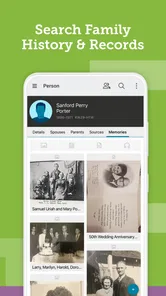
What I love about FamilySearch Tree is how personal it feels. You can add photos, stories, and even audio clips, making the family tree a living document. It's not just about dates and names; it's about preserving memories and creating a narrative that future generations will cherish.
This is where the app can become more meaningful than a list of ancestors. A photo or a brief account of how someone was remembered gives future readers context that a date cannot. A useful approach is to add one small story while it is fresh—who shared it, what the moment was, and which details remain uncertain. That keeps the family record grounded in people’s voices rather than making it look more complete than it is.
Photos and recordings are most useful when they have context. If you add an image, make a note of who is pictured and what you know about when or where it was taken; otherwise, the file may become another mystery for the next person. The same goes for an audio recollection: a short explanation of who is speaking and what the story concerns can make it easier for relatives to understand later. I’d treat these additions as family material worth describing carefully, not just as decoration for a tree.
Moreover, the app is incredibly secure. With privacy settings that give you control over who sees your information, you can rest easy knowing that your family history is safe and sound.
I’d still use ordinary care with personal information: think before sharing details about living relatives, and check the visibility choices that apply to what you add. If your priority is a fully private archive with no collaboration, a local document or another private tool may feel more appropriate. FamilySearch Tree makes most sense when you want research and shared family contributions to be part of the experience.
How it fits alongside other ways to research
Compared with a paper notebook, a spreadsheet, or a simple family chart, this app gives the research a more connected home: names and relationships can sit alongside the search for records and the memories people contribute. A notebook may still be better for rough interview notes, especially when you are talking with a relative and want to capture a story without stopping to organize it. I see the app as a place to develop those notes into a family-history project, not necessarily the only place to preserve every working thought.
It also differs from a private archive whose main purpose is to store a family’s own documents. If you primarily need a personal collection that stays separate from collaborative research, a local folder or another private tool may suit you better. The trade-off is that you may need to manage relationships and clues yourself. FamilySearch Tree is more compelling when you want to connect what your family knows with ongoing ancestor research and shared contributions.
For someone who already has a carefully researched tree elsewhere, I would not assume that switching tools is automatically worthwhile. First decide what you want to do next: investigate a particular ancestor, preserve relatives’ recollections, or make a chart for an upcoming gathering. If all you need is a clean visual of close relatives, a simpler chart may be quicker. If the goal is to keep following evidence and adding context over time, this app’s research-oriented approach is the more natural fit.
Who will get the most from it
The app is a strong fit if you enjoy following clues, want to build a family tree gradually, or hope to bring relatives into a shared research effort. It can also suit a casual user with one specific question, such as identifying a great-grandparent from a family story. It is less suited to someone who wants an instant, finished family history, dislikes checking sources, or only needs a simple list of close relatives. In those cases, a notebook or basic family-chart tool may be less demanding.
It is also a sensible choice for a family member who is willing to be the organizer: the person who asks relatives what they remember, keeps uncertain claims separate from established facts, and returns to unresolved questions later. It may be frustrating if you expect every relative to contribute equally or if you would rather not deal with conflicting memories. The shared aspect can enrich the record, but it works best when participants are patient about checking details and clear about what they actually know.
FamilySearch Tree is rated 4.5 on average, with around 52,000 ratings and 6,000 reviews, and it has over 10 million installs. It is free, rated Everyone, and its current version is 5.3.3; it first arrived on July 15, 2014, and requires iOS 10 or later. Those details make it easy to consider as a low-cost starting point, while the right choice still depends on whether you want active research and collaboration rather than just storage.
Discovering My Roots
In conclusion, if you're looking to dive deep into your family history, FamilySearch Tree is the perfect companion. With its rich features and easy-to-use interface, it's more than just an app; it's a journey into the past. Whether you're a seasoned genealogist or a curious newbie, this app is a must-have. So, go ahead, download it, and embark on your own family discovery adventure!
A steady next step
My practical recommendation is to begin with one branch and one question, then return when you have another clue to check. That makes the project manageable and gives you a clear reason to speak with relatives, review what you have recorded, and decide what to research next. If you prefer a quick answer without the patient work of comparing names and records, this may not be your kind of app. But if you enjoy connecting evidence with family memories, it offers a welcoming place to start and a useful way to keep the discoveries together.
For a first meaningful session, I’d choose a relative whose name and relationship are already clear, add only the details I can stand behind, and then pursue one open question. That could mean asking a family member about a spelling, checking whether a record fits a known place, or adding context to a photograph. It gives you a concrete stopping point, too: once you have a clue to follow and a note about what remains uncertain, you can come back later without feeling that the whole project is unfinished.
Overall, I recommend it to curious beginners who want more than a static list, and to families willing to build a shared history carefully. The best results come from balancing searching with listening, and from treating gaps as part of the process rather than as failures. If you want a private, finished archive or an instant answer, another approach may be more comfortable. If you are happy to investigate one person at a time, this is an approachable place to begin.
FamilySearch Tree Frequently Asked Questions
What devices can run FamilySearch Tree?
FamilySearch Tree is available for Android devices that run Android 10 or later. Before downloading, check your device’s operating system version in its settings to make sure it meets that requirement. The app is a family-history research tool, so it is most useful on a device where you can comfortably read records, review family details, and enter information as you explore.
Who develops FamilySearch Tree, and what is it used for?
FamilySearch Tree is developed by FamilySearch International and belongs to the Books & Reference category. Its focus is researching family history: you can explore ancestors and search for your heritage using a family tree. If you are looking for a general social network or a broad reference library unrelated to genealogy, this app has a more specific purpose centered on family-history research.
Is FamilySearch Tree suitable for children and families?
FamilySearch Tree has an Everyone content rating, and its subject—exploring family history—can be relevant to people of different ages. Families may find it useful for gathering known details about relatives and learning more about their heritage together. As with any shared family-history project, it is sensible to talk with children about which personal details they add and to involve an adult in managing their account and research.
Do I need an account to start researching in FamilySearch Tree?
FamilySearch Tree is designed around building and exploring a family tree, so creating an account is the practical first step before you begin adding relatives or connecting family records. The app is free, and an account gives you a place to organize your research and participate in the shared tree. You can use it to explore your heritage at your own pace.
What is FamilySearch Tree and how does it work?
FamilySearch Tree is a comprehensive genealogy app that allows users to discover their family history through a collaborative family tree. By creating a free account, users can start building their family tree, adding family members, and linking records. The app provides access to billions of historical records, helping users to explore their ancestry and connect with relatives worldwide.
Pros
- User-friendly interface.
- Comprehensive family records.
- Free to use.
- Wide range of genealogical data.
- Collaborative features.
Cons
- Requires internet connection.
- Limited offline access.
- Complex navigation for beginners.
- Occasional data inaccuracies.
- Limited support for non-English records.











