FAMILIES | TalkingPoints
- 1.77K
- 4.4
- Installs
- 1.00M
- Price
- Free

Screenshots
Analysis by Reviewed
I’d treat FAMILIES | TalkingPoints as a practical channel for staying in touch with a child’s school, especially when language makes ordinary school communication difficult. Its value is clearest in small, recurring exchanges: understanding a teacher’s note, asking a question, or keeping up with classroom matters without having to wait for the next meeting.
What to check before you count on it
Before building a routine around the app, I’d ask the school which teachers use it and what kinds of messages they send there. A school may use it for certain classroom exchanges while still relying on other channels for forms, urgent notices, or wider announcements. That distinction matters: the app is most useful when families know where to look for each kind of information, rather than assuming one inbox replaces every school communication route.
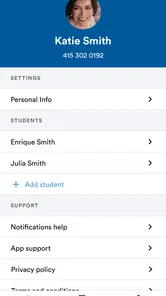
I’d also make sure the account is connected to the right child and that the contact details the school has on file are current. These are simple setup checks, but they prevent a common frustration: waiting for a message that is being sent through another route or tied to a different contact. Once the connection is working, I’d keep notifications enabled if timely classroom notes matter to me, while choosing a regular moment to read and respond rather than feeling obliged to answer every message immediately.
Where free access delivers real value
The app is free, so families can try it without weighing a purchase against occasional use. That matters because school messaging is often useful in bursts rather than every day: a parent might need it for a schedule change one week and a follow-up about classwork the next. I would not assume that “free” means every school uses it or that every communication happens there; its usefulness depends on the school and teachers being part of the same channel.
TalkingPoints is an education app from TalkingPoints, with an average rating of 4.4 from around 17,000 ratings and more than a million installs. It is rated for Everyone and has been available since 2018. Those figures suggest it has reached a sizable audience, but I’d still judge it by whether my child’s school actually uses it and whether messages arrive in a language I can comfortably understand.
For a family that only needs occasional translation, free access is especially practical: there is no purchase decision to revisit when a teacher sends a message after a quiet stretch. I wouldn’t read that as a promise that every possible feature or school workflow is included; the useful point is simply that trying this communication route does not require paying for the app.
How TalkingPoints fits into family-school communication
Let’s dive right into what makes the FAMILIES | TalkingPoints app so special. Imagine getting real-time updates from your child’s teacher, translated instantly into your native language. That’s right, no more awkward guessing games about what’s happening in your child’s school life. The app supports numerous languages, making it a versatile tool for diverse communities. It’s not just about translating messages either; it’s about creating a seamless flow of communication that’s both accessible and effective.
More From Our News Desk

 Bolt: Request a Ride
Bolt and the Shift from One-Tap Rides to More Legible Trips
Bolt shows how ride-hailing is shifting from a one-tap taxi request toward a more legible, choice-driven trip, while leaving the hardest questions of price and reliability unresolved.

 Farm Land - Farming life game
Farm Land Review: A Small Island Farm with a Satisfying Loop
A bright, breezy island farm turns a few quick chores into a satisfying cycle of planting, harvesting, expanding, and deciding what to build next.

 Android Auto
’s Community Takes Shape in the Passenger Seat
Its most valuable network is not a public feed but a shared set of routes, voice habits, app integrations, and advice that make driving less isolating—and sometimes more complicated.

 My Talking Angela
 Makes the Virtual Pet Feel Personal
A polished pet-raising game built on small rituals, playful customization, and a character who gives everyday screen time a surprisingly personal rhythm.

 Google Translate
 Review: A Pocket Tool for the Small Frictions of Travel
From menus and signs to quick conversations, Google Translate earns its place by cutting the little delays that make unfamiliar language feel like a barrier.

 Shazam: Find Music & Concerts
Shazam’s Best Trick Is Turning a Song Into a Night Out
A few seconds of recognition can settle an argument, rescue a half-remembered chorus, and point toward a live show. Shazam’s real trick is what happens after the match.
Latest News



In everyday use, I’d think of it less as a complete school portal and more as a way to make teacher-family conversations easier to enter. That framing helps set reasonable expectations. It can reduce the language and formality barriers around a short question, but it cannot make a school responsive if a teacher is not using the channel, nor can it replace the judgment and context that come from a longer conversation.
Features that make a conversation easier
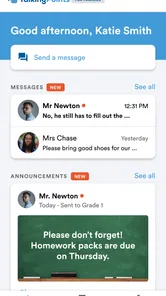
Now, what’s an app without its killer features? TalkingPoints has got some pretty nifty ones that deserve a shoutout. First off, the app allows teachers to send text messages to parents in their preferred language. It uses an AI-powered translation feature that ensures messages make sense in context, which is a huge plus. Nobody wants a Google Translate mishap when discussing a child’s homework!
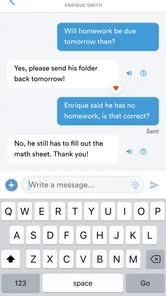
Parents can respond in their own language too, which means conversations are two-way streets, not one-way broadcasts. This feature fosters a more inclusive environment for everyone involved. Plus, the app is super user-friendly. Even if you're not tech-savvy, you’ll find navigating through its features a breeze.
The two-way part is important in practice. A translation tool that only helps a family read notices still leaves the parent to compose a reply in a language they may not be comfortable using. Here, the potential benefit is that a family can ask a follow-up question without first switching to a separate translator and copying text between apps. I’d keep replies direct and specific, though: a clear question about one assignment is easier to act on than a long message mixing homework, attendance, and a separate concern.
Turning a notification into a useful next step
A good way to get more from a school messaging app is to treat each exchange as a small record of what needs attention. If a teacher sends a note about an upcoming classroom activity, I’d reply with one clear question at a time rather than bundling several topics together. That makes a translated conversation easier to follow and gives both sides a better chance of addressing the right issue.
For example, if a message arrives while I’m commuting or working, I can read it when I have a moment, identify whether it needs a response, and ask for clarification in my own language if anything is unclear. I would still use a direct conversation with the teacher for sensitive or complicated matters; short translated messages are helpful, but they are not a substitute for a longer discussion when nuance really matters.
A realistic routine might look like this: I read a classroom note after work, check whether it asks me to do something, then send one short reply if the instruction is unclear. If it mentions a deadline or an item my child needs to bring, I’d put that information into the calendar or reminder system I already use. That extra step avoids treating a message thread as a dependable personal to-do list, while still letting the app do what it is good at: opening a direct line to the teacher.
For recurring questions, I’d also include enough context for the teacher to identify the issue without writing a long explanation. Mentioning the relevant class activity or assignment can be more useful than sending a vague “Can you explain?” The practical trade-off is that concise messages are easier to translate and answer, but if the situation needs a history or careful explanation, a call or meeting may be more efficient than extending a text thread.
Translation helps, but judgment still matters
Translation can lower the effort needed to start a conversation, but I would not treat an automated rendering as infallible. School messages sometimes involve local expressions, a child’s individual situation, or details that need careful interpretation. If a sentence could affect a decision about attendance, support, or an assignment, it is sensible to ask the teacher to clarify rather than guess from wording that feels ambiguous.
One useful habit is to repeat the action you think the teacher is requesting in your reply and ask whether you understood correctly. That gives the teacher a chance to correct a misunderstanding before it turns into a missed task. It is a small safeguard, not a reason to distrust every translation; I’d reserve it for messages where a detail changes what my family needs to do.
There is also a practical dependency: both sides need to use the communication route available through the school. If a teacher relies on paper notices, another school platform, or phone calls, this app cannot gather every school update into one place. Families who already communicate comfortably in the school’s usual language may find that their existing email or messaging routine is simpler.
I’d be especially cautious about using short messages as the only channel for matters involving a child’s wellbeing, a misunderstanding between family and school, or a decision that depends on several details. A translated message can help start that conversation, but I would move to a call or an in-person discussion when tone, timing, or back-and-forth explanation matters more than convenience.
How it compares with email and general translators
Compared with email, a school-focused messaging app can make a quick back-and-forth feel less formal and more accessible across languages. Compared with a general translation app, it keeps the exchange tied to school communication rather than asking a parent to copy and paste each message between separate tools. That is a meaningful convenience, not a guarantee that every school interaction will move into one inbox.
Email may still be the better choice when I need to attach a carefully organized explanation, keep a formal record, or contact someone who is not part of the app’s communication channel. A general translator can be enough when I only need help understanding a one-off note and the school does not use TalkingPoints. The app’s advantage is strongest in the middle ground: an ongoing, practical exchange between a family and a participating teacher where language would otherwise slow down a simple question and answer.
It also does not replace the value of a face-to-face meeting. Written messages let me take time to read and respond, which can be helpful around work or family schedules, but they can make a complex issue feel fragmented. I would use the app to arrange or prepare for a conversation when needed, rather than expecting it to handle every sensitive discussion on its own.
Who is likely to get the most from it
I would choose it when language is the main obstacle and the child’s school actively communicates through it. I would skip it, or keep another route alongside it, if the school rarely uses it, if I need a detailed conversation that would be better handled by phone or in person, or if I simply do not need translation support. It works best as a bridge, not as a replacement for every form of contact.
It is a particularly sensible fit for families who want to ask routine questions but have previously held back because writing in the school’s usual language feels difficult. It can also help a caregiver who shares school responsibilities with another family member: a direct written exchange can make it easier to pass along what a teacher said, provided the family still checks that both adults are working from the same message and any follow-up.
On the other hand, someone looking for a full academic dashboard, a central archive of every school document, or a replacement for all school systems should not choose it on that assumption. A parent who is already comfortable with the school’s email or messaging setup may gain little from adding another channel. I’d install it because a particular school relationship would benefit, not just because communication apps sound useful in general.
Building a more inclusive connection, with realistic expectations
The impact of TalkingPoints goes beyond just convenience. It’s about building a community where everyone’s voice is heard. I mean, how often do you hear about an app that can strengthen school communities by simply making communication more accessible? The app provides a platform where teachers and parents can collaborate more effectively, ultimately benefitting the students.
That potential depends on people actually using the channel and responding with enough context to make each exchange useful. I see the strongest value in lowering the threshold for participation: a parent who can ask a teacher a small question may be better placed to understand what is happening in class than one who has to wait until a meeting. It is a helpful opening, not a guarantee that every concern will be resolved through messaging.
It also respects privacy, ensuring that all communications are secure and confidential. In today’s digital age, this is a feature that can’t be overlooked. Knowing that your conversations are private and protected is a huge relief.
For my own comfort, I would still be thoughtful about what I put in any messaging channel and use the school’s preferred process for highly sensitive information. That is good communication hygiene, not a claim that a particular message is unsafe. The point is to match the channel to the subject: ordinary classroom coordination can suit messaging, while delicate matters deserve a conversation with the right school staff and enough room to explain the situation.
My verdict for families
The current version is 4.2523.0 and requires Android 7.0 or later. I’d start by asking the school whether teachers use TalkingPoints and which messages they send through it; that quick check will tell you more about its day-to-day value than installing it alone. If the school is active there, the free access makes it an easy option to try, particularly for families who want to participate in school conversations across a language barrier.
For an iPhone user, I’d make the same school-use check before deciding whether it belongs in the family’s routine. The version and minimum operating-system detail are useful for Android users checking compatibility, but the bigger question for either platform is whether the relevant teacher will communicate there. In this case, school participation matters more to the experience than the app’s presence on a phone.
In a nutshell, FAMILIES | TalkingPoints is a fantastic tool for breaking down language barriers between schools and families. It’s like having a personal translator who’s always ready to help make school communications smoother and more inclusive. If you’re part of a diverse school community, this app is definitely worth checking out. So, go ahead, give it a whirl, and watch how it transforms the way you connect with your child’s school.
My recommendation is more measured: try it when the school confirms it is part of the communication routine, then judge it by whether messages are clearer and follow-ups easier for your family. Because access is free, the decision is not about whether a subscription is worth paying for; it is about whether this channel solves a real communication problem. If it does, it can be a useful bridge. If not, sticking with the school’s existing method is the simpler choice.
FAMILIES | TalkingPoints Frequently Asked Questions
Can I use TalkingPoints if my child’s school does not use it?
TalkingPoints is intended to support communication between families and schools, so its usefulness depends on the school community using the app. Before downloading, it is worth checking whether your child’s school or teacher communicates through TalkingPoints. When the school uses it, the app can give families a dedicated place to stay connected about a student’s education and school community.
What can families use TalkingPoints to communicate about?
FAMILIES | TalkingPoints is focused on school communication between families and teachers. It is designed to help families stay involved in a student’s education and connected with the school community, rather than to provide lessons or function as a learning game. Families looking for a direct communication channel with their child’s school may find that focus useful.
What age group is FAMILIES | TalkingPoints suitable for?
FAMILIES | TalkingPoints is an education app with an Everyone content rating, so its store age classification is suitable for a broad audience. It is intended to help families stay connected with school communication, rather than serving as a standalone learning game for children. Families can use it as part of their communication with teachers and their school community.
What is FAMILIES | TalkingPoints, and who develops it?
FAMILIES | TalkingPoints is a school communication app developed by TalkingPoints. Its focus is helping families and teachers communicate about a student's education and school community. The app is free to download, and its straightforward purpose makes it relevant for families looking for a dedicated way to stay in touch with school.
What is the primary purpose of the TalkingPoints app for families?
The TalkingPoints app is designed to bridge the communication gap between non-English speaking families and their children’s teachers. It utilizes real-time messaging with automatic translation in over 100 languages, facilitating better engagement in their child's education and school community without language barriers.
Pros
- Enhances parent-teacher communication
- Supports multiple languages
- User-friendly interface
- Free for parents
- Improves student outcomes
Cons
- Limited features for teachers
- Requires internet access
- Occasional notification delays
- Language translation glitches
- No offline mode