Experian®
- 205.97K
- 4.7
- Installs
- 10.00M
- Price
- Free

Screenshots



Analysis by Reviewed
I find Experian most useful when I want a quick, understandable view of my credit rather than another place to manage every part of my money. It is a finance app from Experian, and its central appeal is having credit information and related guidance together on a phone. The free price makes it easy to try, though I would treat it as a tool for checking and learning, not as a substitute for careful financial decisions.
Reading the app at your own pace
Financial language can be intimidating, so clarity matters as much as the information itself. In my experience, the app is most helpful when I open it with one question in mind—such as whether my credit picture has changed—rather than trying to absorb everything at once. Its credit-focused presentation gives a clear starting point, while personalized guidance can help turn a number into something I can act on.
That said, recommendations are prompts, not personal financial planning. I would read them alongside my own circumstances and check the details before making a decision about borrowing or changing a financial product. If you prefer to inspect reports and compare information across several sources, Experian can be one useful view, but it should not be your only one.
Making a credit check easier to use
A useful way to approach a credit-focused screen is to separate noticing from deciding. I would first look for a meaningful change, then write down what I want to understand, and only afterward explore possible next steps. This keeps a score or recommendation from becoming an impulsive reason to apply for credit or alter an account. The app can help me spot a question; it cannot settle every question on its own.
If a detail seems wrong, I would avoid trying to solve it by repeatedly refreshing the same screen. I’d note what appears unfamiliar, compare it with my own records, and use the relevant official process to follow up. This is a small workflow, but it matters: a credit app is most useful as an early-warning and orientation tool, while formal corrections and consequential financial choices deserve deliberate checking.
Different needs, different ways of using it
For someone who checks credit only occasionally, a phone app can make that task feel less like paperwork. A practical routine is to check at a calm moment, note anything that looks unfamiliar, and follow up through the appropriate official channel rather than trying to resolve a serious issue in a hurry. That small habit is more useful than repeatedly opening the app without a specific reason.
People who find dense screens tiring may prefer short visits and one task at a time. I also wouldn’t assume that a mobile interface suits every motor or sensory need: comfort depends on the individual device, display settings, and how easy it is for that person to interact with the screen. If you rely on a particular accessibility setup, it makes sense to test the key screens before depending on the app for an urgent financial check.
More From Our News Desk

 Bolt: Request a Ride
Bolt and the Shift from One-Tap Rides to More Legible Trips
Bolt shows how ride-hailing is shifting from a one-tap taxi request toward a more legible, choice-driven trip, while leaving the hardest questions of price and reliability unresolved.

 Farm Land - Farming life game
Farm Land Review: A Small Island Farm with a Satisfying Loop
A bright, breezy island farm turns a few quick chores into a satisfying cycle of planting, harvesting, expanding, and deciding what to build next.

 Android Auto
’s Community Takes Shape in the Passenger Seat
Its most valuable network is not a public feed but a shared set of routes, voice habits, app integrations, and advice that make driving less isolating—and sometimes more complicated.

 My Talking Angela
 Makes the Virtual Pet Feel Personal
A polished pet-raising game built on small rituals, playful customization, and a character who gives everyday screen time a surprisingly personal rhythm.

 Google Translate
 Review: A Pocket Tool for the Small Frictions of Travel
From menus and signs to quick conversations, Google Translate earns its place by cutting the little delays that make unfamiliar language feel like a barrier.

 Shazam: Find Music & Concerts
Shazam’s Best Trick Is Turning a Song Into a Night Out
A few seconds of recognition can settle an argument, rescue a half-remembered chorus, and point toward a live show. Shazam’s real trick is what happens after the match.
Latest News



Readability, pace, and personal comfort
For me, the most inclusive way to use a finance app is not to assume that every screen must be read in one sitting. Credit information can feel consequential, and people vary in how much detail they can comfortably process at once. I’d use a quiet moment, increase the phone’s text size if that helps, and pause when a figure or phrase is unclear instead of guessing what it means. Those are practical device-level choices, not a guarantee that every screen will adapt perfectly.
Motor access deserves the same individual test. If tapping small controls or moving between screens is difficult, try the core task with the settings and input methods you already rely on before making the app part of a time-sensitive routine. A finance tool that is convenient for one person can still be tiring or awkward for another, so a short trial is more informative than assuming that a clean-looking interface works equally well for everyone.
Where it fits—and where it doesn’t
Compared with a general budgeting app, Experian is better suited to credit awareness than to organizing a household budget. A bank’s own app may be more convenient for checking balances and transactions, while a credit-focused service gives a different perspective. I see value in using the right tool for each job rather than expecting one app to replace all of them.
Experian has a 4.7 average from around 686,000 ratings, and it has passed 10 million installs. It is rated for Everyone, is free, and its current version is 4.2.9. Those details make it approachable, but popularity doesn’t guarantee that its presentation will work for you or that every suggestion will fit your situation. I’d skip it if what you really need is a full budgeting system, or if you are not comfortable putting personal financial information into a finance app.
Choosing the right financial tool
The main alternative depends on the question I’m trying to answer. For “What came in and went out of my account?”, a bank app is usually the more direct place to look. For “How do I plan spending across the month?”, a budgeting app is a better match. Experian makes more sense when I want a credit-oriented view and guidance in the same place. That division of labor is useful because it avoids treating a credit score as a complete measure of financial health.
I would also avoid making a service like this my sole source when a decision has lasting consequences. If I’m comparing borrowing options, checking a report, or trying to understand a change, I’d look at the underlying details and consult the relevant provider or official channel. The app can make routine awareness easier, but it does not replace reading terms, checking records, or asking for help when the issue is complicated.
A realistic, low-pressure routine
Imagine checking your credit while waiting for a routine appointment. Rather than making a rushed decision based on a single screen, you can use the moment to review the information, save a question for later, and investigate anything that needs attention when you have time and a reliable connection. That is the kind of low-pressure use I find sensible: it brings the task within reach without turning a brief check into a financial verdict.
For a more deliberate monthly habit, I’d choose a time when I’m not distracted, keep any relevant account or financial notes nearby, and focus on one change at a time. If something looks unexpected, I can record the date and what I noticed, then investigate when I can give it proper attention. This approach is especially helpful for people who feel anxious about credit: a planned check can be more manageable than opening the app repeatedly in search of reassurance.
It also helps to decide beforehand what the app is being used for. A quick review for awareness is different from investigating a possible error or weighing a new financial product. Keeping those tasks separate reduces the chance that a brief glance becomes a rushed decision, and it makes the app’s role clearer: it is a convenient starting point, not the whole process.
Getting Started with Experian
First things first, downloading and setting up Experian is as easy as pie. Available on both Android and iOS, the app is lightweight and doesn't take up much space on your device. Once you've got it installed, the registration process is a breeze. Just key in a few personal details, and voila, you're in! The user interface is sleek and intuitive, making navigation a walk in the park. Trust me, even if you're not tech-savvy, you'll find your way around without breaking a sweat.
Features That Make a Difference
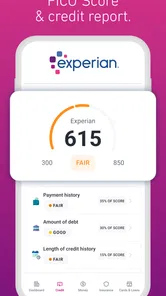
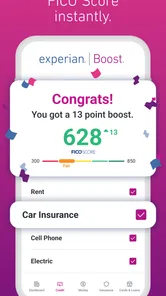
One of the standout features of this app is its ability to provide a free credit score check. Yes, you heard that right—absolutely free! This feature alone is worth its weight in gold, especially if you're someone who likes to keep a close eye on your financial standing. Plus, it updates regularly, so you're always in the loop about where you stand.
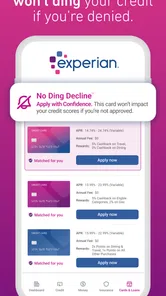
But that's not all. Experian also offers personalized insights and recommendations based on your credit profile. This means you're not just getting generic advice but rather suggestions tailored specifically to your financial situation. Whether it's tips on how to improve your credit score or alerts about potential fraud, this app has got your back.
Using guidance without letting it make the decision
The most useful way to read a personalized suggestion is as a lead to investigate, not as an instruction to follow immediately. I’d ask what the recommendation is responding to, whether it fits a goal I already have, and what the costs or trade-offs would be before acting. Advice can feel personal because it reflects a credit profile, but my budget, timing, and plans still matter.
That distinction is particularly important when an app presents a clear score alongside next steps. A simple number can be reassuring or unsettling, yet neither reaction tells me what I should do. I’d use the score to guide a closer look at the relevant information, and I’d compare any consequential option with other sources rather than treating an in-app prompt as a complete comparison.
Why It's a Game Changer
In today's fast-paced world, keeping track of your financial health can feel like a full-time job. That's where Experian steps in to make life a whole lot easier. By offering detailed insights and actionable recommendations, it empowers users to make informed decisions about their financial future. And let's be honest, who doesn't want a little extra help in that department?
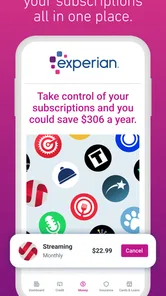
Moreover, the app also provides an option to track your spending habits over time. This feature is a real eye-opener as it gives you a clear picture of where your money is going. With this information at your fingertips, budgeting becomes less of a chore and more of a strategic game plan.
What to check before relying on it
Before making it part of a routine, I would confirm that the app works comfortably on my device and that I understand the information it presents. The listed current version is 4.2.9, and the minimum operating system is 7.0, so compatibility is worth checking on an older phone before planning around it. The app first appeared on May 12, 2016, but what matters more in daily use is whether the current experience suits your needs and setup.
Because this is a finance app, I’d also think carefully about where and when I open it. A private moment is preferable to reviewing sensitive information in a crowded place, and I would avoid making account or borrowing decisions while distracted. The app is free and rated for Everyone, but those points do not mean every adult or household will find it appropriate; personal comfort with financial apps and the ability to interpret the information still matter.
For anyone wondering whether this can replace a bank app, my answer is no: I’d keep using the bank’s own tools for account activity and use Experian for its credit-centered purpose. If you want a complete budget, choose a tool designed around income, bills, and spending plans. If your priority is a clearer credit check and related pointers, this is the more relevant place to start.
The Final Verdict
All in all, Experian is a powerhouse app that offers a blend of convenience, insight, and value. It's like having a personal financial advisor, minus the hefty fees. For anyone who takes their financial health seriously, this app is a no-brainer. So go ahead, give it a whirl, and see how it can transform your financial journey. After all, in the world of finance, knowledge is power, and this app arms you with just that.
My own recommendation is more specific: I’d try it if credit awareness is the gap in my current toolkit, and I’d keep expectations focused on that job. I wouldn’t choose it as my main spending planner, nor would I rely on a single screen to resolve a disputed detail or guide a major borrowing decision. The strongest experience comes from using it deliberately, checking anything important through the right channels, and making sure the interface works for your eyes, hands, and circumstances.
For people who want a convenient way to check credit information and read related guidance, it is an approachable option to consider. For people who need a full financial dashboard, want to avoid sharing personal financial details with a finance app, or depend on an interaction setup that does not work comfortably with it, another approach may be better. That is why I see its best value not in replacing every financial tool, but in making one specific task easier to bring into everyday life.
Experian® Frequently Asked Questions
What should I have ready before setting up an Experian account?
Before getting started, think about whether you are comfortable using a finance app to review personal credit information. You may need to provide identifying details during account setup so Experian can connect your account with the right information. Use accurate details, choose a strong password, and take time to read each prompt before continuing. These steps can help make setup clearer and protect your account.
Can I use Experian if I am new to managing credit?
Experian may be useful for people who are just beginning to understand credit, as well as for those who already monitor it. The app is presented as “Your Big Financial Friend” and offers credit information and guidance intended to help users make sense of their credit. If you are new to the subject, take time to understand each recommendation and consider how it applies to your own financial situation.
What kind of credit information can I view in Experian?
Experian gives users access to a credit score, a credit report, and alerts about changes to credit information. These tools can help you keep track of your credit profile and notice changes that may deserve attention. It works by gathering information from financial institutions and presenting insights in the app, making it a place to review credit details rather than a substitute for careful financial decisions.
Is Experian available on my device, and what age group is it intended for?
Experian is a finance app developed by Experian and is rated for Everyone. Its listed minimum operating system is version 7.0, so check your device’s system version before downloading. The app is presented as “Your Big Financial Friend,” and its broad age rating makes it suitable for a general audience, though anyone managing financial information should use it thoughtfully.
Is Experian free to download?
Experian is free to download. The app has a 4.7 average from around 686,000 ratings, and more than 10 million installs, suggesting it has reached a wide audience. Keep in mind that a free download does not necessarily mean every service inside the app is free; review any offer or subscription details shown in the app before signing up.
Pros
- Comprehensive credit report access.
- User-friendly interface design.
- Real-time credit score updates.
- Offers personalized financial tips.
- Provides identity theft protection.
Cons
- Requires personal information for setup.
- Some features need a paid subscription.
- Occasional app performance lags.
- Limited customer support hours.
- Notifications can be overwhelming.