Expense IQ Money Manager
- 2.81K
- 3.2
- Installs
- 1.00M
- Price
- Free

Screenshots
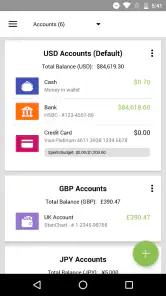
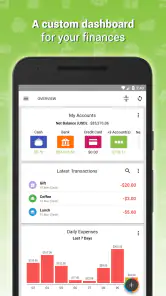
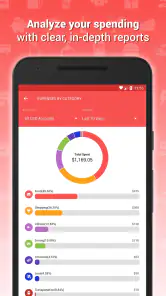
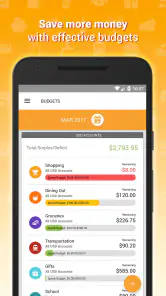


Analysis by Reviewed
I spent time with Expense IQ Money Manager as a practical finance app rather than treating it like a simple calculator. Its purpose is to help me record spending, organize a budget, and keep upcoming bills visible in one place. That combination makes sense for anyone who wants a clearer view of daily money habits without maintaining several separate tools. It is a free Android app from Handy Apps, aimed at Everyone, and its long presence in the finance category gives it the feel of an established utility rather than a newly launched experiment.
The important question is not whether an app can display expenses. Most money apps can do that. The real test is whether I would still open it after the novelty wears off, whether entering a purchase feels quick enough, and whether the budget view helps me make a better decision before the money is gone. Expense IQ does several of those jobs well, but it also asks for consistency. If I want completely automatic tracking with almost no manual involvement, this is not the obvious choice.
How Expense IQ fits into everyday money management
A free starting point with optional paid value
The app can be downloaded and used without an upfront purchase, which makes it easy to test with a real month of spending. That matters in finance software because the right workflow is personal: one person may enjoy entering purchases, while another may abandon the process after a few days. Starting free lets me discover that fit before paying for anything.
There are in-app purchases ranging from $3.49 to $124.99 per item. I would not treat that range as a reason to buy immediately. The sensible approach is to use the free experience first, decide whether the tracking routine actually sticks, and then judge any available paid option by the specific convenience it adds. The free entry point is clear; the exact value of each optional purchase depends on what is presented inside the app and what I personally need.
That distinction is important. A free app can still be expensive in time if recording transactions is awkward, while a paid upgrade can be worthwhile if it removes a daily irritation. Expense IQ’s value is therefore strongest for someone willing to participate in the process. It is less compelling for a user who expects the app to understand every financial movement automatically.
What I found useful in the core workflow
The basic routine is straightforward: record a purchase, place it in an appropriate category, check the effect on the budget, and keep bills in view. That sounds ordinary, but the order is useful because it connects a past action with a future obligation. A spending log tells me where money went; a budget gives that spending context; a bill reminder helps prevent the next avoidable problem.
I found the app most useful when I treated it as a short daily habit instead of a monthly repair project. Entering a coffee, transport fare, or household purchase soon after it happens keeps the information meaningful. Waiting until the end of the week creates uncertainty, especially for cash spending, and makes the budget less trustworthy. The app cannot correct forgotten entries, so the quality of the result depends heavily on the quality of the routine.
One practical technique is to create categories that reflect decisions I can actually change. A long list of tiny labels may look precise but can make entry slower. Broader groups for groceries, eating out, transport, subscriptions, and household costs usually give me a more useful picture than splitting every purchase into an elaborate taxonomy. I would only add a narrower category when it answers a real question, such as whether restaurant spending is crowding out a savings goal.
A realistic month with the app
Imagine I receive my monthly income and immediately enter recurring obligations as bills. I then set spending limits for groceries, transport, meals outside the home, and flexible purchases. During the week, I record transactions as they happen. When the food budget begins to shrink faster than expected, I can adjust the next few choices rather than discovering the problem after the month has ended.
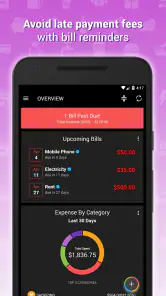
The bill reminder is especially useful in this scenario because it changes the app from a historical diary into a forward-looking checklist. I can review what is due before deciding how much flexible money is genuinely available. That is a subtle but important improvement over checking a bank balance alone: a bank balance may look healthy while scheduled obligations are waiting just ahead.
At the end of the month, I would review categories for patterns rather than judging every single purchase. If several small entries reveal that convenience meals are repeatedly exceeding the planned amount, the next budget can reflect reality. The goal is not to punish myself for spending; it is to make the next plan more honest. Expense IQ works best when its records lead to a change in behavior, not when they become an archive I never consult.
Where it differs from a spreadsheet
A spreadsheet offers almost unlimited flexibility, but that flexibility can become its weakness. I have to design the columns, formulas, categories, and summaries myself. Expense IQ gives the process a finance-specific structure, so I can focus on recording and reviewing instead of building a system from scratch. For someone who wants a ready-made personal ledger, that is a meaningful advantage.
The trade-off is control. A spreadsheet can be tailored to unusual household arrangements, business reimbursements, shared accounts, or detailed forecasting. An app workflow is more opinionated. If my finances require custom formulas, multiple currencies handled in a very particular way, or a highly specialized reporting system, I would be more comfortable with a spreadsheet or a dedicated accounting tool.
Where it differs from automatic banking tools
Bank-connected finance apps are attractive because they can reduce manual entry. They may suit people who want transactions imported with minimal effort. Expense IQ appeals more to someone who wants to deliberately label spending and remain involved in the process. Manual entry can feel slower, but it also makes me notice purchases that an automatic feed might turn into background noise.
That advantage has a limit. If I use several cards, cash, digital wallets, and shared accounts, manual tracking can become a chore. Someone with complicated finances may prefer automatic aggregation, provided they are comfortable with that approach. Expense IQ is better suited to a person who values a hands-on record and can maintain it consistently.
Small workflow choices that make a difference
My first recommendation is to set up the categories before trying to record a full history. Starting with a manageable structure reduces the temptation to postpone entries while deciding where they belong. After a week, I can refine the categories based on actual spending rather than guessing in advance.
My second recommendation is to use the bill area as a planning checkpoint, not merely as a reminder alarm. Before a due date arrives, I would look at the budget and ask whether the money is already reserved. This prevents a common mistake: counting money that is technically in the account but already committed to a bill.
My third recommendation is to review unusual purchases separately from routine spending. A one-time repair or gift can distort a category and make a normal month look unhealthy. Marking that event mentally during the review helps me avoid overcorrecting the next budget. The app provides the record, but judgment is still required to interpret it.
A fourth useful habit is to keep the app as the first place I record a purchase, rather than transferring information from notes later. Delayed transcription creates duplicate entries and missing details. If I cannot enter something immediately, I would keep a short temporary note and reconcile it the same day, while the transaction is still easy to remember.
Limitations I noticed in the overall experience
The central friction is manual discipline. Expense IQ can organize information I provide, but it cannot make an incomplete record accurate. People who dislike entering every purchase may enjoy the first setup and then stop using it. In that case, the attractive budget view becomes misleading because it reflects only the transactions that made it into the app.
There is also a learning curve around deciding how much detail is useful. Too few categories produce vague reports, while too many slow down entry. This is not a flaw unique to one screen; it is a design trade-off built into personal finance tracking. I would expect to adjust my setup more than once before it feels natural.
The average rating is 3.2 from around 23 thousand ratings, with roughly 2.8 thousand written reviews. I read that as a sign to keep expectations practical: the app has a substantial user base, but it is not universally loved. My experience matches that mixed picture. The concept is useful and the combination of tracking, planning, and reminders is coherent, yet the right fit depends strongly on how much manual work I am willing to accept.
Its current version is 2.3.2, and it supports Android starting with version 4.4. That broad compatibility can help people using older devices, although anyone on a newer phone should still judge the app by how comfortably it fits their current routine. The app has been available since May 14, 2014, which gives it a mature identity, but age alone should not be confused with a guarantee that every modern expectation will be met.
Who gets the most value from it
I would recommend Expense IQ to someone who wants a personal spending log with budgeting and bill planning in the same place. It is particularly suitable for a person beginning to take control of money, a household that wants a shared spending conversation, or anyone who has tried a spreadsheet and found the maintenance too tedious. The free starting point makes experimentation low-risk.
It can also help people whose main problem is not income calculation but visibility. If I regularly wonder where small purchases went, or if bills surprise me even though I technically have enough money, the combination of categories and reminders addresses those specific habits. The app is less about sophisticated financial theory and more about making ordinary decisions visible.
I would skip it if I need hands-off transaction importing, advanced investment analysis, or a business accounting system. I would also skip it if I know I will not record purchases. In those cases, an automatic banking service, a simpler notes-based method, or a spreadsheet designed around my exact needs may be more effective. The best finance app is the one that produces a trustworthy record, not the one with the longest feature list.
My buy-or-skip verdict
My honest verdict is to try the free version before considering any paid option. Expense IQ delivers real value when I use it as a daily money routine: record spending, compare it with a budget, and check upcoming bills before making new commitments. That is a practical combination, and it is more useful than a bare expense list for someone who wants to change habits.
I would not pay simply because the app contains several finance tools. I would pay only if an optional purchase clearly improves the workflow I already use and the cost feels justified by repeated convenience. Since individual in-app purchase value can vary, testing the free experience first is the fairest way to decide.
For a hands-on Android money manager, Expense IQ is worth a serious trial. It is not magic, it is not completely automatic, and it will not replace specialized accounting software. But if I want one place to make everyday spending visible, plan a budget, and remember bills, it offers a sensible structure without requiring an upfront price. Choose it for consistent manual control; skip it when automation or advanced financial analysis matters more than habit-building.
Pros
- Clear charts make spending patterns easy to understand.
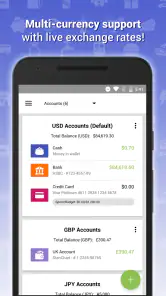
- Supports multiple accounts
- wallets
- and credit cards.
- Recurring transactions help automate regular expense tracking.
- Useful reminders can reduce missed bill payments.
- Offers flexible categories and customizable financial reports.
Cons
- Some advanced features may require a paid upgrade.
- The interface can feel crowded for first-time users.
- Manual entry may become tedious without bank synchronization.
- Limited platform availability may affect cross-device use.
- Users may need time to configure categories and budgets properly.

- Category
- Finance
- Version
- 2.3.2











