EveryDollar: Budget Planning
- 6.57K
- 4.3
- Installs
- 1.00M
- Price
- Free

Screenshots



Analysis by Reviewed
When it comes to managing finances, finding the right tool can feel like searching for a needle in a haystack. Enter EveryDollar: Budget Tracker, a nifty app that promises to simplify budgeting with a zero-based approach. But does it live up to the hype? Let's dive in and see what it's all about.
The Ease of Budgeting
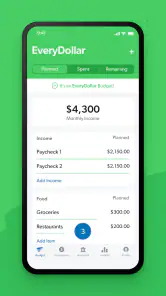
First things first, setting up EveryDollar is a breeze. The app walks you through creating your first budget step-by-step, and before you know it, you're categorizing expenses like a pro. The user interface is clean and intuitive, making navigation a piece of cake. Whether you're tech-savvy or not, you'll find yourself zipping through the setup process without breaking a sweat.
Zero-Based Budgeting Explained
The concept behind EveryDollar is simple yet effective: every dollar you earn is assigned a specific job. This zero-based budgeting method ensures that you're mindful of every penny, and nothing slips through the cracks. It's empowering to see your income and expenses laid out clearly, allowing you to make informed financial decisions. The app even lets you set savings goals, so you can watch your nest egg grow over time.
Tracking and Accountability
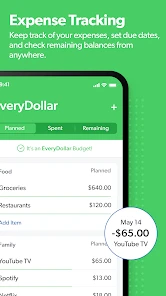
One of the standout features of EveryDollar is its tracking capability. Manually entering each transaction might seem tedious at first, but it's a game-changer for accountability. You become more aware of your spending habits, and seeing where your money goes can be quite the eye-opener. Plus, there's a satisfying feeling when you stay within your budget limits.
Connectivity with Your Bank
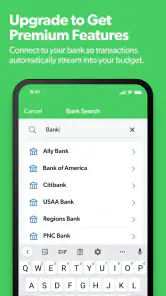
An optional feature worth mentioning is the ability to connect the app with your bank account for automatic transaction importing. It's a bit of a time-saver, reducing the need for manual entries. However, this feature does come with a subscription fee, so it's something to consider if you're on a tight budget.
Final Thoughts
Overall, EveryDollar: Budget Tracker is a solid choice for anyone looking to take control of their finances. Its user-friendly design and effective budgeting method make it accessible to all. While the manual entry might be a bit of a chore for some, the benefits of increased awareness and accountability are well worth it. If you're serious about budgeting and don't mind investing a little time, this app might just be your financial game-changer.
Pros
- User-friendly interface for easy navigation.
- Customizable budget categories.
- Syncs with bank accounts for real-time updates.
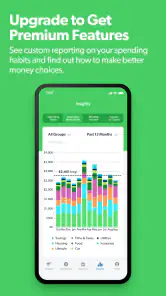
- Offers financial insights and reports.
- Free version available with essential features.
Cons
- Limited features in the free version.
- No bill tracking option.
- Subscription required for full access.
- Manual input needed for cash transactions.
- No investment tracking functionality.

- Category
- Finance
- Version
- 2025.11.260











