English to Spanish Translator
- 4.19K
- 4.6
- Installs
- 1.00M
- Price
- Free

Screenshots

Analysis by Reviewed
I’d treat this as a useful pocket aid for everyday English–Spanish exchanges, not as a substitute for learning how Spanish works. The English to Spanish Translator is a free education app from Translation and Voice Typing Apps, and its focus is narrow in a helpful way: getting a phrase across quickly in either direction. In my view, that direct purpose makes it easier to reach for than a broad language-learning app when all you need is a translation.
When a quick translation is enough
I find this kind of focused tool most useful when a conversation has one clear task: ask a basic question, understand a short message, or check how a common phrase might sound in Spanish. It is less work than opening a course, choosing a lesson, and working through material that does not answer the immediate question. That convenience is also its boundary: a translated sentence can help you communicate, but it does not explain the grammar or guarantee that the wording fits every situation.
A practical way to use it is to keep each request short and specific. Instead of translating a long paragraph with several ideas, break it into one question or statement at a time. That makes it easier to spot a result that seems off and gives the other person a clearer message to respond to. For anything important, I would treat the translation as a draft to check, not as a final authority.
A small workflow for everyday use
Picture arriving at a hotel and wanting to ask whether you can leave a bag before check-in. I would enter that single request, read the Spanish result before showing it, and keep the original question nearby so I can confirm the meaning. If the exchange continues, I would translate the next question separately rather than pasting a whole conversation into one box. That keeps each step manageable and makes it easier to recover if the first phrase needs clarification.
The same approach works for messages, errands, or a simple request for directions. If you are using voice input, first decide whether the setting is quiet enough and whether speaking into your phone will feel comfortable. In a crowded place, typing may be less awkward and more accurate; when your hands are occupied and the setting is calm, speaking can be quicker. I would not assume either method is always best—the useful choice depends on the moment.
A Handy Tool for Quick Translations
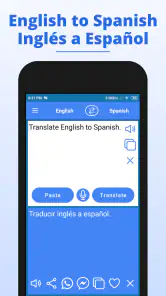
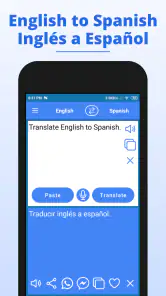
First off, the English to Spanish Translator app is all about simplicity and efficiency. It’s like having a little language assistant in your pocket. You open the app, type in what you need translated, and boom! You’ve got your Spanish equivalent in seconds. The interface is super user-friendly, which means you don’t need to be tech-savvy to get the hang of it. Just type and translate – it’s as easy as pie.
Where the free option earns its place
The app is free to download, so you can try its basic translation workflow without paying upfront. It also offers in-app purchases ranging from $1.99 to $29.99 per item. I wouldn’t assume those purchases are necessary for ordinary translation, or that they unlock any particular feature; check the purchase details in the app before spending. That distinction matters: free access lowers the risk of trying it, while the value of any paid item depends on what you personally need from it.
More From Our News Desk

Clash of Clans Is Won Between the Battles

Android Auto Makes the Case for Quieter Car Software

MobiOffice: Transforming Mobile Productivity with Seamless Integration

EA SPORTS FC™ Mobile Soccer: Redefining Mobile Sports Gaming

How Microsoft OneDrive Became a Mobile Productivity Giant

How Google Translate Breaks Language Barriers Effortlessly
Its reach suggests it has found a sizable audience: it has over one million installs and a 4.6 average from around 29,000 ratings. I’d take that as a reason to consider trying it, not as proof that every translation will be right. The app is rated for Everyone, and it runs on Android 6.0 or later. Its current version is 20250929, so it is worth checking that your device meets the minimum requirement before installing.
Features that Stand Out
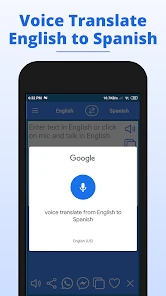
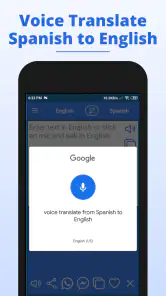
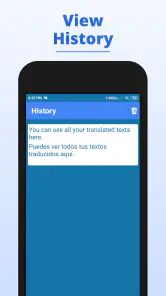
One feature I find particularly cool is the voice translation. Sometimes typing can be a hassle, especially when you’re on the go. With this app, you can simply speak into your phone, and it’ll translate your words right away. It’s pretty slick, I must say! The app also offers a history tab, where you can view your past translations, which is great for revisiting phrases you use often.
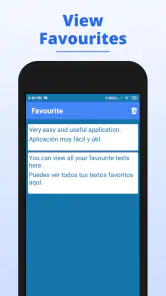
Plus, there’s a feature that allows you to save your favorite translations. So, if there’s a phrase you frequently use, you can save it for quick access later. Pretty neat, huh?
Make saved phrases more useful
To get more from favorites, I’d save a complete line together with enough context to remember when it is appropriate, rather than collecting disconnected vocabulary. A request for directions, for instance, is more useful as a ready-to-use question than as a single translated word. I would also review saved wording before a trip or appointment: a phrase that was right for one exchange may not suit a different person or a more formal setting.
History and favorites serve different purposes in that workflow. History can help me retrace a recent exchange when I need to check what I asked, while favorites are better for phrases I expect to use again. I would avoid treating either as a carefully organized study notebook; a translator’s saved entries are most valuable when I keep them practical and easy to recognize.
Those saved phrases can be more useful as a small personal phrasebook than as a collection of isolated answers. I’d save complete, reusable lines—such as a polite request or a question you expect to ask again—rather than single words whose meaning can shift with context. Before using a result in an important conversation, read the whole sentence and check whether it says what you intend; a quick translation can miss tone or nuance even when the basic meaning looks right.
Using it in real situations
Imagine you’re at a café and need to ask whether a dish contains an ingredient you avoid. You can type the question if the room is noisy, or speak it when your hands are busy, then keep the useful wording in favorites if you expect to ask again. I’d still show the translated sentence to the other person and pay attention to their response rather than treating the app as a perfect interpreter. For medical, legal, or other high-stakes conversations, I’d choose a qualified human interpreter instead.
Voice input is convenient, but it also depends on speaking clearly and having a situation where using the phone aloud feels appropriate. Names, regional expressions, background noise, and long or complicated sentences can make a spoken translation less dependable. If the result seems odd, try a shorter sentence or type it instead. That simple switch is a practical way to avoid trusting one awkwardly phrased result.
Where it sits among other language tools
Compared with a phrasebook, this app is more flexible when you need wording that is not already printed as a fixed example, while a phrasebook can be easier to browse when you want a prepared set of travel expressions. A bilingual dictionary is better when your main question is what one word means and how it is used; a translator is more convenient when you need a whole short sentence. Those tools solve related but different problems, so I would choose based on whether I need a ready-made phrase, a word explanation, or a quick sentence rendering.
Compared with a full Spanish course, this app is better for quick reference than building grammar knowledge or a steady study routine. Compared with a general-purpose translator, its English–Spanish focus may feel more straightforward when that is the pair you use most, while a broader tool may suit someone who regularly moves among several languages or needs a wider set of reference options. I’d use this one for common questions, short messages, and checking a phrase, but not to judge subtle differences in formality or regional usage.
One useful habit is to keep the original English beside the Spanish result when you are learning. Try to predict the translation first, then compare; that turns a quick lookup into a small practice exercise without mistaking the app for a teacher. If you need to understand why a verb changes or how a sentence is built, a structured lesson or grammar reference will serve you better. The translator helps with the immediate wording, but it cannot replace that explanation.
Who is likely to get the most out of it?
I’d recommend giving it a try if you are a beginner who wants help forming simple requests, a traveler who needs a few practical lines, or someone who regularly exchanges short English and Spanish messages. It is especially convenient when you would rather type or speak a phrase than search through a larger language-learning app. The free download makes it easy to test whether that quick workflow fits your habits before deciding whether it deserves a place on your phone.
I would skip it as a primary tool if you need to learn Spanish systematically, polish professional writing, or interpret a sensitive conversation. In those cases, a course, a careful dictionary or grammar reference, or a qualified human interpreter is a better match. If you routinely translate among many languages, a broader translator may also be more convenient than a tool centered on English and Spanish. The right alternative depends on the job, not on which app has the longest feature list.
Why It’s Worth a Shot
Now, you might be wondering, “Why should I give this app a try?” Well, apart from its nifty features, it’s just a great way to get a grasp on Spanish. Whether you’re traveling, learning Spanish, or just trying to impress someone with your language skills, this app has got your back. It’s like having a mini Spanish tutor available anytime you need it.
Moreover, the app is regularly updated to improve accuracy and add new features, so it keeps getting better with time. And did I mention it’s free? Yup, you heard me right. No hidden costs or premium features locked behind a paywall. Just pure, unadulterated translation magic at your fingertips.
For me, it makes the most sense for a beginner, a traveler preparing a handful of useful phrases, or anyone who often needs short English–Spanish translations and appreciates voice input and saved entries. It is less suited to someone who needs careful professional wording, detailed language instruction, or dependable interpretation for consequential decisions. If you are comparing options, decide first whether you want fast phrase help or a tool designed for study and nuance; that answer matters more than a popularity figure.
My recommendation after weighing the trade-offs
I’d try it for everyday, low-stakes communication and judge it on the phrases I actually need: a short question, a simple message, or wording I want to keep handy. I would not pay for an in-app item until I had checked exactly what it offers and decided that it solves a real problem for me. That is the sensible way to assess value here: free access is clear, while whether a purchase is worthwhile depends on its details and your own use.
My main advice is to use it as a bridge, not as the whole conversation. Keep sentences simple, read the result before sharing it, and switch from speech to typing if the environment makes voice input unreliable. When the meaning matters a great deal, use a more dependable source of human expertise. With those limits in mind, this is a practical tool for quick English–Spanish help rather than a replacement for study or professional translation.
In conclusion, if you’re in the market for a reliable and straightforward translation app, the English to Spanish Translator is definitely worth a download. It’s practical, efficient, and surprisingly fun to use. So why not give it a whirl and see how it can fit into your daily routine? ¡Buena suerte!
English to Spanish Translator Frequently Asked Questions
What is English to Spanish Translator, and what is it designed to do?
English to Spanish Translator is an education app for translating between English and Spanish. Its short description focuses on English-to-Spanish translation, while its broader purpose also includes Spanish-to-English translation. It may be useful for looking up words and phrases during study or everyday communication. The app is developed by Translation and Voice Typing Apps.
Is English to Spanish Translator available for iPhone and iPad?
The app is presented as an Android app, and its listed system requirement is Android 6.0 or later. If you use an iPhone or iPad, check the Apple App Store for an edition that is compatible with your device before downloading. App availability and compatibility can differ between platforms, so make sure the app you choose is the intended English-to-Spanish translator.
Does the app support both English-to-Spanish and Spanish-to-English translation?
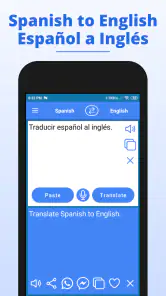
Yes. English to Spanish Translator is described as supporting translation in both directions: English to Spanish and Spanish to English. That makes it relevant whether you are starting with English text or trying to understand Spanish. The app’s name highlights English-to-Spanish translation, so check the available controls after opening it to choose the direction you need.
Is English to Spanish Translator suitable for beginners learning Spanish?
English to Spanish Translator is an education app designed around translating between English and Spanish, so it can be useful for learners who want help understanding words and phrases. Its pronunciation guidance can also support speaking practice. Treat translations as a learning aid rather than a complete language course, and check important or nuanced expressions with additional learning resources.
What should I know about the app’s cost before downloading it?
The app is free to download, and it offers in-app purchases priced from $1.99 to $29.99 per item. That means you can try it without paying upfront, but some features or options may involve a purchase. Review the purchase details shown in the app before confirming anything, especially if you are downloading it for a child or sharing a device.
Pros
- Accurate translations for common phrases.
- Supports voice input for convenience.
- Intuitive and user-friendly interface.
- Fast translation speed for efficiency.
- Offline mode for on-the-go usage.
Cons
- Limited to text and voice inputs only.
- Occasional mistranslations in complex sentences.
- Lacks regional dialect support.
- Ads can be intrusive at times.
- No live chat support for troubleshooting.

- Category
- Education
- Version
- 20250929