English-Myanmar Dictionary
- 455.00
- 4.6
- Installs
- 10.00M
- Price
- Free

Screenshots

Analysis by Reviewed
I reach for English-Myanmar Dictionary when I need a practical English-to-Myanmar reference rather than a full course. It is a free Books & Reference app from NAINGDroid, and its focus is useful: look up language, work on vocabulary, and practise speaking without making every session depend on a connection. I’d treat it as a handy companion, not as a substitute for conversation or a teacher.
A dictionary is useful when the task is small
I find a focused dictionary most valuable when I have one clear question: What does this word mean? How might I say it? Is this the term I remember seeing in a lesson? For those moments, opening a reference is less distracting than entering a broad translation service and trying to turn a whole sentence into a polished result. This app’s English-Myanmar focus makes it a natural fit for short lookups and vocabulary practice.
That focus also sets a boundary. A learner who needs a carefully sequenced path through grammar, regular tests, or extended speaking exercises should look for a course or tutor as well. I would not choose a dictionary as my only learning tool if I were starting from scratch and wanted every lesson planned for me. It can support study, but the learner still has to decide what to practise and how to use each new word.
Its appeal is practical rather than grand: keep a reference close, check a term, and return to what you were doing. I would especially consider it if I read English and want to build Myanmar vocabulary, or if I already know some Myanmar and need occasional English support. Someone whose main need is translating long documents or writing nuanced messages may be better served by a broader translation workflow, with a fluent person checking the final wording.
Starting with a simple, repeatable routine
Rather than browsing randomly, I’d use the app alongside something I already read or do. When an unfamiliar word appears in a message or a short passage, look it up, note the meaning that fits the sentence, and then revisit it later without looking. That small loop—encounter, check, recall—is more useful than collecting a long list of words I never practise. It also helps me notice where a dictionary can clarify vocabulary but cannot explain the full grammar around it.
A useful tip is to keep the lookup question narrow. If I am unsure about one word, I search for that word rather than entering a whole private message. This keeps the task manageable and avoids mistaking a word definition for a complete translation. When I need to communicate an idea rather than understand a term, I would draft the full thought separately and ask a fluent speaker to check it if accuracy matters.
The app’s offline role can make this routine easier to maintain away from a reliable connection. I can prepare a short set of likely travel or study words in advance, then use the reference when I am out. That is different from assuming every lookup will be available in every circumstance: I would test the parts I expect to rely on before leaving, especially if my plans depend on them.
More From Our News Desk

Weather by Xiaomi Review: Clear at a Glance, Less Clear Up Close

X Under Pressure: Can It Recover When Posting Goes Wrong?

Clash of Clans Is Won Between the Battles

Android Auto Makes the Case for Quieter Car Software

MobiOffice: Transforming Mobile Productivity with Seamless Integration

EA SPORTS FC™ Mobile Soccer: Redefining Mobile Sports Gaming
Trust starts with what I can check
Language searches can reveal more than a learner intends. A phrase might relate to work, health, travel, or a personal conversation, so I try not to type sensitive details into any dictionary when a single word will answer the question. The offline function is valuable for access when a connection is unavailable, but I do not treat that fact alone as proof of how information is stored or handled. Those are separate questions, and I prefer to assess them through the app’s visible prompts and current privacy information.
Before using an app for personal or professional material, I read the permission prompts on my device and decide whether each request makes sense for what I want to do. I also check whatever privacy information and controls are available at the time I install it. If I cannot understand why a permission is needed, I pause instead of granting it automatically. This is a sensible habit for any reference tool, not a claim that this app requests a particular permission.
I also keep the example I enter as generic as possible. If I need a term for a sensitive topic, I can search for the term itself rather than paste a whole conversation. When the wording must remain confidential, I may prefer consulting a trusted person or a reference I can use without including identifying context. The key is to choose the smallest amount of information that will answer the language question.
Where user choice matters in daily use
For me, a good language habit needs to fit around real life. I might look up a word during a study break, practise saying it once, and return to my reading rather than turn every moment into a lesson. If daily reminders are useful, they can serve as a prompt to recall a word; if they interrupt more than they help, I can ignore them and open the dictionary only when I have a reason. I would not make learning depend on a notification arriving at the perfect time.
Another practical choice is deciding when not to trust a single entry as the whole answer. A word can have several senses, and the one that fits a textbook may not fit a friendly conversation or a formal request. I use the lookup as a starting point, then consider who I am speaking to and what I want to convey. For a high-stakes message, asking a fluent Myanmar speaker to review the complete sentence is the safer path.
Compared with a general translation app, this dictionary is a better match for checking individual vocabulary and keeping a focused reference close at hand. A general translator is often more convenient when I need a quick draft of a longer passage. Neither choice removes the need for judgement: broad translation tools can flatten context, while a dictionary entry does not automatically supply natural phrasing. I choose according to the size and importance of the task.
Getting Started: First Impressions
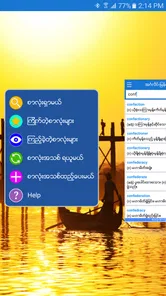
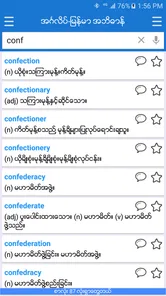
From the moment you open the English-Myanmar Dictionary, it's pretty straightforward. The user interface is clean and intuitive, which is a relief because nobody wants to get lost in a maze of unnecessary features when all you want is a quick translation. I found it incredibly easy to navigate. As someone who’s not exactly a tech wizard, that’s saying something!
The app has a 4.6 average from around 36,000 ratings and has passed 10 million installs, which suggests that many people have found a reason to keep it around. It is rated for everyone, and version 2.6.2 is listed for Android 4.4 and newer. Those details help set expectations about accessibility, though the most important question is still whether its English-Myanmar focus fits the way you plan to use it.
Features that Stand Out
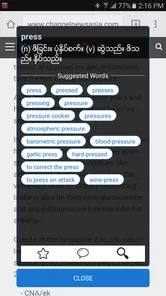
One of the coolest features is the offline mode. Yes, you read that right! You can access translations without internet connectivity. This is a lifesaver, especially if you’re traveling in areas with spotty Wi-Fi. The dictionary is packed with a vast array of words and phrases. I was pleasantly surprised by the pronunciation guide, which is incredibly helpful if you’re like me and struggle with native accents.
Offline access is especially useful if you prepare before leaving home: look up likely words while connected, then keep the reference available when a signal drops. I’d still check important wording in context rather than treating one dictionary entry as a complete sentence. For a message where politeness or nuance matters, a fluent speaker is a better final check than any quick lookup.
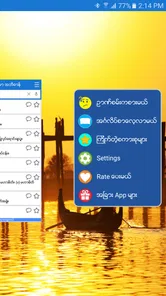
Another feature worth mentioning is the daily word notifications. It’s like having a little language coach in your pocket, encouraging you to expand your vocabulary every day. This feature is particularly beneficial for those who are serious about learning the language in depth.
A small but useful habit is to turn a notification into an active recall exercise: try to remember the meaning before opening the app, then say the word aloud and compare it with the pronunciation guide. That makes a brief prompt more engaging than simply reading and dismissing it. If reminders become distracting, you can just use the dictionary when a real question comes up instead.
Real-World Application
Using the app in real-life situations is where it truly shines. Whether you’re haggling prices at a local market or trying to impress your Burmese friends with a well-pronounced phrase, this app has got your back. I found it particularly useful during my trip to Myanmar, where it helped me engage more meaningfully with the locals.
For an ordinary day, imagine checking a word before a call with a Myanmar-speaking colleague, then revisiting it later to practise saying it more clearly. That is a comfortable fit for a quick-reference tool. It also suits students who want to check vocabulary while reading. By contrast, if your main goal is structured lessons, grammar explanations, or guided conversation practice, I’d pair it with a dedicated course or a human tutor rather than expect a dictionary to teach those skills on its own.
Compared with a general-purpose translation app, a focused English-Myanmar dictionary is appealing when you want a direct word reference and offline access. A broader translator may be more convenient for turning whole passages into another language, but machine-generated sentences can miss context. I use a dictionary entry to understand or check a term, not as a guarantee that a long message sounds natural.
Trust, Choice, and Practical Limits
Because this is a language reference, the content you look up can be personal: a work phrase, a travel plan, or a message you are composing. I avoid entering private details when a single word or shorter example will do. The app’s useful offline role also gives me a simple choice: prepare vocabulary ahead of time and consult it without needing to send every lookup through a live translation workflow. That is a practical habit, not a claim about the app’s broader data handling.
I would not install any language app on the assumption that its privacy practices or permissions are obvious. Before relying on it, I check the permission prompts on my device and review the app’s current privacy information and available settings. If a prompt does not make sense for how I intend to use a dictionary, I pause and decide whether I’m comfortable proceeding. The app’s everyday value is strongest when I can use it for simple lookups without sharing more personal context than the task requires.
There is also a trade-off in using short dictionary entries: a correct word can still be the wrong choice for a particular relationship or situation. Pronunciation support helps with saying a word, but it does not by itself teach conversational timing, tone, or grammar. For sensitive, formal, or high-stakes communication, I would ask someone fluent to review the complete wording.
All in all, the English-Myanmar Dictionary is a nifty tool for anyone keen on learning Burmese or simply needing reliable translations on the go. Its user-friendly interface combined with powerful features like offline access and pronunciation guides make it a standout choice in the sea of language apps. Whether you’re a student, traveler, or just a curious language enthusiast, this app is definitely worth checking out.
So, if you’re ready to embark on a linguistic journey, give this app a try. Trust me, it’s like having a trusty companion in your pocket, ready to assist at a moment’s notice. Happy learning!
English-Myanmar Dictionary Frequently Asked Questions
Can I use English-Myanmar Dictionary while traveling or away from Wi-Fi?
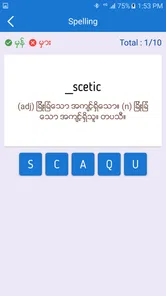
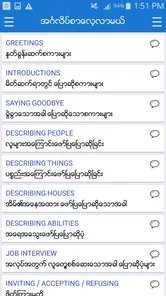
Yes. The app is described as an offline English-Myanmar dictionary, so you can look up words without relying on an internet connection. That can be useful when traveling, dealing with limited connectivity, or trying to avoid using mobile data. Its speaking and vocabulary learning modules also make it more than a simple lookup tool for language practice on the go.
Which languages does English-Myanmar Dictionary focus on?
The app focuses on English and Myanmar, as reflected in its name and its English-Myanmar dictionary description. It is intended for people who want to look up vocabulary between these languages and support their language learning. If your main need involves a different language pair, this app may not be the right match; its central purpose is English-Myanmar reference and practice.
Who develops English-Myanmar Dictionary, and what kind of app is it?
English-Myanmar Dictionary is a Books & Reference app developed by NAINGDroid. Its focus is practical language support: the app is described as an offline English-Myanmar dictionary with learning modules for speaking and vocabulary. It may suit people who want a reference tool alongside language practice, whether they are studying at home or looking up words while away from an internet connection.
Is English-Myanmar Dictionary free, and what devices can run it?
The app is free to download and is rated for everyone. It runs on Android devices with Android 4.4 or later, making it available to many users with older as well as newer phones. Before installing, check that your device meets this minimum requirement and has enough available storage for the app and its dictionary resources.
What is the main purpose of the English-Myanmar Dictionary app?
The primary purpose of the English-Myanmar Dictionary app is to provide users with a reliable and comprehensive tool for translating words and phrases between English and Burmese. It serves as an essential resource for students, travelers, and professionals who need quick and accurate translations to facilitate communication and enhance language learning.
Pros
- Comprehensive word database
- Offers offline access
- Includes pronunciation guides
- User-friendly interface
- Frequent updates
Cons
- Limited advanced features
- Occasional incorrect translations
- Ads in free version
- Requires internet for pronunciation
- Basic design aesthetics











