Empower®
- 11.06K
- 3.2
- Installs
- 1.00M
- Price
- Free

Screenshots
Analysis by Reviewed
When I’m deciding whether a money app belongs in my routine, I start with a practical question: does it fit the accounts and decisions I already have to manage? Empower® is aimed at people whose retirement plan, IRA, retail or HSA accounts are serviced by Empower. That focus matters: it is more useful as a place to check in on an existing Empower relationship than as a universal replacement for a bank’s own app. If you are weighing it up, I’d think first about which accounts you expect to follow and what you want to do after you open the dashboard.
Start with the accounts you need to follow
Empower Retirement, LLC makes this free finance app for customers using its services. It has been available since August 12, 2018, and the current version is v2025.11.19 (2511.19), with Android 7.0 as the minimum operating-system requirement. The app is rated for Everyone. Those details are useful context, but the deciding point for me is whether your plan or account is actually serviced by Empower; people looking for a standalone budgeting app may find a general-purpose alternative a better match.
In an everyday situation, I might open the app after payday to check a workplace retirement account, then return later when deciding whether a change to my monthly spending leaves room for another goal. That kind of check-in can make long-term savings feel less abstract. I would treat the app as a way to review information and support decisions, though, not as a substitute for understanding the plan’s rules or choosing an appropriate level of risk.
What is Empower®?
So, imagine having a financial advisor right in your pocket. That’s exactly what Empower® aims to be. It's designed to help you manage your money more effectively, offering tools that range from budgeting and savings tracking to financial planning insights. Whether you're looking to save for a vacation, pay off debt, or just keep better tabs on your spending habits, this app is here to guide you every step of the way.
Setting Up and Navigating the App
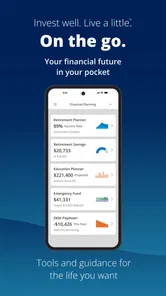
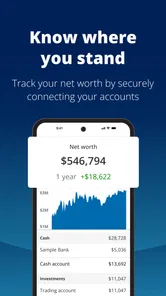
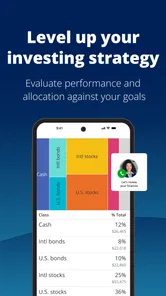
Getting started with Empower® is a breeze. You just download it, sign up, and within minutes, you’re ready to go. The interface is sleek and intuitive, which is a huge plus for those of us who aren’t exactly tech-savvy. You’ll find that the app’s dashboard provides a clear overview of your financial health, complete with visual graphs and charts that make understanding your finances much simpler.
For a more deliberate routine, I’d use a short review rather than checking balances repeatedly: note what changed, identify one question that needs an answer, and follow up through the relevant account or support channel. That keeps a dashboard from becoming a source of noise. It also helps separate a temporary market movement from a decision about contributions or everyday spending, which are not the same kind of problem.
Features Galore!
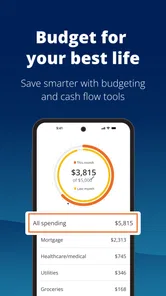
One of the things I love about Empower® is its array of features. First off, the budgeting tool is incredibly comprehensive. You can set spending limits for different categories, receive alerts when you’re close to hitting those limits, and even track your spending trends over time. It’s like having a personal accountant without the hefty fees.
More From Our News Desk

 Bolt: Request a Ride
Bolt and the Shift from One-Tap Rides to More Legible Trips
Bolt shows how ride-hailing is shifting from a one-tap taxi request toward a more legible, choice-driven trip, while leaving the hardest questions of price and reliability unresolved.

 Farm Land - Farming life game
Farm Land Review: A Small Island Farm with a Satisfying Loop
A bright, breezy island farm turns a few quick chores into a satisfying cycle of planting, harvesting, expanding, and deciding what to build next.

 Android Auto
’s Community Takes Shape in the Passenger Seat
Its most valuable network is not a public feed but a shared set of routes, voice habits, app integrations, and advice that make driving less isolating—and sometimes more complicated.

 My Talking Angela
 Makes the Virtual Pet Feel Personal
A polished pet-raising game built on small rituals, playful customization, and a character who gives everyday screen time a surprisingly personal rhythm.

 Google Translate
 Review: A Pocket Tool for the Small Frictions of Travel
From menus and signs to quick conversations, Google Translate earns its place by cutting the little delays that make unfamiliar language feel like a barrier.

 Shazam: Find Music & Concerts
Shazam’s Best Trick Is Turning a Song Into a Night Out
A few seconds of recognition can settle an argument, rescue a half-remembered chorus, and point toward a live show. Shazam’s real trick is what happens after the match.
Latest News



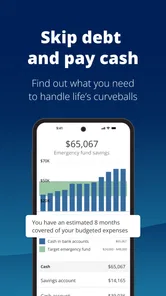
Another standout feature is the automatic savings option. The app analyzes your spending patterns and automatically transfers a small amount of money into your savings account when it predicts you won’t miss it. Talk about effortless saving! Plus, there’s the subscription management tool that helps keep track of all those pesky monthly charges that tend to sneak up on us.
Using the information to make a decision
A useful habit is to check whether a change in a spending category is a one-off or a pattern before reacting to it. If a category is close to its limit, I’d look at the transactions behind the total and decide whether to adjust the next week’s plan or simply accept an unusual expense. This is a more grounded use of budgeting alerts than treating every notification as a warning that something has gone wrong.
That workflow also shows where a handoff may be needed. A spending summary can help me spot a question, but a retirement-plan decision may call for reviewing the plan’s own information, while a charge I do not recognize needs attention from the institution that handled it. I would not assume that one dashboard can resolve every account issue or replace the official channels connected to each financial product.
The Empower® Card
Oh, and did I mention the Empower® Card? This is a debit card linked directly to your app, offering cashback on certain purchases and zero account fees. It’s perfect for those who want to streamline their finances without juggling multiple apps and accounts.
Still, I would compare that convenience with how I already pay. If you prefer keeping daily spending separate from long-term savings, adding a linked card may not simplify your setup. And if your main goal is detailed household budgeting across several institutions, a dedicated budgeting app or the banking apps you already use may be a more natural fit. Empower makes the most sense when its account relationship is central to the job, not simply because it offers several money tools in one place.
A payday review that leads to a useful next step
For me, the strongest use case is not trying to manage every financial decision in one sitting. It is using the app as a checkpoint: after payday, I can review the accounts I expect to see, notice whether anything deserves a closer look, and decide what to do next. If spending has been higher than expected, I can make a modest adjustment to my plans for the coming week rather than reacting by changing a long-term retirement choice. Keeping those decisions separate is a practical way to avoid letting a single busy month dictate a much larger financial move.
A less obvious benefit of that routine is that it can help me prepare for conversations outside the app. If I see a balance or transaction that I cannot explain, I can write down what I noticed and the date it appeared before contacting the relevant provider. That makes the handoff more focused than calling with only a vague sense that “something looks wrong.” For retirement questions, I would also have the plan’s own details nearby; a general overview may help me identify the issue, but the plan’s terms are what matter when I am considering a change.
Choosing the right tool for the job
Compared with a bank’s mobile app, Empower is a better starting point when the question concerns an Empower-serviced retirement, IRA, retail or HSA account. A bank app usually feels more direct for routine banking tasks, because that is where I would go to handle activity tied to that bank. A dedicated budgeting app may be preferable when I want to build a shared household plan, coordinate spending with another person, or focus almost entirely on category-by-category budgeting. I would not switch tools just because one claims to cover more ground; I would choose the one that owns the account or workflow I need to act on.
That distinction matters if you have accounts spread across providers. Before relying on any overview, I would check which of my accounts are actually represented and whether the view answers the question I opened the app to resolve. If I need a complete picture across unrelated institutions, I would compare the app’s coverage with a tool designed around that broader job. If I mainly want to keep tabs on an Empower relationship, the narrower focus can be an advantage rather than a drawback.
Small habits that make the dashboard more useful
I would avoid turning notifications or category limits into automatic instructions. An alert is a prompt to investigate, not proof that a purchase was a mistake or that a budget needs a permanent change. When a total looks unusual, checking the transactions and considering whether the month included a one-off expense gives the number context. That is especially useful when a recurring bill, seasonal purchase, or irregular expense makes a normal month look different from the last one.
I would also set a clear question before opening the app: am I checking a retirement account, reviewing spending, or looking for a charge to investigate? That small choice helps me avoid jumping between long-term savings and everyday expenses without a reason. It also makes it easier to stop once I have the information I need, instead of repeatedly refreshing balances that may not require action. A dashboard is most valuable when it leads to one sensible next step.
Who should pause before making it a daily habit
If your main need is a detailed budget shared between partners or roommates, I would start by comparing tools built specifically for that collaboration. The same goes for someone who wants a simple way to manage ordinary bank transactions but has no Empower-serviced account to check. In those cases, the app’s connection to Empower is not a minor detail; it determines whether its central purpose matches your daily routine. A familiar bank app or a specialist budgeting service may reduce friction.
It may also be a poor fit if you expect a mobile overview to explain every change or make financial choices for you. I would use its information to notice and organize questions, then confirm important details through the account’s official records. That extra step can feel less convenient, but it is sensible whenever the next action affects a retirement plan, savings decision, or unfamiliar charge. The app can help me see where to look; it should not be treated as the final authority on every issue.
Who benefits most—and where the flow breaks
I’d recommend it first to an Empower customer who wants a convenient mobile view of relevant financial activity and is willing to check details before acting. It may also suit someone who likes a single starting point for routine reviews. By contrast, if you do not have an account or plan serviced by Empower, or you mainly need a detailed shared budget for a household, I would compare other options before building a routine around it.
The handoff from overview to action is the part to approach carefully. A chart or alert can suggest where to look, but it does not automatically explain why a balance changed or what a plan rule means. When something looks unexpected, verify it through the account’s own records before changing a contribution, moving money, or making a purchase decision. That small pause is especially worthwhile when a display combines short-term spending with longer-term retirement goals.
The app is free, and its audience is substantial: it has more than a million installs, an average rating of 3.1 from around 29,000 ratings, and roughly 11,000 written reviews. I read that mixed rating as a reason to keep expectations practical rather than assume the experience will suit everyone. For comparison, a bank app is usually the more direct choice for everyday account tasks, while a specialist budgeting tool may offer a better fit if category planning is your main priority. Empower’s clearest advantage is serving people who already have an Empower account to keep an eye on.
What I would want to know before relying on it
A common practical question is whether this can replace a bank app. I would not count on that: I see it as a companion for an Empower-serviced account, while the bank app remains the straightforward place for that bank’s own day-to-day tasks. Another question is whether it suits someone with no Empower relationship. I would skip it as a primary finance tool in that situation, because the reason to choose it is the account connection, not simply the promise of a general money dashboard.
If I were deciding whether to check it every day, I would first ask whether daily attention would change anything. For a long-term retirement account, a calmer routine may be more useful than frequent balance checks; for spending, a periodic review can help spot a trend without making every purchase feel consequential. And if I saw a discrepancy, I would verify it through the relevant account’s own records before acting. That answers the key question of what the app is for: a convenient place to begin a review, not a replacement for careful follow-through.
Final Thoughts
Overall, if you’re looking for a user-friendly app to help you take control of your finances, Empower® is definitely worth checking out. It's not just about budgeting; it's about empowering you to make smarter financial decisions. The insights and tools provided can truly transform how you handle your money, making financial stress a thing of the past. So go ahead, give it a try, and see how it can redefine your approach to money management.
Remember, managing your finances doesn’t have to be a daunting task. With apps like Empower®, achieving financial freedom is just a tap away. Happy saving!
Empower® Frequently Asked Questions
Is Empower® intended for people who are not Empower customers?
Empower® is primarily for customers whose retirement plans, IRAs, retail accounts, or health savings accounts are serviced by Empower. If you do not have an account serviced by Empower, the app may not fit what you need. It is designed to provide access to Empower-serviced accounts, rather than serve as a general-purpose banking app for every financial institution.
What should I check before downloading Empower®?
First, make sure you have an account the app is intended to serve, such as an Empower-serviced retirement plan, IRA, retail account, or health savings account. It is also worth checking that your Android device meets the app’s operating-system requirement. Those quick checks can help you decide whether Empower® matches both your account needs and your device before installing it.
Who is Empower® designed for?
Empower® is a finance app for customers whose retirement plans, IRAs, retail accounts, or health savings accounts are serviced by Empower. Before downloading, consider whether you are looking to access or manage an Empower-serviced account; the app is intended for those customers rather than as a general-purpose banking app for every financial institution.
What devices can I install Empower® on?
Empower® is available for Android devices running version 7.0 or later, so check your device’s operating system before downloading. It is an app in the finance category, and its age rating is Everyone. The app is free to download, making it possible to install and explore its account-access experience without paying an upfront download charge.
What is Empower® and what features does it offer?
Empower® is a financial management app designed to help users track their spending, set budgets, and save money efficiently. Key features include automated savings, spending alerts, bill negotiation, and cash advances. The app also provides personalized financial insights to improve your financial health. It's ideal for anyone looking to take control of their finances with ease.
Pros
- User-friendly interface
- Comprehensive financial insights
- Customizable budget categories
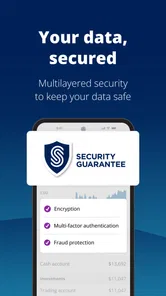
- Secure data encryption
- Integration with major banks
Cons
- Subscription required for premium features
- Limited free version capabilities
- Occasional syncing issues
- No cryptocurrency support
- Desktop version not available