Tilt: Cash Advance & Credit
- 110.38K
- 4.6
- Installs
- 5.00M
- Price
- Free

Screenshots



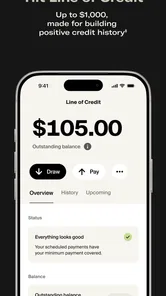
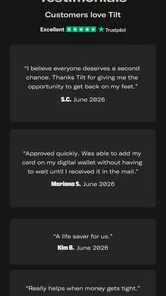

Analysis by Reviewed
I find the main appeal of Empower: Advance & Credit is the way it brings short-term cash access and everyday money management into one place. That combination can be useful when a tight week calls for more than a spending tracker, though it also means the app works best when you’re comfortable using a connected financial service rather than expecting a simple offline budget notebook.
When your plan depends on a connection
Checking balances, reviewing activity, and using account-linked tools are the moments when a stable internet connection matters most. I’d open the app before making a time-sensitive decision, rather than waiting until I’m standing at a checkout or trying to sort out an urgent bill. If the network is slow, refreshing information or moving through a request may take longer, so it’s sensible to keep a little breathing room in your plans.
That connection-dependent approach also shapes how I’d use the app’s financial overview. It is more useful as a place to check in and spot patterns than as a substitute for keeping a note of an immediate payment deadline. A quick glance can inform a choice, but I wouldn’t rely on a screen that may need to update at the exact moment I need to act.
Useful on the move, with a little preparation
On a commute or between errands, a phone makes it convenient to check spending without waiting to get home and open a laptop. My practical tip is to review a budget when I have a reliable connection and enough time to read the details, then use shorter mobile sessions for routine checks. That makes the app feel less like something I have to troubleshoot while distracted.
For example, if an unexpected car expense lands a few days before payday, I’d first check the current picture in Empower, consider whether the expense can wait, and then decide whether a cash advance is appropriate. I would not treat access to an advance as extra income: it can solve a timing problem, but it does not remove the need to account for the money later. That distinction is especially important if several bills are already competing for the same paycheck.
What to do when something doesn’t load
If a screen stalls, I’d check the connection and try again before making a financial decision based on incomplete information. I’d also avoid repeatedly submitting the same request while unsure whether the first attempt went through. For anything urgent, keep the relevant bill or transaction details handy and use the app’s support route if the issue persists; the safest response is to confirm what happened, not guess from a frozen screen.
Because this is a finance app, I’d be deliberate about where and when I use it. A private, trusted connection is a better choice for reviewing personal details than public Wi-Fi, and I’d lock my phone when I’m done. Those are sensible habits for any app that brings financial information together, regardless of how convenient it is to check while out.
More From Our News Desk

 Bolt: Request a Ride
Bolt and the Shift from One-Tap Rides to More Legible Trips
Bolt shows how ride-hailing is shifting from a one-tap taxi request toward a more legible, choice-driven trip, while leaving the hardest questions of price and reliability unresolved.

 Farm Land - Farming life game
Farm Land Review: A Small Island Farm with a Satisfying Loop
A bright, breezy island farm turns a few quick chores into a satisfying cycle of planting, harvesting, expanding, and deciding what to build next.

 Android Auto
’s Community Takes Shape in the Passenger Seat
Its most valuable network is not a public feed but a shared set of routes, voice habits, app integrations, and advice that make driving less isolating—and sometimes more complicated.

 My Talking Angela
 Makes the Virtual Pet Feel Personal
A polished pet-raising game built on small rituals, playful customization, and a character who gives everyday screen time a surprisingly personal rhythm.

 Google Translate
 Review: A Pocket Tool for the Small Frictions of Travel
From menus and signs to quick conversations, Google Translate earns its place by cutting the little delays that make unfamiliar language feel like a barrier.

 Shazam: Find Music & Concerts
Shazam’s Best Trick Is Turning a Song Into a Night Out
A few seconds of recognition can settle an argument, rescue a half-remembered chorus, and point toward a live show. Shazam’s real trick is what happens after the match.
Latest News



What’s the Deal with Empower?
Empower offers a suite of features designed to help you take control of your finances. From tracking your spending to setting up budgets and even receiving cash advances, it’s like having a financial advisor right in your pocket. The app is tailored to provide personalized insights, helping you to not just see where your money is going, but to make sure it’s working for you.
Cash Advances: A Real Lifesaver
One of the standout features of Empower: Advance & Credit is the ability to access cash advances. Picture this: It’s a week until payday, and your car breaks down. Instead of panicking, you can request a cash advance through Empower. The process is straightforward, and you can have the funds you need without the stress of traditional loan applications. Plus, there’s no interest, which is a huge plus!
Budgeting Made Easy
Empower shines in the budgeting department. It’s like having a personal trainer, but instead of counting calories, you’re counting dollars. You can set up various budgets, get alerts when you’re nearing your limits, and even receive tips on how to save money. It feels almost like a game, encouraging you to hit your financial goals.
In practice, I’d treat those budgets as prompts for decisions, not rigid rules. If groceries run high one week, checking the rest of the month’s spending can help me decide whether to trim a flexible category or simply accept a one-off change. A useful habit is to revisit the plan after a large purchase, so the next alert reflects the reality of the month rather than an outdated target. That makes the budgeting side more useful than checking a total only after the money is gone.
Who is likely to get the most from it?
I can see Empower suiting someone who wants cash-flow visibility, budgeting, and access to credit-related tools in the same app, especially if their finances are spread across everyday transactions and they like checking progress on a phone. It may be less appealing to someone who wants a bare-bones expense log, prefers not to connect financial accounts, or is looking for a long-term borrowing plan. In those cases, a spreadsheet or a bank’s own tools may be a better fit; neither asks you to adopt an additional finance platform.
Compared with a basic budget app, Empower’s distinguishing trade-off is the mix of planning and borrowing options. A standalone tracker can be simpler if all you need is categorization, while a bank app may be more direct for checking one account. Empower makes more sense when you’ll actually use its wider set of tools, not merely because having everything together sounds convenient. The app is free to download, but I’d still read the terms for any financial product before relying on it; free access does not by itself tell you what conditions apply to a particular service.
Getting started without rushing a money decision
When setting up a finance app, I’d take time to understand what information I’m entering and how the app organizes it before treating its overview as a complete picture. Then I’d check whether the spending categories and budget periods match how I think about my money. If the labels don’t fit, the numbers can be accurate yet still lead to the wrong takeaway. The goal is not to make every category perfect on day one, but to build a view that helps answer practical questions such as what is safe to spend before the next payday.
Empower is a finance app from Empower Finance, and its reach is reflected in a 4.7 average from around 275,000 ratings, with more than five million installs. It is free and rated for Everyone, which makes trying the app accessible, but I’d still approach account-linked finance tools thoughtfully. The current version is 7.17.0.780, and the app has been available since December 4, 2017; it supports Android 7.0 and newer. Those details help set expectations about availability, while the real question is whether its mix of services suits your own money habits.
Security and Support
Security is a top priority for Empower. The app employs robust security measures to protect your data, giving you peace of mind as you manage your finances. Additionally, their customer support is top-notch. Whether you have a question about a transaction or need help navigating the app, their team is ready to assist. It’s comforting to know you’re not alone on your financial journey.
For me, the connectivity verdict is practical rather than dramatic: this is the kind of app I’d use during a deliberate check-in, not as the only place I keep urgent payment details. I’d also use Wi-Fi or a dependable mobile signal for account-related tasks, and avoid assuming a delayed screen reflects the latest activity. Those small habits reduce the chance of making a rushed choice from stale information.
In conclusion, if managing your finances feels like a daunting task, Empower: Advance & Credit might just be the app you’ve been looking for. It’s user-friendly, packed with features, and offers a level of financial freedom that many of us crave. So, why not give it a try and see if it can empower your financial future? You might find it’s just the tool you need to keep those financial torches under control without getting burned.
Making the tools work together
The biggest practical benefit of combining budgeting and credit-related options is not simply having more buttons in one place. It is being able to pause before treating a shortfall as a borrowing problem. I’d check whether the pressure comes from a one-off expense, a bill arriving earlier than expected, or a recurring gap between income and spending. The right response differs: a temporary timing mismatch may call for a different decision than a budget that routinely leaves too little for essentials.
A useful routine is to check the upcoming week before requesting any advance. I’d identify fixed bills first, then look at flexible spending and the amount likely to remain after those commitments. If an advance is still under consideration, I’d think through how its repayment affects the next period rather than focusing only on what it makes possible today. That forward-looking check is an important counterweight to the immediacy of mobile access.
Credit tools call for a slower read
The app’s broader mix includes credit cards, credit lines, and score monitoring, but I would not treat every available tool as equally relevant to every financial situation. A person trying to improve awareness may value monitoring, while someone who already has a reliable system for tracking credit may find that part less compelling. Borrowing products deserve a more careful comparison than budget alerts: review the individual terms, repayment expectations, and total cost before deciding whether one fits.
This is also where Empower differs from a bank app that focuses mainly on accounts held at that institution. Bringing several types of money management together can reduce the need to jump between tools, but it can also make the overall picture feel more comprehensive than it is. I’d still compare balances and transactions with the financial sources I use, especially when planning a payment or making a decision that depends on an up-to-date figure.
Small habits that improve a mobile check-in
I’d use a short checklist when opening the app for a decision: make sure the connection is steady, check the date or timing of the information shown, and distinguish money already committed from money that is genuinely available. That last step is easy to overlook when a balance looks reassuring at a glance. A budget view is most useful when I interpret it alongside rent, utilities, and other payments that may not yet have cleared.
For data-conscious use, I’d avoid leaving the app open on a shared screen and keep sensitive financial conversations out of crowded public spaces. I’d also think carefully before connecting accounts, weighing the convenience of a consolidated view against my comfort with using an account-linked service. That is not a reason to avoid the app automatically; it is a personal choice worth making deliberately rather than clicking through setup just to reach the next screen.
Where I would draw the line
I would skip Empower if I wanted a fully manual ledger, did not want account-linked finance tools, or needed a dependable way to complete urgent money tasks without a connection. A spreadsheet gives more control over categories and assumptions, though it asks for more maintenance. A bank’s own app may be preferable for a single-account check, and a dedicated credit-monitoring service may suit someone who only wants that narrow function. The better choice depends on which job matters most, not on how many features an app can gather.
I’d also be cautious if I were already relying on repeated advances to make ordinary bills fit. A short-term option can ease a particular pinch, but it cannot repair a recurring mismatch between income and obligations. In that situation, I’d use the budgeting view to identify the pattern and consider broader support or a different financial plan, rather than assuming another request will make the next month easier.
A realistic way to decide
Imagine checking your finances during a lunch break and seeing that a household bill is due before your next payday. I’d first confirm the amount and due date from the bill itself, then look at the cash already committed elsewhere. If the connection is unreliable, I’d wait to review account-linked details rather than make a rushed choice from a partial screen. If an advance remains an option, I’d read its conditions and map the repayment against the next set of bills before proceeding.
That approach answers the most important practical question: whether the app can help without becoming the decision-maker. It can put useful information and several kinds of financial tools close at hand, but I remain responsible for checking the details and deciding what I can afford. Used as a planning aid, that is a sensible role for a mobile finance app. Used as a substitute for a careful cash-flow plan, it is not.
My bottom line on connectivity and fit
Empower Finance has built a broad finance app for people who want budgeting, spending awareness, and borrowing-related options gathered in one mobile service. Its large audience and strong average rating suggest many users find that package worthwhile, but popularity cannot tell me whether its account connections or credit tools match an individual’s needs. I’d judge it by whether I return to the budget and monitoring features, and whether the borrowing options remain an occasional, considered choice rather than a routine patch.
Connectivity is part of that judgement, not a minor technical detail. I’d reserve meaningful account checks and requests for a moment when the network is dependable, keep essential payment information accessible elsewhere, and give myself time to verify anything that appears delayed. If that style of deliberate use suits you, Empower is worth considering; if you need a private manual ledger or a narrow tool that works around your existing habits, a simpler alternative may serve you better.
Tilt: Cash Advance & Credit Frequently Asked Questions
Is Empower: Advance & Credit free to download?
Yes, Empower: Advance & Credit is free to download. Keep in mind that downloading the app and using its financial features are separate considerations: some services may have their own terms or costs. Before you rely on a feature, review the details shown in the app so you understand how it works and whether it fits your needs.
What can I use Empower: Advance & Credit for?
Empower: Advance & Credit brings together several personal-finance tools, including cash advances, credit cards, credit lines, credit score monitoring, saving, and budgeting. That range may appeal if you prefer to explore multiple money-management options in one app. The features are distinct, so take time to review each one and its terms before deciding which tools to use.
Is Empower: Advance & Credit suitable for beginners?
The app is aimed at everyday money management and includes familiar features such as budgeting, saving, and credit score monitoring, alongside credit-related products. That combination may make it approachable for someone starting to organize their finances, although each person’s needs differ. Read through the explanations and terms for any feature you plan to use, particularly before applying for a financial product.
What should I know about the app before downloading it?
Empower: Advance & Credit is a finance app from Empower Finance, with a focus on tools for everyday money management. Its features include cash advances, credit cards, credit lines, score monitoring, saving, and budgeting. The app is free to download and is rated for Everyone, making it broadly accessible to users who want to explore its personal-finance tools.
Is Empower: Advance & Credit available for my phone?
Empower: Advance & Credit is available for Android devices running Android 7.0 or later. Before downloading, check your phone’s operating system version and make sure you have enough space for the app. The current release is version 7.17.0.780, so keeping the app updated can help you access its latest available features and changes.
Pros
- User-friendly interface for easy navigation.
- Quick access to cash advances when needed.
- No hidden fees or surprise charges involved.
- Provides detailed financial insights and tips.
- Secure and encrypted data to protect users.
Cons
- Limited to users with stable income sources.
- Monthly subscription fee may deter some users.
- Not available in all countries or regions.
- Cash advance limits may be too low for some.
- Requires access to personal financial data.