eero wifi system
- 5.03K
- 4.8
- Installs
- 5.00M
- Price
- Free

Screenshots

Analysis by Reviewed
When several people share one home network, the trouble is rarely just a weak signal. A call can freeze while someone streams in another room, a new device may need joining, and everyone wants the connection to behave without turning one person into the household’s permanent tech support. I find the eero app most useful when it helps make that everyday network easier to understand and manage, rather than asking everyone to learn router jargon.
One network, different routines
Picture a weekday evening: one person is finishing a video call, another is watching a show, and a guest asks for Wi-Fi access. With an eero mesh setup, the aim is to spread coverage through the home using several eero devices working together. That can be a more practical answer to rooms where a single router struggles than repeatedly moving the router or hoping a basic range extender reaches the right corner.
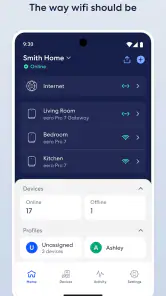
The app’s connected-device view can help when the network feels busy: I’d check which devices are online before assuming the internet service itself is at fault. A speed test can also give a useful snapshot, though it is not a guarantee that every room or device will perform identically. For a shared home, that distinction matters; a network-wide result does not explain every local slowdown.
Getting the setup and household boundaries right
Setup is approachable, but it still depends on having the eero hardware and a working internet connection to configure. Before starting, I’d choose a sensible place for the first unit and think about where additional units might help, rather than hiding every device in a cupboard. Mesh placement is a trade-off: a unit needs to be near the area it should improve, but it also needs a useful connection back to the rest of the system.
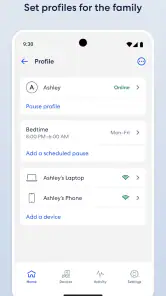
When several adults share the home, agree who will handle network changes and who should be contacted before pausing access. The app’s pause function can be handy for a temporary interruption, but it is a blunt tool if people rely on the same network for work, school, or essential devices. I would treat it as a quick household coordination option, not a substitute for talking through schedules or resolving a device-specific issue.
Age, trust, and practical limits
The app is listed for everyone, and eero LLC makes it as a lifestyle app. That age context is about the app’s audience; it does not mean a household should assume that every online safety need is handled by the network. Adults still need to set expectations with younger users, and a router-level setting cannot replace age-appropriate guidance or supervision. In particular, I would not rely on broad network controls as a precise way to manage one person’s activity when devices are shared.
There is also a hardware commitment behind the experience. If your current router already covers your home reliably, installing a mesh system may add little value. And if you only need to improve one stubborn spot, comparing a targeted access point or another suitable networking option may make more sense than changing the whole setup. The app’s usefulness depends on having compatible eero equipment, so it is not a standalone fix for poor coverage.
More From Our News Desk

Clash of Clans Is Won Between the Battles

Android Auto Makes the Case for Quieter Car Software

MobiOffice: Transforming Mobile Productivity with Seamless Integration

EA SPORTS FC™ Mobile Soccer: Redefining Mobile Sports Gaming

How Microsoft OneDrive Became a Mobile Productivity Giant

How Google Translate Breaks Language Barriers Effortlessly
Transform Your Home Network
The eero wifi system is like having a tech wizard in your pocket. It’s designed to blanket every corner of your home with reliable, high-speed internet. Whether you’re streaming your favorite show, gaming online, or just browsing the web, eero ensures you’re always connected. The magic lies in its mesh network technology, which means multiple eero devices work together to eliminate dead zones and buffering.
Easy Setup and Management
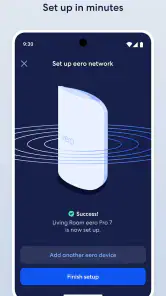
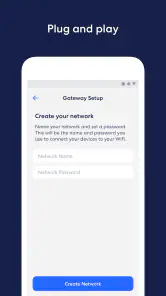
Setting up the eero system is a breeze. The app guides you through each step with simple instructions and visuals. Even if you’re not tech-savvy, the installation process is as easy as pie. You’ll have your network up and running in no time.
Once set up, managing your network is incredibly intuitive. The eero app lets you see how many devices are connected, run speed tests, and even pause the internet for some digital downtime. It’s like having a remote control for your Wi-Fi.
Parental Controls and Security
One of the standout features of the eero app is its robust parental controls. If you have kids, you know the struggle of trying to monitor their online activity. With eero, you can set schedules for internet access, block certain websites, and keep an eye on their usage. It’s a relief knowing your kids are safe online.
Security-wise, eero doesn’t cut any corners. It offers automatic updates to keep your network secure from threats. Plus, with WPA3 encryption, your data is always protected.
Integration and Compatibility
The eero system plays well with others, too. It easily integrates with smart home devices like Alexa, allowing you to manage your network with voice commands. Whether you’re an Apple or Android fan, eero’s got you covered with its cross-platform compatibility.
Where it fits among network options
Compared with the settings page of a standard router, the eero app is aimed at making day-to-day network checks and changes less technical. That simplicity is a strength if you want a clear view of connected devices, but it may feel limited if you enjoy adjusting detailed network settings yourself. I would choose it for a household that values straightforward management and needs coverage across more than one area, not for someone shopping for a phone-only Wi-Fi booster.
It is a free app, though in-app purchases range from about fifty cents to around three hundred dollars per item, so I would check what any optional purchase covers before paying. The app has an average rating of 4.8 from around 101,000 ratings, with about 5,000 written reviews and over 5 million installs. Those figures suggest it is widely used, but they do not tell you whether it fits your home; your existing equipment and layout matter more.
Who I’d recommend it to
I’d consider eero if several people depend on Wi-Fi across different parts of a home and someone wants a more approachable way to check the network. I’d skip it if the current router already does the job, if you want to manage Wi-Fi without buying eero hardware, or if you need highly granular controls that a simple household interface may not provide. Before choosing, ask whether the problem is coverage, the internet connection itself, or one device: a mesh system is most relevant to the first of those.
The app is currently at version 6.63.0.36736 and requires Android 9 or later. For household use, I’d also settle on one person to manage the network and explain any changes to everyone who relies on it. That small bit of coordination can prevent a paused connection from becoming a surprise during a class, meeting, or evening call.
Making day-to-day troubleshooting less guesswork
A useful habit is to check the network before changing several things at once. If one person reports a problem, I’d first compare that device with another one in the same room, then look at the connected-device view and run a speed test. If only one device is struggling, restarting the entire network may interrupt everyone without addressing the cause. If several devices in one area have trouble, that points more toward placement or coverage than toward an individual device.
That order is especially helpful in a shared home because it gives the household a common starting point. A person who is not managing the equipment can describe what is affected—one device, one room, or the whole home—without needing access to settings. The app can make the network easier to inspect, but it cannot diagnose every cause automatically, so a little careful observation still matters.
Planning for guests and changing routines
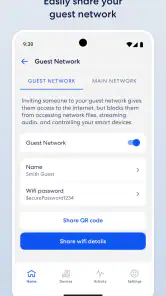
Visitors are a good test of whether a household has a comfortable way to handle access. I’d decide in advance who will help a guest connect and avoid making network changes in the middle of a busy evening. If a device appears unfamiliar, it is worth checking with everyone at home before treating it as unwanted; a new phone, speaker, or work laptop can belong to someone who simply forgot to mention it.
Shared homes also change over time. A room may become a home office, a child may start using a tablet for school, or someone may bring home new connected equipment. Rather than adding mesh units automatically, first note where the issue happens and whether it affects more than one device. That small check can prevent spending on extra hardware when the actual problem is a single device or a service interruption.
Choosing the right person to manage the network
One practical question is whether every adult needs to manage the system or whether one person should take responsibility for changes. I prefer a clear arrangement: one person handles configuration, while other household members know whom to contact and what information to share when something goes wrong. This reduces accidental changes and makes a pause or restart less likely to catch someone off guard.
That arrangement should not become a reason to keep the rest of the household in the dark. If a change could interrupt a call, class, or work session, a quick heads-up is more useful than assuming nobody will notice. The app can make administration more approachable, but it does not replace a shared understanding of who relies on the connection and when.
When simpler or more flexible gear makes sense
For a small home with a reliable signal from an existing router, its companion app may already be enough for the occasional network check. A mesh system is a more compelling choice when coverage across separate rooms is the actual issue. A range extender or a wired access point may suit a particular layout better, especially if you want to solve one defined weak spot or already have networking equipment you prefer to keep.
The trade-off is between convenience and control. eero’s approachable app can be a relief for people who do not want to dig through technical router menus, while someone who likes setting detailed network rules may prefer equipment designed around that level of adjustment. I would choose based on the person who will maintain the setup as much as on the rooms that need coverage: a system that feels easy to the household is more useful than one with options nobody wants to manage.
What the app can and cannot settle
It is reasonable to wonder whether an app can fix slow internet by itself. It cannot replace a working connection from the internet provider, and a speed test is only a clue about performance at a particular moment. If every device is slow, the issue may be outside the home network; if only one corner is affected, placement is a more relevant thing to investigate. Keeping those possibilities separate can save time and avoid unnecessary resets.
It is also worth distinguishing network access from online safety. Age suitability for the app does not mean the app can make every decision for a family, and shared devices complicate any attempt to treat network activity as belonging to one person. I would use household conversations and device-level settings where appropriate, rather than expecting a router interface to act as a complete supervision tool.
In a world where staying connected is more important than ever, the eero wifi system is a game-changer. It’s reliable, easy to use, and packed with features that make managing your home network a breeze. So if you’re tired of dealing with Wi-Fi woes, give eero a try. You won’t regret it.
eero wifi system Frequently Asked Questions
What does the eero app let me manage from my phone?
The eero app is designed to help you manage an eero WiFi system from a mobile device. Its purpose is reflected in eero’s simple promise: “eero wifi.” If you are considering a download, think of it as the companion app for the system rather than a general-purpose WiFi service. It is listed as a Lifestyle app and is developed by eero LLC.
Do I need eero hardware to use the eero app?
The app is intended to help users manage the eero WiFi system, so it is most relevant if you have or plan to use eero hardware. The app itself is free to download, but downloading it does not mean you have purchased networking equipment. Consider whether the eero system fits your home and setup before installing the companion app.
What kind of phone or tablet do I need to use the eero app?
The eero app is a lifestyle app from eero LLC, and the listed minimum operating-system requirement is version 9. Before downloading, check that your device meets this requirement and that you can access the app store on your phone or tablet. The app is free to download, though optional in-app purchases are available.
Is the eero app free, and are there any optional purchases?
The app is free to download, so you can install it without paying for the app itself. Optional in-app purchases are offered, with prices ranging from about fifty cents to around three hundred dollars per item. Those purchases are separate from the download, so check the options shown in the app before making a purchase and decide whether they suit your needs.
What is the eero WiFi system and how does it work?
The eero WiFi system is a home mesh networking solution designed to eliminate dead zones and provide fast, reliable internet coverage throughout your home. It works by using multiple devices, called eeros, placed around your house to create a seamless network. These devices communicate with each other to ensure optimal WiFi performance, adjusting in real time to ensure all your devices receive a strong signal.
Pros
- Easy setup and management via app
- Seamless connectivity across devices
- Improves Wi-Fi coverage significantly
- Regular software updates
- Compatible with Alexa voice control
Cons
- Requires stable internet for setup
- Limited advanced network settings
- Higher price compared to competitors
- Subscription needed for extra features
- Dependent on app for full functionality

- Category
- Lifestyle
- Version
- 6.63.0.36736