Droid Dashcam - Video Recorder
- 765.00
- 4.5
- Installs
- 1.00M
- Price
- Free

Screenshots
Analysis by Reviewed
I like to know what a dashcam app will actually ask me to do before I head out, and Droid Dashcam - Video Recorder is at its best when I treat the first trip as a short test rather than trusting it blindly. It turns an Android phone into a driving recorder, so the main idea is simple: set it up while parked, start recording before moving, and check that the resulting clip is useful afterward. That routine matters more than exploring every setting on day one.
What to expect from a phone-based dashcam
This is an Auto & Vehicles app from DroidCoolApps, and its focus is recording the road rather than offering navigation or a full vehicle-management toolkit. It is free to install, rated for Everyone, and currently at version 1.1.12; optional in-app purchases range from $0.99 to $7.99 per item. Its audience is substantial, with a 4.5 average from around 18,000 ratings and over one million installs. Those figures suggest it has found a broad audience, but I would still judge it by whether it works smoothly on your own phone and in your car.
A phone recorder is a practical alternative if you do not want to buy or install a dedicated dashcam. The trade-off is that your phone has other jobs: it may be running navigation, receiving calls, or getting warm while recording. A dedicated camera is usually the better choice if you need a permanently mounted, always-ready system. I see this app as a convenient way to document occasional drives or try out dashcam recording before investing in extra hardware.
First Impressions
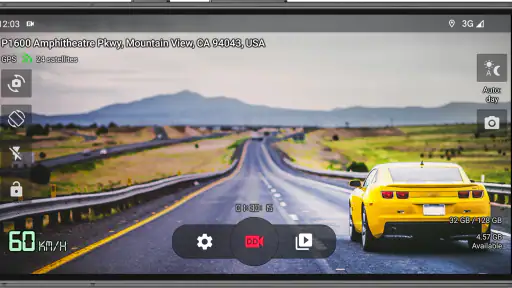
Installing Droid Dashcam - Video Recorder was a breeze. Right off the bat, the app's interface is sleek and intuitive. I mean, no one wants a complicated UI when they're trying to focus on driving, right? The buttons are large and easy to tap, which is perfect since you might be using it on the go. Plus, the setup process was straightforward, taking less than five minutes from download to hitting the record button.
Set up while parked, then test the whole routine
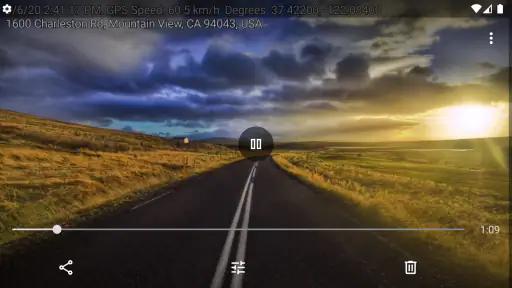
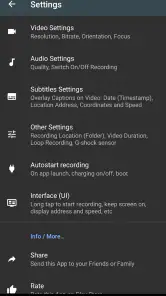
For a first-time setup, I would put the phone in its intended mount before opening the settings. That makes it easier to judge whether the controls are reachable and the camera view is framed sensibly. Choose video settings with your available storage and phone performance in mind, then make a brief test recording while stationary. Play it back before relying on the app for a commute: check that the picture is oriented correctly, the scene is visible through the windshield, and any location information is appropriate for how you plan to share the clip.
Latest News
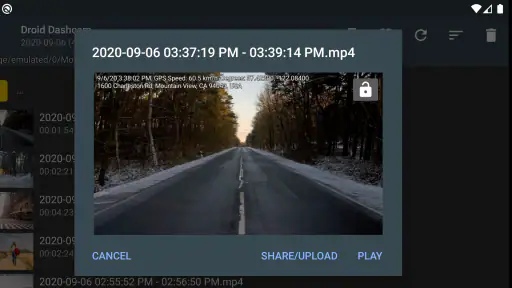
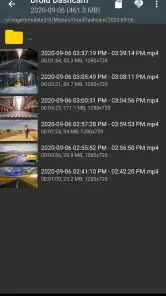
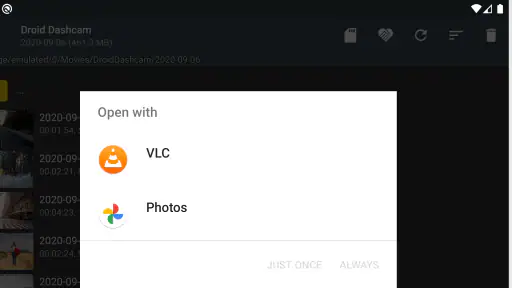
That quick check also answers a common question: does pressing record mean the setup is finished? Not quite. A recording that exists but points at the dashboard, has muffled sound, or is difficult to locate later is not much help. I would identify where the app saves its videos and try opening one from the app before the first real drive. A short test is a small effort that can prevent a much more frustrating discovery after an incident.
Features That Stand Out
Let's dive into what makes this app tick. First up, the video quality. Wow, just wow! The recordings are crisp and clear, even in low-light conditions. If you've ever tried recording at night, you know how big of a deal this is. The app supports high-definition video recording, which makes it perfect for capturing those picturesque road trips or, you know, any unforeseen incidents.
Another cool feature is the loop recording. Basically, the app will keep recording over old footage, ensuring you always have the most recent happenings at your fingertips without eating up your phone's memory. This is particularly handy for someone like me who forgets to delete old files. Plus, the app has an option for auto-deletion of old videos, ensuring your storage never gets clogged.
Making loop recording work for you
Looping is useful for everyday driving because it avoids turning every trip into a growing archive, but it changes how you should handle a clip you may need to keep. If something unusual happens, make finding and saving the relevant recording your next parked task; do not assume that a clip you want will remain untouched indefinitely while recording continues. I would also check the storage situation before a long outing, especially if the phone is used for photos, downloads, and navigation as well. The useful balance is enough recent footage to cover routine driving without letting video quietly take over the device.
One realistic example is a daily commute with an unexpected lane change or a minor bump. I would let the app record during the trip, then, once safely parked, review the moment and decide whether the clip needs to be kept or shared. GPS tags can make a recording easier to place in context, but location details are personal information; I would think twice before sending a clip widely if it identifies where I travel regularly.
Easy Navigation and Control
What I really loved about Droid Dashcam was its ease of use. The app offers various controls like start/stop recording, video quality adjustments, and even the ability to capture still images while recording. It's like having a mini production studio right there on your dashboard. And if you're into customizing, you'll appreciate the different settings for video resolution, bitrate, and file size. Trust me, tinkering around with these settings is both fun and functional.
Those quality controls are not just for people who enjoy tweaking. If the phone struggles while recording and running navigation, reducing the workload may be more sensible than chasing the highest available quality. Conversely, if you are documenting a scenic drive and have room to spare, you may prefer settings that preserve more detail. I would change one setting at a time and compare short clips, rather than making several changes at once and having no clear idea which one helped.
Another practical question is whether the app replaces navigation or a dedicated dashcam. It does not need to: I would use it alongside a separate navigation app, while remembering that running both can put more strain on the phone. For someone who mainly wants a recorder on occasional drives, that arrangement can be convenient. If you need continuous, hands-off recording without managing a phone, a dedicated dashcam is a more dependable fit.
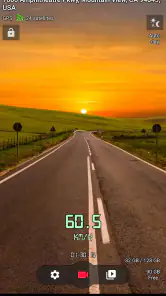
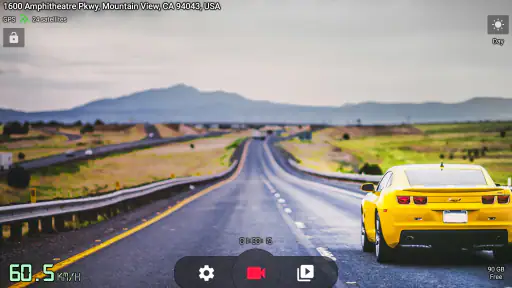
One more thing—GPS integration. Yes, the app tags your videos with location data. While this might not sound like a biggie, it can be incredibly useful for reviewing footage or, heaven forbid, providing evidence in an accident.
Where the phone approach can become inconvenient
A phone mounted in the car needs a stable position that does not obstruct your view, and it should be arranged before driving. Reaching for controls or adjusting the camera while moving is not worth the distraction. You will also need to think about power on longer journeys, since recording and other active apps can be demanding. I would make the recording routine part of getting ready to leave, then leave the phone alone until parked.
The app makes most sense for drivers who want a straightforward recorder and are willing to check clips and storage occasionally. It is less appealing if your phone is older, already busy, or essential for navigation and calls throughout the trip. The earlier performance hiccup I noticed with several apps running is exactly why I would test the setup on my usual route before depending on it for a long journey.
Choosing a recording routine that fits your drive
The most useful routine depends on whether you drive the same short route every day or take longer, less predictable trips. For a familiar commute, I would prioritize a quick start, a stable mount, and a habit of checking storage now and then. On a longer outing, I would be more deliberate: make sure the phone is powered, clear enough space for video, and avoid changing recording settings halfway through unless there is a clear reason. A repeatable setup is easier to trust than one that changes every time I get in the car.
There is also a practical distinction between footage for personal recollection and footage you might need to show someone else. A scenic clip can be entertaining even if it is not perfectly framed; a road incident calls for a view that clearly captures what is ahead. I would position the camera to include the road rather than aiming for an attractive angle, and I would review a sample in daylight as well as in the conditions I commonly drive. The app can record, but the usefulness of the evidence still depends on the phone's placement and the scene in front of it.
Room for Improvement
Of course, no app is perfect. While Droid Dashcam is pretty solid, there are a couple of tweaks that could enhance the user experience. For instance, the app could benefit from cloud storage integration. Imagine being able to upload your recordings directly to Google Drive or Dropbox! It would add an extra layer of security and convenience for users who might want to keep their footage off-device.
Also, while the app performs well under most conditions, it did lag a bit during a long drive when multiple apps were running in the background. A bit of optimization could make it run smoother alongside other apps, especially on older phones.
When a different option makes more sense
If you already own a dedicated dashcam, this app is not automatically an upgrade. A separate camera is better for a driver who wants recording to be part of the car rather than another task involving a personal phone. It also avoids the awkward choice between keeping the phone available for navigation and calls or asking it to record for the whole trip. On the other hand, if you drive only occasionally or want to see whether dashcam footage would be useful to you, using a phone you already have can be a sensible way to start.
I would also think carefully before using a phone-based recorder in a car where the mount is unstable, the windshield placement blocks a clear view, or the handset is already unreliable under load. Those are not problems a clever setting can fix. The app is most convincing when the hardware arrangement is already comfortable: the phone stays put, the camera sees the road, and you can start and stop recording without reaching around while driving.
A sensible first trip and who should choose it
My suggested first outing is deliberately ordinary: mount the phone, start a short recording before leaving, follow a familiar route, and check the clip only after parking. That reveals whether the view, file handling, and phone performance suit your setup without making an unfamiliar road trip the first test. If anything feels awkward, adjust the arrangement at home rather than trying to fix it in traffic.
I would recommend it to commuters, occasional drivers, and people who want to record a road trip without buying another device. I would skip it if you need a dedicated camera’s always-on convenience, expect automatic off-device backups, or cannot spare your phone for recording while driving. For Android users, the minimum supported OS is 6.0, so it can work across a range of devices, but compatibility alone does not guarantee smooth performance on every handset.
For a first meaningful success, I would keep the goal modest: finish a short drive with a clip that is easy to find, shows the road clearly, and plays back as expected. That tells you more than tapping through every menu. If the result is satisfactory, the next step is to settle on a recording quality that balances detail against space and phone workload, then repeat the same setup on your normal route. If it is not, adjust one thing at a time while parked so you can tell whether the change actually helped.
All in all, Droid Dashcam - Video Recorder is a nifty little app that does exactly what it promises. It's a reliable co-pilot that records your journeys and ensures you have that extra peace of mind on the road. Whether you're a daily commuter or a road trip enthusiast, this app is worth checking out. So, if you haven't yet, give it a download and take it for a drive!
Droid Dashcam - Video Recorder Frequently Asked Questions
Is Droid Dashcam - Video Recorder free to download, and are there in-app purchases?
Droid Dashcam is free to download, so you can try it without paying upfront. It also offers optional in-app purchases, with items ranging from $0.99 to $7.99. If you prefer to keep your spending under control, check the purchase options before confirming anything. The app is rated for Everyone, making its content suitable for a broad audience.
What Android version do I need to use Droid Dashcam?
Droid Dashcam requires Android 6.0 or later. Before downloading, check the Android version on your phone or tablet, since an older operating system may prevent installation. The app is intended to turn an Android device into a driving recorder, so it is also worth considering whether your device can be positioned securely and has enough available storage for the footage you want to keep.
What is Droid Dashcam - Video Recorder?
Droid Dashcam is a mobile application designed for Android devices that transforms your phone into a fully functional dashcam. It records high-quality video while you drive, offering features like loop recording, GPS tracking, and speed overlay. This app is particularly useful for capturing road trips, accidents, or any unexpected events on the road.
How does loop recording work in Droid Dashcam?
Loop recording is a feature that allows Droid Dashcam to continuously record video footage by overwriting the oldest files. Users can set the length of each video segment, typically ranging from 1 to 10 minutes. This ensures that your storage is efficiently used and the dashcam can keep recording without running out of space.
Can Droid Dashcam record videos in the background?
Yes, Droid Dashcam can record videos in the background, allowing you to use other apps simultaneously. This means you can still navigate, make calls, or listen to music while the app records your journey. It's a practical feature for users who need to multitask without interrupting the recording process.
Pros
- High-quality video recording
- User-friendly interface
- Supports multiple video formats
- GPS feature for location tracking
- Loop recording to save space
Cons
- Consumes a lot of battery
- Ads can be intrusive
- Some features require in-app purchases
- Occasional app crashes
- Limited cloud storage options

- Category
- Auto & Vehicles
- Version
- 1.1.12











