Dollarwise: Budget & Tracking
- 1.16K
- 3.3
- Installs
- 100.00K
- Price
- Free

Screenshots

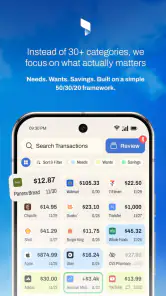
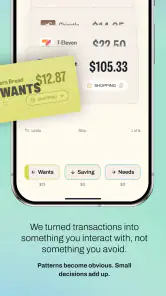
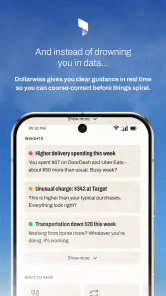
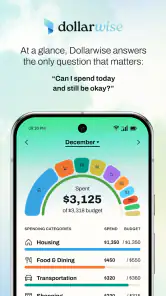
Analysis by Reviewed
I approached Dollarwise: Budget & Tracking as a practical finance app rather than a complete replacement for a bank account. Its promise is simple: help me look at my spending and make a more deliberate plan for my money. That sounds familiar in this category, but the useful question is how well that promise holds up when I am checking a budget in ordinary mobile situations—between errands, while travelling, or when a connection is unreliable.
The app is free to install, aimed at Everyone, and developed by HammerMedia. It belongs to the personal finance category, where convenience matters just as much as presentation. I found the experience most appealing when I treated it as a regular check-in tool: open it, review where money is going, and make a small decision before the next purchase. It is less convincing if I expect a fully automated financial command centre.
There is also a practical detail worth keeping in mind before committing to it. The app has a 3.3 average from around 2.2 thousand ratings and has passed 100 thousand installs, so it has attracted a meaningful audience but is not universally loved. It is free at the starting point, while in-app purchases range from $14.99 to $499.99 per item. I would therefore explore the free experience carefully before paying for anything.
How Dollarwise feels when the connection matters
Checking money during a busy day
The most natural use case is a quick spending decision. Imagine I am leaving work, considering takeaway food, and trying to remember whether this week’s flexible spending is already stretched. A budget app is valuable at that exact moment only if it gets me to the relevant information quickly. Dollarwise works best when I use it as a prompt to pause rather than as a place to conduct a complicated financial review.
That distinction is important. A traditional spreadsheet gives me almost unlimited control, but it also asks me to maintain formulas, categories, and formatting. A bank app usually shows account activity more authoritatively, yet it may not encourage me to set a personal limit for groceries, entertainment, or small daily purchases. Dollarwise sits between those approaches. It is more focused than a spreadsheet and more planning-oriented than simply reading a balance.
Connectivity shapes this routine. When the app needs current information or any action depends on communication with an online service, I have to allow the process time to complete. A strong connection makes the experience feel immediate. A weak signal changes the rhythm: instead of making a quick decision, I may be left waiting or wondering whether an action was accepted. For a finance tool, that uncertainty is more annoying than it would be in a casual game because I do not want to guess whether a money-related update has been recorded.
My advice is to avoid making an important budgeting decision based on a screen that has not clearly refreshed. If I am in a basement shop, on public transport, or moving between Wi-Fi and mobile data, I would treat the displayed information as something to verify once the connection is stable. That is not a criticism unique to this app; it is simply a sensible habit whenever financial information may depend on online communication.
Mobile use is the real test
Finance apps are often judged from a calm home setting, but their real value appears on a phone. I tested the idea of using Dollarwise in short sessions rather than sitting down for a long weekly administration task. That approach suits the app’s concept. A few seconds of attention after a purchase can be more useful than a large review at the end of the month, when I may no longer remember why several small transactions happened.
There is a trade-off here. Short sessions reduce the mental effort of budgeting, but they also make consistency essential. If I only open the app when I feel guilty about spending, it becomes a record of problems instead of a planning aid. I would get more from it by choosing a repeatable moment, such as after checking my bank balance or before doing the weekly food shop. The app cannot make that habit for me; its value depends on whether I return to it.
On a phone, clarity matters more than a long list of options. I want to understand the most important figure without navigating through several screens, especially when I am outside. Dollarwise is most useful when I keep my goal narrow: review a category, check progress, or decide whether a purchase fits the plan. Trying to rebuild my entire financial life during a five-minute break is a poor match for mobile use and increases the chance of entering something hastily.
A helpful workflow is to separate observation from correction. First, I look at what has happened. Then I decide whether the budget itself needs changing. I would not immediately move limits around just because one unusual purchase made a category look high. That small discipline prevents the app from becoming a tool for rationalising every impulse. It also makes the information more meaningful over time.
What happens when something goes wrong
The uncomfortable part of any finance app is recovery. A missed update, a delayed screen, or an entry that does not look right can make me question the whole picture. Dollarwise should be approached with the same care I would use for any digital money record: check the result, avoid duplicate actions, and give a failed-looking operation time before trying it again.
For example, if I attempt to record a purchase while the connection is unstable and the screen does not respond normally, repeating the action several times could create confusion if the first attempt eventually completes. My safer routine would be to wait, reopen the relevant view, and confirm what is actually present. If the information still looks wrong, I would compare it with the original bank or payment record instead of relying on memory.
This is one area where a spreadsheet can feel reassuring because I can see exactly what I typed, while a bank app may be stronger for confirmed transaction history. Dollarwise is better viewed as a budgeting layer than as the final authority for account activity. That does not make it useless; it simply defines the role I would give it. I use it to plan and interpret spending, while I verify important facts at the source.
Recovery also includes personal mistakes. If I categorise a purchase incorrectly, the right response is not to abandon the budget. I would correct the entry if the app allows that workflow, then review whether the category still reflects the way I actually spend. The larger lesson is that a budget is a model, not a moral score. A single imperfect entry should not lead me to make dramatic changes to every limit.
Using it carefully with mobile data
Because this is a finance app, I would be selective about when I use it over public networks. I would avoid making sensitive decisions while connected to an unfamiliar hotspot, particularly if I am distracted or rushing. A trusted home connection or my normal mobile data is a better setting for reviewing personal information. The point is not to become anxious about every connection, but to give financial tasks the same privacy awareness I would give online banking.
Data-conscious use also means avoiding unnecessary refreshes. If I only need to remember a planned spending limit, repeatedly reopening the app while travelling adds little value. I prefer to check once when I have a dependable connection, note the decision I need to make, and return later for a proper review. This makes the experience less dependent on a perfect signal and keeps the app from becoming a constant source of notifications or checking behaviour.
I would also be cautious about treating a current-looking screen as proof that every recent transaction is included. A finance dashboard can be useful while still depending on timing, synchronisation, or the way information reaches it. When the amount matters—rent, a large purchase, or a payment close to its deadline—I would verify it through the relevant financial provider. Dollarwise can help me understand my plan, but I would not use it alone to confirm that money has moved.
One of the more useful habits is to decide in advance what must be checked online and what can wait. A weekly planning session may need a stable connection, while a quick mental reminder about a category does not. This distinction keeps the app practical in places with poor reception. It also prevents a connectivity problem from turning into a budgeting problem.
Who gets the most from this approach
I think Dollarwise is a good fit for someone who wants more structure than a bank balance but less complexity than a manually built spreadsheet. It may suit a person who is beginning to pay attention to recurring spending, someone trying to control flexible purchases, or a user who prefers a phone-based routine over desktop financial software. The free entry point makes it reasonable to test whether this style of budgeting fits.
It is particularly helpful for people who benefit from visible boundaries. If I know that small purchases are the source of most surprises, a dedicated tracking routine can make those decisions easier to notice. The app is also useful for a household member who wants to understand personal spending without learning spreadsheet formulas. In both cases, the benefit comes from repeated review, not from installing it and expecting automatic financial discipline.
I would be more hesitant to recommend it as the only tool for someone with complicated finances. Freelancers managing business and personal expenses, people with numerous accounts, or anyone needing detailed tax records may prefer a specialised service or a carefully designed spreadsheet. Likewise, users who want guaranteed real-time account authority should start with their bank’s own application. Dollarwise can complement those tools, but it should not be forced into a role it was not designed to fill.
The purchase structure deserves attention for the same reason. Since the app is free but offers items from $14.99 up to $499.99, I would not assume that every useful capability belongs to the no-cost experience. Before paying, I would identify the exact problem I am trying to solve and ask whether the purchase improves that workflow enough to justify it. A budget app should reduce financial pressure, not encourage an impulsive subscription or upgrade decision.
Comparing it with familiar alternatives
Compared with a spreadsheet, Dollarwise is likely to feel more approachable on a phone. I do not need to design a layout before I can think about spending. The disadvantage is control: a spreadsheet lets me build unusual categories, custom calculations, and long-term records exactly as I want. If I enjoy organising financial data, the spreadsheet may remain the better choice.
Compared with a bank app, Dollarwise offers a different mindset. A bank application tells me what an institution has recorded about my account. A budgeting app asks what I intend to do with my money. I need both perspectives if I want to distinguish between available cash and sensible spending. Relying on only the bank view can make a balance look larger than it really is after upcoming commitments; relying only on a budget view can leave me disconnected from confirmed transactions.
Compared with a dedicated expense tracker, the decision is more personal. A tracker may be stronger when I want detailed categorisation and historical analysis. Dollarwise makes more sense when the central task is turning spending awareness into a simple plan. I would choose it for a lighter, more regular routine and choose the more specialised alternative when reports, exports, or complex financial organisation are the priority.
Small habits that make the app more useful
My first practical tip is to begin with the categories that cause real friction instead of trying to document every part of life immediately. If takeaway meals, transport, and spontaneous shopping are the problem areas, I would focus there first. A smaller system that I maintain is more useful than a perfect-looking budget that I stop updating after a few days.
Second, I would review unusual spending separately from ordinary spending. A one-off purchase can distort a category and tempt me to set an unrealistic limit. Marking it mentally as exceptional lets me ask a better question: is this a temporary event, or does it reveal a recurring habit? That distinction turns Dollarwise from a passive log into a decision-making aid.
Third, I would schedule a connection-safe review rather than waiting until I am standing at a checkout. Once a week, I would open the app somewhere with a reliable signal, check the latest picture, and decide which limits or priorities need attention. Then I could use quick mobile checks during the week without depending on them for the whole record. This two-stage workflow is more resilient than trying to do everything during random moments.
Finally, I would keep a separate mental line between budgeting and account security. I would not enter sensitive information casually, and I would verify any major discrepancy through the official financial source. That habit protects me from both technical uncertainty and human error. It also keeps expectations realistic: the app helps me manage a plan, while the bank remains the place I trust for final transaction confirmation.
My connectivity verdict
After looking at Dollarwise through the lens of everyday mobile use, I see it as a focused budgeting companion rather than an all-purpose financial system. Its experience is strongest when I have a clear question—how much room is left in a spending area, whether a purchase fits, or which habit needs attention—and a dependable connection for checking current information.
The connection requirement changes how I would use it. I would not depend on a hurried screen in a low-signal location for a high-stakes financial decision. Instead, I would make important reviews in a stable setting, use short checks when the network is reliable, and confirm anything significant through the appropriate account source. That approach reduces uncertainty without turning connectivity into a constant obstacle.
The app’s 3.3 average suggests a mixed experience, and my judgement is similarly measured. I like the accessible idea and the potential for a simple phone-based routine, but I would not recommend it blindly to users who need detailed financial records, complex account management, or a definitive transaction ledger. Those people should look toward a bank tool, spreadsheet, or specialist finance service.
For someone who wants a free starting point for building better spending awareness, however, it is worth trying with modest expectations. I would use the no-cost version first, establish a stable review habit, and only then consider whether an in-app purchase solves a specific problem. The best reason to choose Dollarwise is not that it replaces every money tool, but that it can make a small, repeatable budgeting check easier to perform on a phone.
HammerMedia’s app is therefore most convincing as a companion for deliberate decisions, especially when I treat connectivity, verification, and consistency as part of the workflow. It will not remove the need to think about money, and that is ultimately its honest limitation. Used in the right role, it can help turn vague concern about spending into a clearer routine; used as the sole authority for financial information, it is not the option I would choose.
Pros
- Simple interface makes daily expense tracking quick and approachable.
- Custom categories help organize spending around personal habits.
- Budget alerts can encourage users to notice overspending early.
- Clear spending summaries make financial patterns easier to understand.
- Useful for building consistent money-management habits over time.
Cons
- Manual transaction entry may feel tedious for frequent purchases.
- Limited features may not satisfy users seeking advanced financial planning.
- Budget accuracy depends on consistently recording every expense.
- Some useful tools may require a paid subscription or in-app purchase.
- Privacy-conscious users may have concerns about sharing financial information.

- Category
- Finance
- Version
- 6.4.0











