Dog Scanner: Breed Recognition
- 4.73K
- 4.3
- Installs
- 5.00M
- Price
- Free

Screenshots
Analysis by Reviewed
Dog breed identification is a charming curiosity, but a phone camera cannot settle every question about a dog’s ancestry. I find Dog Scanner: Breed Recognition most enjoyable when I treat its result as a well-informed guess and a starting point for learning, not a definitive answer. That balance matters: it can turn a passing encounter with an unfamiliar dog into a small discovery, while mixed-breed dogs and tricky photos still call for a little skepticism.
A quick scan is a clue, not a pedigree
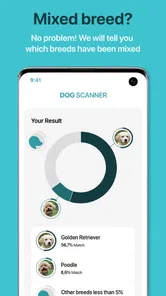
The most useful way to approach a breed scanner is to ask what it can reasonably do with the image in front of it. It can compare visible features and offer a likely match; it cannot see a dog’s family history or account for every influence behind its appearance. That distinction is especially important when a dog has traits from several breeds. A plausible label can help you decide what to read next, but it should not be treated as proof of ancestry.
I also wouldn’t use a result to predict an individual dog’s temperament. Breed descriptions can be interesting background, yet dogs vary widely within the same breed, and a photo tells you very little about the animal’s past or personality. If I were meeting a dog for the first time, I’d pay more attention to its owner’s guidance and the dog’s behavior than to a scan. The app is at its best when it enriches that encounter rather than directing it.
A useful tool for curious dog watchers
As an education app from Siwalu Software GmbH, Dog Scanner pairs quick image-based identification with breed information. Its free-to-download approach makes it easy to try, and the app has an average rating of 4.3 from around 60,000 ratings, with more than five million installs. It is rated for everyone, runs on Android 6.0 and newer, and its current version is 22.4.1-G. Optional in-app purchases range from $0.99 to $14.99 per item, so it is worth checking what is included before buying anything.
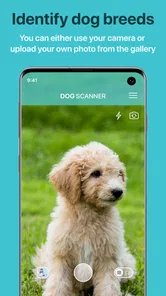
The key strength is convenience: you can try a photo from your gallery as well as point the camera at a dog. That makes it useful when a dog has already wandered out of view, or when you want to revisit a picture later. I would use it to satisfy curiosity, pick up breed facts, or start a friendly conversation with a dog’s owner—not to make decisions about a dog’s health, behavior, or care. For those questions, a veterinarian or a knowledgeable rescue professional is a much better source.
Getting to Know Your Furry Friends
Dog Scanner is like having a dog encyclopedia right in your pocket. It’s designed to identify dog breeds simply by snapping a picture or uploading one from your gallery. The app’s interface is user-friendly, making it a breeze even for the less tech-savvy among us. I tried it out on my neighbor’s pooch, and voila! In seconds, I knew I was looking at a Dachshund mix.
How It Works
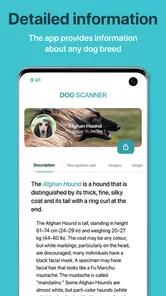
The process is as simple as it gets. You open the app, point your camera at the dog in question, and snap a photo. The app processes the image and, using its vast database, identifies the breed. It’s like magic! What’s more, the app provides a detailed description of the breed, including personality traits, history, and fun facts. So, not only do you get to know what breed you’re dealing with, but you also walk away with some nifty trivia to impress your friends.
More From Our News Desk

 Bolt: Request a Ride
Bolt and the Shift from One-Tap Rides to More Legible Trips
Bolt shows how ride-hailing is shifting from a one-tap taxi request toward a more legible, choice-driven trip, while leaving the hardest questions of price and reliability unresolved.

 Farm Land - Farming life game
Farm Land Review: A Small Island Farm with a Satisfying Loop
A bright, breezy island farm turns a few quick chores into a satisfying cycle of planting, harvesting, expanding, and deciding what to build next.

 Android Auto
’s Community Takes Shape in the Passenger Seat
Its most valuable network is not a public feed but a shared set of routes, voice habits, app integrations, and advice that make driving less isolating—and sometimes more complicated.

 My Talking Angela
 Makes the Virtual Pet Feel Personal
A polished pet-raising game built on small rituals, playful customization, and a character who gives everyday screen time a surprisingly personal rhythm.

 Google Translate
 Review: A Pocket Tool for the Small Frictions of Travel
From menus and signs to quick conversations, Google Translate earns its place by cutting the little delays that make unfamiliar language feel like a barrier.

 Shazam: Find Music & Concerts
Shazam’s Best Trick Is Turning a Song Into a Night Out
A few seconds of recognition can settle an argument, rescue a half-remembered chorus, and point toward a live show. Shazam’s real trick is what happens after the match.
Latest News



For a more useful result, I’d take a clear picture in decent light and try to include the dog’s whole body rather than a close-up of its face. If the dog is moving, a still image with an unobstructed view gives the scanner a fairer chance than a blurry snapshot. This is especially helpful with mixed breeds: visible features can point toward possibilities, but appearance alone cannot confirm a dog’s lineage. If one result seems surprising, compare it with another suitable photo and treat any change as a clue, not proof.
Accuracy and Performance
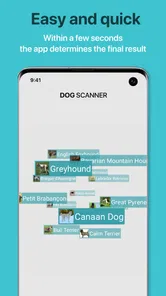
I must say, the accuracy of this app is pretty impressive. Of course, it’s not always perfect — no app is — but it gets it right more often than not. During my escapades at the local dog park, I tested it on various breeds, and it nailed most of them. The app’s speed is another point worth mentioning. It processes images quickly and delivers results in the blink of an eye, which is perfect for someone like me who’s always on the go.
The main limitation is the nature of the task, rather than a reason to trust every confident-looking match. Many breeds share similar shapes, coats, and coloring, and crossbreeds may not fit neatly into a single label. A result is best read as an estimate based on the image. If you need a reliable breed history for adoption paperwork, training plans, or a medical discussion, ask the people who know the dog or consult a qualified professional instead of relying on a visual scan.
Getting a fair comparison from a photo
One practical trick is to compare like with like. If you have more than one picture, choose images where the dog is similarly visible rather than comparing a full-body shot with a cropped face or a heavily blurred frame. That makes it easier to judge whether a changed result comes from a different view or simply from the scanner having less to work with. I’d also avoid using a photo with several dogs in it when the aim is to identify one particular animal; the image can make it unclear which subject should guide your interpretation.
Gallery scanning is useful for another reason: it lets you do the learning later, when there is no pressure to photograph a dog on the spot. You might save a picture from a walk, then look up the suggested breed at home and compare the description with what you actually observed. That slower approach is often more rewarding than trying to get a perfect answer in front of an owner or a distracted pet. It also avoids turning a friendly moment into a camera session.
More Than Just a Scanner
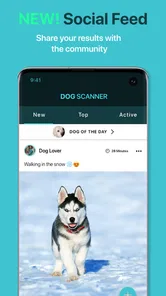
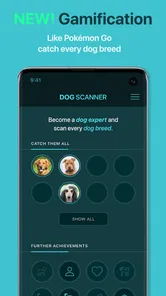
Beyond just identifying breeds, Dog Scanner offers a community feature where dog enthusiasts can share photos and stories about their furry friends. There’s also a leaderboard that lets you earn points and rank up as you identify more breeds. It’s a fun little addition that adds a competitive edge to the app, making it more engaging for users.
That social layer suits someone who enjoys collecting breed discoveries, but it is not essential to the app’s core purpose. If you simply want a quick identification, you can focus on scanning and reading; if you like sharing discoveries, the community gives the activity a more playful dimension. I’d still keep a dog’s comfort first: don’t crowd or distract an unfamiliar animal just to capture a better image, and ask its owner before taking a close photo.
A family could make the learning side more useful by turning a scan into a small observation exercise. Instead of treating the first label as the answer, look at the dog’s coat, build, and other visible features, then see which details the breed description actually explains. Children can enjoy the trivia while also learning that a suggested breed is not a complete account of an individual dog. That’s a more grounded way to use an educational app than simply collecting labels.
The community and leaderboard are extras rather than reasons everyone should use the app. If you like sharing pet photos and seeing what other dog enthusiasts post, they add a social reason to return. If you only want a private, occasional identification tool, those parts may not matter to you, and you can focus on the scanner and breed information. I’d decide based on whether that ongoing, playful layer sounds enjoyable, not because a ranking makes a scan more reliable.
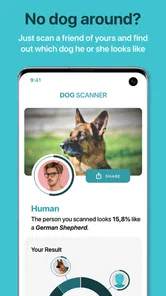
Another cool feature is the app’s ability to recognize dogs in videos, not just photos. This means you can identify breeds while watching a YouTube video or even your own recorded clips. It’s these little extras that make the app stand out from the crowd.
Video recognition is particularly handy when a dog’s distinctive shape or movement is clearer across a clip than in one frame. On the other hand, a busy or low-clarity video may offer less useful visual information than a carefully chosen photo. I’d try a still image first when possible, then use a clip if the dog’s features are hard to capture at rest. That small choice can make the result easier to interpret without turning a casual scan into a chore.
When another source is the better choice
Compared with a general web search, the app is quicker when all you have is a dog’s image and want an immediate breed suggestion. Searching the web can be more flexible if you already have a few candidate breeds or want to compare several descriptions, but it asks you to do more of the filtering yourself. The scanner turns that first step into a simple prompt; it doesn’t remove the need to think critically about whether the suggestion fits.
For a dog whose background matters, asking the owner or checking records is a different kind of evidence altogether. A scanner cannot replace those sources, and a professional who knows the animal is the better choice when breed assumptions could affect care or a practical decision. I’d keep the app for the low-stakes question, “What might this dog be?” and choose firsthand information for questions that need a dependable answer.
Who will get the most from it
I can see this appealing to dog lovers, families who enjoy learning together, and anyone who regularly meets unfamiliar dogs on walks. A realistic use is spotting a distinctive dog at a park, taking a respectful photo with the owner’s permission, and using the breed description as a conversation starter. It also works as a light learning aid: read about a breed after a scan, then notice which visible traits fit and which do not. That turns a quick guess into a more thoughtful bit of dog-spotting.
It also suits people who already have a photo collection and want to revisit the dogs in it, rather than needing to scan every animal in real time. A person who volunteers around dogs or enjoys learning breed characteristics may find the descriptions a handy jumping-off point. The important fit is curiosity: if you like checking a suggestion against what you can see, the app gives you something to explore. If you want a definitive pedigree or an authoritative assessment, it is the wrong tool for that job.
Someone deciding whether to try it may also wonder if they need to pay first. The app is free to download, so I’d begin with the basic experience and only consider an optional purchase if I knew what extra value I wanted from it. Because in-app items have different prices, it makes sense to check the specific offer rather than assume every feature is included or that a purchase is necessary. Casual users can decide whether the free experience already answers their occasional questions.
If your main goal is dependable identification, the usual alternatives are asking the owner, checking adoption records, or speaking with a veterinarian or rescue worker who knows the animal. Those options can use background information that a photo cannot. Dog Scanner is better for immediate curiosity and casual learning; it is not a substitute for a dog’s documented history. People who dislike social features can simply ignore that side, while anyone expecting a definitive answer for every mixed breed may find the app frustrating.
Final Thoughts
All in all, I’d say Dog Scanner: Breed Recognition is a must-have for any dog enthusiast. It’s informative, entertaining, and incredibly easy to use. Whether you’re trying to identify a breed or just want to learn more about your favorite furry friends, this app is a fantastic tool. So go ahead, give it a try, and let it unleash the dog detective in you!
My recommendation comes with one qualification: enjoy the identification as a prompt to observe and learn, not as a final verdict on a dog. The free app is an easy place to start, while optional purchases mean it is sensible to explore the basic experience before spending. If you want quick breed clues, approachable descriptions, and a playful reason to notice more about the dogs around you, it is worth a try. If accuracy has real consequences, choose a person with firsthand knowledge instead.
Dog Scanner: Breed Recognition Frequently Asked Questions
Is Dog Scanner: Breed Recognition suitable for children and families?
Dog Scanner is rated for Everyone, so its audience is not restricted to adults. Its breed-recognition focus can make it a simple way for families to explore different kinds of dogs together, whether they are looking at a pet or a dog they have spotted while out. As with any camera app, children should use it with an adult’s guidance when appropriate.
Can I try Dog Scanner without paying, and what do in-app purchases cover?
Dog Scanner is free to download, so you can try the app without an upfront purchase. It also offers in-app purchases, with items ranging from $0.99 to $14.99. Those optional purchases may be relevant if you want to explore paid extras, but the basic idea of taking a picture to find out a dog’s breed is the app’s central appeal.
What devices and operating systems can run Dog Scanner: Breed Recognition?
Dog Scanner: Breed Recognition is an app for identifying dogs, and it supports Android devices running Android 6.0 or later. Before downloading, check the operating-system version on your phone or tablet to make sure it meets that minimum. The app is free to download and is rated for Everyone, making it suitable for a broad audience interested in learning about dog breeds.
Who develops Dog Scanner, and what is it mainly used for?
Dog Scanner is developed by Siwalu Software GmbH and is an education app focused on recognizing dog breeds. Its central idea is straightforward: when you see a dog but do not know its breed, take a picture and use the app to get an identification. It may appeal to dog owners, people curious about breeds, and anyone who wants an accessible way to explore canine characteristics.
What is the Dog Scanner app and how does it work?
The Dog Scanner app is designed to identify dog breeds using your smartphone's camera. By taking a photo or recording a short video of the dog in question, the app analyzes the image using advanced algorithms to match it with its extensive database of dog breeds. It provides a detailed report on the dog’s breed, including its characteristics and traits, which can be particularly useful for dog owners and enthusiasts.
Pros
- Accurate breed identification.
- Easy-to-use interface.
- Fast scanning process.
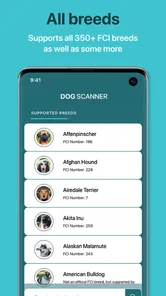
- Comprehensive breed database.
- Educational breed information.
Cons
- Requires internet connection.
- Some ads in free version.
- Limited features without premium.
- Occasional misidentifications.
- Needs good lighting for best results.