Discover Mobile
- 108.86K
- 4.8
- Installs
- 10.00M
- Price
- Free

Screenshots

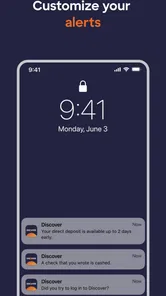
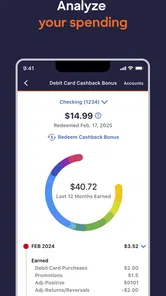

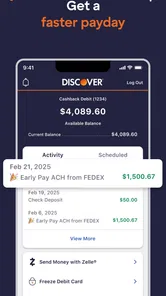
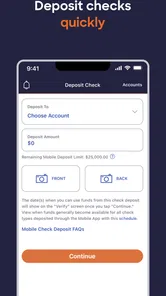

Analysis by Reviewed
I use Discover Mobile as the official account app from Discover Financial Services, rather than as a general place to browse for new apps. That distinction matters: its value is in keeping account tasks close at hand, especially when I’m away from a computer. The free finance app has been around since February 2, 2010, and its current version is 2522.0. It’s rated for Everyone and requires Android 10 or later. The strong adoption—over 10 million installs and a 4.8 average from around 376,000 ratings—makes it a familiar option for Discover customers, though it’s most useful if you already have a Discover account.
Using it when a connection matters
Account management depends on being able to reach the service, so I treat the app as a convenient route to my account rather than a substitute for a working connection. If I’m checking something while out, I first make sure my phone has a usable network connection; a slow or unavailable connection can get in the way of any task that needs current account information. This is a practical consideration, not a reason to avoid mobile banking: it simply helps to know that a quick check is easiest when the network is behaving.
That dependence changes how I use it. For a routine check, I can open the app when I have a moment and handle the account task without waiting until I’m back at a desk. For anything time-sensitive, I’d avoid leaving the task until the last minute or assuming a weak signal will be good enough. I also wouldn’t rely on a screen I opened earlier as proof that the information is still current; reconnecting and checking again is the sensible habit.
Useful in the small gaps of the day
The strongest fit is for someone who already banks with Discover and wants a phone-based way to manage the account while moving through an ordinary day. Imagine I’m between errands and want to check a detail before deciding what to do next. The phone is already with me, so using the account app can be more convenient than finding a computer. That kind of brief, purposeful visit is where a mobile finance app earns its place.
I’d use it differently from a budgeting app. A budgeting tool is usually better for bringing several accounts or spending categories together; Discover Mobile is the more direct choice when the task concerns a Discover account. If I’m trying to understand my whole financial picture, I’d use a broader view as well. If I simply need to deal with Discover, the official app is the more focused route, without making it an all-in-one money planner.
What I would check before relying on it
For a smoother visit, I’d keep the app updated and sign in before I’m in a hurry, rather than discovering a login issue at the moment I need account information. I’d also make sure I can access the email or other account-recovery route associated with my account. Those habits don’t remove network problems, but they can make it easier to recover from a forgotten credential or an interrupted session. The app is most helpful when I treat account access as something to prepare for, not just an icon to tap in an emergency.
On a weak connection, I’d avoid repeatedly tapping a control if the screen appears to stall. Waiting briefly, checking the connection, and then trying again is less likely to leave me uncertain about whether a request went through. If I’m still unable to get in, I’d switch to another reliable way of reaching Discover rather than assuming the app can resolve a connection or account-access problem by itself. That’s a modest limitation, but an important one for anyone who expects a finance app to work instantly in every setting.
More From Our News Desk

 Bolt: Request a Ride
Bolt and the Shift from One-Tap Rides to More Legible Trips
Bolt shows how ride-hailing is shifting from a one-tap taxi request toward a more legible, choice-driven trip, while leaving the hardest questions of price and reliability unresolved.

 Farm Land - Farming life game
Farm Land Review: A Small Island Farm with a Satisfying Loop
A bright, breezy island farm turns a few quick chores into a satisfying cycle of planting, harvesting, expanding, and deciding what to build next.

 Android Auto
’s Community Takes Shape in the Passenger Seat
Its most valuable network is not a public feed but a shared set of routes, voice habits, app integrations, and advice that make driving less isolating—and sometimes more complicated.

 My Talking Angela
 Makes the Virtual Pet Feel Personal
A polished pet-raising game built on small rituals, playful customization, and a character who gives everyday screen time a surprisingly personal rhythm.

 Google Translate
 Review: A Pocket Tool for the Small Frictions of Travel
From menus and signs to quick conversations, Google Translate earns its place by cutting the little delays that make unfamiliar language feel like a barrier.

 Shazam: Find Music & Concerts
Shazam’s Best Trick Is Turning a Song Into a Night Out
A few seconds of recognition can settle an argument, rescue a half-remembered chorus, and point toward a live show. Shazam’s real trick is what happens after the match.
Latest News



Choosing the right tool for the job
Compared with a bank website, a phone app is easier to reach when I’m away from a keyboard, while a larger screen can be more comfortable for longer sessions or careful review. Compared with a general finance tracker, this app is better suited to direct Discover account access than to organizing money across unrelated institutions. I’d choose based on the task: use the app for a quick account visit, a browser when I want a roomier screen, and a broader tracker when I need a consolidated view.
Discover Mobile is free, and its high rating and large user base suggest that many people find it useful, but neither figure guarantees that it will suit every banking routine. If you don’t have a Discover account, or you want one place to manage several banks, this probably isn’t the right primary finance app. For an existing customer who values access from a phone, it’s a sensible option—as long as you plan around the basic realities of connectivity and account sign-in.
Making quick checks more useful
I find that a little intention makes mobile account access more useful than opening the app simply to look around. Before I connect, I decide what I need to verify: a particular account detail, whether a recent change has appeared, or something I need to confirm before making a decision. That keeps a short visit focused and reduces the chance of confusing an old screen with fresh information. For any decision that depends on current details, I’d refresh the account view over a working connection rather than rely on what I remember seeing earlier.
A practical routine is to separate checks from actions that matter more. If I’m only reviewing information, a brief visit may be enough. If I’m about to make a consequential account request, I’d slow down, read the screen carefully, and wait for a clear confirmation before leaving the app. That’s not a special trick; it’s a useful discipline for any financial service on a small screen, where distractions and hurried taps can make it easier to miss a detail.
Where it fits in a real day
Picture a customer leaving work who wants to check an account detail before deciding whether to make a purchase on the way home. With a reliable mobile connection, Discover Mobile can be the direct route to that account, avoiding the extra step of opening a laptop. If the signal is poor in a transit station or crowded building, I’d wait until the connection improves instead of treating a stalled screen as a definite answer. The value is convenience, not a guarantee that every place and moment is equally suitable for banking.
That also helps explain who should skip it. Someone who doesn’t use Discover, or who mainly wants spending charts and a combined view of several financial providers, is likely better served by a different kind of finance tool. A Discover customer who checks their account occasionally may still find it worthwhile, but a person who prefers to do every financial task on a desktop may not gain much from adding another phone app. I’d install it for a specific account-access need, not just because mobile banking is available.
People often wonder whether a phone app can replace the bank’s website. I see them as useful in different situations: the app is convenient for a short visit while away from home, while a browser on a larger screen can be easier for extended reading or reviewing several details together. I’d also plan for what happens if I can’t sign in: keep access to the recovery method tied to the account and use another reliable route to contact or reach Discover if the app itself isn’t getting through. That preparation matters more than repeatedly retrying a login on a weak connection.
Connectivity, privacy, and sensible habits
Because this is a finance app, I’m more careful about where and how I use it than I would be with a casual browsing app. I avoid rushing through account tasks while distracted, and I prefer a connection I trust when handling private financial information. I also make sure I’m opening the official app associated with Discover Financial Services, rather than assuming a similar-looking app is the right one. These are ordinary precautions, but they make a phone-based financial routine feel more deliberate.
Data-conscious use is mostly about choosing the right moment. I wouldn’t keep reopening the app just to see whether a slow connection has improved; I’d check the network first and try again once it is stable. If I’m travelling or trying to limit mobile data, I’d reserve account visits for when I have a suitable connection and avoid assuming that a previously viewed screen reflects the latest account state. The app is most dependable as a way to request current information when the connection allows it, not as a record I can treat as freshly updated at all times.
A focused option, not a complete money dashboard
The distinction from other finance apps is worth keeping in mind. Discover Mobile is a focused channel for a Discover customer, while a budgeting service may be more useful for tracking categories, comparing institutions, or building a broader spending picture. Those tools solve different problems, and using a general tracker does not automatically make an official account app unnecessary. When I need a direct account visit, I’d choose the official route; when I’m planning across accounts, I’d turn to a tool designed for that wider job.
The app’s 105,000 reviews and over 10 million installs show that it has attracted a substantial audience, but popularity doesn’t remove the basic trade-offs. It still depends on a working connection for current account access, and the narrow focus is a drawback if your financial life is spread across services. Its Everyone age rating describes its content classification; it doesn’t mean a child should be managing a financial account. I’d treat it as a practical tool for the account holder, with normal care around credentials and personal information.
My connectivity verdict
After weighing the everyday use against those limits, I see Discover Mobile as a convenient companion for existing Discover customers who want to handle account tasks from a phone. Its strongest moments are the small ones: a quick check while away from a computer, or a focused visit when I already know what I need to do. Its weaker moments are predictable too: a time-sensitive task on an unreliable network, a sign-in problem when I haven’t prepared recovery access, or an attempt to use it as a substitute for a cross-bank budgeting view.
I’d recommend it to a Discover customer who is comfortable using a phone for account access and understands that connectivity affects what can be checked in the moment. I’d choose a browser for longer review, and a broader finance app for a consolidated picture across providers. Keeping the app current, protecting account access, and waiting for a stable connection are small habits that make the experience more dependable. Used for its proper role, it is a straightforward way to keep Discover account access close at hand; if you need a full financial command centre or must complete tasks regardless of signal, another option will fit better.
Have you ever found yourself lost in the vast universe of mobile apps, not knowing where to start or what to explore next? Well, let me introduce you to Discover Mobile, an app that's like having a personal guide to the world of mobile applications right in your pocket. I gave it a spin, and here's what I think.
Unveiling the Features
First off, Discover Mobile is all about exploration and discovery. As soon as you fire it up, you're greeted with an interface that's both sleek and intuitive. No need to fumble around trying to figure out where to go next; the app lays out everything in a way that's easy on the eyes and simple to navigate. The home screen offers a curated list of trending apps, giving you a pulse on what's hot in the app world right now.
What really caught my attention was the app's personalized recommendations. It uses smart algorithms to suggest apps based on your preferences and previous downloads. It’s like having a tech-savvy friend who knows exactly what you’d love. And the best part? These recommendations are spot on most of the time!
Getting Into the Nitty-Gritty
Beyond just recommending apps, Discover Mobile provides detailed reviews, ratings, and even user comments. It’s a one-stop-shop for all the information you might need before hitting that download button. Each app profile includes screenshots, feature lists, and even video previews. It's like trying before buying, but for apps!
The app also sports a nifty search feature that lets you hunt for apps by categories, tags, or even specific features. Whether you're into gaming, productivity, or just looking for something fun to kill time, Discover Mobile has got you covered.
The Experience
While testing the app, I found the user experience to be smooth and engaging. There were no annoying ads popping up every few seconds, which is a huge relief. The app runs seamlessly, without any noticeable lags or crashes, making my exploration journey enjoyable and hassle-free.
One thing I really appreciated was the community aspect of Discover Mobile. There’s a section where users can share their experiences and tips, making it a vibrant space for app enthusiasts like us to connect and share insights. It's a bit like being part of a club where everyone is just as passionate about apps as you are.
Final Thoughts
In conclusion, Discover Mobile is a gem for anyone who loves exploring new apps. It’s user-friendly, rich in features, and offers a personalized journey through the app universe. Whether you're a tech newbie or a seasoned app explorer, this app is sure to enhance your mobile experience. So, why not give it a try? After all, discovering something new is just a tap away!
Discover Mobile Frequently Asked Questions
Do I need a Discover account to use Discover Mobile?
Discover Mobile is designed to help customers manage a Discover account, so having an account is important if you want to use its account-management features. What you can access will depend on the Discover services associated with your account and the sign-in requirements for those services. If you are exploring the app before becoming a customer, consider whether its account-focused purpose matches what you need.
Can I use Discover Mobile to manage my account while I’m away from home?
Yes. The app’s central purpose is to let customers manage their Discover account conveniently from anywhere, making it useful when you want to check in without relying on a desktop computer. You can use it as a mobile way to access account-management tools, subject to signing in and having a compatible device. As with any finance app, use a trusted connection and protect your login details.
Who develops Discover Mobile, and what is its age rating?
Discover Mobile is a finance app developed by Discover Financial Services. Its Everyone content rating makes it suitable for a broad audience, although users will still need to follow the account and sign-in requirements for the financial services they want to manage. If you are considering installing it, check that the app is the official Discover Mobile offering before entering any account details.
What is Discover Mobile and what does it offer?
Discover Mobile is a comprehensive app designed to enhance your financial management experience. It offers users a range of features including account monitoring, transaction alerts, credit score tracking, and personalized financial insights. The app aims to simplify banking tasks, allowing users to manage their finances on-the-go with ease and security. Its central purpose is to let customers manage their Discover account conveniently from anywhere.
Is Discover Mobile free to use?
Yes, Discover Mobile is a free app available for both Android and iOS users. There are no charges for downloading or using the basic features of the app. However, users should be aware that certain financial transactions conducted through the app, such as transfers or payments, may incur standard banking fees. The app itself is free, but it is sensible to review any applicable terms for the financial products or transactions you use.
Pros
- User-friendly interface
- Wide range of features
- Fast performance
- Seamless navigation
- Regular updates
Cons
- High battery consumption
- Limited offline functionality
- Occasional bugs
- Requires constant internet
- In-app purchases are costly