Dictionary.com: English Words
- 179.35K
- 4.3
- Installs
- 10.00M
- Price
- Free

Screenshots
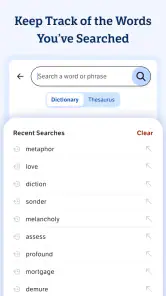
Analysis by Reviewed
When I’m reading, writing, or trying to follow a conversation, I sometimes need more than a quick definition. I want to check how a word is used, hear how it sounds, or find a better fit for a sentence. That’s where Dictionary.com: English Words earns a place on my phone: it brings several useful word-reference habits together in one app, without making every lookup feel like a study session.
A practical starting point for everyday lookups
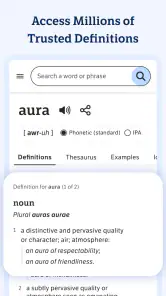
My usual workflow is simple: search for the word that slowed me down, read the definition, then check the pronunciation or related wording if I’m still unsure. That makes the app useful for more than settling a spelling question. If I’m drafting an email and a word feels slightly off, I can use the dictionary and thesaurus tools to compare options before choosing one. For a student, that same routine can help clarify a reading assignment; for someone learning English, hearing a pronunciation can add a useful second check.
A realistic example is reading an article on a commute and meeting an unfamiliar word. I can look it up, get enough context to keep reading, and return to the article without turning the moment into a long research detour. When I’m offline, the app’s offline access can be handy too, though I’d check what is available without a connection before relying on it for a trip or a place with unreliable service. That small bit of preparation is more useful than assuming every part of a reference app works the same way offline.
Building a reliable lookup routine
I find the app most useful when I decide in advance what a lookup should accomplish. For reading, I want a quick meaning that lets me continue. For writing, I want to check whether a proposed synonym actually carries the tone I need. For speaking practice, I want to hear a pronunciation and try it myself. Naming that goal keeps me from bouncing between features without learning anything or losing track of the original task.
One practical habit is to search the form of the word as it appears in the sentence, then read the entry before jumping to related terms. If I start with a synonym search, I can end up comparing several plausible alternatives without knowing which one fits the context. Starting with the definition gives me an anchor; the thesaurus is then a way to explore, not a substitute for understanding.
A Word Lover’s Paradise
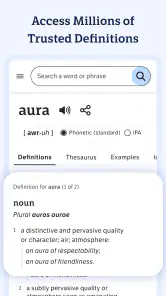
When I first downloaded Dictionary.com: English Words, I was blown away by its sheer depth and breadth. It’s not just your average dictionary app, oh no! This bad boy is packed with over 1.5 million words and definitions. Whether you’re a student, a writer, or just someone who loves to learn new things, this app is a treasure trove waiting to be explored.
Features That Stand Out
One of my favorite features has to be the offline access. Imagine needing a word and not having internet access—nightmare, right? Well, fear not because this app has got you covered. You can look up words even when you’re off the grid, which is perfect for those impromptu camping trips or when you’re just trying to save on data.
You May Like

Clash of Clans Is Won Between the Battles

Android Auto Makes the Case for Quieter Car Software

MobiOffice: Transforming Mobile Productivity with Seamless Integration

EA SPORTS FC™ Mobile Soccer: Redefining Mobile Sports Gaming

How Microsoft OneDrive Became a Mobile Productivity Giant

How Google Translate Breaks Language Barriers Effortlessly
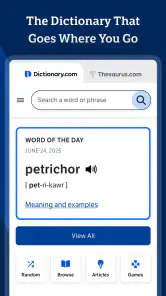
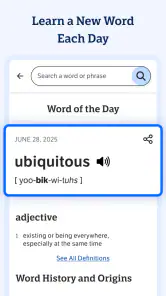
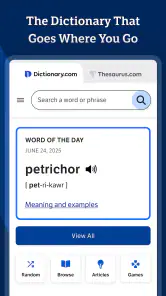
Another gem is the Word of the Day feature. Every day, I’m greeted with a new word and its meaning, pronunciation, and even a little history behind it. It’s a fantastic way to expand your vocabulary and impress your friends with your newfound lexicon.
Settings and repeatable habits
I get more lasting value from a reference app when I make looking things up part of a routine instead of browsing at random. With a daily word, for example, I’d pause to say it aloud, then try to use it in a sentence of my own. That quick step helps me judge whether I actually understand the word, rather than merely recognizing its definition. If I’m studying, I might keep a small list elsewhere of words I want to revisit; I wouldn’t assume a particular save or study feature without checking the current app interface.
It’s also worth taking a moment to explore the settings and adjust any options that suit your habits, rather than expecting the default setup to fit everyone. I’d keep the routine lightweight: one useful lookup, one pronunciation check when needed, and a quick return to whatever I was doing. That works better for casual learning than turning every new word into a project, and it makes the app easier to stick with.
Making vocabulary practice stick
For a more deliberate routine, I’d use the app in two passes rather than trying to memorize an entry on first sight. First, I’d check the definition and pronunciation while the word is in front of me. Later, I’d try to recall its meaning without opening the entry again, then check whether my understanding was accurate. Keeping a short note in a separate notebook or document gives me a simple review list without depending on a feature I may not use consistently.
This approach is especially useful for words that appear repeatedly in a class reading or at work. I don’t need to collect every unfamiliar term; I’d save my effort for words that affect comprehension, recur often, or would genuinely improve my writing. That selective approach keeps vocabulary practice manageable and makes the app a reference tool rather than another stream of material to keep up with.
Learning Made Fun
Let me tell you about the quizzes and word games. These aren’t just your typical boring tests; they’re fun, engaging, and super addictive. I found myself spending hours trying to beat my high scores and learning new words in the process. It’s like a workout for your brain, and who doesn’t love a good mental challenge?
Faster ways to use a word reference
When I need a quick answer, I try to search the exact form I encountered first, then check a related entry only if the definition leaves room for doubt. For writing, I use synonyms as candidates, not automatic replacements: two words can be close in meaning but differ in tone or context. Reading each option’s definition before swapping it into a sentence helps avoid the familiar thesaurus mistake of choosing a word that sounds impressive but doesn’t quite mean what I intend.
Pronunciation is another place where a repeatable check pays off. I listen once, say the word myself, and replay it if the sound is still unclear. That is especially useful when I’m learning English or preparing to say a name or technical term aloud. For a quick spelling check, though, a keyboard’s built-in suggestions may be faster; I reach for a dictionary when I need meaning, usage, or confidence beyond spelling.
Small shortcuts that save time
When I’m reading on my phone, I try not to let a lookup become a separate browsing session. I note the unfamiliar word, search it, take the part of the definition that answers my question, and return to the text. If the word is important enough to revisit, I make a note outside the app while its context is fresh. That gives me a useful record of the sentence where I found it, which a definition by itself can’t preserve.
For drafting, I find it faster to test a possible replacement in the whole sentence instead of judging it in isolation. I read the sentence with the original word, then with the synonym, and ask whether the meaning, formality, and rhythm still fit. If the alternative changes the point I’m making, I keep the original. A thesaurus offers options; the writer still has to make the call.
Personal Experience
Personally, I’ve found this app to be incredibly user-friendly. The interface is clean, intuitive, and easy to navigate. Even if you’re not tech-savvy, you’ll have no trouble finding your way around. Plus, the app doesn’t bombard you with ads, which is a massive plus in my book.
Another aspect I appreciate is the pronunciation feature. You can listen to how words are pronounced, which is super helpful if you’re learning English as a second language or just want to make sure you’re saying things right. Trust me, you don’t want to be that person who mispronounces "quinoa."
Where it fits—and where it doesn’t
Dictionary.com is a free Books & Reference app from Dictionary LLC, and its Everyone age rating makes it an accessible option for a broad range of readers. It has a 4.3 average from around 979,000 ratings, with over 10 million installs, so it is clearly a familiar choice for many people looking for an English word reference. Version 12.0.5 supports devices running Android 8.0 or later. I’d consider it a strong everyday companion if I want a dictionary, thesaurus, pronunciation help, and lightweight vocabulary practice in one place.
Compared with a basic built-in dictionary, this app is more appealing when I want to move between meanings, synonyms, pronunciation, and word activities. A general web search can be better when I need broader context, examples from current writing, or specialist information, while a dedicated language-learning course is a better fit for structured lessons and progress tracking. Dictionary.com is most useful in the middle: quick reference and occasional practice, rather than a full writing coach or a complete language course.
Choosing it for the right job
I’d recommend it most readily to readers who regularly encounter unfamiliar English words, students who want a quick reference while working through assigned texts, and writers who need a second opinion on meaning or a possible synonym. It also suits English learners who want to hear a word as well as read its definition. The combination is convenient when the task is small and specific: settle a meaning, check a sound, or explore a few related choices.
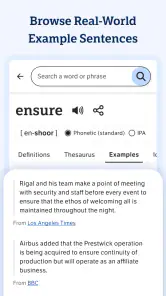
I’d skip it as my main solution if I needed a guided course with a planned sequence, frequent feedback, and a record of learning progress. I’d also reach for a specialist dictionary or a more authoritative subject resource when precision in a technical field matters. For a current phrase, idiom, or usage question, examples from real-world writing can add context that a compact dictionary entry may not answer on its own. The right tool depends on whether I need a definition, instruction, or evidence of how people use a phrase.
A practical everyday example is preparing for a meeting where I expect to use an unfamiliar term. I can look up its meaning beforehand, listen to the pronunciation, and test it in a sentence that matches the discussion. If the entry leaves me unsure about a specialized meaning, I can verify that point with a subject-specific source rather than treating a general English reference as the final authority. That gives me a useful confidence check without asking the app to do more than it is designed for.
Limits worth keeping in mind
Reference entries are most helpful when I already have a little context. A word can have multiple senses, and selecting the first definition without checking how it functions in the sentence can lead me astray. I slow down when a term is technical, regional, or being used figuratively, and I compare the entry with the passage that prompted the lookup. That extra step matters more than collecting a long list of definitions.
Offline access is valuable for basic preparation, but I would check the app while connected before depending on it somewhere without service. I’d also distinguish between access to a definition and access to every part of the experience; I don’t assume that word activities or other connected elements behave exactly like offline lookup. This is a small planning point, but it can prevent frustration when a trip or a classroom has unreliable connectivity.
Final Thoughts
All in all, Dictionary.com: English Words is a fantastic app that I’d highly recommend to anyone looking to enhance their vocabulary or just have a handy dictionary at their fingertips. It’s packed with features that make learning fun and effortless. So, go ahead, give it a whirl and let it be your guide in the wonderful world of words. Happy learning!
My recommendation comes with one practical caveat: I wouldn’t choose it as my only tool for a high-stakes translation, a specialist subject, or a detailed grammar question. A dictionary can help me understand a word, but I still need context to decide whether it belongs in a particular sentence. If I mostly need occasional definitions and want a little vocabulary practice along the way, though, the combination is convenient. The best results come from using it in small, repeatable moments—checking a word, listening when unsure, and applying the meaning—rather than expecting the app to do the thinking for me.
For me, mastery is less about exploring every feature than knowing which one will answer the question in front of me. I use the dictionary to establish meaning, the pronunciation tool when I need to say a word, and the thesaurus when I’m revising a sentence—not as interchangeable shortcuts. That modest routine is why this app works: it can sit quietly in the background of reading and writing, ready when a word gets in the way, without needing to become a full-time study system.
Dictionary.com: English Words Frequently Asked Questions
Can I use Dictionary.com: English Words for school, work, or everyday reading?
Dictionary.com: English Words is aimed at people who need an English reference while reading, studying, writing, or building vocabulary. Its dictionary, thesaurus, synonyms, and vocabulary focus makes it useful for checking a word or exploring related wording. Whether it suits a particular class or workplace depends on the task, but its broad Everyone rating makes it accessible to a wide audience.
Is Dictionary.com: English Words suitable for someone learning English?
The app can be useful for English learners who want to look up words and explore synonyms, and its translation feature can help users connect English words with other languages. It is also relevant to native speakers who want to expand their vocabulary or check word meanings. Its emphasis is English reference, so learners should consider whether that focus matches their language-learning needs.
Can Dictionary.com: English Words help me find alternatives to a word?
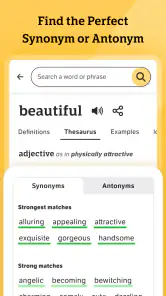
Yes. The app’s thesaurus and synonyms are part of its core reference offering, so it can help when you want to explore alternative wording as well as look up English words. This can be handy while writing or studying, though you should still check that a suggested alternative fits the meaning and tone of your sentence.
Who develops Dictionary.com: English Words, and what is it for?
Dictionary.com: English Words is a Books & Reference app developed by Dictionary LLC. It is designed for people who want a convenient reference for English words, with the store summary highlighting a dictionary, thesaurus, synonyms, and vocabulary. The app has an Everyone content rating, making it suitable for a broad audience interested in looking up or learning about words.
What does Dictionary.com: English Words cost, and is it suitable for all ages?
The app is free to download, and its content rating is Everyone. That makes it an approachable option for readers, students, and language enthusiasts looking for an English reference tool. The published app details also mention in-app purchases for removing ads and accessing premium content, so some optional features may involve an additional purchase.
Pros
- Extensive word database.
- User-friendly interface.
- Offline access available.
- Daily word feature.
- Audio pronunciation.
Cons
- Ads can be intrusive.
- Limited free features.
- Occasional crashes.
- Requires internet for updates.
- Subscription needed for premium.

- Category
- Books & Reference
- Version
- 12.0.5