DeepL Translate
- 2.67K
- 4.7
- Installs
- 10.00M
- Price
- Free

Screenshots
Analysis by Reviewed
My first-week reaction to DeepL Translate is that it makes the basic job feel refreshingly direct: enter a sentence, choose languages, and focus on what the result means. I reach for it when a phrase in another language is slowing me down, not because I want to explore a complicated toolkit. That quick, low-friction start is a real strength, though I’ve learned that a fluent-sounding result still deserves a second look before I rely on it.
When the First-Week Appeal Lasts
What makes a translation app feel useful after the first few tries is not a dramatic feature; it is whether I can reach for it without interrupting whatever I am doing. DeepL works best for me when I have a short passage to understand or a sentence to shape, and I want to get back to the task rather than spend time learning an elaborate interface. That simplicity is appealing, but it also means I need to bring my own judgment to the result.
A realistic everyday example is receiving a message from a rental host while I am arranging a trip. I can translate the message to understand the main point, then check the original for a date, address, or condition before replying. If the message contains an unclear instruction, I write back with a short, direct question rather than trying to infer details from a smooth translation. That is the kind of small, repeatable job where the app can earn a place on my phone.
First Impressions: An Intuitive Design
Upon firing up the DeepL: translate & write app, the first thing that strikes you is its clean and intuitive interface. The developers have clearly put a lot of thought into user experience. Everything is laid out simply, making it easy for anyone, tech-savvy or not, to dive right in. The app doesn’t bombard you with unnecessary features; instead, it focuses on doing a few things exceptionally well.
Translation Quality: A Cut Above
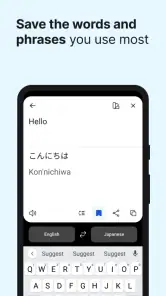
Now, let's get to the meat of the matter: the translation quality. Unlike many other translation apps that serve up literal translations, DeepL tackles the nuances of language. It’s like having a pocket-sized language expert who not only translates but understands context. I tested it with several languages, including some trickier ones like German and Japanese, and it didn’t disappoint. The translations felt natural and nuanced, which is critical for anyone looking to communicate effectively across languages.
That natural feel is most useful when I need to understand a whole thought rather than match words one by one. For instance, if I receive a short message from a host while travelling, I can translate it to catch the intent, then check any uncertain phrase separately. I would not treat that as proof that every nuance is right: humor, regional slang, technical terms, and a sentence with missing context can still trip up an automated translation. For important wording, I compare the result with the original and ask a fluent speaker when the stakes justify it.
Language choice also matters. DeepL is aimed at translating across a broad range of languages, but I don’t assume that a result will be equally natural for every pair or subject. When a translation sounds oddly polished or unexpectedly formal, I simplify the source sentence and try again. Short, clear sentences give the app less ambiguity to resolve, and they make it easier for me to spot where the meaning may have shifted.
Writing Assistant: More Than Just a Translator
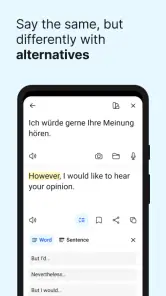
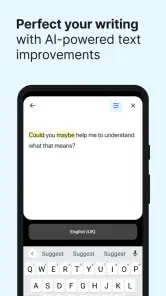
One of the standout features that sets DeepL apart from its competitors is its writing assistant. This isn’t just about translating your words but helping you craft better sentences. Whether you’re drafting an email in French or jotting down notes in Spanish, the app offers suggestions to refine your writing. It’s like having a language tutor right in your pocket, ready to help at any moment.
For a practical workflow, I draft the message in the language I know best, translate it, and then read the translated version as if I were the recipient. If it is a work email, I remove jokes, idioms, and sentences that depend on shared background before sending. That small edit is often more valuable than repeatedly adjusting one word in a long paragraph: clarity travels better than clever phrasing, and it gives any translator a cleaner starting point.
DeepL is useful for language learners too, but I see it as a checking tool rather than a substitute for study. I might translate a phrase, identify a construction I don’t understand, and then look it up in a proper grammar resource. Copying a polished answer without learning why it works can create false confidence. If your main goal is vocabulary practice, pronunciation, or a structured course, a dedicated learning app or a teacher is a better companion.
Usability and Performance
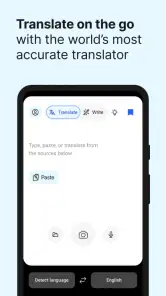
DeepL is light on your device, which means it runs smoothly without any hiccups. The app is quick, responsive, and the translations happen almost instantaneously. Whether you’re connected to Wi-Fi or using mobile data, the performance remains top-notch. It's perfect for those on-the-go moments when you need quick translations without the wait.
For an everyday example, I can imagine using it at a café abroad: I translate a menu item, check the result, and use a short phrase to clarify an ingredient with staff. That is a sensible use of a translation app, but for allergies or other health matters I would not rely on machine translation alone. I would use simple wording, show the original text if available, and seek direct confirmation. The convenience is valuable; it does not remove the need for care when misunderstanding could matter.
When comparing it with the usual alternatives, I value DeepL most for drafting and checking sentences where tone and flow matter. A general-purpose translator may be handier if I want a broader travel toolkit or a different set of extra utilities, while a dictionary is better when I need a precise definition, usage examples, or word forms. I keep DeepL for natural-sounding translation, but I would not expect one app to replace those more focused tools.
It translates into more than a hundred languages, which makes it practical for varied reading and communication, but that breadth does not mean every language pair will feel equally dependable in every situation. I first check that the chosen source and target languages are correct, then read the output for names, numbers, dates, and negations. Those details are easy to overlook when a sentence otherwise sounds convincing.
And hey, the app's offline mode is a lifesaver. If you’re traveling or ever find yourself without internet access, DeepL has your back. You can download languages for offline use, ensuring you’re never left in the lurch.
For travel, offline access can be a useful fallback, but I would prepare before leaving rather than assume it will cover every situation. I check that the relevant language is ready on the device and keep essential addresses or instructions somewhere accessible as well. If a translation is important, saving the original wording gives me another way to ask for help when the app’s result is unclear.
Month-to-Month Value and Maintenance
The reason I can see this staying on my phone after the novelty fades is that translation is a recurring, small need: a note from a neighbour, a product label, or a message from someone who writes in a language I’m learning. DeepL is free, and that makes it easy to keep as a handy reference without feeling I need to use it every day to justify the space. It is developed by DeepL SE, and its Books & Reference role is clear: it helps me understand and compose text, rather than turning language practice into a full course.
Maintenance is modest, but not nonexistent. I make sure the app is current when I depend on it regularly; version 25.48 is the current version. Its minimum operating-system requirement is Android 8.0, so anyone with an older Android device should check compatibility before planning around it. The app is rated for Everyone, and its scale is reassuring: it has more than ten million installs, a 4.7 average from around 382,000 ratings, and roughly 2,700 written reviews. Those figures suggest broad use, though they cannot tell me whether a particular translation is right.
One habit helps avoid fatigue: I don’t translate every line of a long document when I only need the gist. I start with the passage that answers my question, then translate surrounding text only if context is missing. This keeps the app useful as a quick aid instead of turning it into a chore, and it reduces the chance that I will skim a large block of output without noticing a key exception.
Keeping the Tool Useful Without Making It a Habitual Crutch
I would not install a translator just to collect another app, and I would not open DeepL out of habit when I can understand the original. Its value is situational: it saves time when I meet text I cannot comfortably read, or when I want a first draft in a language I am still learning. If those situations barely happen in my week, keeping a separate translation app may not change much; a browser or another tool I already use could be enough.
When a longer document is involved, I find it more useful to translate a representative section first than to process the entire thing automatically. That gives me a quick sense of whether the wording and subject are being handled sensibly. If the passage is full of specialist terms, I note those terms and verify them separately instead of assuming a fluent paragraph is accurate from end to end. This approach takes a little discipline, but it makes translation feel like a deliberate aid rather than an answer to accept without thought.
People often wonder whether a translation app is enough for travel, study, and writing all at once. My answer is that it can assist with all three, but it does not serve them equally. It can help me understand a sign or compose a simple message; for learning, I still need explanations and practice; and for professional writing, a knowledgeable reviewer can catch context and tone that an automatic result misses. The more consequences a mistake would have, the less I treat the app as the final authority.
Where I’d Draw the Line
DeepL is not my first choice for legal, medical, or high-stakes business text that must be exact. In those cases, a qualified human translator or a specialist review is safer than trusting a smooth sentence on its own. Nor would I choose it as my only language-learning resource: it can help me inspect phrasing, but it cannot replace practice, feedback, or a reference that explains grammar in depth.
It can also feel less useful when I already know the language well enough to read the original, or when a dictionary lookup would answer a narrow question faster. Repeatedly pasting tiny fragments can break the flow of a conversation, so for live back-and-forth I prefer a tool or method designed around that exchange. DeepL earns its place when I need a quick, readable bridge between languages—not when I need certainty, specialist expertise, or a complete learning plan.
Another trade-off is that readable output can tempt me to trust it too quickly. I slow down when the sentence contains a negation, a condition, or a polite request whose force matters. I also avoid judging a translation by whether it sounds elegant in isolation; I compare it with the source and ask whether the same practical meaning survived. Those checks are simple, but they matter more than repeatedly running the same phrase through an app and choosing whichever version sounds nicest.
My Long-Term Verdict
If you’re serious about learning a new language, or just want to make sure your communications are spot on, DeepL: translate & write is a must-have in your app arsenal. It's not just an app; it's a companion in your language learning journey, making every step a bit easier.
So, give it a whirl and see how it transforms your communication game. Who knew breaking down language barriers could be this fun and effortless?
My recommendation is more measured now: I’d keep DeepL around if translation comes up often enough that a fast, readable first pass saves me effort. The lasting value is not novelty but the habit of using it thoughtfully—checking context, simplifying tricky sentences, and knowing when to ask a person instead. If that is the kind of help you want, it deserves a spot on your phone; if you need exact professional translation or structured lessons, I’d choose a more suitable resource.
DeepL Translate Frequently Asked Questions
Can DeepL Translate help me communicate while traveling or studying another language?
DeepL Translate is intended for translating text between languages, which can make it handy when you need to understand a phrase, prepare a message, or work through unfamiliar wording. Its focus on context can help translations read more naturally than a direct word-for-word swap. It can support travel or language-learning routines, but it is still wise to check important details rather than treating an automatic translation as authoritative.
Does DeepL Translate offer writing assistance as well as translation?
DeepL Translate is presented as a translation and writing app, so it is intended to help with more than converting text between languages. Writing suggestions or alternatives can be useful when you want to refine phrasing or make a message clearer. The tools available may vary by task, so it is worth exploring the app’s options to see which features fit your writing needs.
Is DeepL Translate suitable for quick everyday translations as well as longer text?
DeepL Translate is designed for translating text across languages, so it can be useful for everyday phrases as well as longer passages. Its AI aims to account for context rather than simply replacing words one by one. As with any automated translation, it is sensible to review important wording before using it in a formal, legal, or sensitive situation.
What is DeepL: translate & write, and how does it work?
DeepL: translate & write is an advanced translation application that allows users to translate text in multiple languages with high accuracy. It uses artificial intelligence to provide contextually relevant translations and can also help users write documents by suggesting improvements or alternatives. The app is designed for both personal and professional use, facilitating seamless communication across different languages.
Which languages does DeepL: translate & write support?
DeepL: translate & write supports a wide range of languages, including but not limited to English, Spanish, French, German, Italian, Dutch, Portuguese, Russian, Japanese, and Chinese. The app continues to expand its language offerings, providing high-quality translations that are regularly updated to ensure accuracy and relevancy. DeepL describes its service as translating into more than 100 languages, though the exact options available can depend on the task you want to complete.
Pros
- Accurate translations in multiple languages.
- User-friendly interface enhances usability.
- Includes a handy text-to-speech feature.
- Supports translation of documents and files.
- High-speed translation with minimal lag.
Cons
- Limited offline functionality available.
- Subscription required for premium features.
- Occasional errors in complex translations.
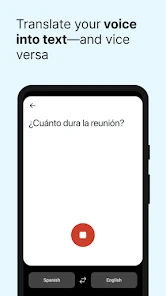
- No voice input for translation yet.
- Interface can feel cluttered at times.

- Category
- Books & Reference
- Version
- 25.48