Day One Diary: Daily Journal
- 2.02K
- 4.6
- Installs
- 1.00M
- Price
- Free

Screenshots
Analysis by Reviewed
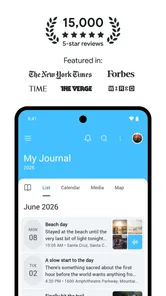
I like journaling apps that make it easier to return to my own thoughts without turning the habit into another project to manage. Day One Diary: Daily Journal takes that approach. It is a lifestyle app from Automattic, Inc, built around personal entries that can include writing, photos, travel memories, and everyday notes. After spending time with it, I see it as a calm digital notebook rather than a social network or an over-engineered productivity system.
The appeal is simple: I can open it when something matters, record it in a few lines, and leave without needing to organize my life first. That makes it useful for private reflection, trip memories, gratitude notes, personal goals, or a quick record of a difficult day. It is free to start, rated for Everyone, and has reached more than a million installs. Those details make it approachable, but the real question is whether its controls and habits suit the way you want to handle personal information.
What Day One feels like in everyday use
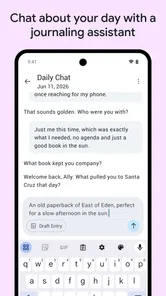
The first thing I noticed is that the app’s value depends less on writing long diary entries and more on reducing the distance between a moment and the act of saving it. A journal is most useful when I actually keep using it. Day One Diary works well for short entries because I do not have to treat every note as a finished piece of writing. A sentence about a conversation, a photograph from a walk, or a few thoughts before bed can all become part of the same personal record.
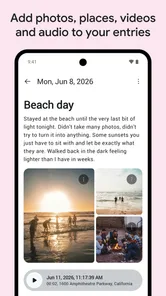
That flexibility separates it from a traditional paper diary. Paper has a lovely physical quality, but searching an old page is slow, and adding a photo means printing it or accepting that the memory will stay separate. With this app, written memories and images can live together. I found that especially practical for travel: instead of keeping scattered camera images, message threads, and scraps of notes, I can put the context beside the moment while I still remember it.
It also differs from a basic notes app. Notes are usually designed for information I need to retrieve, while a journal is about what an event meant to me. A note might say that I visited a restaurant; a journal entry can capture why the evening mattered, who I was with, or how I felt afterward. Day One Diary encourages that more personal use without forcing me into a rigid diary template.
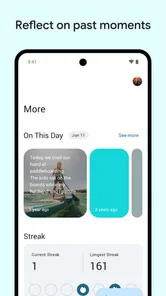
The app’s store summary presents it as a daily journal for notes, thoughts, photos, travels, and more, but I found the broader usefulness in combining those formats. A short text entry can explain a photograph. A travel memory can become a reference point months later. A recurring personal concern can become easier to understand when I read several entries together instead of relying on memory alone.
A realistic routine that makes the app worthwhile
Imagine coming home after a stressful workday. I would not want to compose a polished page, so I might write three lines: what happened, what bothered me, and what I want to do tomorrow. If there was one useful detail, I could add a photo or leave the entry as text. The important part is that the app supports a small record rather than demanding a major emotional performance.
More From Our News Desk

Weather by Xiaomi Review: Clear at a Glance, Less Clear Up Close

X Under Pressure: Can It Recover When Posting Goes Wrong?

Clash of Clans Is Won Between the Battles

Android Auto Makes the Case for Quieter Car Software

MobiOffice: Transforming Mobile Productivity with Seamless Integration

EA SPORTS FC™ Mobile Soccer: Redefining Mobile Sports Gaming
On a weekend trip, I would use a different rhythm. I could make one entry for each day, attach selected photos, and add practical context while the details are fresh. Months later, that combination would be more useful than a camera roll full of images with no explanation. For someone who enjoys looking back, this is one of the strongest reasons to choose a dedicated journal over a general notes tool.
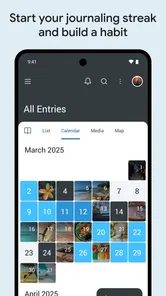
There is also a good use case for people who dislike the pressure of daily streaks. I do not need to pretend that every day was profound. A journal can contain ordinary observations, unfinished thoughts, or a simple record of what I want to remember. That makes the habit feel more honest. If you are trying to build a reflective routine, I would start with a deliberately small target: one entry whenever you have something worth preserving, rather than forcing a long paragraph every night.
Trust matters more when the content is personal
Journaling is different from many lifestyle activities because the material can be intimate even when the writing looks harmless. A shopping list is replaceable; a record of grief, family tension, health concerns, or a private decision may not be. That is why I would judge Day One Diary not only by its writing experience, but also by how clearly I can understand its account controls, data choices, and the moments when information leaves my device or becomes part of a broader service.
The developer is Automattic, Inc, and the app has a strong public presence, with an average rating of 4.6 from around 28 thousand ratings and roughly 2 thousand written reviews. That level of adoption can make an app feel established, but popularity is not a substitute for checking settings yourself. I would still read the privacy information presented during setup and review the choices available in the account area before adding anything highly sensitive.
My practical rule is to begin with low-risk material. I might record books I am reading, places I visit, or general reflections before storing information that could cause real harm if exposed. This is not a criticism unique to Day One Diary; it is sensible for any cloud-connected journal. The more personal the entry, the more important it becomes to understand backup, synchronization, account access, and deletion choices rather than assuming that “private journal” means every possible layer of privacy is automatic.
Controls I would check before building a long archive
When I test a journal app, I look for visible choices rather than relying on reassuring language. I want to know whether I can manage my account, review the settings that govern synchronization, and remove entries or the account when necessary. I also pay attention to whether the app makes those options easy to find or hides them behind a maze of menus. The quality of that experience matters because a control is only useful if I can locate and understand it.
I would also check what happens when I use the app on more than one device. A journal becomes much more convenient when it is available where I need it, but every additional access point makes account security more important. I would use a strong, unique password and enable any account protection the app visibly offers. I would not share login details with family members simply because the app is convenient for storing household memories; a personal diary should remain tied to the person who writes it.
Another useful check is the difference between deleting an entry from view and deleting an account or stored copy. Those actions may not be identical in a digital service. Before importing years of notes, I would look for the app’s export and deletion instructions and make sure they match what I expect. If I cannot explain how I would leave the service later, I would keep the early entries modest until I had done that homework.
The free price makes this testing period easy. I can explore the writing workflow without paying upfront, while optional in-app purchases range from a few dollars to much higher amounts per item. I would pay attention to which functions are included in the free experience and which are connected to purchases before moving my whole archive into the app. A free starting point is helpful, but it does not automatically mean that every long-term feature is free.
Where privacy decisions become especially important
Photos deserve extra care. A picture can reveal more than the image itself: faces, addresses, documents, children, vehicle details, or a location associated with the moment. Before attaching a photo, I would ask whether I need the original image or whether a less revealing version would tell the story just as well. For a travel journal, I might avoid adding pictures that show tickets, room numbers, or personal identification.
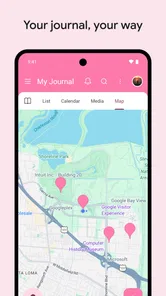
Location-related memories require the same caution. A note about a beautiful viewpoint may seem innocent, but a detailed record of where I live, work, or spend time can create a sensitive pattern. I would write the place in a general way when exact detail is unnecessary. That keeps the journal meaningful without turning it into a precise map of my routine.
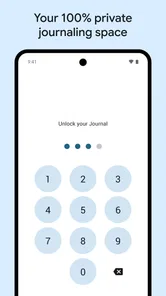
Shared devices are another realistic weak point. Even if I think of the journal as private, a phone left unlocked on a table can expose entries to anyone nearby. I would use the device’s own screen lock and avoid opening the journal in situations where someone could read over my shoulder. If the app presents additional privacy or access settings, I would review them rather than assuming that the presence of a password on the phone solves every problem.
I would be similarly careful with entries about other people. A journal is personal, but it may contain names, conversations, photographs, or details that belong to someone else as well. I try to write with enough context for my future self while avoiding unnecessary identifying information. That is a small habit, yet it reduces the impact if an entry is ever viewed by the wrong person.
How much control do I really have?
Day One Diary gives me the most value when I treat it as a tool I actively configure, not a box where I pour every private thought without checking anything. I would review account and privacy choices during setup, revisit them after updates, and keep the app’s current version—2026.17 at the time of this review—so the experience and available controls are not based on an old installation.
The minimum operating system is version 9, which keeps the app accessible to people using older supported devices. That is convenient, although compatibility alone does not tell me how comfortable the app will feel on every phone. I would still check the interface on my own device before committing to a large archive, especially if I rely on an older handset or have limited storage for photographs.
One trade-off is convenience versus independence. A dedicated journal can make writing more pleasant and memories easier to browse than a folder of text files. At the same time, a proprietary app can become part of my long-term routine, so I want a clear exit plan. I would periodically keep a separate copy of especially important writing in a format I can read without the app. That is not as effortless as trusting one service forever, but it gives me more control over memories I do not want to lose.
Another trade-off concerns emotional dependence on the archive. Looking back can reveal patterns and provide comfort, but it can also encourage me to reread upsetting entries repeatedly. I would use tags, dates, or simple organization habits only when they help me find something; I would not turn the journal into a constant self-monitoring project. The best workflow is the one that supports reflection without making me feel watched by my own records.
Who should choose it, and who should look elsewhere?
I would recommend Day One Diary to someone who wants one place for personal writing and photographs, especially if ordinary notes and travel memories are equally important. It suits people who prefer flexible entries over a strict planner, and it can work well for a private daily habit that sometimes consists of only a few sentences. The free entry point also makes it reasonable to test the workflow before deciding whether optional purchases are worthwhile.
I would be more cautious about recommending it to someone whose main requirement is complete offline independence, a plain-text archive, or total control over storage. That person may be happier with a local notes system or a paper notebook, even if those alternatives are less convenient for searching and combining photos with writing. I would also suggest another option to anyone who dislikes account management or does not want to review privacy settings before storing intimate material.
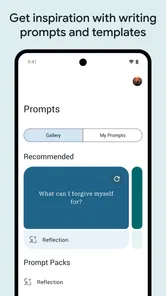
It is not the best choice for team collaboration, shared household planning, or task management. A journal can record those experiences, but it is not a replacement for a shared checklist or calendar. Likewise, if your goal is structured mood tracking with dedicated charts and prompts, a specialized wellness app may fit better. Day One Diary’s strength is the open-ended personal record, not forcing every entry into a measurable category.
My cautious recommendation
After using it as a personal lifestyle journal, I think Day One Diary earns its place through consistency rather than spectacle. It makes it natural to combine words, images, travel memories, and small observations, and that gives the archive more emotional detail than a basic notes app. I especially like the freedom to write briefly; a journal that accepts an ordinary day is easier for me to maintain than one that expects a major insight every time I open it.
Still, I would not treat the app as a vault by default. I would inspect the visible account and privacy controls, use strong device and account protection, think carefully before adding identifiable photos or precise locations, and keep independent copies of irreplaceable writing. Those steps are part of using any digital journal responsibly, but they matter more here because the content is likely to become deeply personal over time.
For me, the final decision is straightforward: choose it if you want a polished, flexible place to build a mixed text-and-photo diary and are willing to stay involved in your privacy choices. Skip it if your priority is a completely local notebook, a collaborative tool, or a highly structured tracking system. As a free app rated Everyone, it is easy to try, but its long-term value depends on whether its account model and controls match your comfort level. The best way to start is with a small, low-risk journal and a clear plan for protecting the memories you eventually decide to keep.
Day One Diary: Daily Journal Frequently Asked Questions
Can I use Day One Diary: Daily Journal to build a regular journaling habit?
Yes. The app is intended for recording everyday notes, thoughts, photos, travels, and other moments, so it can fit a short daily check-in or a longer reflection. You can begin with whatever routine feels manageable and add entries as you go. If you prefer to write only when something memorable happens, it can serve that purpose too.
What does Day One Diary: Daily Journal let me record?
The app is designed to collect notes, thoughts, photos, travel memories, and more in a personal journal. That makes it useful for writing down an idea, keeping a record of a day, or saving memories connected with a trip. You can use it as a flexible diary rather than limiting yourself to one specific journaling style.
Is Day One Diary: Daily Journal suitable for someone who has never kept a journal?
Yes. Day One Diary: Daily Journal can work for both quick notes and longer reflections, so you do not need an established journaling routine to get started. You can record thoughts, activities, photos, and important moments as they happen, then return to those entries later. Its everyday diary format makes it a practical option if you want to begin documenting your life without setting up a complicated system.
Who makes Day One Diary: Daily Journal, and what kind of app is it?
Day One Diary: Daily Journal is a lifestyle app developed by Automattic, Inc. It is centered on personal journaling: you can use it to collect notes, thoughts, photos, travel memories, and other moments in one place. The app is free to download, and its age rating is Everyone. Its focus is on keeping a personal record rather than serving as a general-purpose social network or messaging tool.
What is Day One Diary: Daily Journal used for?
Day One Diary: Daily Journal is a private journaling app designed for recording thoughts, memories, activities, photos, and important moments in one organized place. During use, its clean layout makes it suitable for quick daily notes as well as longer reflections. Entries can usually include dates, locations, media, and tags, helping you search and revisit personal experiences later.
Pros
- Clean
- distraction-free interface makes daily writing feel effortless.
- Supports photos
- videos
- audio
- drawings
- and text in one entry.
- Powerful search and tags help you quickly revisit older memories.
- Passcode and biometric locks add privacy for personal journal entries.
- Journaling reminders encourage a consistent writing routine.
Cons
- Many advanced features require a paid subscription.
- Some users may find the desktop and web sync setup confusing.
- Media-heavy journals can consume considerable device storage.
- Limited customization may disappoint users wanting highly styled pages.
- Exporting large journals with media can take time and space.












